In plain English
An AI agent is a program that calls a language model, decides what to do with the response, uses tools, and loops until a goal is done. Normally you write that loop yourself — in Python or TypeScript, using an agent framework like LangGraph or the OpenAI Agents SDK. No-code and low-code builders give you the same capability as a drag-and-drop canvas instead of a text editor. You connect boxes with arrows, pick your LLM from a dropdown, and click Run.
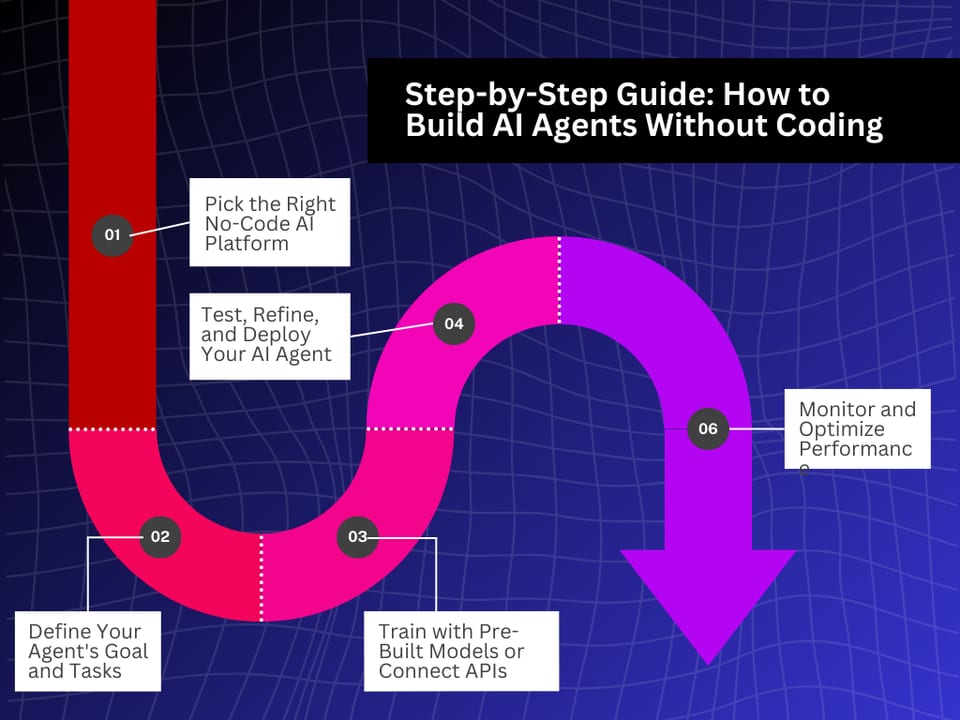
Think of it like building with LEGO. A software developer can carve custom shapes from raw wood. But for most jobs, snapping together prebuilt bricks is faster, cleaner, and requires no woodworking at all. No-code builders are the LEGO set for AI workflows — they limit what shapes are possible, but they dramatically lower the floor for who can build.
The three most popular visual AI workflow tools right now are n8n, Zapier, and Flowise. They come from different angles: n8n is a general automation platform that added strong AI-agent nodes; Zapier is the most accessible and integrates with the widest app catalogue; Flowise is AI-first and targets engineers who want visual RAG and LLM chains without writing LangChain code. Each is a legitimate way to ship something useful.
Why it matters
Most people who want an AI agent are not trying to build a product for other developers. They are a solo founder who wants a research assistant, an operations manager who wants a Slack bot that files support tickets, or a content team that wants automated briefings. For those people, opening a Python file and installing pip packages is a real barrier — not laziness, just the wrong tool for the job.
No-code builders solve three genuine problems: speed (a working prototype in an afternoon, not a week), maintainability (a non-engineer teammate can read a visual flow and edit it), and integration breadth (Zapier alone connects to over 7,000 apps — far more than any code library pre-wires for you). If your agent workflow lives between apps you already use and a hosted LLM you access via API key, the canvas approach is often faster even for developers.
Where builders and developers both reach for no-code
- Automation of repetitive tasks — form submission triggers a GPT summary, which sends a Slack alert and creates a Notion page.
- Customer-facing chatbots — FAQ bot with a knowledge base retrieval step (RAG), deployed as an embeddable widget.
- Internal assistants — a Slack bot that queries a CRM, drafts email replies, or triages incoming support tickets.
- Prototyping — validate an agent idea fast before committing to a code-based implementation.
- Non-engineer teams — marketing or ops staff who own a workflow and need to maintain it without a dev on-call.
How it works
Under the hood, every no-code AI workflow is still just HTTP calls to LLM APIs plus logic. The visual canvas is a layer on top that generates those calls, sequences them, and stores credentials. When you drag an "OpenAI" node onto the canvas and wire it to a "Send Slack Message" node, the platform writes the API calls you didn't want to write. The resulting workflow runs on the platform's infrastructure (or your own server, if self-hosted).
The agent loop in visual form
A true agent loop — where the model decides which tool to call, calls it, reads the result, and repeats — is supported in n8n and Flowise. In n8n, the AI Agent node holds a system prompt, a set of registered tools, and a memory option. When you run the workflow, n8n handles the back-and-forth between the model and the tools automatically; you just supply what tools are available and what the agent's job is. Flowise calls this an Agentflow, and it works the same way. Zapier's agent mode (Zapier Agents) works through natural-language instructions rather than a visual graph, which makes it the most approachable but also the least configurable.
n8n vs Zapier vs Flowise: what each one is for
The three tools are not direct substitutes. Each occupies a different position in the spectrum from "broadest app coverage" to "deepest LLM control." Choosing the wrong one for your use case wastes time.
| n8n | Zapier | Flowise | |
|---|---|---|---|
| Primary strength | End-to-end automation with strong AI nodes | Widest app catalogue (7,000+ integrations) | Visual LLM chains and RAG pipelines |
| Who it's for | Developers and ops who want control + self-hosting | Non-technical teams; broadest app reach | Builders prototyping AI chatbots and knowledge apps |
| Agent loop support | Yes — native AI Agent node with tools and memory | Yes — Zapier Agents (natural language driven) | Yes — Agentflow with multi-agent orchestration |
| Self-host option | Yes — Docker, open-source community edition | No | Yes — Docker, open-source |
| Pricing (cloud) | $20/mo for 2,500 executions; free if self-hosted | From $19.99/mo for 750 tasks | $35/mo for unlimited flows; free if self-hosted |
| Code escape hatch | JavaScript Code node; custom nodes in TypeScript | Code by Zapier (JavaScript) | Custom components in JavaScript/TypeScript |
| Vector / RAG support | Via HTTP nodes + external vector DBs | Limited — via integrations | Native — Pinecone, Chroma, Supabase built-in |
When to pick n8n
n8n is the right pick when your workflow crosses many different systems (CRM, database, email, Slack, HTTP APIs) and involves at least one step that needs an LLM to reason or generate text. Its pricing model — per workflow execution, not per step — means a complex 20-node workflow costs the same as a 2-node one. It is open-source and fully self-hostable, which matters if you handle sensitive data or need to run inside your own cloud account.
When to pick Zapier
Zapier wins on breadth. If you need to connect to a niche SaaS app that no one else supports, Zapier probably has it in its 7,000+ connector catalogue. It is also the least intimidating for non-technical teammates who need to maintain a workflow themselves. Zapier Agents adds natural-language instruction-driven agents on top of this, so you can describe what you want in plain English and the platform figures out the step sequence. The catch is cost — each action in a Zap counts as a separate task against your monthly quota, so high-volume or multi-step workflows get expensive fast.
When to pick Flowise
Flowise is built entirely around LLM workflows. It has three canvas modes: Chatflow for single-agent chatbots, Agentflow for multi-agent orchestration, and Assistant for a simpler no-frills creation path. Native support for vector stores (Pinecone, Chroma, Supabase), document loaders, and embeddings makes it the natural choice when your agent needs a knowledge base — a RAG chatbot over your docs, for instance. If your team writes JavaScript/TypeScript, custom components feel natural; if your team writes Python, Langflow (the Python-native equivalent) is worth comparing.
Signs you have hit the no-code ceiling
No-code tools are real tools for real production workflows. But they do have a ceiling, and the ceiling is lower than most people expect when they start. Here are the signals that mean it is time to move to a code-based framework.
- You are writing more code than canvas. If 60% of your n8n workflow is JavaScript Code nodes, you are already coding — you are just doing it inside a worse IDE with no type checking.
- You need custom state between steps. No-code tools pass data between nodes as simple key-value objects. If your agent needs a proper state machine — where previous decisions influence future branching logic — frameworks like LangGraph give you explicit state management that no canvas tool matches.
- You hit platform pricing walls. Zapier's per-task model becomes expensive above moderate volume. At thousands of agent loops per day, the cloud bill from a no-code tool often exceeds what self-hosted Python on a $20 VPS would cost.
- You need a custom tool that has no node. If your agent needs to call an internal API, use a library function with complex logic, or integrate with a system that nobody has built a connector for, you are writing code anyway.
- You need observability. Production agents need trace logging, token-count monitoring, latency metrics, and structured error handling. No-code platforms expose some of this, but dedicated observability tools (LangSmith, Arize, Weights & Biases) integrate naturally with code-based frameworks, not with visual canvases.
- You are building a product, not a workflow. If the agent is a feature inside software you are selling to other people, you need version control, a test suite, CI/CD, and deployment pipelines. Those workflows are designed for code, not for canvas exports.
Going deeper
If you have validated your idea with a no-code builder and are ready to move to code, the first decision is whether to use a framework at all. For simple linear pipelines, raw API calls in a loop are sufficient. For workflows with complex branching, persistent memory, or multi-agent coordination, a framework pays for itself quickly. The article on choosing between no-framework and a full SDK in this section walks through that decision.
Hybrid architectures
You do not have to pick a side. The most practical 2026 pattern is hybrid: keep your integration glue — the Slack notifications, the Notion writes, the CRM updates — in n8n or Zapier, and call a custom-code service for the reasoning-intensive part. n8n supports an HTTP Request node that can call any endpoint, including a FastAPI route or a Cloud Run container running LangGraph. This gives you the no-code breadth for connectors and the code-level control for the LLM logic.
MCP and the future of no-code agents
n8n now exposes workflows as an MCP Server, which means any MCP-compatible AI client (Claude Desktop, Cursor, custom SDKs) can call your n8n workflow as a tool. This blurs the line between no-code and code: you build the integration layer visually in n8n, then expose it as a structured tool that a code-based agent can call. As MCP adoption spreads, no-code and code agents are increasingly two layers of the same stack rather than competing choices.
Langflow vs Flowise for developers
Developers who try Flowise and want more flexibility often compare it to Langflow. The practical difference is the tech stack: Flowise is Node.js (custom components in JS/TS), Langflow is Python (custom components in Python). Langflow also has source-code access to every built-in component — you can fork and modify an existing node rather than writing from scratch. Flowise has a slightly friendlier onboarding and a stronger managed hosting offering (Flowise Cloud). If your team is Python-first and cares about deep customization, Langflow wins. If your team is JavaScript-first and wants fast deployment, Flowise wins.
FAQ
Can you really build a production AI agent with no coding?
Yes, for many use cases. Customer-support bots, internal assistants, and document Q&A systems run in production on Flowise and n8n at companies that never write Python. The ceiling is real — once you need custom state, high volume, or deep observability, code frameworks are better — but a huge range of useful agents never hit that ceiling.
Is n8n free to use?
The self-hosted community edition of n8n is free and open-source. The cloud-hosted version starts at $20/month for 2,500 workflow executions. Self-hosting on a cheap VPS costs roughly $5–$20/month in infrastructure, so the total cost can be near zero for low-volume use.
What is the difference between Flowise and Langflow?
Both are open-source visual builders for LLM chains and agents. Flowise is built on Node.js — custom components use JavaScript/TypeScript. Langflow is Python-native — custom components use Python, and every built-in component's source code is accessible and forkable. If your team writes Python, Langflow will feel more natural; if you are a JavaScript shop, Flowise fits better.
Why does Zapier get expensive for AI workflows?
Zapier charges per task, where each action in a workflow counts separately. An agent loop that calls an LLM, queries a database, writes to Notion, and sends a Slack message is four tasks per run. At hundreds or thousands of runs per day, the monthly bill climbs fast. n8n charges per execution regardless of how many steps it has, which is much cheaper for complex multi-step workflows.
When should I switch from n8n to a code-based agent framework?
Switch when you find yourself writing more JavaScript Code nodes than visual connections, when you need real state management across agent turns, when you hit volume-based pricing limits, or when you are building a product you need to test and deploy in a CI/CD pipeline. At that point, a framework like LangGraph or the OpenAI Agents SDK will give you the control you need and is easier to maintain long-term.
Can I use Flowise for a RAG chatbot over my own documents?
Yes — this is Flowise's strongest use case. It has native support for document loaders, embedding models, and vector stores (Pinecone, Chroma, Supabase). You connect a document loader to an embedding node to a vector store, then wire that into a retrieval-augmented QA chain or agent. The whole RAG pipeline is visual and takes under an hour to set up for the first time.