In plain English
A coding agent doesn't just suggest text — it reads files, writes code, runs shell commands, installs packages, and sometimes talks to external APIs. Every one of those actions is a trust decision: should the agent be allowed to do this right now, without asking you first?
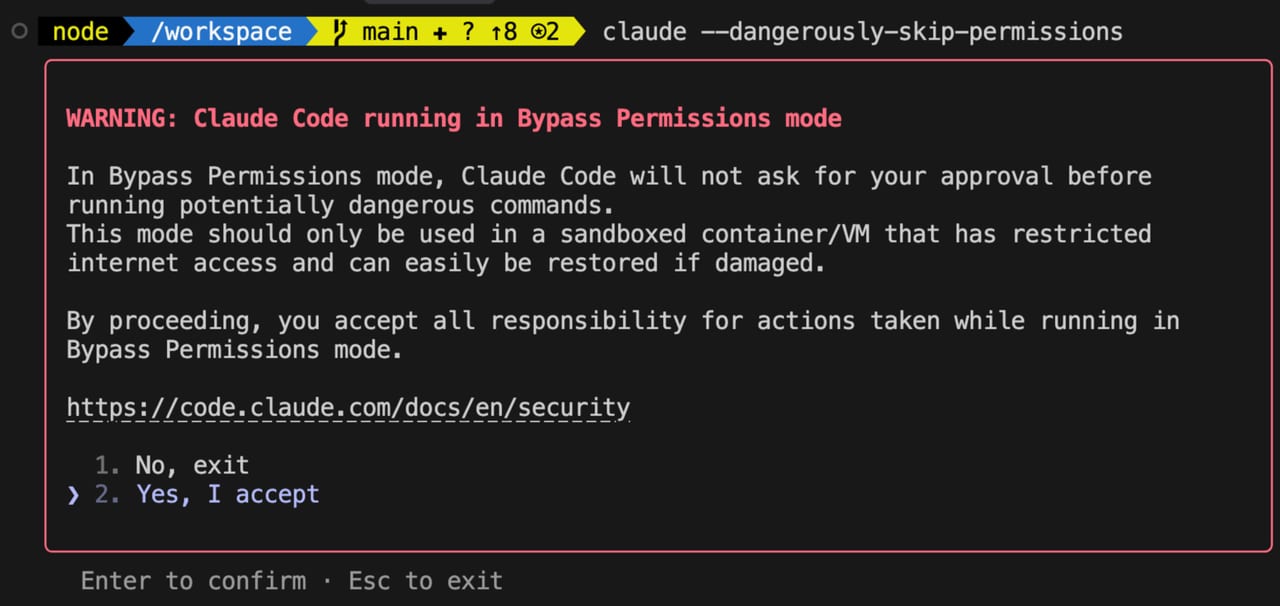
Coding agent permissions are the rules that answer that question. They sit between the model's intent and your machine (or your repository), and they range from "ask me every time" to "do whatever you need." Most tools let you tune this dial — per-project, per-session, or even per-tool — so you can move fast on throwaway work and stay careful around production databases.
Here's an analogy that makes it click. Imagine hiring a contractor to renovate a room. You could stand next to them and approve every drill hole (slow, but nothing surprises you). You could hand them a list of pre-approved tasks — paint walls, replace switches, don't touch load-bearing beams — and let them work unsupervised within those bounds (the allowlist model). Or you could hand them a full master-key and say "use your judgment" (YOLO mode). Each option trades oversight for speed. The right choice depends on the room, the contractor's track record, and whether any mistakes are reversible.
Why it matters
When a coding agent runs with broad permissions and something goes wrong, the fallout is real. An agent that can execute shell commands has the same OS-level access as your own user account — it can delete files, overwrite .env secrets, push to git remotes, or run database migrations. A December 2025 study found that AI-generated code introduces roughly 2.74x more security vulnerabilities than human-written code. Add unchecked execution to that and the risk compounds quickly.
There is also a subtler threat: prompt injection. A coding agent that reads files, web pages, or code comments can be manipulated by hostile content embedded in those sources — a malicious instruction hidden in a README, a crafted error message, or a planted comment in a dependency. Security researchers report prompt injection success rates exceeding 85% against unguarded agents. Tighter permissions are the primary defense: if the agent isn't allowed to exfiltrate data, a successful injection can't do much damage.
On the other side of the equation, constant approval prompts kill flow. If you approve every file write individually, a 20-file refactor generates 20 modal dialogs. The goal of permission management is not maximum restriction — it's calibration: remove friction where risk is low, preserve oversight where mistakes are hard to undo.
How it works
Most coding agents implement some version of the same layered model. At the bottom is a fixed list of always-safe read-only tools (file search, directory listing, reading source). Above that, each action category — file writes, shell commands, network requests — gets its own policy. Policies evaluate in order: deny rules win first, then ask rules (which pause and prompt), then allow rules (which proceed silently). The first matching rule wins.
Allowlists are pre-approved patterns that skip the prompt entirely. In Claude Code, for example, you can add entries like Edit(src/**) or Bash(npm run *) to a .claude/settings.json file. Any tool call that matches the pattern executes without asking. Deny entries work the same way in reverse — Edit(.env*) or Bash(rm -rf *) would block those actions outright regardless of what mode you're in.
// .claude/settings.json — project-level permissions
{
  "permissions": {
    "allow": [
      "Edit(src/**)",
      "Edit(tests/**)",
      "Bash(npm run *)",
      "Bash(git diff *)"
    ],
    "deny": [
      "Edit(.env*)",
      "Bash(rm -rf *)",
      "Bash(git push --force*)"
    ]
  }
}
Settings files have a hierarchy. In Claude Code, ~/.claude/settings.json applies user-wide defaults; .claude/settings.json in the repo is team-shared and checked in; .claude/settings.local.json is a personal override that stays git-ignored. The most specific file wins on any given rule. This means your team can agree on project-level deny rules while each developer fine-tunes their own allow shortcuts.
The permission mode spectrum
Beyond individual rules, most tools offer named modes that set a global posture for the session. Think of them as presets that shift the default behavior for everything not already covered by an explicit allow or deny rule.
| Mode | What auto-approves | What still prompts | Best for |
|---|---|---|---|
| Default / Ask | Read-only tools | All writes, shell commands, network | Sensitive codebases, unfamiliar tasks |
| acceptEdits (Claude Code) | All file create/edit/delete operations | Shell commands, external requests | Heavy refactors where you'll git-diff after |
| Auto mode (Claude Code) | Actions the classifier deems safe for the request | Anything that escalates scope or targets unrecognized infra | Daily development — smart middle ground |
| YOLO / bypassPermissions | Everything except explicit deny rules | Nothing | CI/CD pipelines, disposable containers |
| Plan / dontAsk | Nothing (read + plan only) | All writes | Architecture review, understanding a codebase |
Claude Code lets you cycle through these modes live during a session by pressing Shift+Tab, with the current mode shown in the status bar. The cycle is default → acceptEdits → plan by default. The auto and bypassPermissions modes slot in after plan when they are available or enabled.
Cursor calls its equivalent YOLO mode (Settings > Features > Chat & Composer > Enable YOLO mode). When active, the agent executes terminal commands and deletes files without confirmation. Cursor's newer Auto-review mode (introduced in Cursor 3.6, May 2026) is a more nuanced alternative: it immediately approves allowlisted commands, sandboxes what it can, and runs a classifier subagent on everything else to decide between allow, retry-differently, or ask-user.
OpenAI Codex takes a different approach, leaning on sandbox isolation rather than per-action prompts. Its cloud agent runs in an isolated container with no network access by default. Permission profiles control local command scope: :read-only locks the sandbox to reads, :workspace allows writes inside the active project, and :danger-full-access removes sandbox restrictions entirely. On Linux and WSL, Codex uses bubblewrap and seccomp for OS-level enforcement.
YOLO mode: when it's safe and when it isn't
"YOLO mode" is the community shorthand for any full-auto setting — Claude Code's --dangerously-skip-permissions, Cursor's YOLO toggle, Windsurf's Turbo policy. The pattern is the same: approval prompts are suppressed and the agent runs at full throttle. The gains are real — long autonomous runs, uninterrupted CI pipelines, faster iteration on greenfield work. The risks are just as real.
Safe contexts for full-auto mode
- Disposable containers or VMs — Docker dev containers, GitHub Codespaces, CI runners. If the agent damages the environment, you spin up a fresh one.
- Throwaway branches — work in a dedicated feature branch with no uncommitted stash on
main; the worst outcome is a bad commit you can revert. - New projects with no secrets — greenfield work where there is nothing sensitive to leak and no production system reachable.
- CI/CD automation — there is no human to click Allow; auto-approval is not optional. Use network-isolated runners and never load production credentials into the environment.
Contexts where full-auto is dangerous
- Production databases or live infrastructure — a bad migration or Terraform apply can cause immediate customer impact.
- Repos with loaded credentials —
AWS_SECRET_ACCESS_KEY, database URLs, and OAuth tokens in.envfiles are reachable by the agent and by any injected content it reads. - Core business logic — logic errors silently introduced into payment flows or access-control code can be hard to detect and expensive to fix.
- Shared development environments — changes affect your teammates in real time; there is no isolation boundary.
Sandboxes and isolation as the deeper safety layer
Permission rules tell the agent what it should do. Sandboxes enforce what it can do at the OS level — regardless of what the model decides. The two layers are complementary: rules handle the normal case, sandboxes handle the case where a rule is missing, a prompt injection succeeds, or the model simply behaves unexpectedly.
Several common sandbox patterns are worth knowing. Docker dev containers are the most portable: define a devcontainer.json with no mounted credentials, no external network, and a non-root user — the agent can do anything inside the container and nothing outside it. GitHub Codespaces provides this boundary automatically for cloud-hosted work. Bubblewrap (bwrap) is the Linux tool OpenAI Codex uses locally; it creates a lightweight namespace sandbox without needing root privileges.
Network isolation deserves special attention. Even a perfectly sandboxed agent can exfiltrate secrets through DNS lookups if outbound UDP port 53 is not blocked — security researchers demonstrated this exact technique against ChatGPT's code execution sandbox. Block all outbound traffic by default and open only what the task explicitly requires.
Going deeper
The permission models described above are the current generation, but they are actively evolving. Auto mode in Claude Code — introduced in 2025 — is an early example of the next approach: instead of static rules, a classifier model evaluates each pending tool call against the original request and blocks anything that looks like scope escalation, access to unrecognized infrastructure, or apparent prompt injection influence. This moves permissions from a configuration problem to a real-time judgment problem.
Hooks are another layer to know. Claude Code's hook system lets you run arbitrary shell scripts before or after any tool call — before a file write, after a bash command, after the agent stops. You can use a pre-write hook to reject changes to specific paths, run a linter on every file the agent touches, or send a notification when the agent calls git push. Hooks give you custom enforcement logic that goes beyond what the built-in allow/deny grammar can express.
For teams, the settings file hierarchy is the right place to encode organizational rules. Check a .claude/settings.json into the repo with deny entries for paths the agent should never touch — infrastructure Terraform files, credential stores, migration files — and add it to onboarding docs. Every developer and every CI run will inherit those rules automatically, without relying on individuals to configure their own sessions correctly.
Finally, think about reversibility as a permission design principle. Prefer actions the agent can take that are easy to undo: staged git commits (not force-pushes), dry-run modes for infrastructure tools, writing to a temp file before overwriting the original. Build your workflows so that the blast radius of any single bad agent action is small and recoverable. The most resilient setups don't rely on the agent never making a mistake — they rely on catching and undoing mistakes before they propagate.
FAQ
What is YOLO mode in AI coding tools?
YOLO mode is a colloquial term for a permission setting that suppresses all approval prompts, letting the coding agent execute commands and edit files without stopping to ask. Claude Code calls it --dangerously-skip-permissions; Cursor has a YOLO toggle in Settings > Features. It's useful in disposable environments like containers or CI pipelines, but dangerous when credentials or production systems are reachable.
Is it safe to auto-approve all coding agent actions?
Only in isolated environments — Docker containers with no loaded secrets, throwaway git branches, or CI runners with network restrictions. On your main workstation with real credentials and a live codebase, full auto-approval means a single bad decision (or a successful prompt injection) can delete files, push bad code, or leak secrets. Use allowlists to auto-approve specific safe patterns instead.
What is an allowlist in Claude Code and how do I set one up?
An allowlist is a set of pre-approved action patterns stored in .claude/settings.json. Any tool call matching an allow pattern runs without prompting; any matching a deny pattern is blocked outright. For example, Edit(src/**) lets the agent edit any file under src/ silently, while Edit(.env*) in the deny list blocks writes to environment files regardless of mode. The file can be checked into the repo to share rules with your team.
What is the difference between Claude Code's auto mode and bypassPermissions?
auto mode routes each tool call through a classifier that checks whether the action fits the original request and doesn't escalate scope or target unrecognized infrastructure. Risky calls still get blocked. bypassPermissions (enabled with --dangerously-skip-permissions) disables all checks — only explicit deny rules apply. Auto mode is the safer everyday option; bypassPermissions is for fully isolated environments where container boundaries provide the safety instead.
How does OpenAI Codex handle permissions differently from Claude Code?
Codex leans on OS-level sandbox isolation rather than per-action approval prompts. Its cloud agent runs in a network-isolated container by default. Locally, it uses bubblewrap and seccomp on Linux/WSL. Permission profiles (:read-only, :workspace, :danger-full-access) define the scope of allowed local commands. This makes the permission model more binary — in or out of a sandbox — rather than the fine-grained rule patterns Claude Code uses.
Can a coding agent be tricked into doing something harmful even with strict permissions?
Yes — through prompt injection. A malicious instruction embedded in a file the agent reads (a README, a dependency, a web page it fetches) can redirect its behavior. Security research puts injection success rates above 85% for current agents. Strict deny rules reduce the blast radius, but the best defenses are OS-level sandboxing and network isolation, which limit what a successfully injected instruction can actually accomplish.