In plain English
GitHub Copilot is an AI assistant that lives inside your code editor and helps you write code faster. It watches what you're typing, predicts what comes next, and can hold a full chat conversation about your codebase — all without leaving your editor.
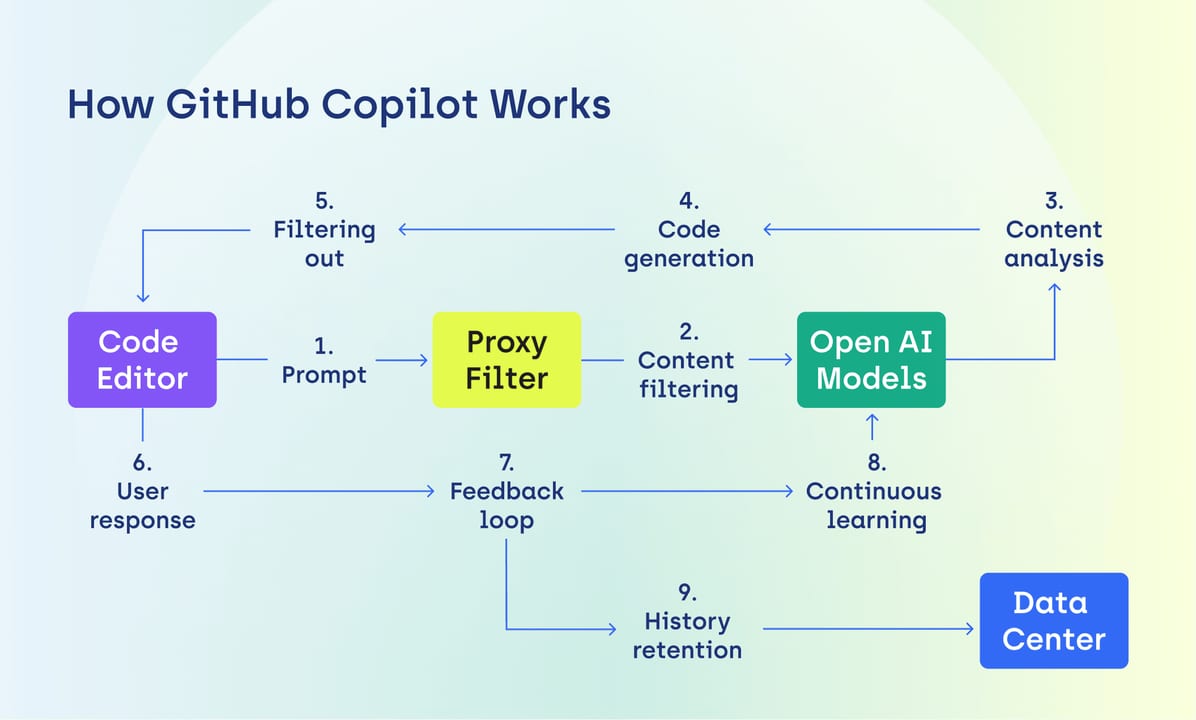
The best analogy: imagine having a fast-typing colleague who has read millions of open-source projects and is always ready to finish your sentences, write your boilerplate, suggest a test, or explain a confusing function — but who still needs you to review their work before it ships.
Copilot started as a code-completion plugin and has expanded into an agentic tool. As of 2026 it ships as a VS Code extension (and works in JetBrains, Neovim, and Visual Studio too), and it integrates with GitHub.com itself for pull-request reviews and issue triage. The pricing question most developers face is simple: the free tier exists, so when does it make sense to pay?
Why this decision matters
AI coding assistants are now a standard part of the developer workflow — the question is no longer whether to use one, but which tier to use and whether it pays for itself. Making the wrong call costs money (if you over-buy) or time (if you under-buy and keep hitting free-tier limits).
GitHub's own controlled study of 95 professional developers found that developers using Copilot completed tasks 55% faster on average — dropping average task time from 2 hours 41 minutes to 1 hour 11 minutes. Separate research reported a 26% increase in completed tasks for the Copilot group versus a control group. Those numbers are from GitHub's own research, so they carry a self-reporting caveat, but independent longitudinal studies broadly confirm a real productivity lift for boilerplate-heavy work.
Beyond raw speed, 73% of Copilot users in GitHub's study reported staying in a flow state more often, and 87% said it preserved their mental energy during repetitive tasks. For solo developers or students, even a modest time saving can mean the difference between finishing a side project and abandoning it.
How Copilot works under the hood
When you type code, Copilot sends a context window — the surrounding code, open files, and sometimes your whole repository index — to a large language model running in the cloud. The model predicts the most likely continuation and streams it back to your editor as a grey "ghost text" suggestion. Pressing Tab accepts it; any other key dismisses it.
Chat mode works similarly but is more conversational: you ask a question in a side panel, Copilot pulls relevant code snippets into the prompt automatically, and the model writes a prose answer with code blocks. Agent mode (available in Pro and higher) goes further — it can read files, run terminal commands, and iterate across multiple steps to complete a larger task, similar to how tools like Cursor's Composer work.
What consumes AI Credits
Since June 2026, GitHub moved Copilot to usage-based billing. Each plan includes a monthly allotment of GitHub AI Credits — think of them as a prepaid token budget. Code completions and Next Edit suggestions are always free across all plans and never touch your credit balance. Credits are consumed by chat, agent mode, code review, and calls to premium models. If you exhaust your monthly credits, features that rely on them pause until the next billing cycle (or you add more).
| Feature | Free | Pro ($10/mo) | Pro+ ($39/mo) |
|---|---|---|---|
| Inline code completions | Up to 2,000/month | Unlimited | Unlimited |
| Next Edit suggestions | Limited | Unlimited | Unlimited |
| Chat (AI Credits budget) | Limited | $10 credits/mo | $39 credits/mo |
| Agent mode | No | Yes (credit-limited) | Yes (larger budget) |
| Premium models (e.g. GPT, Claude, Gemini) | No | Standard selection | Full selection |
| PR code review on github.com | No | Yes | Yes |
| Model selection in chat | Auto only | Yes | Yes |
The honest tier breakdown
There are five Copilot tiers as of mid-2026. Here is what each actually buys you:
Copilot Free — $0
You get up to 2,000 code completions per month and a limited chat budget. No credit card required. For hobbyists, students evaluating the tool, or developers who only write code occasionally, this is enough to form a genuine opinion. Heavy users will hit the completions cap in a few days of active coding.
Copilot Pro — $10/month
This is the tier most individual developers should evaluate first. Completions are unlimited (they never consume credits). You get $10 in monthly AI Credits for chat, agent tasks, and code review. For a full-time developer writing code 6–8 hours a day, $10/month is roughly the cost of one coffee — and even a 5–10% productivity improvement easily pays for it in billable time or personal velocity.
Copilot Pro+ — $39/month
Pro+ is for power users who regularly push into agent mode or need access to premium models like the GPT-5 series and Claude's Opus and Sonnet models in chat. You get $39 in monthly AI Credits — nearly 4x the Pro budget. Worth it if you use agentic workflows heavily or want the best available model for complex architectural questions. Overkill if you primarily use inline completions.
Copilot Business and Enterprise — $19–$39/seat/month
Business ($19/seat) adds organization-level policy controls, audit logs, SAML SSO, and IP indemnity (GitHub assumes legal responsibility if a suggestion turns out to match copyrighted code). Enterprise ($39/seat) adds knowledge-base integration so Copilot can reference your internal documentation, plus priority access to new models. For a 10-person team, Business costs $190/month — justifiable if even one developer saves an hour a week.
Who gets real value — and who doesn't
The productivity research is real, but the gains are not evenly distributed. Here is an honest look at where Copilot earns its cost and where it struggles:
Copilot earns its cost when you
- Write a lot of boilerplate — REST endpoints, database models, form validation, test scaffolding
- Work in strongly-typed languages like TypeScript, Python, Java, or C# where Copilot has rich training data
- Frequently start new files or switch languages — it eliminates the "blank page" cognitive tax
- Want pull-request review assistance without paying for a separate tool
- Are a student learning to code — seeing pattern completions and idiomatic code accelerates learning
Copilot struggles when you
- Work on domain-specific or proprietary logic with no public equivalents — the model has nothing to draw on
- Write security-critical code — Copilot can suggest subtly insecure patterns; always review cryptography, auth, and input validation by hand
- Need offline access — all tiers require an internet connection (unlike Tabnine's self-hosted option)
- Have a codebase that's primarily in a niche or low-resource language
- Are a complete beginner who needs explanation before code — copying Copilot suggestions without understanding them can slow your actual learning
Copilot vs the main alternatives
Copilot is not the only game in town. The main alternatives in 2026, and when to consider them:
| Tool | Price | Key difference vs Copilot |
|---|---|---|
| Cursor Pro | $20/month | AI-native editor (VS Code fork); deeper codebase indexing; stronger multi-file agent; no free completions tier |
| Windsurf (Codeium) | Free tier + $15/mo Pro | Most generous free tier; unlimited autocomplete on free; good for budget-constrained developers |
| Tabnine Pro | $9-12/month | Cheapest paid option; only major tool with true offline/air-gapped mode; good for compliance-heavy orgs |
| Claude Code | Usage-based (~$10-50+/mo) | Terminal-first agentic coding; best at large refactors; no inline completions |
| Copilot Free | $0 | Baseline for comparison; 2,000 completions/month cap |
The key differentiator for Copilot is its tight GitHub integration. If your team already lives in GitHub — PRs, issues, Actions, Codespaces — Copilot's native PR review, issue summarization, and Actions debugging add value that a standalone editor plugin like Cursor or Windsurf cannot match. For pure coding-assistant quality, Cursor is widely considered the strongest alternative.
For a 50-developer team, GitHub Copilot Business costs roughly $11,400/year versus Cursor's $14,400/year and Tabnine Enterprise's $23,400/year — Copilot is the lowest-cost enterprise option among the major players.
Going deeper
Once you've committed to a tier, a few advanced practices determine how much value you actually extract from Copilot:
Write better context to get better suggestions
Copilot's suggestion quality scales with the context you give it. A function with a clear docstring, typed parameters, and a descriptive name gets dramatically better completions than an anonymous function with no comments. The single highest-leverage habit: write the function signature and a one-line docstring before the body, then let Copilot draft the implementation.
/**
 * Parse a JWT and return its payload, or null if the token is invalid or expired.
 * Does NOT verify the signature — call verifyJwt() before trusting the result.
 */
function parseJwtPayload(token: string): Record<string, unknown> | null {
  // Copilot will now suggest a correct base64-decode + JSON.parse implementation
}
Use chat for architecture, completions for execution
A common pattern among experienced Copilot users: use chat mode to think through the design ("what's the best way to structure a retry queue in this Node service?") and then let inline completions do the mechanical work of writing it. This division of labour keeps credit consumption low while still using the AI's reasoning for high-leverage decisions.
Track acceptance rate to measure real value
Copilot's VS Code extension exposes a suggestion acceptance rate in its status bar and dashboard. A healthy acceptance rate is typically 25–35%. If yours is below 15%, Copilot is wasting your time with irrelevant suggestions — consider whether the file context is poor, the codebase is too domain-specific, or you'd be better served by a tool with stronger codebase indexing like Cursor.
The IP indemnity question for commercial work
If you ship commercial software, the Copilot Business plan's IP indemnity clause is worth understanding. GitHub indemnifies customers if a Copilot suggestion is later found to infringe on a third-party copyright — GitHub bears the legal and financial risk, not you. Free and Pro plans do not include this protection. For a solo developer it rarely matters; for a company shipping a product, it is a real enterprise risk consideration.
FAQ
Is GitHub Copilot free forever?
GitHub Copilot Free is a permanent free tier, not a trial. It gives you up to 2,000 code completions per month and limited chat — with no credit card and no expiration. The cap is the only restriction. GitHub has confirmed code completions and Next Edit suggestions do not consume AI Credits on any plan.
Does GitHub Copilot Pro cost $10 per month in 2026?
Yes. Copilot Pro is $10 per month as of mid-2026. GitHub moved to usage-based billing in June 2026, but the base price did not change. The $10/month now includes a matching $10 in monthly AI Credits for chat and agent features, on top of unlimited inline completions.
Can beginners use GitHub Copilot without it hurting their learning?
It depends on how you use it. Copilot accelerates learning when you read and understand every suggestion before accepting it — it exposes you to idiomatic patterns you might not have known to look for. It can slow learning if you accept suggestions blindly without understanding why they work. A good rule: never accept a suggestion you couldn't explain in an interview.
How does GitHub Copilot compare to Cursor for individual developers?
Cursor Pro ($20/month) offers stronger multi-file agentic editing and deeper codebase indexing, making it the preferred choice for developers who frequently refactor across many files. Copilot Pro ($10/month) wins on price and GitHub integration, especially for pull-request review and Actions debugging. If you live entirely in GitHub, Copilot's native integration is hard to beat at that price.
Is there a free GitHub Copilot for students?
Yes. Verified students get Copilot Pro — the full $10/month tier — for free through the GitHub Student Developer Pack. You verify via your school email or student ID through the GitHub Education portal. This makes it one of the most valuable free tools available to anyone in a CS or software program.
What happens if I run out of AI Credits on Copilot Pro?
Inline code completions and Next Edit suggestions keep working regardless — they never consume AI Credits. Only chat, agent mode, code review, and calls to premium models are paused until your credits reset at the next billing cycle. You can purchase additional credits if you don't want to wait.