In plain English
Every AI provider speaks its own dialect. OpenAI, Anthropic, Google, and a dozen others each ship their own SDK, name their parameters differently, and shape their streaming responses in their own way. If you wire your TypeScript app directly to one of them, you've quietly married that provider — switching later means rewriting the glue code in every file that touches the model.
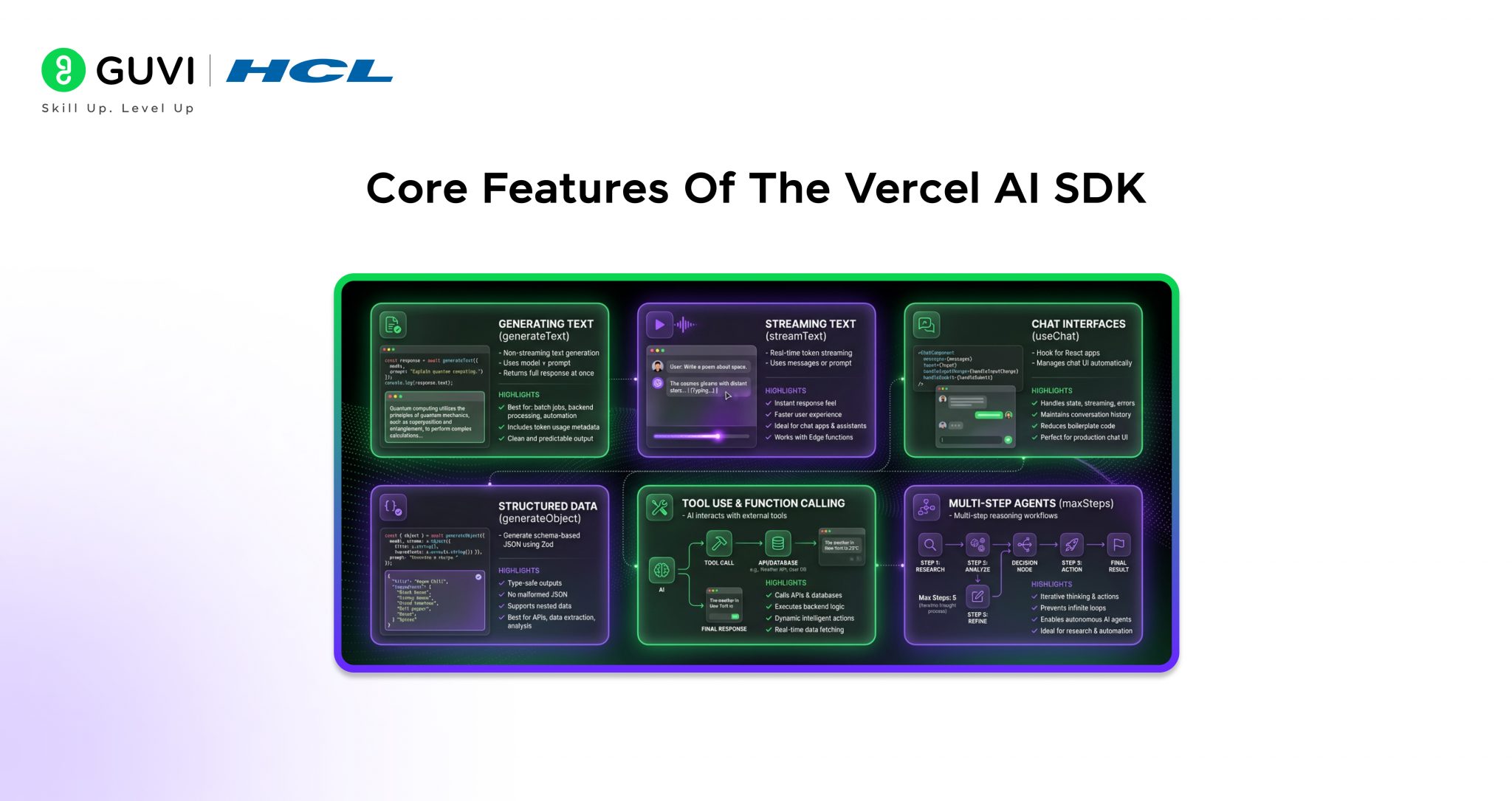
The Vercel AI SDK is a single TypeScript/JavaScript toolkit that sits between your app and all of those providers. You learn one set of functions — generateText, streamText, generateObject, and a few more — and the SDK translates them into whatever the chosen model expects. Swapping Claude for GPT or Gemini becomes a one-line change instead of a rewrite.
Think of it like a universal power adapter for travel. The wall sockets differ in every country, but you carry one adapter and plug your laptop in anywhere. The Vercel AI SDK is that adapter for language models: your application code stays the same, and the SDK handles the shape of each provider's plug.
Why it matters
Most AI tutorials are written in Python, but a huge share of real products live in TypeScript — the language of the web front end and of full-stack frameworks like Next.js. The Vercel AI SDK exists because that audience needed a first-class way to add AI to a web app, not a Python library wrapped in HTTP calls. It solves four problems that otherwise eat days of work.
- Provider lock-in. Without a common layer, your code hard-codes one vendor's request and response format. The SDK gives every provider the same interface, so you can A/B-test models, fall back to a cheaper one, or migrate when prices change — without touching your business logic.
- Streaming UX is hard to get right. Users expect text to appear word-by-word, the way a chat app types its reply, instead of staring at a spinner for ten seconds. Doing that by hand means parsing server-sent events, managing partial chunks, and piping them to the browser. The SDK makes streaming the default, not a project.
- Typed, structured output. A lot of AI work isn't chat — it's "read this email and return a JSON object with the sender, date, and intent." The SDK can force the model's output to match a schema you define, and hand you back a fully typed object your editor understands.
- Tool calling and agents. Letting a model call your functions (look up an order, query a database) involves a back-and-forth loop. The SDK runs that loop for you, so tool use and simple agents become a few lines instead of a state machine you maintain.
Who should care? Anyone building an AI feature in a JavaScript or TypeScript codebase — a chatbot, a "summarize this page" button, an internal tool that extracts data, or a full agent. If your stack is already TypeScript, this is the default choice; see how it fits the modern AI app stack and how it compares to Python for AI work.
How it works
The SDK is built in two layers, and understanding the split is the key to using it well. The lower layer, the AI SDK Core, is your server-side toolkit: functions that call a model and return text, objects, or tool results. The upper layer, the AI SDK UI, is a set of framework helpers (React, Svelte, Vue) that connect those server functions to a live, streaming interface in the browser.
The unified interface
Every Core function takes a model you pick from a provider package, plus your prompt or messages. Because the function signature is identical no matter which provider you pass, your code stops caring about who serves the model. Here is the smallest possible example — generate one block of text:
import { generateText } from 'ai';
import { anthropic } from '@ai-sdk/anthropic';

const { text } = await generateText({
  model: anthropic('claude-sonnet-4-6'),
  prompt: 'Explain what an API is in one sentence.',
});

console.log(text);

// Switch providers by changing ONE line:
//   import { openai } from '@ai-sdk/openai';
//   model: openai('gpt-5'),
// The rest of your code never changes.
Streaming to the browser
For a chat UI you swap generateText for streamText, which returns a stream instead of waiting for the whole answer. On the server you turn that stream into an HTTP response; in a React component, the useChat hook consumes it and re-renders as each token arrives. The whole request-to-render path looks like this:
You never parse a server-sent-event chunk by hand. The Core produces the stream, a helper turns it into the right HTTP response shape, and the UI hook on the other end reassembles it into a growing message. That end-to-end wiring — the part everyone gets wrong the first time — is what the SDK gives you for free.
Structured output and tools
Plain text is only half the job. The two features that make the SDK genuinely powerful are forcing the model into a typed shape, and letting it call your code.
generateObject: typed results, not strings
You describe the output you want with a schema (commonly written with the Zod validation library), and generateObject makes the model produce data that matches it. You get back a real typed object — your editor autocompletes its fields and the compiler catches typos — instead of a string you have to hope is valid JSON and parse by hand.
import { generateObject } from 'ai';
import { anthropic } from '@ai-sdk/anthropic';
import { z } from 'zod';

const { object } = await generateObject({
  model: anthropic('claude-sonnet-4-6'),
  schema: z.object({
    sender: z.string(),
    intent: z.enum(['question', 'complaint', 'praise']),
    urgent: z.boolean(),
  }),
  prompt: 'Classify this email: "My order never arrived and I need it today!"',
});

// object is fully typed: object.intent is 'complaint', object.urgent is true
console.log(object.intent, object.urgent);
Tools: let the model call your functions
A tool is a function you hand the model with a description and an input schema. When the model decides it needs that function — say, to look up live weather or query your database — it returns a structured request, the SDK runs your function, feeds the result back, and lets the model continue. That loop is what turns a chatbot into something that can act. Define the tools, set how many steps the loop may take, and the SDK orchestrates the rest.
When to use it (and when not to)
The SDK is the obvious default for TypeScript apps, but it isn't the only option and it isn't always the right one. A quick map of the alternatives:
| Approach | Best when | Trade-off |
|---|---|---|
| Vercel AI SDK | You're in TypeScript and want streaming, typed output, tools, and provider-swapping out of the box | One more dependency and its abstractions to learn |
| A provider's own SDK (e.g. the official OpenAI or Anthropic client) | You only ever use one provider and want every cutting-edge, vendor-specific feature the day it ships | You re-implement streaming and structured output yourself, and you're locked to that vendor |
Raw fetch to the API | A tiny script or a one-off call where a library is overkill | You hand-roll streaming, retries, and JSON parsing |
| A Python framework (LangChain, LlamaIndex) | Your stack is Python, or you need heavy data-pipeline/RAG tooling | Wrong language for a TS front end; see Python vs TypeScript for AI |
Reach for the Vercel AI SDK when you're building a user-facing AI feature in JavaScript or TypeScript and you value being able to change models later. Lean toward a provider's native SDK only when you depend on a brand-new, vendor-specific capability that the unified layer hasn't exposed yet — and even then, you can mix the two in the same app.
Common pitfalls
The SDK removes most of the boilerplate, but a few traps catch newcomers — and almost all of them come from forgetting that an LLM call is a network call to a third party.
- Calling the model from the browser. The Core functions run on the server. Putting your API key in front-end code leaks it to every visitor — see where to keep secrets and API keys. Always call the model from a server route and stream the result down.
- Forgetting to persist the conversation. The
useChathook keeps messages in memory while the page is open, but a refresh wipes them unless you save them. State and storage are your job — see managing LLM chat history. - Assuming the abstraction hides every difference. Providers genuinely differ — context limits, which support tools, how they handle images. The unified interface smooths the common path, not every edge. Test the model you actually ship.
- Ignoring cost on streaming endpoints. A unified, easy interface makes it trivial to call an expensive model in a loop. Watch token usage and budget per request — see estimating AI app cost.
- Over-trusting structured output.
generateObjectvalidates the shape, not the truth. A correctly-typed object can still contain a wrong answer, so validate values that matter.
Going deeper
Once the basics click, the SDK has several layers worth exploring as your app grows past a single chat box.
Generative UI. Beyond streaming text, the SDK can stream actual interface components. A tool can return not just data but a React component to render — so when a model "checks the weather," the user sees a weather card appear inline rather than a paragraph. This blends model output and UI into one stream and is one of the SDK's signature ideas.
Agents and multi-step loops. With tools plus a step limit, the SDK runs an agentic loop: the model calls a tool, reads the result, decides whether to call another, and only stops when it has an answer or hits the limit. This is how you build something that reasons over several actions instead of replying once. The deeper agent concepts — planning, memory, when to stop — carry over from what an AI agent is.
Provider middleware and fallbacks. Because every provider goes through the same interface, you can wrap calls with middleware — logging, caching, retries — or route to a backup provider when your primary one is rate-limited or down. This is where provider-agnosticism pays off in production, not just in a demo.
Embeddings and multimodal input. The same toolkit covers more than chat: it can generate embeddings for search and RAG, and pass images or files to models that accept them, all through functions that mirror the text ones you already know.
The durable lesson is the same one that justifies the whole library: in a field where the best model changes every few months, code that depends on one model's exact API is a liability. A unified interface lets your application logic outlive any single provider — you write against the toolkit once, and swap the engine underneath as the landscape shifts. Start with generateText, add streaming, then structured output, then tools, in that order.
FAQ
What is the Vercel AI SDK used for?
It's a TypeScript/JavaScript toolkit for adding LLM features to web and full-stack apps: generating and streaming text, producing typed structured output, calling tools, building simple agents, and wiring all of that to a React/Svelte/Vue interface. Its main job is giving you one unified API that works across many model providers.
Do I have to deploy on Vercel to use the AI SDK?
No. Despite the name, it's an open-source npm package that runs in any JavaScript environment — Node.js, edge runtimes, Cloudflare Workers, AWS Lambda, or your own server. Vercel maintains it, but it has no dependency on Vercel hosting.
What's the difference between AI SDK Core and AI SDK UI?
Core is the server-side layer — functions like generateText, streamText, and generateObject that actually call the model. UI is the client-side layer — framework hooks like useChat that consume a stream and update the interface as tokens arrive. You typically use both together: Core on the server, UI in the browser.
Can I switch model providers without rewriting my code?
Mostly yes. You change the model you pass into each function — for example from an Anthropic model to an OpenAI one — and the rest of your code stays the same. The caveat is that vendor-specific features and limits still differ, so re-test the model you actually ship.
Vercel AI SDK vs LangChain — which should I use?
They serve different audiences. The Vercel AI SDK is the default for TypeScript/JavaScript apps, especially anything with a web front end and streaming UI. LangChain (and LlamaIndex) are richer in Python for data pipelines and RAG. Pick based on your language and whether your focus is the UI or a heavy data backend.
How does the AI SDK handle structured JSON output?
You use generateObject with a schema (commonly written in Zod). The SDK constrains the model to return data matching that schema and hands you back a fully typed object, so you skip manual JSON parsing and get editor autocomplete and compile-time checks on the fields.