In plain English
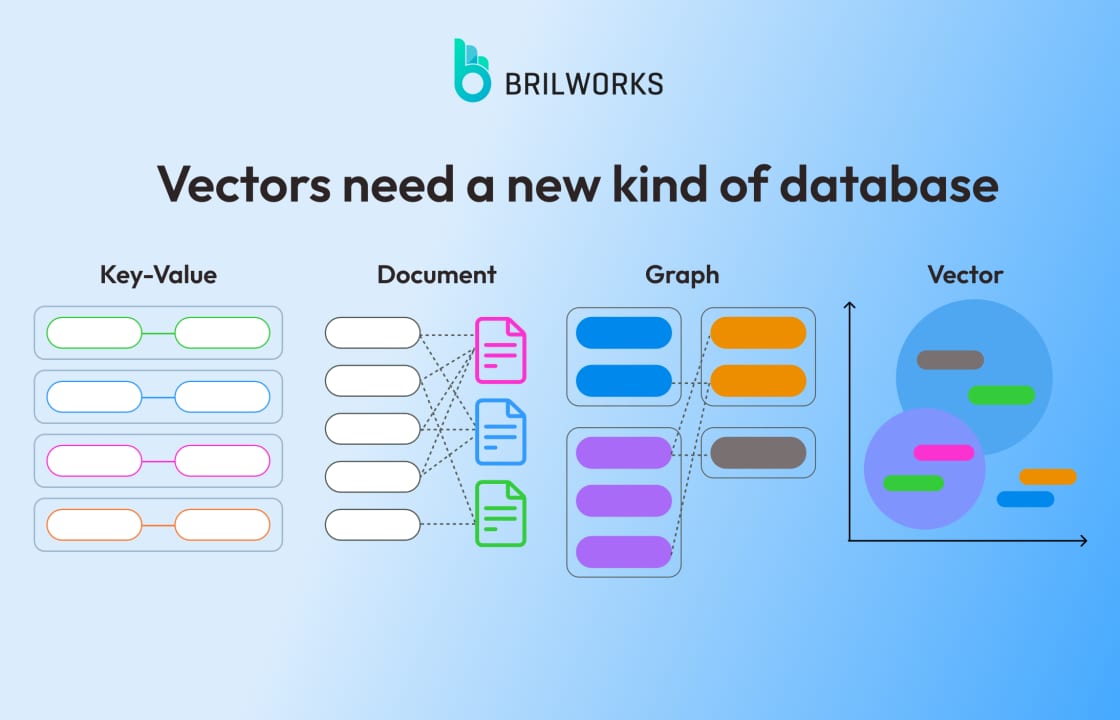
A vector database is a specialized system built to index and query millions — sometimes billions — of floating-point vectors at low latency. Tools like Pinecone, Qdrant, and Weaviate are purpose-built for that job, and they do it well. But here is what the marketing copy glosses over: you may not need any of that infrastructure at all.
Think of it like shipping packages. If you are sending three boxes across town, you do not rent a truck and hire a logistics crew — you carry them yourself. A dedicated vector database is the logistics crew. For small datasets, the overhead of spinning it up, paying for it, and operating it costs more than the problem it solves.
Before reaching for Pinecone or a managed Qdrant cluster, there is a ladder of simpler options: a NumPy matrix multiply in memory, an in-process SQLite file with the sqlite-vec extension, or the pgvector column in the Postgres database you are already running. Each rung handles more data and complexity — and the right move is to start at the bottom and only climb when you must.
Why it matters
The default assumption in many AI tutorials is: "build a RAG app, therefore use a vector database." That assumption quietly inflates every project's cost, complexity, and operational surface area. For most RAG prototypes, internal tools, and early-stage products, that assumption is simply wrong.
Here is the concrete cost of over-building:
- Money you don't need to spend. Managed vector databases charge per vector stored and per query. A project with 100,000 chunks from your company's docs does not need a metered external service — that data fits in RAM on a five-dollar VPS.
- A second database to babysit. Every specialized service is a new failure mode: its own backup policy, its own auth, its own version upgrades, its own monitoring. If you can keep everything in Postgres, you have one fewer system to wake up for at 2 a.m.
- Painful migration debt. If you build on a dedicated vector database and later realize pgvector was enough, you re-embed everything, rewrite query paths, and re-tune filtering. Starting simple and graduating upward is cheaper than the reverse.
- False confidence in precision. Approximate nearest-neighbor (ANN) indexes — the core trick in dedicated databases — trade a tiny amount of recall for speed. Brute-force search over a small dataset gives you exact nearest neighbors, which is often what you actually want during development.
The goal is not to avoid vector databases forever. It is to delay adding infrastructure until the simpler option genuinely breaks down under your load.
How the alternatives actually work
Each alternative relies on the same math — computing a distance (cosine similarity or dot product) between your query vector and every stored vector — but differs in where that math runs and how the data is stored.
Brute-force search with NumPy
If your embeddings are already in memory — say, 50,000 chunks loaded from a JSON file — a single matrix multiplication finds the top-k nearest neighbors. On a modern CPU, NumPy's dot product over 50,000 vectors of 1536 dimensions runs in roughly 5–15 milliseconds. That is well inside acceptable latency for most interactive apps, and the code is a few lines.
import numpy as np

# corpus_vectors: (N, D) float32 array already loaded in memory
# query_vector:   (D,) float32
def top_k(corpus_vectors, query_vector, k=5):
    # Cosine similarity via normalized dot product
    norms = np.linalg.norm(corpus_vectors, axis=1, keepdims=True)
    normed = corpus_vectors / norms
    q_norm = query_vector / np.linalg.norm(query_vector)
    scores = normed @ q_norm          # (N,)
    idx = np.argpartition(scores, -k)[-k:]
return idx[np.argsort(scores[idx])[::-1]]sqlite-vec: vector search inside SQLite
sqlite-vec is a Mozilla Builders-sponsored SQLite extension written in pure C with no dependencies. It adds a vec0 virtual table and a vec_distance_cosine() function. Because it runs inside SQLite, your vectors live alongside your regular relational data in a single .db file — no separate process, no TCP connection, no network latency.
import sqlite3
import sqlite_vec  # pip install sqlite-vec

db = sqlite3.connect("my_app.db")
db.enable_load_extension(True)
sqlite_vec.load(db)
db.enable_load_extension(False)

# Create a virtual table for 1536-dim embeddings
db.execute("""
  CREATE VIRTUAL TABLE IF NOT EXISTS chunks
  USING vec0(embedding float[1536])
""")

# Insert
db.execute(
  "INSERT INTO chunks(rowid, embedding) VALUES (?, ?)",
  [doc_id, embedding_as_bytes]
)

# Query top-5 nearest neighbors
rows = db.execute("""
  SELECT rowid, distance
  FROM chunks
  WHERE embedding MATCH ?
  ORDER BY distance
  LIMIT 5
""", [query_bytes]).fetchall()
Benchmarks on an M1 Mac show sqlite-vec achieving around 17 ms for k=20 nearest neighbors on the SIFT1M dataset (1 million 128-dim vectors), compared to FAISS at 10 ms and NumPy at 136 ms. For datasets well below 500k vectors, the difference is imperceptible to users. Importantly, sqlite-vec currently uses brute-force scan (no ANN index), so recall is exact — every result is the true nearest neighbor.
pgvector: vector columns in Postgres
pgvector adds a vector(n) column type and operators like <-> (L2), <=> (cosine), and <#> (negative inner product) to Postgres. If you are already running Postgres — and most apps are — this is zero new infrastructure. You add an extension, run one ALTER TABLE, and write your nearest-neighbor queries in SQL.
-- Enable extension once
CREATE EXTENSION IF NOT EXISTS vector;

-- Add a vector column to an existing table
ALTER TABLE documents ADD COLUMN embedding vector(1536);

-- Create an HNSW index for larger datasets
CREATE INDEX ON documents
  USING hnsw (embedding vector_cosine_ops)
  WITH (m = 16, ef_construction = 64);

-- Nearest-neighbor query
SELECT id, title, embedding <=> $1 AS distance
FROM documents
ORDER BY embedding <=> $1
LIMIT 5;
Without the HNSW index, pgvector performs an exact sequential scan — essentially brute-force, like NumPy. Add the index and it switches to approximate search, giving you sub-10 ms latency at hundreds of thousands of vectors. For datasets under roughly 1 million vectors with a proper HNSW index, pgvector typically delivers sub-second query latency that is more than adequate for most production workloads.
Picking the right rung
The alternatives ladder is not a strict size chart — context matters. Here is a practical decision table:
| Situation | Recommended approach | Reason |
|---|---|---|
| <10k vectors, prototype or script | NumPy / in-memory list | Zero dependencies, exact results, trivial to change |
| 10k–200k vectors, Python service | FAISS IndexFlatL2 or NumPy | Still fast enough brute-force; FAISS adds SIMD acceleration |
| Up to ~500k vectors, serverless / edge / mobile | sqlite-vec | Single file, no server, runs on WASM / Raspberry Pi |
| Up to ~1M vectors, already on Postgres | pgvector | No new infra, SQL joins, transactional consistency |
| >1M vectors OR multi-tenant OR real-time indexing | Dedicated vector DB (Qdrant, Weaviate, Milvus, Pinecone) | ANN indexes, sharding, and purpose-built ops at that scale |
LanceDB: the embedded option for heavier workloads
LanceDB occupies a middle ground worth knowing about. Like sqlite-vec, it is an embedded library (no separate process). Unlike sqlite-vec, it is built on the Apache Arrow columnar format and supports HNSW-based approximate search — making it fast enough for multi-million-vector datasets without requiring you to run a server. It is a good fit when you outgrow NumPy/sqlite-vec but are not ready for a dedicated cluster. A 2025 Rust rewrite delivered around 4x faster writes and queries than the original Python implementation.
The tradeoff is complexity: LanceDB is a heavier dependency than sqlite-vec, and its on-disk format is not a plain SQLite file you can inspect with any SQLite tool. Use it when you need embedded ANN indexing at scale; use sqlite-vec when simplicity and portability matter more.
The real cost of starting simple vs. starting with a managed service
Cost is not just dollars — it is also operational complexity and migration risk. Running the numbers on a typical early-stage RAG app clarifies the tradeoff.
| Approach | Infrastructure cost | Ops overhead | Migration cost if you outgrow it |
|---|---|---|---|
| NumPy / in-memory | $0 (runs alongside your app) | None | Low — swap one function |
| sqlite-vec | $0 (file on disk) | Minimal (backup the file) | Low — export row data |
| pgvector | Your existing Postgres bill | Low (one extension) | Medium — re-embed into new store |
| Self-hosted Qdrant on $30/mo VPS | $30/mo + your time | Medium (Docker, backups, upgrades) | Medium |
| Pinecone Starter (managed) | Free tier then ~$70+/mo | None | High — re-embed + migrate + rewrite queries |
The hidden cost in the managed-first path is migration debt. If you start with Pinecone and discover six months later that pgvector would have been sufficient, you have already built client code against Pinecone's SDK, integrated their metadata filtering syntax, and possibly stored embeddings only in their system. Unwinding that takes real engineering time.
Conversely, starting with NumPy and graduating to pgvector when you genuinely need persistence, then to a dedicated database when you cross a million vectors, keeps your options open at every stage. Each upgrade is incremental — you swap the search layer without touching the embedding generation code or the rest of your application.
Going deeper
Once you have validated that you genuinely need more than pgvector can offer — usually because you are over a million vectors with sub-10 ms latency requirements, need real-time indexing during writes, or have multi-tenant isolation requirements — the next decision is which dedicated engine to use. That is a separate topic, but a few advanced considerations are worth naming here.
ANN recall vs. exact search
Every dedicated vector database uses an approximate nearest-neighbor (ANN) algorithm — typically HNSW or IVF — to return results faster than a full scan. The tradeoff is recall: an ANN index at default settings might return the true top-5 neighbors only 95% of the time, occasionally substituting the 6th or 8th best match. For most RAG applications, this does not matter — the LLM handles imperfect retrieval gracefully. But if you are building a product where exact recall matters (legal discovery, duplicate detection, genomics), be aware that brute-force on a simpler store gives you 100% recall by definition.
Filtering is where simple approaches break first
The first real wall you hit with NumPy and sqlite-vec is filtered vector search: "find the 5 nearest neighbors where user_id = 42 and status = 'published'." The naive approach — filter first, then search — can degrade to a full scan over a tiny post-filter set. pgvector handles this reasonably well up to moderate scales using partial indexes. Dedicated databases (Qdrant's payload indexes, Weaviate's hybrid search, Milvus's bitset filtering) are purpose-built for this pattern at scale.
Quantization and memory
A 1536-dimension float32 embedding takes 6 KB. One million such embeddings take 6 GB of RAM — fine for a well-provisioned server, but tight on a $10/mo VPS. Dedicated databases support scalar quantization (float32 to int8, 4x smaller) and product quantization (up to 64x smaller, with recall loss). FAISS also supports both. sqlite-vec and pgvector store full-precision vectors, so if memory is the bottleneck pushing you off the simpler options, quantization in a dedicated database may be the actual enabler — not index type or query latency.
The zero-infrastructure edge case
sqlite-vec compiles to WebAssembly and runs in the browser and in Cloudflare Workers. If you are building an edge function or a client-side app that needs local vector search with no round-trip to a server, sqlite-vec is currently one of the very few options that works — no dedicated database can match that deployment profile. Keep it in mind for offline-capable apps, privacy-preserving local search, and edge inference pipelines.
FAQ
How many vectors can NumPy realistically handle before it becomes too slow?
In practice, a normalized dot-product search over 100,000 vectors of 1536 dimensions runs in roughly 10–50 ms on a modern CPU, which is acceptable for most interactive apps. Above 500,000 vectors the latency climbs into the hundreds of milliseconds range for a single-threaded scan, and you should switch to FAISS with IndexFlatL2 (still exact, but SIMD-accelerated) or add a proper ANN index.
Is sqlite-vec production-ready?
sqlite-vec v0.1.0 was declared stable in 2024 and is sponsored by Mozilla Builders. It is MIT/Apache-2.0 licensed, written in pure C, and has no external dependencies. It currently uses brute-force scan with no ANN index, so query time grows linearly with dataset size. For production workloads under roughly 500,000 vectors where you can tolerate 20–50 ms latency, it is a reasonable choice. For larger datasets or latency-sensitive workloads, use pgvector or a dedicated database.
Does pgvector support approximate nearest-neighbor search?
Yes. pgvector supports two index types: HNSW (Hierarchical Navigable Small World) for fast, high-recall approximate search, and IVFFlat for faster index builds at the cost of slightly lower recall. Without an index, pgvector falls back to an exact sequential scan. For datasets under 1 million vectors with an HNSW index, pgvector typically delivers sub-10 ms query latency.
What is the main thing sqlite-vec gives me that NumPy doesn't?
Persistence and SQL joins. With NumPy you have to load your vectors into memory on every startup and manage the file format yourself. sqlite-vec stores vectors in a standard SQLite .db file alongside your metadata, so you can filter on any column using SQL before or after the vector search — without writing custom filtering code.
When should I stop using pgvector and switch to a dedicated vector database?
The main triggers are: your dataset exceeds roughly 1 million vectors and query latency is degrading even with a tuned HNSW index; you need real-time indexing during high-frequency writes (pgvector's HNSW index locks during large inserts); you need multi-tenant isolation at the storage level; or your vector workload is starving your transactional Postgres queries of CPU and memory. Below those thresholds, pgvector plus good index tuning is usually sufficient.
Can I use these simpler tools for multimodal embeddings (images, audio)?
Yes. NumPy, sqlite-vec, and pgvector are agnostic to what the vector represents — they just store and compare arrays of floats. A CLIP image embedding and a text embedding from OpenAI are both just float32 arrays. The only constraint is dimension consistency: all vectors in a single index must have the same number of dimensions.