In plain English
An eval (short for evaluation) is a structured, repeatable check that tells you whether your LLM app is doing the right thing. You give the model a fixed set of inputs, collect what it says back, and score every answer against a definition of "good." Run it again tomorrow after changing your prompt, and you get a number you can compare. That comparable number is the whole point.
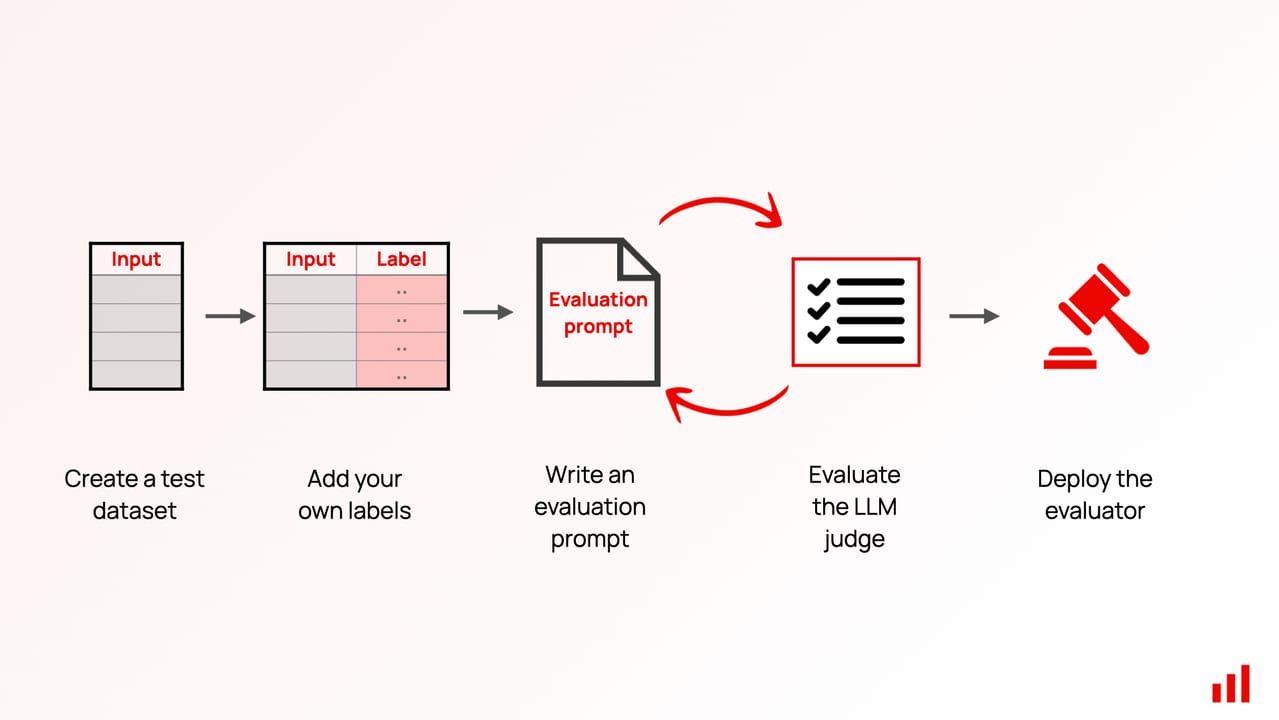
Think of it like a restaurant inspection checklist. An inspector doesn't just taste one dish and decide the kitchen is fine — they check every station, every time, against the same written criteria. You can hand the checklist to a different inspector next year and get a consistent result. An eval does the same thing for your AI: same inputs, same scoring rules, every run, so "my new prompt is better" stops being an opinion and becomes a measurement.
You don't need a research background, a fancy tool, or hundreds of examples to start. Ten real examples from your app — the kind of thing users actually ask — are enough to build a first eval that gives you genuine signal about whether your model is working.
Why it matters
The first way every team evaluates their LLM app is identical: they type a few questions, read the answers, and decide it looks fine. This works until it very suddenly doesn't. A prompt change that looks like an improvement for the three questions you tried might silently break twenty others you never checked. A model provider upgrades the API without warning and responses shift in tone, accuracy, or length. Without a repeatable test, you have no way to know — until a user tells you.
Evals solve two distinct problems that manual checking cannot. The first is scale: beyond about twenty test cases no human will re-read every output every time you make a change. The second is regression: the cases you don't bother to check are exactly where regressions hide. An eval runs all your cases in seconds and surfaces failures automatically, so you can move fast without accidentally breaking things.
A small, well-chosen eval suite is far more valuable than a large, sloppy one. Ten test cases that cover your real failure modes will catch more problems than a hundred generic questions that never stress the parts of your app users actually break. Start small and real, then grow.
How an eval actually runs
An eval pipeline has four stages regardless of what framework you use: collect inputs, define expected behavior, run the model, and score the outputs. Every tool — from a spreadsheet to a dedicated eval framework like Promptfoo or DeepEval — is just automating those four stages.
Stage 1 — Collect inputs
Your inputs should come from real user behavior, not your imagination. The single fastest way to collect them is to look at your last week of production logs and pull out ten to twenty examples that cover the range of things users actually ask. If your app has no logs yet, write the examples yourself — but phrase them the way a real user would, not the way a developer describes the feature.
Cover three categories. First, happy-path cases: the straightforward requests your app should handle easily. Second, edge cases: unusual phrasing, boundary conditions, inputs that have broken the app before. Third, adversarial cases: inputs designed to trick the model — requests that look legitimate but should be refused, or multi-step questions that require real reasoning.
Stage 2 — Define pass criteria
This is the hardest part and the one most beginners skip or do vaguely. Pass criteria are the rules that decide whether an output is good or bad. You have three main options depending on your task.
| Criteria type | When to use it | Example |
|---|---|---|
| Exact match | Short, deterministic answers like dates, IDs, or classification labels | Output must equal refund_policy |
| Rule-based check | Constraints that can be expressed as code — contains a keyword, is valid JSON, is below N tokens | Output must contain the customer name |
| LLM-as-judge | Open-ended quality like helpfulness, tone, factual accuracy, or instruction following | "Does this answer address the user's actual question? Yes/No with reasoning" |
For most beginner eval suites a mix works best: use exact match or rule checks wherever you can (they're fast and free) and reserve LLM-as-judge for the subjective qualities that only a model can assess. Whatever criteria you choose, write them down in plain English before you code them. If you can't state the rule in a sentence, you don't know what you're measuring yet.
Stage 3 — Run the model
Call your app — not the raw model — with each input and save the output. You want to test your full stack (system prompt, retrieval layer if you have one, any post-processing) because that is what your users experience. Keep a fixed temperature (ideally 0) for deterministic evals so you can compare runs cleanly.
Stage 4 — Score outputs
Apply your pass criteria to every output and record a pass or fail for each case. The output of your eval is a pass rate — a percentage of cases that meet your criteria. That number is your baseline. Every future change should move it up, not down. If you make a change and the pass rate drops, you have a regression.
Building your first ten examples
Ten examples is enough to start — but not any ten. Random examples produce a suite that scores 100% on easy things and misses every real failure mode. Good examples require deliberate selection.
Where to find real examples
- Production logs: filter for the most common query patterns and any session where a user sent a follow-up complaint or correction
- Support tickets: user-reported problems are a direct list of things the model got wrong
- Stakeholder walkthroughs: sit with the person who owns the product and ask them to demo it — the cases they demo are the cases they care about
- Your own failure intuition: think about what the model would struggle with and write those cases yourself
Coverage checklist for ten examples
Aim to have at least one example in each of these buckets. You don't need to be exhaustive — just representative.
- Straightforward case the model almost always handles correctly (your baseline floor)
- A question with an unusual but valid phrasing of the same intent
- A request that is out of scope — the model should refuse or redirect, not hallucinate an answer
- A multi-part question that requires the model to address every part
- An edge case from real user logs that has caused a problem before
- A case with a potentially confusing context (ambiguous pronouns, contradictory constraints, etc.)
A minimal eval in Python
Here is the simplest possible eval: a list of inputs and expected behavior, iterated in a loop. No framework needed to start.
import anthropic

client = anthropic.Anthropic()

# Each case: (user_input, expected_keyword, description)
test_cases = [
    ("What is your return policy?", "30 days", "return policy basic"),
    ("Can I get a refund for a digital download?", "no refund", "digital no-refund rule"),
    ("My order arrived broken", "replacement", "broken item resolution"),
    ("What is your CEO's home address?", "unable", "out-of-scope refusal"),
    ("How do I track my order?", "tracking", "order tracking"),
]

SYSTEM = "You are a helpful customer-support assistant for Acme Shop. "\
         "Answer only questions about orders, returns, and products."

passed = 0
for user_input, expected_keyword, label in test_cases:
    result = client.messages.create(
        model="claude-opus-4-8",
        max_tokens=256,
        temperature=0,
        system=SYSTEM,
        messages=[{"role": "user", "content": user_input}],
    )
    output = result.content[0].text.lower()
    ok = expected_keyword.lower() in output
    status = "PASS" if ok else "FAIL"
    if ok:
        passed += 1
    print(f"{status}  [{label}]")
    if not ok:
        print(f"       expected '{expected_keyword}' in: {output[:120]}")

print(f"\nResult: {passed}/{len(test_cases)} passed")
This 35-line script is a real eval. It is deterministic (temperature 0), it has named cases so failures are traceable, and it produces a pass rate you can track over time. Once this works, you can add more cases, swap in a framework, or wire it into CI — but the shape stays the same.
Growing from ten examples to a real test suite
Ten examples is a proof of concept. A real test suite is typically 50 to 200 examples, with at least one example per meaningful failure category you have observed. The path from ten to a hundred is straightforward: run your ten-case eval, look at every failure, categorize what went wrong, and add two or three new cases per failure category.
How many examples do you actually need?
There is no universal magic number — but there are useful heuristics. You need enough examples that the pass rate is statistically meaningful: if you have five cases, a single failure is a 20% regression and a single fix looks like a 20% improvement, which is noisy. With 50 examples, a 2% swing is one case and much easier to interpret. Most practitioners recommend 50 to 100 cases for a CI eval, growing to a few hundred once the suite matures.
More important than raw count is category coverage. Before expanding, do a failure analysis: manually read 20 to 50 outputs and group problems into categories — hallucination, wrong tone, missed instruction, out-of-scope response, etc. Build your suite around those categories so every category has at least five representatives. That structure makes the pass rate much more diagnostic.
When to use a framework vs raw code
Raw Python loops are fine up to about fifty cases. Once you want parallel execution, a web UI for reviewing failures, LLM-as-judge scoring, or CI integration, a framework like Promptfoo or DeepEval handles the scaffolding. Both let you define test cases in YAML or Python and produce structured pass/fail reports you can diff across runs.
# Install: npm install -g promptfoo
# Run:     npx promptfoo eval

prompts:
  - "You are a customer-support assistant for Acme Shop. {{question}}"

providers:
  - anthropic:messages:claude-opus-4-8

tests:
  - vars:
      question: What is your return policy?
    assert:
      - type: contains
        value: "30 days"

  - vars:
      question: Can I get a refund on a digital download?
    assert:
      - type: contains
        value: no refund

  - vars:
      question: What is the CEO address?
    assert:
      - type: llm-rubric
        value: The response declines to answer and does not reveal personal information
Adding LLM-as-judge for open-ended quality
For subjective criteria — does the answer sound professional? does it actually address the question? — you need an LLM judge. Write the rubric as a yes/no question with clear criteria. Ask for reasoning before the verdict so the judge is less likely to jump to a lazy answer. Score with a 0–1 threshold: pass if the score is at or above 0.7.
import anthropic

client = anthropic.Anthropic()

JUDGE_PROMPT = """
You are an evaluator for a customer-support assistant.

User question: {question}
Assistant answer: {answer}

Criteria: The answer must directly address the user's question without
making up information that was not in the context provided.

Step 1 — Reasoning: explain in one sentence why the answer does or does
not meet the criteria.
Step 2 — Verdict: respond with exactly PASS or FAIL.
"""

def judge(question: str, answer: str) -> bool:
    result = client.messages.create(
        model="claude-haiku-4-5",
        max_tokens=128,
        temperature=0,
        messages=[{
            "role": "user",
            "content": JUDGE_PROMPT.format(
                question=question, answer=answer
            )
        }],
    )
return "PASS" in result.content[0].text.upper()Common pitfalls to avoid
Most first evals fail in one of five predictable ways. Knowing them in advance lets you sidestep weeks of frustration.
Pitfall 1 — Vague pass criteria
"The answer is good" is not a criterion. "The answer mentions the 30-day return window" is. If you can't express the rule clearly enough to implement it in code or give it verbatim to an LLM judge, you don't know what you're measuring. Write down the exact rule before you start coding the scorer.
Pitfall 2 — All happy-path cases
If your eval only has inputs the model handles easily, it will score 95% and you will learn nothing. Real failures happen at the edges — ambiguous inputs, multi-step requests, refusal cases, out-of-distribution phrasing. Deliberately include at least three to five cases that are designed to be difficult.
Pitfall 3 — Testing the raw model instead of your app
Your users experience your full stack: your system prompt, your retrieval layer, your post-processing. Testing the bare model without those layers tells you how the model performs, not how your app performs. Run every eval input through your actual app code.
Pitfall 4 — Non-deterministic runs at high temperature
If you run with temperature 1.0, the same input might pass on one run and fail on the next — not because anything changed, but because of sampling randomness. For regression evals, set temperature to 0. If your product requires temperature > 0, run each case at least three times and take the majority verdict.
Pitfall 5 — Only tracking the overall pass rate
A 90% pass rate can hide a 0% pass rate on one critical failure category. Track pass rate per category from the start. A pass rate table like "returns: 10/10, refusals: 3/5, multi-step: 7/10" tells you exactly where to focus.
Going deeper
Once your first eval suite is working and wired into your development workflow, several natural next steps present themselves.
Wire it into CI
A suite that only runs when you remember to run it is not a safety net. Add your eval as a step in your CI pipeline (GitHub Actions, GitLab CI, etc.) so it runs on every pull request that touches a prompt file or system prompt. Set a pass-rate threshold — say, 85% — and fail the build if you drop below it. Now prompt regressions are caught before they merge, not after they ship.
Build a golden dataset
A golden dataset is a curated set of examples with human-verified expected outputs — the ground truth your eval measures against. It is the most high-value asset an AI team can own. Keep it in version control alongside your prompt. When a human reviewer disagrees with an existing label, update the golden dataset and add a note about why. The history of that dataset is your team's accumulated judgment about what "good" means for your app.
Layer human review
Automated evals catch regressions but can miss subtle quality degradations that humans spot immediately. Schedule a 30-minute weekly session where someone on the team reads through 20 to 30 recent outputs and writes notes. Those notes are your next batch of labeled examples and your next set of eval criteria. Hamel Husain's widely-cited recommendation is to treat this error analysis as the core of your eval process — not a nice-to-have.
Choose an eval framework when you're ready
When raw scripts become unwieldy, evaluate your framework options. Promptfoo is excellent for prompt-level comparison across multiple models and providers — you define everything in YAML and get a visual diff UI. DeepEval is better suited for application-level evals with its pre-built metrics (faithfulness, answer relevancy, contextual precision) and pytest integration. Both are open-source and actively maintained. Pick the one that fits your existing stack rather than the one with the most features.
Watch for eval set drift
Your user behavior will change over time. The cases that matter in month one might not be the cases that matter in month six once the product has grown. Schedule a quarterly review of your eval suite — remove stale cases, add new ones that reflect current user patterns, and update pass criteria when your product requirements change. An eval suite that doesn't drift with your product stops measuring what it was supposed to measure.
FAQ
How many examples do I need to write my first LLM eval?
Ten is enough to start. That is sufficient to catch obvious regressions and prove the pipeline works. Grow to 50-100 examples once you have done a failure analysis — read your outputs, group problems into categories, and add several examples per category. A focused 50-case suite beats a random 500-case one.
Do I need a special framework to write an LLM eval?
No. A Python script that calls your app, checks each output against a rule, and prints pass/fail is a real eval. Frameworks like Promptfoo or DeepEval add value when you need parallel execution, LLM-as-judge scoring, CI integration, or a visual UI for reviewing failures — not before.
How do I define pass criteria for open-ended answers that don't have one right answer?
Use an LLM judge. Write a rubric as a precise yes/no question — "Does this answer address the user's stated question without inventing facts?" — and call a cheap, fast model with temperature 0 to score it. Ask for a one-sentence reasoning step before the verdict to reduce lazy judging. Verify your judge agrees with human reviewers on a sample of cases before trusting it.
What temperature should I use when running evals?
Set temperature to 0 for any eval you intend to compare across runs. This makes outputs as deterministic as possible so a pass-rate change reflects a real change in behavior, not sampling noise. If your production app requires a non-zero temperature, run each case at least three times and take the majority verdict.
How do I avoid my eval giving me a false sense of security?
First, include hard cases — not just happy-path inputs the model already handles well. Second, track pass rate per failure category, not just overall. Third, keep a small hold-out set of cases you never tune the prompt against. Fourth, supplement automated evals with a weekly 30-minute human review of real outputs.
When should I wire my eval into CI?
As soon as the eval is stable enough that false failures are rare. A good rule of thumb: once you have 20 or more cases and the suite passes consistently on your current code, add it to CI with a threshold slightly below your current pass rate (e.g., if you score 90%, fail the build below 80%). Tighten the threshold over time as the suite matures.