In plain English
An API key is a long, randomly generated string of characters — like sk-ant-api03-... or sk-proj-... — that you include in every request you send to an LLM provider. It is the provider's way of answering two questions: Who is calling? and Should I let them? Every billable model call is logged against the key that made it, so your invoice at the end of the month traces directly back to your keys.
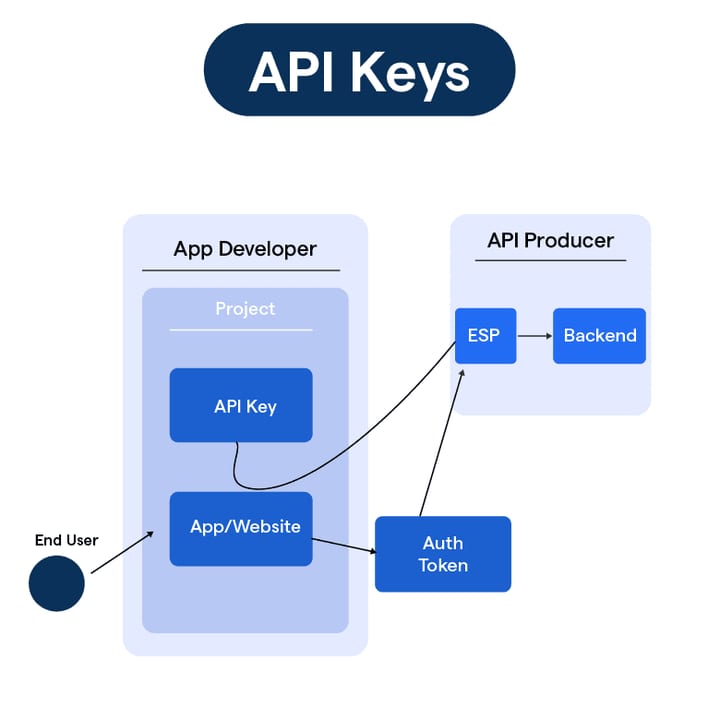
The best analogy is a hotel room key card. The card itself isn't tied to your identity — it's just a token with a specific set of permissions embedded in it. Hand it to someone else and they can open your room. Lose it, and you call the front desk to deactivate it and issue a new one. The hotel's door locks never learn your face; they only check whether the card is valid. An API key works the same way: the server never checks who you are, it only checks whether your key is active and has permission to do what you're asking.
LLM provider keys follow predictable patterns you'll quickly recognise: Anthropic keys start with sk-ant-, OpenAI keys start with sk- (and project-scoped keys start with sk-proj-), and Google Gemini keys are bare hex strings starting with AIza. The prefix is just a naming convention — the security comes from the length and randomness of the rest.
Why it matters
Without a key, you cannot make a single API call. Every provider blocks unauthenticated requests with an HTTP 401 Unauthorized response. So getting and managing keys is literally step one — nothing else in this section is reachable until you have one.
But keys matter for more than just unlocking access. They are the billing anchor for every token you consume. If a key leaks onto a public GitHub repository, anyone who finds it can run model calls billed to your account. In 2025, GitGuardian found 28.65 million hardcoded secrets committed to public GitHub repositories — a 34% increase over the prior year. Automated scanners harvest leaked keys within minutes of a push, and charges appear on your account within hours.
Keys also provide operational control. Providers let you create multiple keys, name them descriptively, and revoke them independently. A sensible pattern is one key per project or environment — dev, staging, production — so if a key is compromised you can revoke exactly that scope without touching everything else. Most providers also let you set spend limits and monitor usage per key, giving you an early-warning system for unexpected billing spikes.
- Authentication — proves your application is authorised to call the API.
- Billing — every token billed rolls up to the key that made the call.
- Rate limiting — quotas (requests per minute, tokens per day) are enforced per key.
- Revocation — you can kill a compromised key without changing anything else.
- Auditing — usage logs show which key called which model, when, and how many tokens it used.
How it works
When your code calls an LLM API, the key travels in the HTTP request's Authorization header — never in the URL itself. The provider's gateway receives the request, extracts the key, looks it up in its database, checks that it's active and has the right permissions, then routes the request to the model. The response comes back (along with token counts for billing) and the gateway logs the usage against your key. The model itself never sees the key — all of this happens at the network edge before the request even reaches the GPU cluster.
The header format follows the Bearer token convention from the OAuth spec:
Authorization: Bearer sk-ant-api03-YOUR_KEY_HEREEvery major LLM SDK handles this header automatically when you pass the key during client initialisation. You rarely write the header yourself. But it's worth knowing it's there — if you ever make a raw HTTP request with curl or fetch, you'll need to set it manually.
Getting your key: Claude, OpenAI, and Gemini
Each provider has a slightly different setup flow. Here's a concise walkthrough for the three most common LLM APIs.
Anthropic (Claude)
Go to console.anthropic.com and sign up with an email address or Google account. Before you can create a key you must add a credit card — Anthropic has no free tier for the API. Once billing is active, navigate to Settings → API Keys and click Create Key. Give it a descriptive name (e.g., my-app-dev) and choose whether it needs full access or read-only scope. The key is shown exactly once: copy it immediately and store it somewhere safe. If you close the dialog without copying, you'll need to revoke that key and create a new one. All Anthropic keys begin with sk-ant-.
OpenAI
Go to platform.openai.com and sign up or log in. Navigate to API Keys in the left sidebar and click Create new secret key. New accounts receive a small free credit allowance; after that you must add a payment method under Settings → Billing. Like Anthropic, the full key value is shown only once. OpenAI supports project-scoped keys (starting with sk-proj-) that are limited to a single project's resources, which is the recommended approach for new integrations.
Google Gemini
Go to aistudio.google.com and sign in with a Google account. Click Get API key in the left sidebar, then Create API key. Gemini has a genuine free tier with rate-limited access on its faster Flash models — no credit card required to get started. When you're ready for higher quotas, link a Google Cloud billing account to the project and the key automatically upgrades. Note: starting June 19, 2026 Google requires API-level restrictions to be configured on keys; keys set to 'any API' will stop working with Gemini.
| Provider | Console URL | Free tier? | Key prefix | Shown once? |
|---|---|---|---|---|
| Anthropic (Claude) | console.anthropic.com | No — billing required | sk-ant- | Yes |
| OpenAI | platform.openai.com | Small credit for new accounts | sk- / sk-proj- | Yes |
| Google Gemini | aistudio.google.com | Yes (rate-limited) | AIza... | Yes |
Using keys safely: the rules every builder must know
A key is only useful if it stays secret. The most common — and most expensive — mistake beginners make is committing a key directly into source code and pushing it to a public repository. Here are the habits that prevent that.
Rule 1: always use environment variables
An environment variable is a named value stored in your operating system's process environment rather than in a file your code reads. Your code asks for the value by name at runtime; it never contains the actual key. This is the universal standard for handling secrets in code.
# Terminal: set the variable for your current shell session
export ANTHROPIC_API_KEY="sk-ant-api03-YOUR_KEY_HERE"

# Or store it in a .env file (never commit this file)
echo 'ANTHROPIC_API_KEY=sk-ant-api03-YOUR_KEY_HERE' >> .envimport os
import anthropic
# The SDK reads ANTHROPIC_API_KEY from the environment automatically
client = anthropic.Anthropic()
# Or pass it explicitly — still from env, not hardcoded
client = anthropic.Anthropic(api_key=os.environ["ANTHROPIC_API_KEY"])import Anthropic from "@anthropic-ai/sdk";
// SDK reads process.env.ANTHROPIC_API_KEY automatically
const client = new Anthropic();
// Or explicitly
const client2 = new Anthropic({ apiKey: process.env.ANTHROPIC_API_KEY });Rule 2: add .env to .gitignore before your first commit
A .env file is a plain text file holding KEY=VALUE pairs. It keeps your keys out of source code, but only if git never tracks it. Add these lines to your .gitignore before you create the file:
# .gitignore
.env
.env.local
.env.*.local
Alongside your real .env file, commit a .env.example file with placeholder values so teammates know which keys the project needs:
# .env.example — safe to commit; contains no real secrets
ANTHROPIC_API_KEY=your_anthropic_key_here
OPENAI_API_KEY=your_openai_key_here
Rule 3: never put keys in frontend code
Any key baked into client-side JavaScript — whether in a React app, a browser extension, or a mobile app — is visible to anyone who opens DevTools. The request to the LLM API must always originate from your backend server, not directly from the user's browser. Your frontend calls your backend, which adds the key and proxies the request to the provider.
Rule 4: revoke a leaked key immediately
If you accidentally commit a key, revoke it before doing anything else — before removing it from git history, before rewriting the commit. An active key in a git clone someone already pulled is still live. Revocation takes effect immediately at the provider's gateway. Only after the key is dead should you clean up the repository history and rotate in a fresh key.
Going deeper
Once you have the basics locked in, there are several practices worth adopting as your project grows.
Multiple keys per environment
Create separate keys for development, staging, and production. This limits the blast radius of any single leak: a compromised dev key only exposes dev traffic. It also makes spend attribution easy — you can see immediately whether an unexpected cost spike came from a production issue or a developer's test loop.
Spend limits and usage alerts
All three major providers let you set a monthly spend limit and configure email alerts when you approach it. Set this before you write any code. A loop bug or a prompt injection attack can exhaust hundreds of dollars of quota in minutes. OpenAI's billing page has both a hard limit (requests fail after the cap) and a soft limit (you get an email). Anthropic's console lets you configure spend limits at the workspace level.
Automated secret scanning
GitHub's Secret Scanning feature automatically detects patterns matching known API key formats (including Anthropic and OpenAI keys) and alerts you — or blocks the push entirely with push protection enabled. For extra coverage, tools like TruffleHog scan your entire commit history and can detect over 800 different secret types. Running trufflehog git file://. locally before pushing is a useful safety net.
Secrets managers for production
Environment variables work well for local development and simple deployments, but production systems benefit from a dedicated secrets manager: AWS Secrets Manager, Google Secret Manager, Azure Key Vault, or HashiCorp Vault. These store keys encrypted at rest, provide fine-grained access control (only the production Lambda can read the production key), generate audit logs, and support automatic rotation. With rotation active, keys change every 30–90 days without any manual work — the manager generates a new key, updates it in the API call configuration, and revokes the old one.
Key rotation
Even keys that have never leaked should be rotated periodically. Industry guidance puts the cadence at every 30–90 days for production keys handling sensitive data, and at least every 90 days otherwise. To rotate without downtime: create the new key, deploy it to all services (the old key remains valid), verify that no traffic is using the old key, then revoke it. Many deployment platforms (Fly.io, Render, Railway, Vercel) support updating secrets without a code redeploy, making the swap fast and safe.
FAQ
What happens if I share my API key by accident?
Revoke it immediately from the provider's console — this takes effect within seconds. Then check your usage logs for any unexpected calls made with the leaked key. If charges occurred that you didn't authorise, contact the provider's support team. After revoking, generate a fresh key and update your environment variables.
Can I use the same API key for development and production?
You can, but you shouldn't. Using separate keys per environment limits the blast radius of a leak, makes it easy to track spending by environment, and lets you revoke a development key without disrupting production. Create a fresh key for each environment and name them clearly.
Is it safe to put an API key in a .env file?
Yes, as long as the .env file is in your .gitignore and never committed to source control. The file itself stores the key in plaintext, so anyone who can read the file can use the key. Keep .env files off shared machines, out of screenshots, and out of any system that syncs to the cloud (like Dropbox or iCloud Drive).
Do API keys expire automatically?
By default, no — LLM provider API keys do not have an automatic expiry date. They remain valid until you revoke them manually. Some enterprise configurations and secrets managers can enforce a rotation schedule, but the keys themselves have no built-in TTL. This is why periodic manual rotation is a best-practice habit rather than a built-in safeguard.
Why does Claude's API key need billing set up when Gemini offers a free tier?
Each provider has a different business model. Anthropic does not offer a free API tier — every call is billed, so a payment method is required from the start. Google subsidises a limited free tier on Gemini through AI Studio, making it easier to experiment before committing to billing. OpenAI historically gave new accounts a small credit but has made free tier availability variable over time, so check the current platform.openai.com billing page for the latest status.
How do I use an API key in a serverless function or CI/CD pipeline?
Every major platform has a secrets store designed for this: Vercel and Netlify have Environment Variables in the project settings, AWS Lambda uses Parameter Store or Secrets Manager, and GitHub Actions uses Repository Secrets. Store the key there and reference it as an environment variable in your function or workflow file — never paste the raw key into a config file that gets committed.