In plain English
Every API call you send to an LLM is priced and rate-limited in tokens — not words, not characters, not messages. A token is a small chunk of text (roughly 4 characters or three-quarters of a word in English). The API counts them on the way in and on the way out, adds the numbers up, and charges you accordingly. If you want to know the bill before it arrives, you need to count tokens yourself.
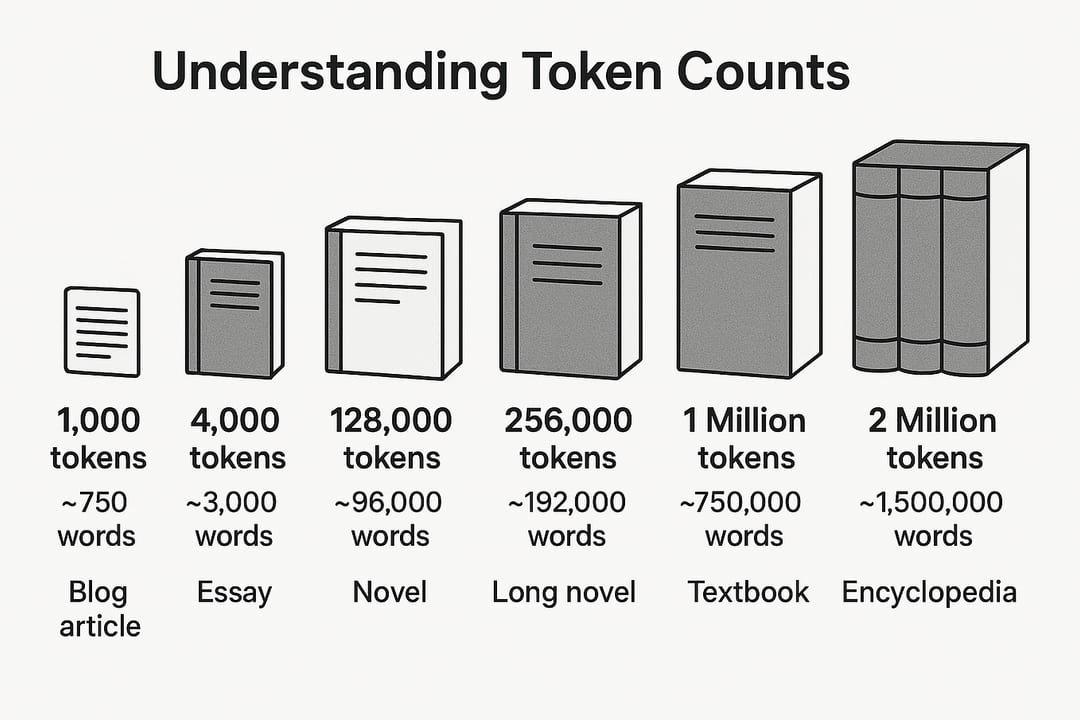
Think of a parking meter that charges by the minute, not by the trip. You can guess how long you'll be parked, or you can set a timer. Counting tokens before sending a prompt is that timer. It tells you how much context budget a prompt will consume, whether a conversation is about to overflow the model's context window, and what the API call will cost to the cent — before you spend a single credit.
Why it matters
Two hard limits govern every LLM call: the context window (how many tokens the model can read at once) and the cost per token (what you pay). Misjudge either one and bad things happen silently.
- Context overflow: If your input exceeds the model's context window, the API returns an error or silently truncates the prompt. Either way, the model never reads the part you needed most.
- Surprise invoices: Because output tokens typically cost 3–5x more than input tokens, a few hundred extra tokens on every call can double a monthly bill at scale.
- Rate-limit headroom: Many providers enforce token-per-minute (TPM) quotas. If you don't know how large each request is, you can't predict when you'll hit the limit.
- Caching misses: Prompt caching (available on OpenAI and Anthropic) only kicks in on the cacheable prefix. If your prompt is longer than you think, you may blow past the cached portion and pay full price.
- Agent loops: In multi-step agent workflows, the context grows with every tool call. Without counting, a five-step plan can silently consume 80% of the window before the agent has finished step two.
None of these problems show up during development on short prompts. They all surface in production, at 3 a.m., when you're handling real user inputs that are longer, messier, and more varied than your test cases.
How token counting works
Token counting is not a mystery: it is just tokenization without the inference step. A tokenizer maps raw text to a sequence of integer IDs using a fixed vocabulary (the same vocabulary baked into the model during training). Count the IDs, and you have the token count. The tricky part is that every model family uses a different tokenizer, so you must use the right one for the model you are calling.
Each provider ships a specific tokenizer. OpenAI uses tiktoken, a Byte Pair Encoding (BPE) library. The newer OpenAI encoding, o200k_base, uses a 200,000-token vocabulary, while older GPT-4 and GPT-3.5 models used cl100k_base (100,000 tokens) — tiktoken picks the right one for the model id you pass. Anthropic's Claude models use a SentencePiece-based BPE trained on different data entirely. Google Gemini models use a different vocabulary again.
The good news: every major provider either ships a local tokenizer library or exposes a free counting API endpoint. You can always get an exact count without paying for inference.
Counting tokens for OpenAI models with tiktoken
For OpenAI models, the official Python library is tiktoken. It runs entirely locally — no network call, no API key, near-instant results even on large documents. Install it with pip install tiktoken, then use encoding_for_model to load the right vocabulary automatically.
import tiktoken

# Automatically selects the right encoding for the model id
enc = tiktoken.encoding_for_model("gpt-5.5")

text = "How do transformer models handle long documents?"
tokens = enc.encode(text)

print(f"Token count: {len(tokens)}")
print(f"Token IDs:   {tokens}")
For chat models, each message carries a small structural overhead (around 3–4 tokens for role markers plus separators). The OpenAI Cookbook publishes a helper function that accounts for this overhead when counting a full messages list — use it whenever you need an exact request total rather than just the content token count.
def count_chat_tokens(messages: list[dict], model: str = "gpt-5.5") -> int:
    """Approximate total token count for a chat-formatted messages list."""
    enc = tiktoken.encoding_for_model(model)
    # Each message has ~4 tokens of overhead (role, separators, etc.)
    tokens_per_message = 4
    total = 0
    for message in messages:
        total += tokens_per_message
        for value in message.values():
            total += len(enc.encode(str(value)))
    total += 3  # every reply is primed with 3 tokens
    return total

msgs = [
    {"role": "system", "content": "You are a helpful assistant."},
    {"role": "user",   "content": "Explain attention mechanisms in one paragraph."},
]
print(count_chat_tokens(msgs)) # e.g. 29Counting tokens with provider APIs (Anthropic and Gemini)
For models where no local tokenizer library is available, the providers expose free token-counting API endpoints — they run tokenization without inference, so they are fast and do not consume credits.
Anthropic Claude
Anthropic's Python SDK exposes client.messages.count_tokens(...) with the same parameters as the messages endpoint. It returns an input_tokens count for the exact prompt you plan to send — system prompt, tools, and all.
import anthropic

client = anthropic.Anthropic()  # reads ANTHROPIC_API_KEY from env

response = client.messages.count_tokens(
    model="claude-opus-4-8",
    system="You are an expert in distributed systems.",
    messages=[
        {"role": "user", "content": "What is the CAP theorem?"}
    ],
)

print(f"Input tokens: {response.input_tokens}")
Google Gemini
The Google AI Python SDK provides client.models.count_tokens(...), which returns totalTokens. Like Anthropic's endpoint, this call is free and does not count against your inference quota.
from google import genai

client = genai.Client()  # reads GEMINI_API_KEY from env

result = client.models.count_tokens(
    model="gemini-3.5-flash",
    contents="What is the CAP theorem?",
)

print(f"Total tokens: {result.total_tokens}")Common pitfalls and edge cases
Counting the content of your messages is necessary but not sufficient. Several additional token sources can push your actual usage higher than your estimate.
| Token source | Where it hides | How to handle it |
|---|---|---|
| Chat message overhead | Role labels and separator tokens added by the API on every message | Add ~4 tokens per message to your content count |
| System prompt | Counted every request even if identical across all calls | Count it once and cache it; subtract it from your per-call budget |
| Tool / function definitions | Full JSON schema injected into the prompt before user content | Count your schema JSON with the same tokenizer; large schemas add hundreds of tokens |
| Image inputs | Images are converted to a fixed or variable number of tokens depending on resolution and model | Check provider docs for the tile-based formula used by the model's vision support |
| Long conversation history | All previous turns sent on every call in a chat loop | Implement a sliding window or summarization once history grows |
| Response tokens | Output tokens are priced separately, often at 3–5x the input rate | Budget for expected output length; set max_tokens to cap runaway responses |
Tool definitions deserve special attention. A single function schema with a detailed description and several parameters can add 100–300 tokens per tool per request. If you have ten tools registered, that is potentially 1,000–3,000 invisible tokens on every call — before you have typed a single word.
Going deeper
Once you have basic counting wired up, a few more techniques help you manage token budgets at scale.
Prompt caching and cached-token pricing
Both OpenAI and Anthropic offer prompt caching: if you send the same large prefix (a long system prompt, a big document, tool schemas) across many requests, the API can cache the key-value computation for that prefix and charge you a reduced rate on cache hits — typically 50% of the normal input price. The catch is that the cache only applies to a leading prefix that is identical byte-for-byte. Counting tokens lets you verify that the cacheable prefix stays stable and does not accidentally grow.
Building a token budget into your request layer
The most robust pattern is to count tokens as a pre-flight check before every API call — not as a debugging tool you reach for after something goes wrong. A typical implementation: (1) count input tokens for the current request, (2) assert that input_tokens + max_output_tokens <= model_context_window, and (3) log both the counted input and the model-reported usage from the response for drift detection. If the counted estimate and the reported usage diverge by more than a small margin, your counting logic probably missing something (a tool definition, an injected system note, etc.).
Cross-provider abstraction with liteLLM
If your application calls multiple providers, liteLLM provides a unified token_counter(model, messages) function and a acount_tokens async variant. Under the hood it routes to tiktoken for OpenAI models and to the provider API for others. This lets you count tokens for any supported model through one interface without conditional logic scattered throughout your codebase.
Setting max_tokens to protect your budget
Counting inputs is only half the equation. Output tokens are typically more expensive than input tokens, and without a limit, a single verbose model response can cost more than a hundred typical inputs. Always set max_tokens (OpenAI) or max_tokens (Anthropic) to an appropriate ceiling for the task. For classification or extraction tasks that should produce short answers, a ceiling of 200–500 tokens prevents accidental runaway. For open-ended generation, set it to the maximum you are willing to pay, not to the model's absolute maximum.
FAQ
Is tiktoken accurate for OpenAI's GPT models, or will the real API charge me a different amount?
tiktoken uses the exact same tokenization algorithm and vocabulary that OpenAI uses internally, so counts match the API to within the chat overhead (role markers, separators). Use the OpenAI Cookbook's chat-counting helper to include that overhead, and your estimate will be within 1–2 tokens of the actual charge.
Can I use tiktoken to count tokens for Claude or Gemini?
No. Claude uses a SentencePiece BPE tokenizer trained independently by Anthropic, and Gemini uses a different vocabulary again. Using tiktoken for non-OpenAI models will give you wrong counts. Use client.messages.count_tokens() for Claude and client.models.count_tokens() for Gemini — both are free.
Does token counting cost money?
For Anthropic and Gemini, the dedicated counting endpoints are explicitly free — they run tokenization only, no inference. tiktoken is a local Python library, so there is no network call at all. OpenAI does not publish a separate counting endpoint; tiktoken is the recommended approach there.
Why does the same text have more tokens in French or Japanese than in English?
English was the majority language in the training data used to build most tokenizer vocabularies, so common English words and subwords each get their own token. Less-represented languages fall back to smaller byte-level pieces, requiring more tokens to represent the same amount of meaning. Non-Latin scripts are particularly affected: a single Chinese character may be 1 token in a vocabulary trained with Chinese text, or multiple tokens in a vocabulary that barely saw it.
How do I count tokens when my prompt includes images?
Image tokens are calculated from the image's resolution using a tile formula, not from file size — check your provider's docs for the exact per-model formula, since a high-detail image can add several hundred tokens. Anthropic's count_tokens endpoint handles image payloads directly — pass the base64-encoded image in the messages array and the API counts everything together.
What is the fastest way to estimate tokens without writing code?
OpenAI's Tokenizer tool lets you paste text and see an instant token count with color-coded token boundaries. For a rough back-of-the-envelope check, divide your character count by 4 or multiply your word count by 1.33. These estimates are accurate to within about 15% for standard English prose.