In plain English
A prompt is just text — the instructions your app sends to a language model. In most projects that text starts life as a string pasted into the middle of the code, where only an engineer can see it and changing it means a code deploy. PromptLayer is a platform that pulls those prompts out of your code and into a shared, version-controlled home called a registry, then adds the things you wish prompts had all along: a full edit history, tests that score a new version before it ships, A/B testing on live traffic, and a log of every request the model ever handled.
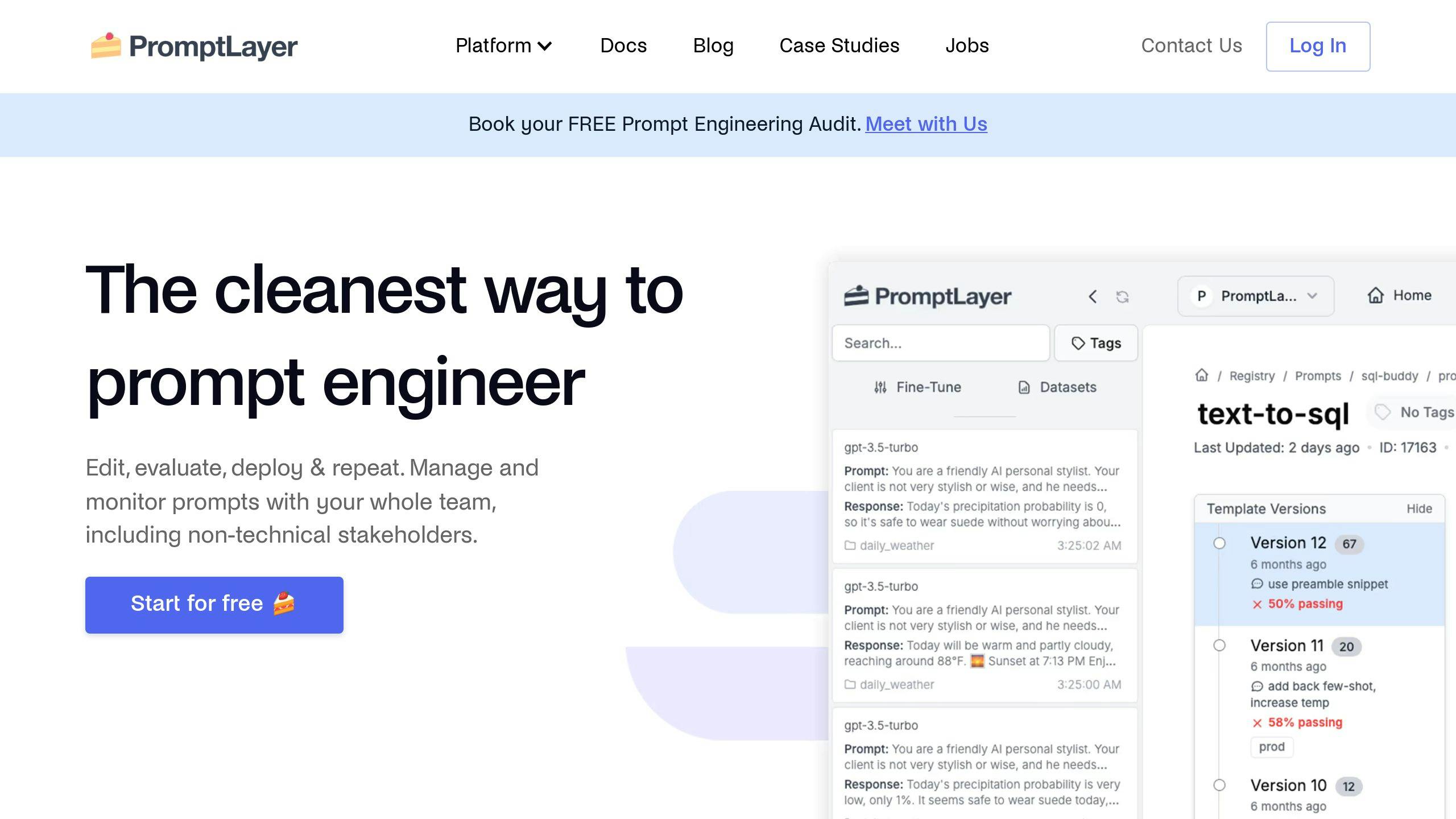
The tagline people use is Git for your prompts, and it's a fair one. Git took source code out of "whatever is on my laptop right now" and gave it numbered commits, branches, diffs, and a rollback button. PromptLayer does the same move for prompt text — except the people editing aren't only engineers. A product manager, a support lead, or a writer can open the web UI, tweak the wording, run it against test cases, and ship the new version without touching the codebase or waiting for a release.
Picture a restaurant's signature sauce. Without a system, the recipe lives in the head chef's memory and every cook "improves" it a little each night — some nights great, some nights sent back, and nobody can say what changed. PromptLayer is the laminated recipe card with a revision number: v12 is what's served tonight, v13 is being taste-tested in the back, and if v13 flops you flip one switch back to v12. The registry holds the cards, the evals are the taste tests, and the logs are the record of which sauce went to which table.
Why it matters
Prompts are the highest-leverage, least-controlled part of most LLM apps. Changing one word in a prompt can shift behavior across every conversation — and unlike a code bug, it doesn't fail loudly. It fails weirdly: the assistant gets slightly ruder, skips a step, or starts refusing a request it used to handle. The reason a tool like PromptLayer exists is that the default workflow has no defense against any of that.
- Prompts buried in code. When the prompt is a string inside
app.py, only engineers can change it, and every tweak rides a full deploy. The person with the best instinct for the wording — often a non-engineer — can't touch it. - No history, no rollback. The old text was overwritten in place. "The bot got worse last Tuesday" can't be traced to the prompt edit someone shipped last Tuesday, because that edit left no record.
- Vibes-based iteration. A change ships because the author tried three inputs in a playground and it "looked better." Three inputs is not a test, and the next model upgrade quietly re-rolls every prompt with no way to tell what broke.
- No link between an answer and its prompt. When a user complains about a bad response, you can't see which prompt version, which model, and which inputs produced it — so you're debugging blind.
PromptLayer's pitch is that it turns each of those gaps into a feature: the registry gives prompts one versioned home outside the code; evals replace spot-checking with a scored test suite; A/B testing replaces "looked better" with real numbers from real traffic; and request logging ties every production response back to the exact prompt, model, and inputs behind it. Who should care? Anyone with an LLM feature in front of users — solo builders get cheap insurance, and teams get a shared workflow where non-engineers can safely own the prompts.
How it works
PromptLayer has two halves that work together. One is a registry you read from at runtime: your app stops hardcoding prompt text and instead asks PromptLayer for "the prompt named support-reply, production label," and gets back the current approved version. The other is an observability and testing layer that records every model request and lets you score prompt versions before they ship. The same identifier ties them together — a logged response knows which registry version produced it.
The registry: prompts as versioned artifacts
In the registry, each prompt is a named template with variables (like a {customer_name} slot) rather than a finished string. Every edit creates a new immutable version with an author, a timestamp, and a note. You never overwrite the old text — you add a version. A label such as production or staging is just a pointer to one specific version, so deploying a prompt change means moving the label, and rolling back means moving it back. No build, no code release, instant.
Because the prompt is fetched by name and label, shipping a new prompt is decoupled from shipping code. A teammate promotes v13 in the web UI, and the very next request your running app makes picks it up — no redeploy. That single property is what lets non-engineers iterate safely, and it's the heart of the Git for prompts idea.
Evals, A/B tests, and logging around it
Pulling prompts into a registry is only safe if you can tell whether a new version is actually good. PromptLayer wraps three checks around the registry. Evals run a candidate version against a saved set of test cases and score the outputs — some assertions are cheap deterministic checks (does it contain this string, is it valid JSON), others are model-graded rubrics for fuzzy qualities like tone. A/B testing goes further by splitting live traffic between two versions and comparing real metrics. And request logging records every call the model handles, stamped with the prompt version, so you can replay a bad answer and turn it into a new test case.
Notice the loop closes on itself: the requests you log in production become the raw material for the next round of eval cases. A failure caught in the wild on Monday becomes a test case on Tuesday, so the same mistake can never silently ship again.
A worked example
Here's the shape of using the registry from code. Instead of hardcoding the prompt, you ask PromptLayer for it by name and let the platform return whatever version the production label currently points at.
from promptlayer import PromptLayer

pl = PromptLayer(api_key="pl_...")

# 1) Ask the registry for the prompt by name + label.
#    A teammate can re-point "production" to a new version
#    in the web UI with no code change here.
template = pl.templates.get(
    "support-reply",
    label="production",
    variables={"customer_name": "Dana", "question": "Where is my order?"},
)

# 2) The template comes back already filled in and ready
#    to send to whichever model it was configured for.
messages = template["llm_kwargs"]["messages"]

# 3) Call the model however you normally would, then log
#    the request so it is tied back to this prompt version.
# response = your_model_call(messages)
# pl.log_request(...)  # stamps the log with support-reply's version
The important part is what is not in the code: the prompt wording, the model choice, and the temperature all live in the registry, not in this file. To change any of them, a teammate edits a version in the UI, runs the eval suite, and moves the production label — and this code starts using the new behavior on its next call. The code only ever names the prompt and supplies the variables.
Where PromptLayer fits vs. plain git
You don't strictly need a platform. Plain text files in git, reviewed via pull requests and tested in CI, get you surprisingly far and cost nothing. The honest question is who edits your prompts. If it's only engineers comfortable with pull requests, git may be enough. If product managers, writers, or support leads need to iterate — or you want to ship prompt changes without a code deploy and link every response to its prompt version — a registry like PromptLayer earns its place.
| Need | Plain git | PromptLayer |
|---|---|---|
| Versioned prompt history | Yes (commits) | Yes (registry versions) |
| Non-engineers can edit | Hard (needs PRs) | Yes (web UI) |
| Ship without a code deploy | No | Yes (move a label) |
| Built-in evals & datasets | Bring your own runner | Built in |
| A/B test on live traffic | Build it yourself | Built in |
| Response linked to its version | Manual | Logged automatically |
Many teams blend both: prompts live in git as the source of truth, CI pushes each merged version into PromptLayer, and the platform handles runtime delivery, labels, A/B tests, and analytics. The one setup to avoid is two independent sources of truth — a prompt that exists in git and gets hand-edited in the PromptLayer UI will drift apart within a week, and you're back to "which one is actually live?" Pick one owner and sync one-way.
Common pitfalls
- Versioning the text but not the settings. A prompt's behavior depends on the model and sampling parameters as much as the wording. Capture the whole bundle in the version, or "v13" tells you almost nothing about why behavior changed. Many of these are the classic prompting mistakes wearing a version number.
- A happy-path-only eval suite. Five friendly inputs that always passed will keep passing. Evals earn their keep on edge cases — hostile users, empty inputs, very long inputs, inputs in the wrong language.
- Editing the production label directly. The UI makes hot-editing the live version easy. Always draft a new version, test it, then promote — don't edit in place.
- Treating the playground as the workflow. Playgrounds are for exploring, not shipping. Promote what you learn into a versioned, tested prompt.
- Calling an A/B test too early. A small sample of live traffic can swing either way by luck. Decide a sample size and a metric up front before you trust the result — the same care any A/B test needs.
Going deeper
A prompt version is really a config version. Mature teams stop versioning prompt text and version the full generation config: template, model identifier, sampling parameters, tool definitions, output schema, and the few-shot examples. Eval results are only valid for the exact bundle they ran against — a prompt tested on one model at a low temperature is an unknown quantity on a different model at a high one. Storing the config beside the text in the registry is what keeps a version meaningful.
Close the loop with observability. The strongest reason to choose a registry over bare git is the trace link: every production response is tagged with the prompt version that generated it. That unlocks per-version metrics — cost, latency, thumbs-down rate, refusal rate — and staged rollouts, where v13 serves a slice of traffic next to v12 and you compare real numbers before going all-in. At that point shipping a prompt looks exactly like canary-deploying code.
CI for prompts is harder than CI for code. Outputs are nondeterministic, and the model-graded judges used for fuzzy assertions are themselves a little flaky. Working mitigations: run each test case several times and score the pass rate rather than demanding perfection; gate on a threshold like "≥90% pass" instead of all-green; keep cheap deterministic checks separate from expensive model-graded ones so most regressions are caught for a fraction of a cent; and pin the judge model so the grader doesn't drift under your tests.
Where this is heading. Text diffs are nearly useless for prompts — swapping "concise" for "brief" looks trivial and may not be, so the real diff is the eval delta. Once prompts are versioned, tested, and measured, the natural next step is letting a tool propose candidate versions and have the eval suite pick the winner, which is exactly where automatic prompt optimization takes over. PromptLayer is one platform in an active category; the durable lesson is the discipline it encodes — treat prompts like code, and never ship a version you haven't measured.
FAQ
What is PromptLayer used for?
PromptLayer is a prompt management platform: it stores your prompts as versioned entries in a registry outside your code, then adds evaluation, A/B testing, and request logging. Teams use it so non-engineers can edit prompts, changes get tested before shipping, prompts can be deployed without a code release, and every model response can be traced back to the exact prompt version that produced it.
Why is PromptLayer called 'Git for prompts'?
Because it does for prompt text what git does for source code: every edit becomes a new immutable version with an author and timestamp, you can diff versions and roll back instantly, and a label like production points at whichever version is live. The difference is that the editing happens in a web UI, so product managers and writers can version prompts without using git itself.
What is a prompt registry?
A prompt registry is a central store where each prompt lives as a named, versioned template instead of a string buried in code. Your app fetches a prompt by name and label (like "support-reply, production") at runtime, so updating the prompt is a matter of pointing the label at a new version rather than redeploying the application.
Do I need PromptLayer or can I just use git?
Plain files in git, reviewed via pull requests and tested in CI, work well when only engineers edit prompts. A platform like PromptLayer is worth it when non-engineers need to edit prompts, when you want to ship prompt changes without a code deploy, when you want built-in evals and A/B testing, or when you need every production response linked to its prompt version. Many teams use both, with git as the source of truth syncing one-way.
How is PromptLayer different from prompt engineering?
Prompt engineering is writing and improving the prompt itself — the wording, structure, and examples. PromptLayer is about everything around the prompt: where it lives, how versions are tracked, how new versions get tested, and how the live version is deployed and rolled back. Engineering makes one prompt good; PromptLayer keeps it good across many edits, multiple editors, and model upgrades.