
Microsoft · 2026-11-16 · major
Windows 11 Tracks Which Coding Agents You Run — Optional diagnostics report
In short
Windows 11 records which coding agents and developer tools run on a PC and reports it as optional diagnostic data, says researcher Xusheng Li. The report holds no prompts or code. It can be switched off in Settings.
Microsoft · 2026-11-16 · 2 sources checked
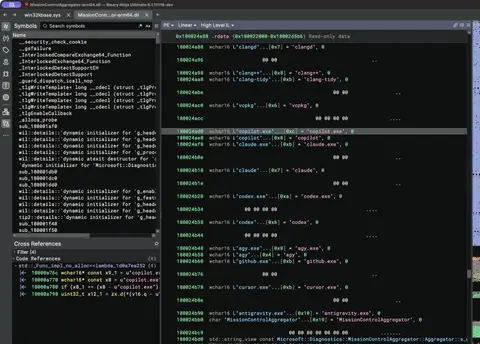
Windows 11 quietly notes which coding agents and dev tools run on your PC and reports it as optional diagnostics.
Quick facts
| Finding by | Xusheng Li (reverse engineering) |
|---|---|
| Feature flag | CLICodingAgentUsage (ID 62580080) |
| Component | MissionControlAggregator.dll in AggregatorHost.exe |
| Data sent | Which agents were seen; no prompts or code |
| Upload condition | Optional diagnostic data enabled |
| Test build | Windows 11 ARM64 build 26200.9974 |
What is it?
A Windows 11 diagnostics feature checks for coding agents such as Claude Code, Codex, Copilot CLI, Cursor and Antigravity, and for common developer tools. Researcher Xusheng Li found it by reverse engineering and published the details on 2026-11-16. The report has no prompt text or source code.
How does it work?
MissionControlAggregator.dll runs inside AggregatorHost.exe, a child of the DiagTrack service. It listens to existing Windows process and WSL events and matches executable names, sometimes with the publisher name. Matches are stored as bits in a local state file and sent as an ETW event called Segments.SubCohorts, behind the CLICodingAgentUsage flag.
Why does it matter?
Developers who use coding agents on Windows, especially in companies with privacy rules, now have a clear reason to review their diagnostic settings. The data shows tool adoption, not content. The Hacker News discussion (177 points) notes that Windows telemetry is long-standing, and that it can be turned off.
Who is it for?
Windows developers and IT teams
Frequently asked questions
- Does Windows 11 send my prompts or source code to Microsoft?
- No prompt text or source code was found in the Windows 11 coding-agent report, according to researcher Xusheng Li. The report only records which agents and developer tools were seen running on the PC. It does not record how long they ran or how long they had focus.
- How do I turn off Windows 11 coding-agent tracking?
- Windows 11 uploads the coding-agent report only when optional diagnostic data is allowed. Decline optional diagnostic data during setup, or switch off Send optional diagnostic data under Settings, Privacy & security, Diagnostics & feedback. On the author's clean US Home install, the setting was on by default.
- Which coding agents does Windows 11 look for?
- The Windows 11 check looks for the command-line tools copilot, claude, codex and agy, plus desktop apps github, claude, codex, cursor and antigravity. It also groups developer tools such as node, python, dotnet, gcc, clang, gdb, javac, devenv and code into broader categories.
- Is the Windows 11 coding-agent tracking on every PC?
- The Windows 11 feature is not confirmed on every PC. Xusheng Li tested a limited set of virtual machines, where the CLICodingAgentUsage flag was already enabled as a service experiment. Microsoft had not responded to the finding in the article or in the Hacker News thread.
Try it
Settings > Privacy & security > Diagnostics & feedback > Send optional diagnostic data