
OpenAI · 2026-06-05 · major
OpenAI Rolls Out Lockdown Mode to Free, Go, Plus, Pro, and Self-Serve Business — Optional Defense Disables Deep Research, Agent Mode, File Downloads, and Outbound Image Fetches to Block the Final Stage of Prompt-Injection Data Exfiltration
In short
OpenAI begins rolling out Lockdown Mode to all eligible personal tiers — Free, Go, Plus, Pro — and self-serve ChatGPT Business. The toggle blocks outbound network requests, disables Deep Research and Agent Mode, and stops file downloads.
OpenAI · 2026-06-05 · 3 sources checked
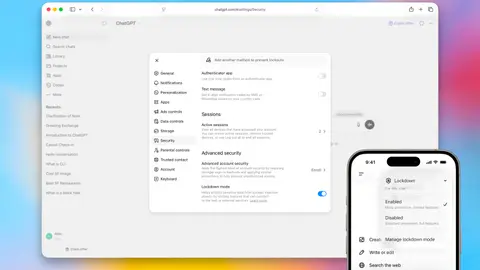
OpenAI's deterministic patch on the 'final stage' of prompt-injection attacks now reaches free ChatGPT users.
What is it?
Lockdown Mode is an optional security toggle in ChatGPT that switches off the network-enabled features attackers use to exfiltrate data once a prompt injection lands. First teased in February 2026 for enterprise plans, it is now rolling out to Free, Go, Plus, Pro, and self-serve ChatGPT Business accounts.
How does it work?
Enabled from Settings > Safety and security > Advanced security, the mode blocks outbound network requests, disables Deep Research and Agent Mode, refuses to download files for analysis, and stops the model from pulling images from the open web — only cached web content and uploaded images go through. Document uploads and image generation remain available. OpenAI describes the controls as deterministic, not gated by another AI system that could itself be subverted.
Why does it matter?
Simon Willison frames the rollout as a direct attack on the 'data exfiltration' leg of the Lethal Trifecta — private data plus untrusted content plus an outbound channel. Pushing the hardened mode to the free tier puts a prompt-injection-resistant ChatGPT in front of anyone who handles sensitive content. OpenAI explicitly notes Lockdown Mode does not stop injected instructions from being read; it only cuts the channel attackers use to send stolen data out.
Who is it for?
people and teams handling sensitive data in ChatGPT
Try it
ChatGPT → Settings → Safety and security → Advanced security → Lockdown mode