
Overview
AI Sheets is Hugging Face's open-source, no-code tool for building, enriching and transforming datasets with AI models. It looks like a spreadsheet, but a column can be driven by a prompt: you write an instruction that references other columns with the `{{column_name}}` syntax, pick a model, and the tool fills the cells row by row. You can start from nothing by describing the dataset you want, or import an existing file (XLS, TSV, CSV or Parquet, up to 1,000 rows) and add AI columns alongside the data you already have.
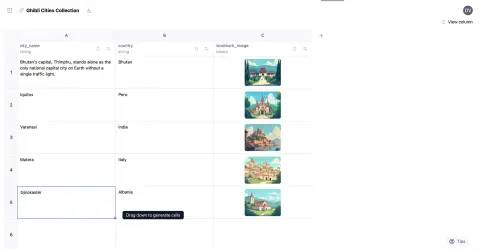
Models come from the Hugging Face Hub through Inference Providers, so you can switch a column to a different open model or provider and compare outputs side by side. It can also point at any endpoint that speaks the OpenAI API, such as a local Ollama server, via two environment variables. Columns can produce text or images, and a per-column toggle lets the model search the web (through the Serper API) when generating a cell.
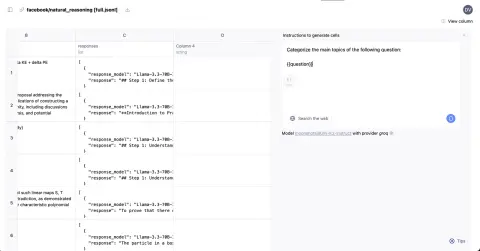
Refinement is built into the grid. You can edit a cell by hand or give it a thumbs-up, and those validated cells are fed back as few-shot examples when the column is regenerated; dragging down extends a column to new rows. When the sheet looks right it can be saved to the Hugging Face Hub as a dataset or downloaded, and the export includes a config with the prompts and examples so the same pipeline can be re-run at scale with the repository's scripts on Hugging Face Jobs. It runs as a hosted Space, in Docker, or from source (a Qwik app with an Express server).
What it does
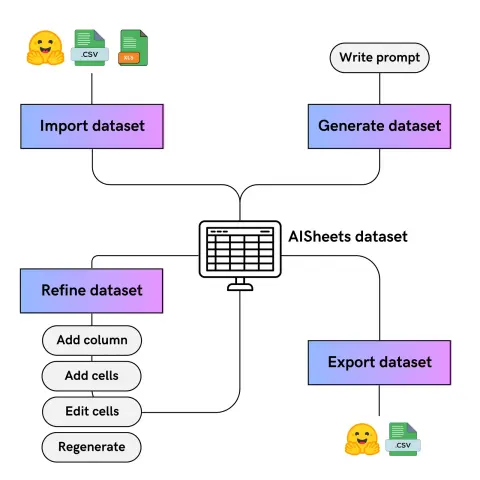
- Prompt-driven columns that reference other columns with {{column_name}}, generating text or image cells row by row
- Start from a plain-language description of a dataset, or import XLS, TSV, CSV or Parquet files (up to 1,000 rows) and enrich them
- Pick any Hub model and Inference Provider per column, or route inference to your own OpenAI-compatible endpoint such as Ollama
- Manual edits and thumbs-up validations become few-shot examples when a column is regenerated
- Optional per-column web search via the Serper API
- Save to the Hugging Face Hub with a reusable prompt config, then scale it up with the bundled HF Jobs scripts (Inference Providers or vLLM)
Getting started
The quickest way to try AI Sheets is the hosted Space at huggingface.co/spaces/aisheets/sheets. To run it yourself you need a Hugging Face token from huggingface.co/settings/tokens.
Run it with Docker
Export your token, start the published image and open http://localhost:3000 in your browser.
export HF_TOKEN=your_token_here
docker run -p 3000:3000 \
-e HF_TOKEN=$HF_TOKEN \
aisheets/sheets
Or run it from source with pnpm
Clone the repository, install dependencies and start the dev server, then open http://localhost:5173. For a production build use pnpm build followed by pnpm serve.
git clone https://github.com/huggingface/aisheets.git
cd aisheets
export HF_TOKEN=your_token_here
pnpm install --frozen-lockfile
pnpm dev
Use a local model through Ollama (optional)
Any OpenAI-compatible endpoint works. Start Ollama with a model, point AI Sheets at it with MODEL_ENDPOINT_URL and MODEL_ENDPOINT_NAME, then serve the app. Hub models stay selectable in each column's settings; image generation still uses Hugging Face Inference Providers.
ollama serve
ollama run llama3

export MODEL_ENDPOINT_URL=http://localhost:11434
export MODEL_ENDPOINT_NAME=llama3
pnpm serve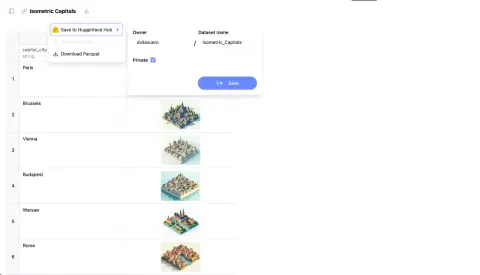
Scale a sheet up on HF Jobs
Once a sheet is saved to the Hub with its config, the repository's extend_dataset scripts can run the same prompts over a full dataset on Hugging Face Jobs. This is the README's example; drop --num-rows to process every row, or use the with_vllm.py script on a GPU flavor to avoid per-call inference costs.
hf jobs uv run \
-s HF_TOKEN=$HF_TOKEN \
https://github.com/huggingface/aisheets/raw/refs/heads/main/scripts/extend_dataset/with_inference_client.py \
nvidia/Nemotron-Personas dvilasuero/nemotron-kimi-qa-distilled \
--config https://huggingface.co/datasets/dvilasuero/nemotron-personas-kimi-questions/raw/main/config.yml \
--num-rows 100
Commands and code are distilled from the project's own documentation — always check the official repo for the latest.
When to use it
- Reach for it to prototype a synthetic dataset from a one-line description, iterate on the prompts in a grid, and publish it to the Hub
- Reach for it to enrich an existing CSV or Hub dataset with LLM columns such as topic categories, summaries or extracted fields
- Reach for it to compare several open models on the same inputs, or to add an LLM-as-judge column that scores their outputs
- Reach for it when non-programmers need to build or clean training and evaluation data without writing pipeline code
How AI Sheets compares
AI Sheets alongside other open-source synthetic data tools AI/TLDR tracks, ranked by GitHub stars.
| Tool | Stars | What it does |
|---|---|---|
| Easy Dataset | ★ 15k | An application that parses your documents and converts them into structured question-answer datasets for fine-tuning, RAG, and model evaluation. |
| SDV (Synthetic Data Vault) | ★ 3.6k | A Python library that learns patterns from real tabular data and generates realistic synthetic tables. |
| distilabel | ★ 3.4k | A framework for building synthetic-data and AI-feedback pipelines that call any LLM to generate and judge datasets. |
| NeMo Data Designer | ★ 2.4k | An NVIDIA library for orchestrating LLM-based synthetic-data pipelines with validation and quality scoring. |
| Augmentoolkit | ★ 1.9k | A tool that turns raw documents into synthetic instruction and conversation datasets for fine-tuning models. |
| NeMo Curator | ★ 1.8k | An NVIDIA toolkit for cleaning, deduplicating, and curating large text datasets used to train LLMs. |
| Curator | ★ 1.8k | A Python library for generating and curating large synthetic datasets to train and post-train language models. |
| AI Sheets | ★ 1.7k | A no-code spreadsheet for generating, enriching and transforming datasets with open AI models |