Overview
DemoGPT is an open-source project that generates LLM applications from a written instruction. You describe the app you want and give it a title; DemoGPT writes the LangChain code for it and packages the result as an interactive Streamlit app, so the output is something you can click through rather than a script you still have to wire up.
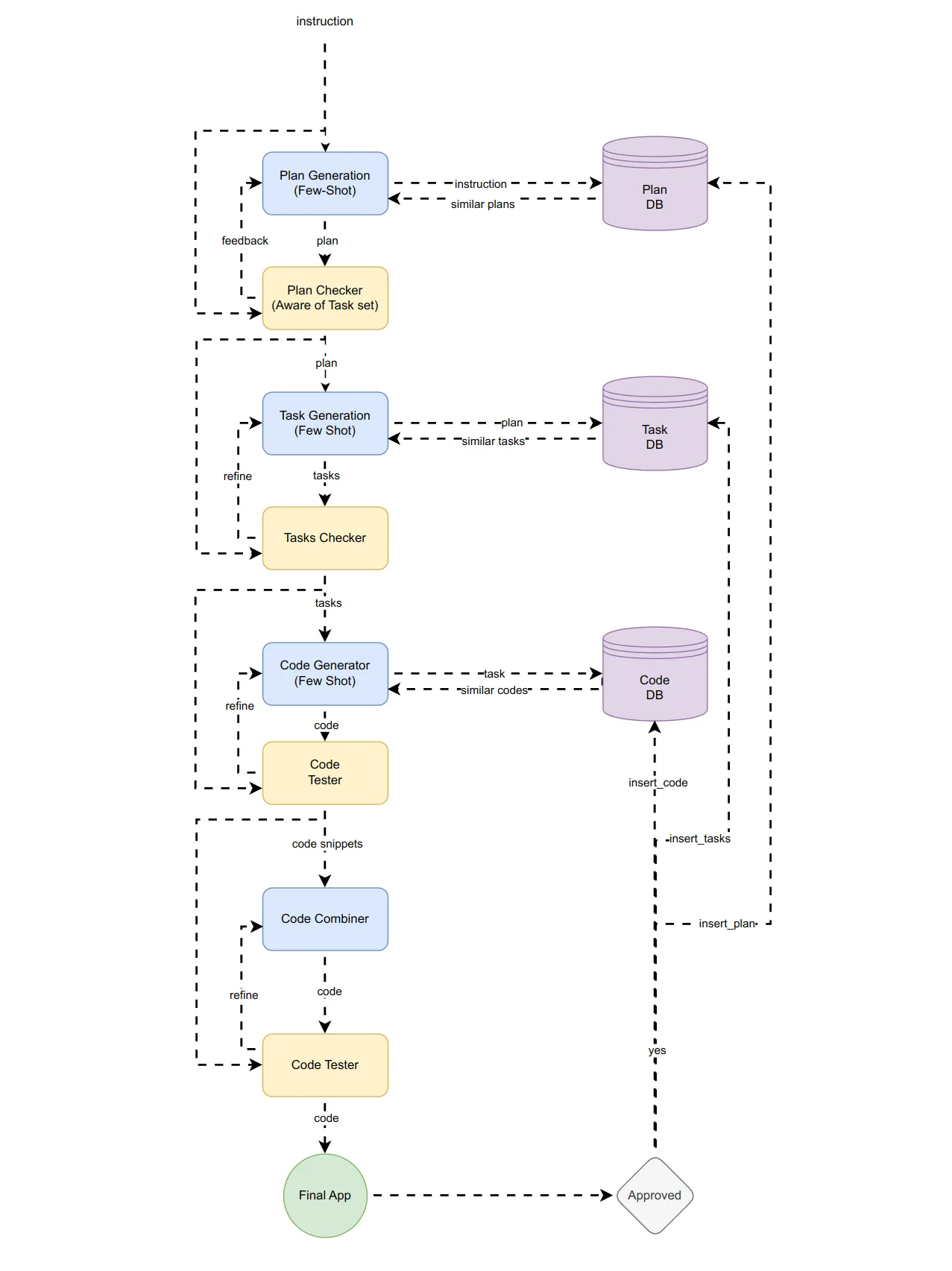
Generation runs as a staged pipeline. DemoGPT first drafts a plan from the instruction, then breaks the plan into specific tasks, turns each task into a code snippet, and finally assembles the snippets into one Streamlit program. The project's architecture diagram adds checker and tester steps between the stages, with feedback loops that send a plan, task list or code back for refinement. From Python, the same pipeline is exposed as a generator that yields a JSON record per stage, with a completion percentage and the code so far.
The package also ships DemoGPT AgentHub (`demogpt_agenthub`), a library for building agents directly in code. It provides a `ToolCallingAgent` and a `ReactAgent` that prints its reasoning, decisions and tool calls step by step, a `BaseTool` class for writing your own tools, a set of built-in tools, and a `BaseRAG` class for retrieval over your own files that can itself be handed to an agent as a tool.
What it does
- Prompt-to-app generation: an instruction and a title become LangChain code wrapped in an interactive Streamlit app
- Staged pipeline — plan, tasks, code snippets, final assembly — with the stages streamed back as JSON from the Python API
- Runs as a local Streamlit interface with the `demogpt` command or as a library via `from demogpt import DemoGPT`
- AgentHub agents: `ToolCallingAgent` and a `ReactAgent` that shows its reasoning and each tool call
- Built-in tools including Tavily search, weather, Wikipedia, Bash, Python, arXiv, YouTube search, Stack Overflow, Wikidata, PubMed and YOLO object detection, plus custom tools via `BaseTool`
- `BaseRAG` retrieval over PDF, TXT, CSV and JSON files with Chroma, Pinecone or FAISS vector stores, usable on its own or as an agent tool
Getting started
DemoGPT installs from PyPI. The generator uses an OpenAI model by default, so set `OPENAI_API_KEY` in your environment (or pass `openai_api_key` to the Python class).
Install
One package covers both the app generator and the AgentHub library. To work from source instead, clone the repo and install it locally.
pip install demogpt

# or from source
git clone https://github.com/melih-unsal/DemoGPT.git
cd DemoGPT
pip install .
Launch the app generator
The `demogpt` command opens the Streamlit interface where you type an instruction. From a source checkout, run the Streamlit app directly.
demogpt

# from a source checkout
streamlit run demogpt/app.py
Generate an app from Python
Iterating over the agent yields one JSON record per generation stage; the record marked `done` carries the final Streamlit code.
from demogpt import DemoGPT

agent = DemoGPT(model_name="gpt-3.5-turbo")
instruction = "Your instruction here"
title = "Your title here"
code = ""
for phase in agent(instruction=instruction, title=title):
    print(phase)
    if phase["done"]:
        code = phase["code"]
print(code)
Build an agent with AgentHub
Combine built-in tools with an LLM wrapper; `verbose=True` prints the agent's reasoning and tool calls.
from demogpt_agenthub.agents import ToolCallingAgent
from demogpt_agenthub.llms import OpenAIChatModel
from demogpt_agenthub.tools import TavilySearchTool, WeatherTool

llm = OpenAIChatModel(model_name="gpt-4o-mini")
agent = ToolCallingAgent(tools=[TavilySearchTool(), WeatherTool()], llm=llm, verbose=True)
print(agent.run("What's the weather like in New York today?"))
Commands and code are distilled from the project's own documentation — always check the official repo for the latest.
When to use it
- Turn an idea for a small LLM tool into a clickable Streamlit prototype without writing the LangChain code by hand
- Generate a starting LangChain program from Python and edit the returned code instead of beginning from a blank file
- Build a tool-using agent that searches the web, runs Python or Bash, and checks the weather, with its reasoning printed step by step
- Answer questions over your own PDFs, CSVs or JSON files with a RAG pipeline that an agent can call alongside other tools
How DemoGPT compares
DemoGPT alongside other open-source low-code & no-code builders tools AI/TLDR tracks, ranked by GitHub stars.
| Tool | Stars | What it does |
|---|---|---|
| Langflow | ★ 156k | Langflow is an open-source platform for building AI agents and workflows visually, then deploying each flow as an API or MCP server. |
| OpenDesign | ★ 103k | Local-first desktop app that turns a written brief into web, mobile and desktop prototypes, decks, images and video by delegating to the coding-agent CLIs already on your machine. |
| NocoDB | ★ 65.3k | An open-source tool that turns any SQL database into a no-code spreadsheet-style app, used as a self-hosted Airtable alternative. |
| Flowise | ★ 55.5k | Flowise is an open-source low-code tool that lets you build LLM apps and AI agents by connecting nodes on a visual canvas, then ship them as an API or chat widget. |
| JeecgBoot | ★ 48.3k | Java low-code platform — online form, report and workflow designers plus a code generator — with a bundled langchain4j app layer for chat assistants, RAG knowledge bases and MCP plugins. |
| ToolJet | ★ 41.1k | An open-source low-code platform with a drag-and-drop UI builder, built-in database, and JavaScript logic for building internal tools, dashboards, and workflows. |
| Appsmith | ★ 41.1k | An open-source low-code platform for quickly building internal tools, admin panels, and dashboards from a visual editor plus custom JavaScript and data-source connections. |
| DemoGPT | ★ 1.9k | Turn a one-line instruction into a working LangChain app with a Streamlit UI |