Overview
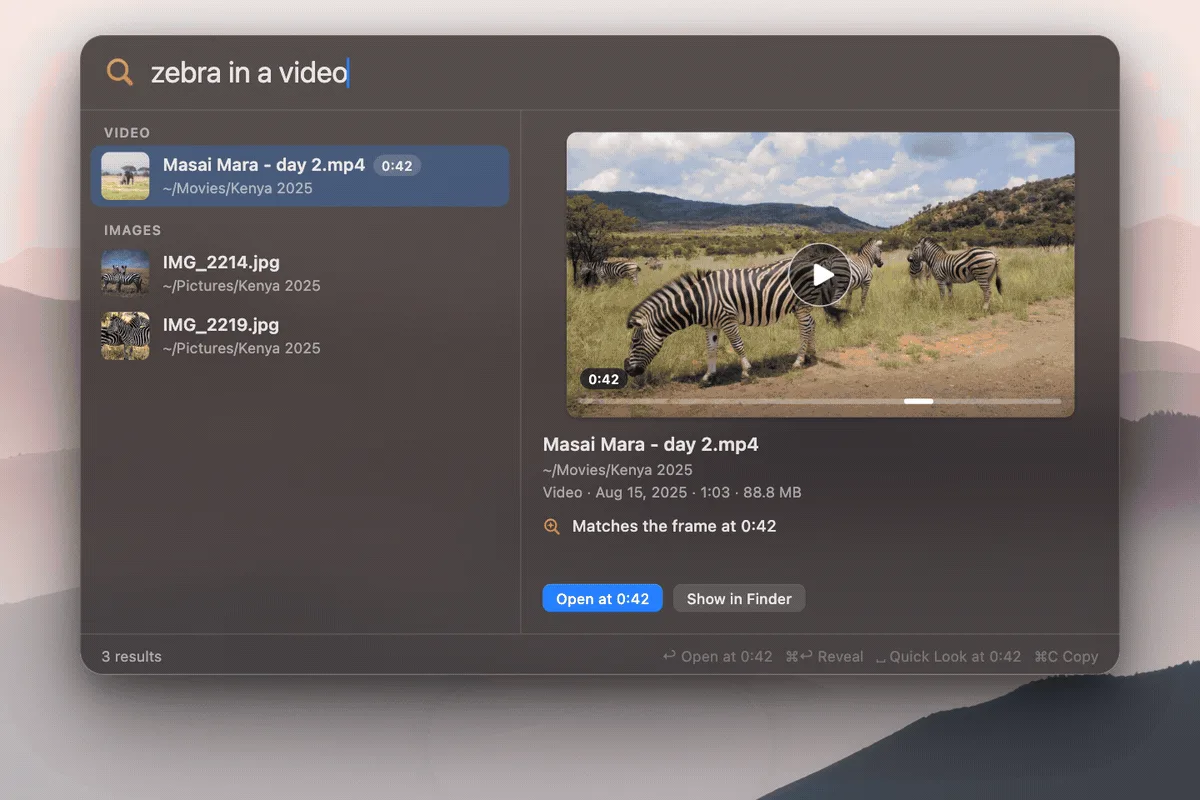
DigUp is a free, open-source (MIT) search app for Apple Silicon Macs, written in Swift. You pick the folders to search, it reads the pictures, PDFs, documents, recordings and videos in them, and you then describe what you are looking for in your own words: "zebra in a video" opens the clip at the moment the zebra appears, "where they talk about sleep" jumps to that minute of a podcast, and "the clause about pets in the lease" opens the PDF page with the words marked. Its first public release, 0.6.0, shipped in October 2026.
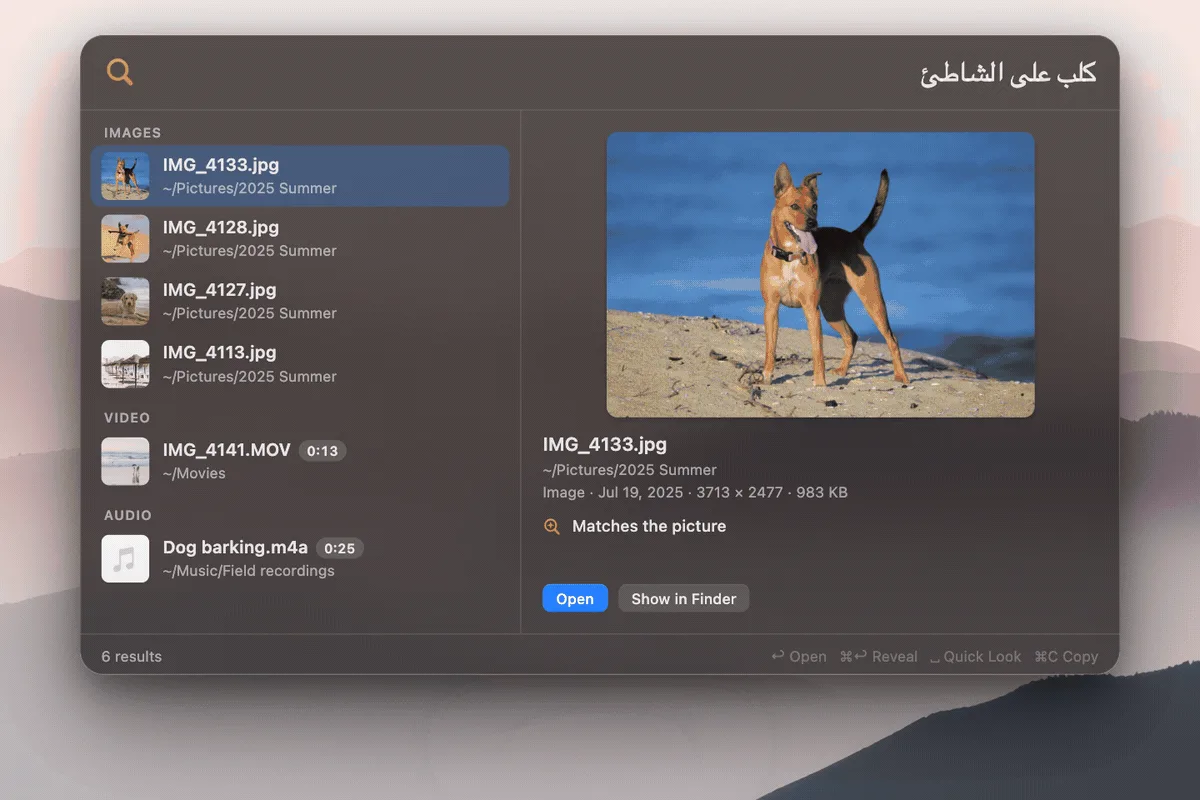
It is built on EmbeddingGemma 2, Google DeepMind's open multimodal embedding model, which puts text, images, audio and video into one shared vector space and covers more than 100 languages. That shared space is why one query can rank a video frame against a PDF page, and why a search in English can find a note written in Bengali or Arabic. DigUp runs ggml-org's 8-bit build of the model through llama.cpp on the Mac's GPU, in a helper process that quits when indexing is done.
Every picture, PDF page, text passage, video frame and 30-second window of audio becomes a vector in one SQLite file, alongside a keyword index, so exact strings such as invoice numbers and error codes are matched as written and get a boost over pure meaning. Nothing indexed leaves the Mac: DigUp goes online only to download the model once (865 MB) and for a daily update check that can be turned off, with no account and no telemetry. An optional code search indexes chosen repositories separately and opens results in your editor at the line.
What it does
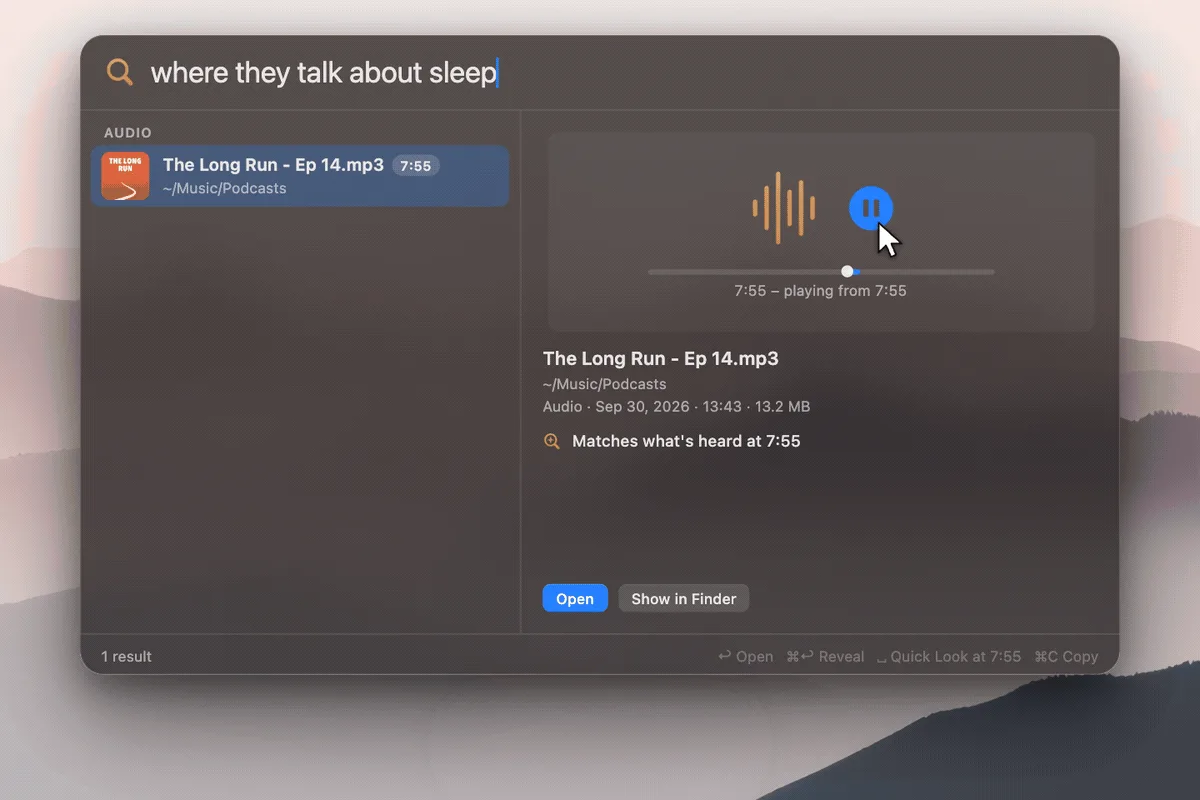
- Natural-language search across photos, screenshots, PDFs (including scans), documents, audio and video of any length, opening each result at the matching page or moment
- Multilingual and cross-language search through EmbeddingGemma 2's 100+ languages
- Hybrid ranking: semantic vectors plus a keyword index for exact names, codes and numbers, including text inside screenshots
- Opt-in code search with a `code:` prefix that finds functions by what they do and opens them at the line in Zed, VS Code, Cursor, Xcode, JetBrains IDEs and others
- Runs fully on-device with llama.cpp on Metal; one SQLite index; no account or telemetry
- Global ⇧⌘Space search panel, Quick Look at the page or moment, a menu-bar indexer you can pause, and a `digup` command-line tool for indexing, search and evals
Getting started
DigUp needs an Apple Silicon Mac with macOS 14 or later. These steps follow the project's README.
Install the app
Download the DMG from the GitHub Releases page and drag DigUp to Applications, or install it with Homebrew.
brew install --cask arahim3/tap/digupPick folders while the model downloads
On first launch DigUp downloads EmbeddingGemma 2 once (865 MB). Meanwhile, choose whole folders or only some of their subfolders; DigUp shows how long the first pass will take for each. After that first pass, new files become searchable a second or two after they land.
Search from any app
Press ⇧⌘Space and describe what you are looking for. Use the arrow keys to move through results, ↩ to open at the page, moment or line, Space for Quick Look, ⌘↩ to show it in Finder, and ⌘O for a larger window with a picture grid and filters.
Turn on code search (optional)
In Settings → Code, choose the repositories to index. Then start a query with `code:` and describe what the code does, or type a name that appears in it.
code: retry a failed call with backoff
code: refreshAccessToken
Build from source
You need Xcode 26, git and CMake (or uv). The build script compiles a pinned llama.cpp; the release build also produces the `digup` command-line tool.
git clone https://github.com/ARahim3/DigUp && cd DigUp
scripts/build-llama.sh
swift build -c release && swift test
./build.sh

.build/release/digup --help
Commands and code are distilled from the project's own documentation — always check the official repo for the latest.
When to use it
- Find a photo, screenshot or scanned document when you remember what it showed but not its name
- Jump to the minute of a podcast, lecture or meeting recording where a topic came up
- Search a personal archive written in several languages with a query in just one of them
- Locate a function across your projects by describing what it does
- Keep semantic search over private files entirely offline on your own Mac
How DigUp compares
DigUp alongside other open-source rerank, search & hybrid tools AI/TLDR tracks, ranked by GitHub stars.
| Tool | Stars | What it does |
|---|---|---|
| Elasticsearch | ★ 78.4k | Distributed search and analytics engine with a built-in vector database for dense/sparse embeddings and hybrid keyword-plus-semantic retrieval. |
| Meilisearch Cloud | ★ 59.6k | Managed cloud for the Meilisearch engine, combining fast full-text search with hybrid, semantic, and multimodal vector search. |
| Typesense Cloud | ★ 27k | Managed hosting for the Typesense search engine, offering typo-tolerant keyword search plus vector and semantic search via a simple API. |
| Tantivy | ★ 16.3k | A fast full-text search engine library in Rust that provides BM25 keyword search for the lexical half of hybrid retrieval. |
| FlagEmbedding | ★ 12.3k | BAAI's retrieval toolkit that provides the BGE embedding and cross-encoder reranker models used widely in RAG pipelines. |
| Vespa | ★ 7.1k | A search and serving engine that natively combines vector, keyword (BM25), and structured search with built-in ranking for large-scale retrieval. |
| DigUp | ★ 5.7k | An on-device Mac app that finds photos, PDFs, recordings, videos and code by what is in them, using Google DeepMind's EmbeddingGemma 2 |
| RAGatouille | ★ 4k | A wrapper that makes it easy to train and use ColBERT late-interaction retrieval inside RAG pipelines. |