Overview
git-lrc is a command-line tool from Hexmos that moves AI code review to commit time. It installs a global git hook, so every git commit in every repository on the machine first sends the staged diff for an AI review. The README's reasoning: by pull-request time faulty code is already committed, pushed and in front of teammates, and IDE extensions are optional and editor-specific, while every engineer commits. It is aimed especially at code produced by AI coding agents, which can silently remove logic, relax constraints or leak credentials.


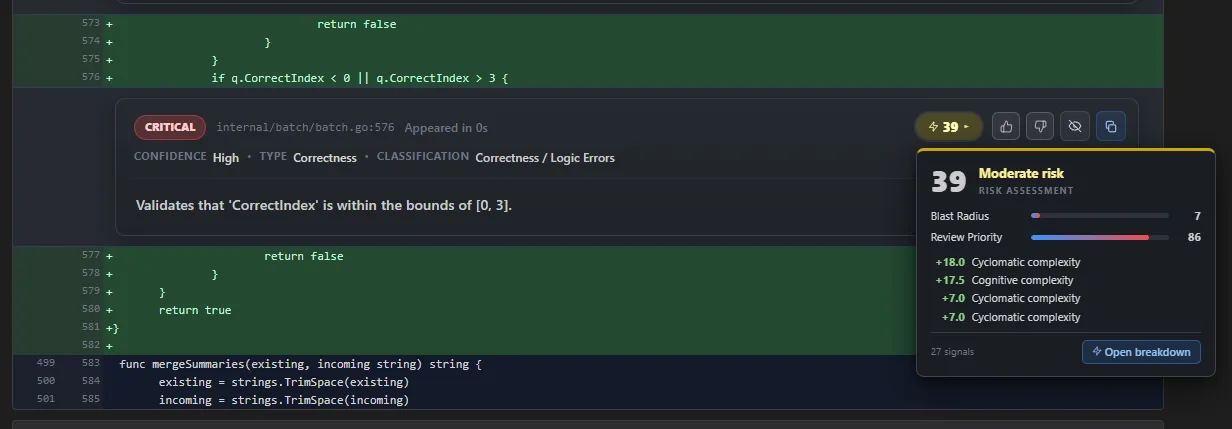
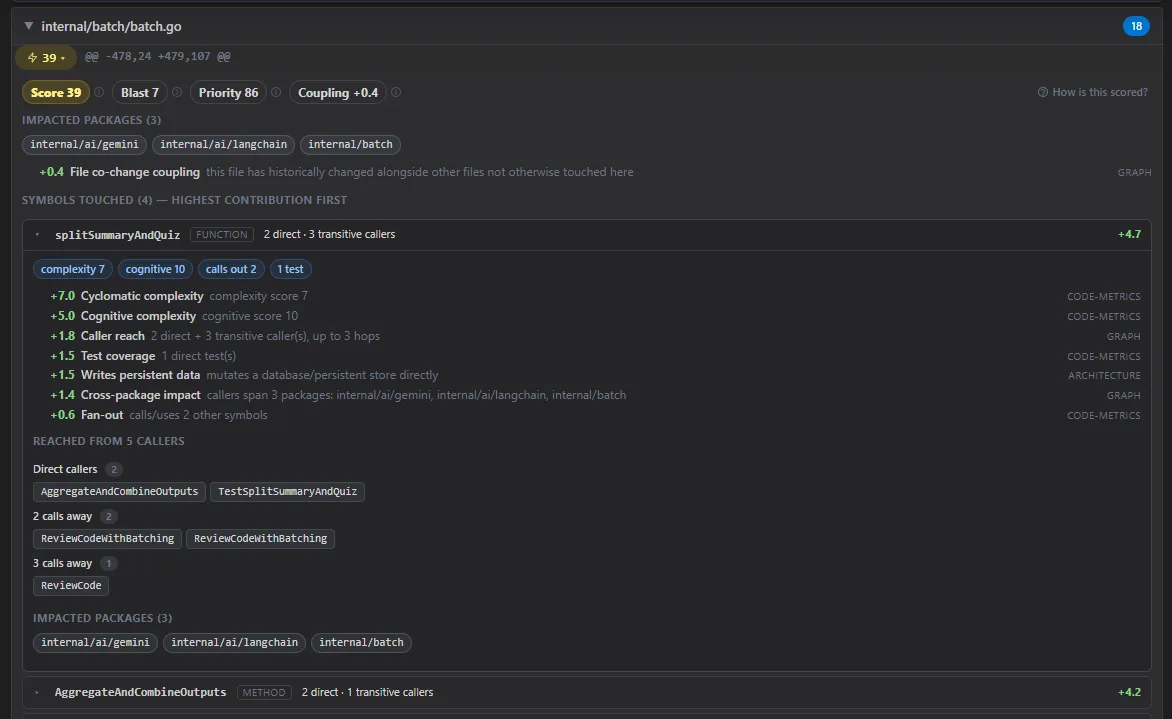
Each review opens a local web UI with a GitHub-style diff, inline AI comments with severity badges, a review summary and a staged-file list. From there you commit, commit and push, or skip to go fix things. An Issue Navigator filters findings by severity, type and a catalogue of 10 risk categories, and can copy the issues or send them to Claude to feed back into the fix loop. A risk-scored view ranks every hunk by blast radius and review priority using a locally built code graph, and each review also produces a short summary slide deck.
Every commit gets a review status line in its message (ran, vouched or skipped, with iteration count and AI-review coverage), so git log shows which changes were reviewed. Setup signs you in to Hexmos's LiveReview service and uses a free Gemini API key by default; OpenAI, Claude, DeepSeek, OpenRouter, Atlas Cloud and Anthropic-compatible endpoints can be added as bring-your-own-key connectors. The README says only the staged diff is sent and diffs are not stored after review. Pricing is by lines of code reviewed: 30k LOC a month free, with paid Premium and Enterprise tiers.
What it does
- Global commit hook: every git commit is reviewed automatically, or run git lrc review by hand, with --vouch to take personal responsibility or --skip to bypass
- Browser review UI with a GitHub-style diff, inline AI comments with severity, a summary, per-file diff stats, one-click issue copying and a Commit / Commit & Push / Skip decision
- Issue Navigator that filters findings by severity, type and risk category, with thumbs up/down feedback and Send to Claude, plus an auto-generated summary slide deck for each review
- Risk-scored review view that ranks hunks by blast radius and review priority from a local codebase-memory-mcp knowledge graph, with the contributing signals shown for every score
- Review status written into git log (iterations and coverage), an --agent-mode for coding agents and CI that returns JSON, and a bundled claude-lrc slash-command workflow for Claude Code
- Per-repository rules and ignore patterns in a version-controlled .lrc/ directory, plus bring-your-own-key connectors for Gemini, OpenAI, Claude, DeepSeek, OpenRouter and Atlas Cloud
Getting started
git-lrc installs as a single binary and sets up its hooks globally. You need a Hexmos (LiveReview) sign-in and, by default, a free Gemini API key from Google AI Studio. The commands below come from the project README.
Install git-lrc
The README recommends Hexmos's IPM installer; a direct install script is the alternative. On Windows use the PowerShell equivalents from the README.
# Linux/macOS via IPM
curl -L https://hexmos.com/ipm-install | bash && ipm i HexmosTech/git-lrc

# or the direct install script
curl -fsSL https://hexmos.com/lrc-install.sh | bash
Run the one-time setup
Setup opens your browser twice: once to sign in with Hexmos for a LiveReview API key and once to get a Gemini API key. After this, every git repository on the machine triggers review on commit.
git lrc setupCommit as usual, or review first
A normal commit launches the review before it goes through. To iterate before committing, run the review yourself; either way a review UI opens in your browser.
git add .
git lrc review          # run AI review first
# git lrc review --vouch   # vouch personally, skip AI
# git lrc review --skip    # skip review entirely
git commit -m "add payment validation"
Let a coding agent or CI run it
Agent mode runs the review without a browser and prints JSON; a completed review records an agent-reviewed attestation so the next commit proceeds.
git add .
git lrc review --agent-mode
git commit -m "add payment validation"
Teach it your repository's rules
Create a .lrc/ directory with rules/*.md guidance and an ignore file, then check and preview exactly what will be sent to the reviewer.
lrc config init
lrc config check
lrc config preview
Manage models and per-repo hooks
lrc ui manages bring-your-own-key connectors and their priority; hooks can be turned off for a single repository.
lrc ui
git lrc hooks disable   # disable for current repo
git lrc hooks enable    # re-enable later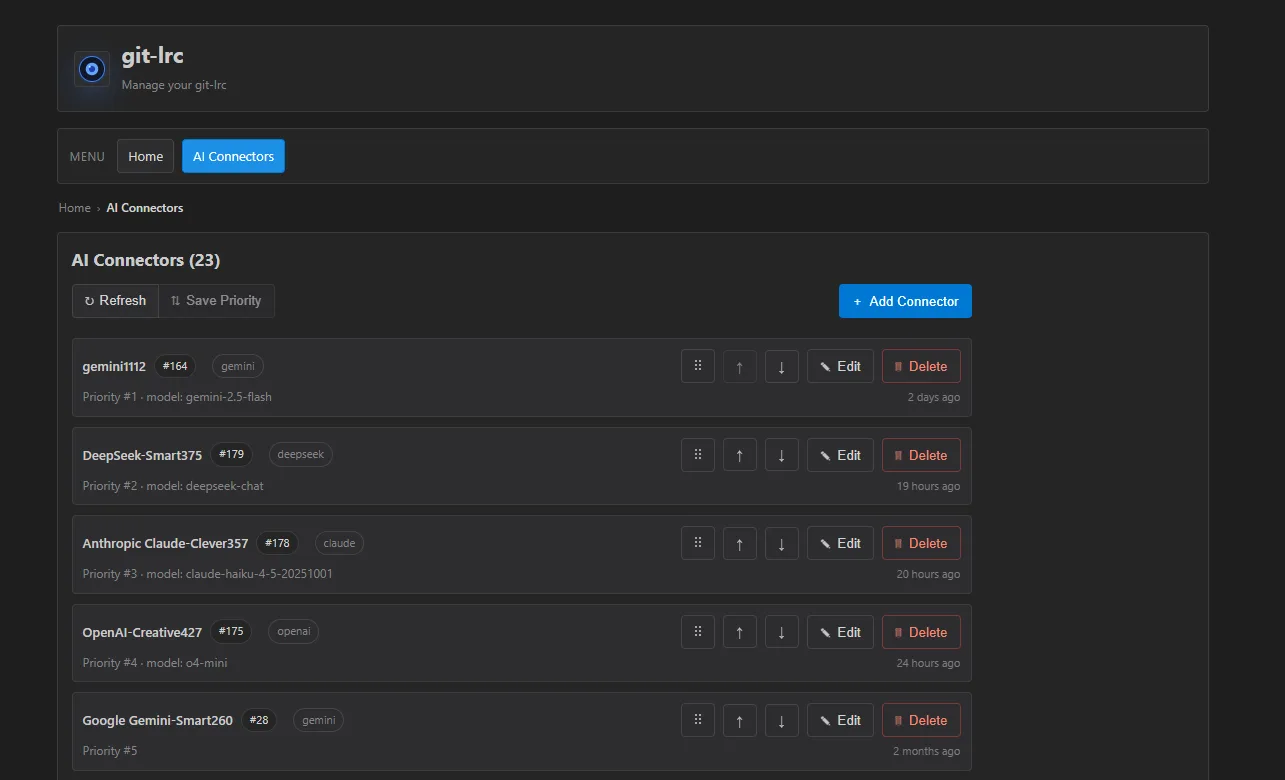
Commands and code are distilled from the project's own documentation — always check the official repo for the latest.
When to use it
- Reach for it when AI coding agents write much of your code and you want every diff checked for removed logic, leaked secrets or costly calls before it enters git history
- Reach for it when your team uses different editors and assistants and you want one review checkpoint that does not depend on an IDE extension
- Reach for it when you want git log to record which commits were AI-reviewed, vouched for or skipped, and how much of each diff was covered
- Reach for it when a large diff needs triage and you want its hunks ranked by blast radius so the riskiest changes are read first
How git-lrc compares
git-lrc alongside other open-source ai code review & security tools AI/TLDR tracks, ranked by GitHub stars.
| Tool | Stars | What it does |
|---|---|---|
| Open Code Review | ★ 47.6k | Alibaba's code-review CLI that pins file selection, bundling and rule matching in deterministic pipelines and leaves only judgement to an LLM agent, producing line-level comments. |
| Bend | ★ 23.8k | Compiled language whose type checker doubles as a proof checker, so an edit only builds if it can be proved to keep the rules declared in a LAWS.bend file. |
| Codex Security | ★ 11.1k | OpenAI's CLI and TypeScript SDK that scans a repository for security vulnerabilities, deduplicates findings by embedding similarity and re-grades their severity against your own policy. |
| Whiteboard | ★ 3.2k | Open-source desktop app where coding agents such as Claude Code and Codex draw sequence and database diagrams of their changes for review beside an AST-aware diff. |
| git-lrc | ★ 1.5k | A Go CLI that hooks into git commit and runs an AI review of every staged diff before it lands, with a browser review UI and review stats in git log |
| CodeRabbit | — | AI pull request reviewer that analyzes diffs with full-repo context to flag bugs, security issues, and quality problems, posting inline comments and one-click fixes. |
| Greptile | — | AI code review tool that indexes your whole codebase into a graph so a swarm of agents can catch multi-file logic bugs and security risks in every PR. |
| Qodo | — | Agentic code-quality platform whose Qodo Merge reviews PRs with context-aware suggestions, test generation, and team-standard enforcement across Git hosts and IDEs. |