Overview
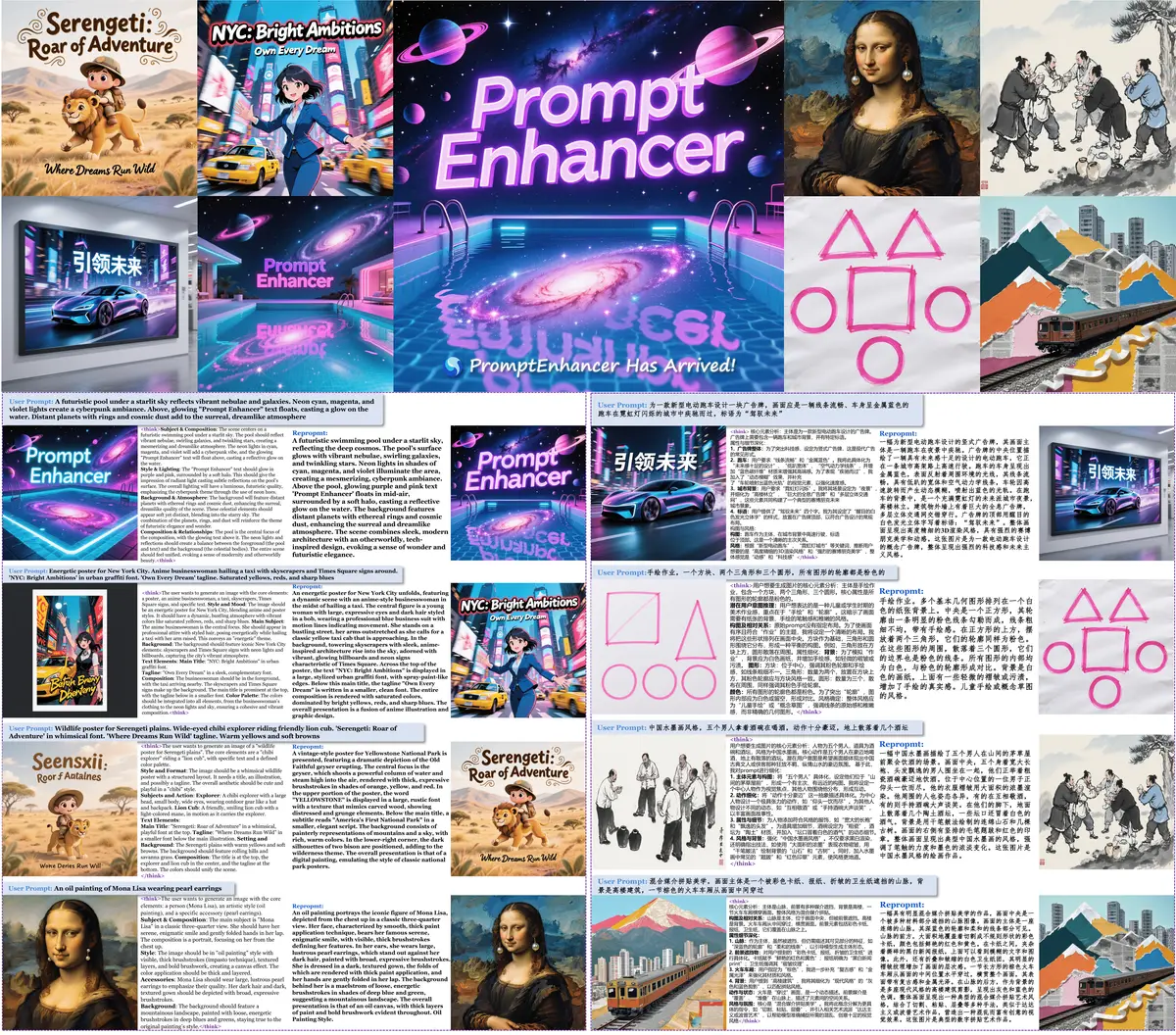
Hunyuan PromptEnhancer is a prompt-rewriting utility from Tencent Hunyuan that sits in front of an image model. You hand it a rough prompt; it restructures that prompt into a clearer, more explicit one for the downstream generator, using chain-of-thought rewriting rather than a fixed template. The stated design constraint is intent preservation: subject, action, style, layout and attributes all have to survive the rewrite, so the enhanced prompt is a better-specified version of what the user asked for rather than a different picture.
It covers two modes. Text-to-image enhancement takes a prompt alone, and image-to-image editing refines an editing instruction with the source image as visual context, so a vague edit request becomes a precise one. Parsing is defended with a multi-level fallback so the tool degrades to a usable output rather than failing when a rewrite comes back malformed.
Deployment is flexible across hardware. The 7B model is the recommended starting point at roughly 13GB and 8GB+ of memory, the 32B model targets highest quality at 32GB+, and community GGUF quantisations (Q8_0, Q6_K, Q4_K_M) bring the 32B down to between 35GB and 20GB for consumer cards. The project also publishes the T2I-Keypoints-Eval dataset and evaluation script, and an accompanying arXiv paper. Note the weights are released under the Tencent Hunyuan Community License, which is not an OSI open-source licence and expressly excludes the European Union, United Kingdom and South Korea.
What it does
- Chain-of-thought prompt rewriting that restructures a prompt while preserving the original intent
- Dual mode: text-to-image prompt enhancement and image-to-image editing-instruction refinement with visual context
- Multi-level fallback parsing so a malformed rewrite still yields usable output
- Model sizes from 7B (13GB) to 32B (64GB), plus GGUF quantisations down to 20GB
- A published T2I-Keypoints-Eval dataset and evaluation script for measuring rewrite quality
- Vision-language variant for editing tasks, alongside the full-precision text models
Getting started
Install the Python dependencies, download a checkpoint from Hugging Face, then call the enhancer on a prompt. Start with the 7B model unless you specifically need the 32B's quality.
Install dependencies
The standard path covers full-precision models. Use the GGUF script instead if you want quantised inference with CUDA.
pip install -r requirements.txt

# or, for quantised GGUF models:
chmod +x script/install_gguf.sh && ./script/install_gguf.sh
Download a model
PromptEnhancer-7B is the recommended balance of quality and memory. The 32B and the img2img editing model are separate downloads.
# PromptEnhancer-7B (13GB) — recommended for most users
huggingface-cli download tencent/HunyuanImage-2.1/reprompt --local-dir ./models/promptenhancer-7b

# PromptEnhancer-32B (64GB) — highest quality
huggingface-cli download PromptEnhancer/PromptEnhancer-32B --local-dir ./models/promptenhancer-32b

# Image-to-image editing model
huggingface-cli download PromptEnhancer/PromptEnhancer-Img2img-Edit --local-dir ./models/promptenhancer-img2img-edit
Enhance a prompt
Point HunyuanPromptEnhancer at the downloaded directory and call predict. Prompts can be Chinese or English; the default system prompt is tuned for image prompt rewriting.
from inference.prompt_enhancer import HunyuanPromptEnhancer

models_root_path = "./models/promptenhancer-7b"

enhancer = HunyuanPromptEnhancer(models_root_path=models_root_path, device_map="auto")

user_prompt = "Third-person view, a race car speeding on a city track..."
new_prompt = enhancer.predict(prompt_cot=user_prompt)
Measure the rewrites
The repository ships the T2I-Keypoints-Eval script so you can score whether a rewrite preserved the prompt's key points.
python t2i_keypoints_eval.pyCommands and code are distilled from the project's own documentation — always check the official repo for the latest.
When to use it
- Reach for it when users write short, vague image prompts and your generator needs a fully specified one
- Reach for it to turn a casual editing instruction into a precise one, with the source image supplied as context
- Reach for it when prompt rewriting has to run on your own hardware — quantised GGUF builds fit a single consumer GPU
- Reach for it with T2I-Keypoints-Eval when you need evidence that a rewrite kept the user's intent intact
How Hunyuan PromptEnhancer compares
Hunyuan PromptEnhancer alongside other open-source prompt programming tools AI/TLDR tracks, ranked by GitHub stars.
| Tool | Stars | What it does |
|---|---|---|
| DSPy | ★ 38.7k | A Stanford framework for programming language models with composable modules and automatic prompt optimization instead of hand-written prompts. |
| Prompt Optimizer | ★ 38.3k | A prompt optimization workbench that rewrites system and user prompts, then tests and compares the versions side by side; ships as a web app, desktop app, Chrome extension, Docker image and MCP server. |
| GEPA | ★ 7k | A reflective, evolutionary optimizer that improves prompts and other text components of a system using language-model feedback. |
| ell | ★ 5.8k | A Python library that treats prompts as versioned functions, with tooling to track, visualize, and iterate on them as code. |
| LMQL | ★ 4.2k | A query language for LLMs that mixes Python control flow with prompts and constraints to script multi-step generation. |
| AdalFlow | ★ 4.2k | A PyTorch-like library for building and auto-optimizing LLM pipelines, tuning prompts across the components of a task. |
| Hunyuan PromptEnhancer | ★ 3.8k | Chain-of-thought prompt rewriting for text-to-image and image editing models |
| TextGrad | ★ 3.8k | A library that optimizes prompts and other text variables using textual gradients, applying a backpropagation-like loop driven by LLM feedback. |