Overview
RocketRide calls itself an AI Development Environment: an open-source data pipeline builder and runtime for AI and ML workloads that lives inside the code editor you already use. You install its extension, open a `.pipe` file and get a visual canvas where nodes are dragged in and wired together by typed input and output lanes. Every pipeline starts at a source node — a `webhook`, a `chat` or a `dropper` for file drops — and ends in a response, with the steps in between doing the work.
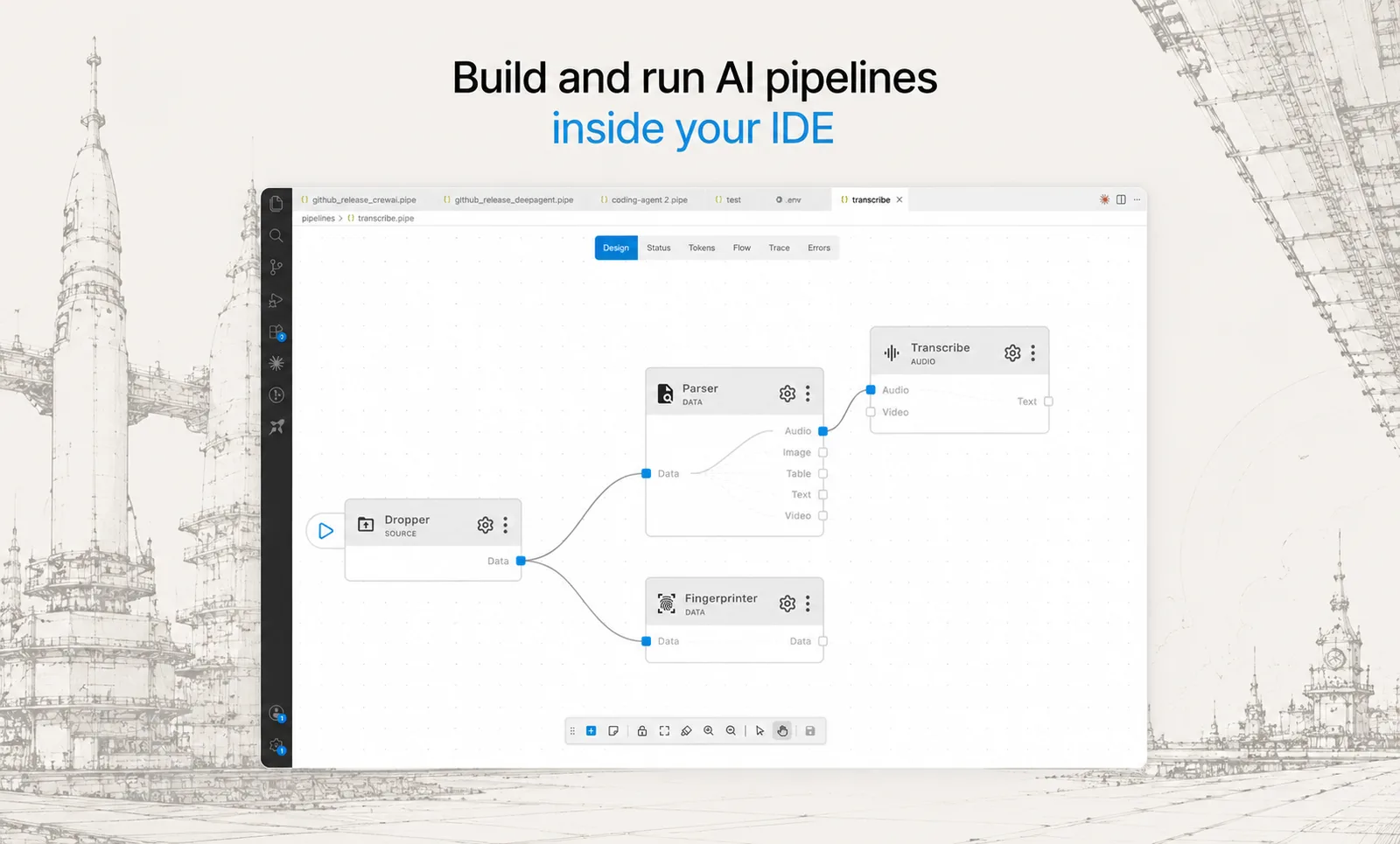
Those steps come from a catalogue of more than 100 nodes spanning 15+ LLM providers, 9 vector databases, OCR, named-entity recognition, PII anonymisation, chunking strategies and embedding models, plus agent nodes with built-in CrewAI and LangChain support. An agent node is an LLM allowed to call other nodes in a loop until it is done, and LLMs or agents can be attached to a parent node as tools. Nodes are small Python packages, so adding a provider, tool or store means writing one more of them. The pipeline itself is saved as plain JSON, so it can be diffed, reviewed and version-controlled like any other config file.
Execution happens on a multithreaded C++ engine. The same engine runs locally inside the IDE, in Docker or on-prem (with a Helm chart for clusters), or on the project's hosted RocketRide Cloud, and the README states that a `.pipe` file moves between them unchanged. Applications call a running pipeline through the Python or TypeScript SDK, and pipelines can be exposed to AI assistants through an MCP server. The whole engine is MIT-licensed; the README states there is no enterprise edition and nothing behind a paywall, with the hosted cloud offered as an optional managed way to run it.
What it does
- Visual pipeline builder in VS Code (also published on the Open VSX Registry) with real-time observability of token usage, LLM calls, latency and execution
- Multithreaded C++ runtime built for the throughput of AI and data workloads, with Python-extensible nodes on top
- 100+ pipeline nodes: 15+ LLM providers, 9 vector databases, OCR, NER, PII anonymisation, chunking and embeddings
- Agent nodes with built-in CrewAI and LangChain support, shared memory across pipeline runs, and nodes callable as tools
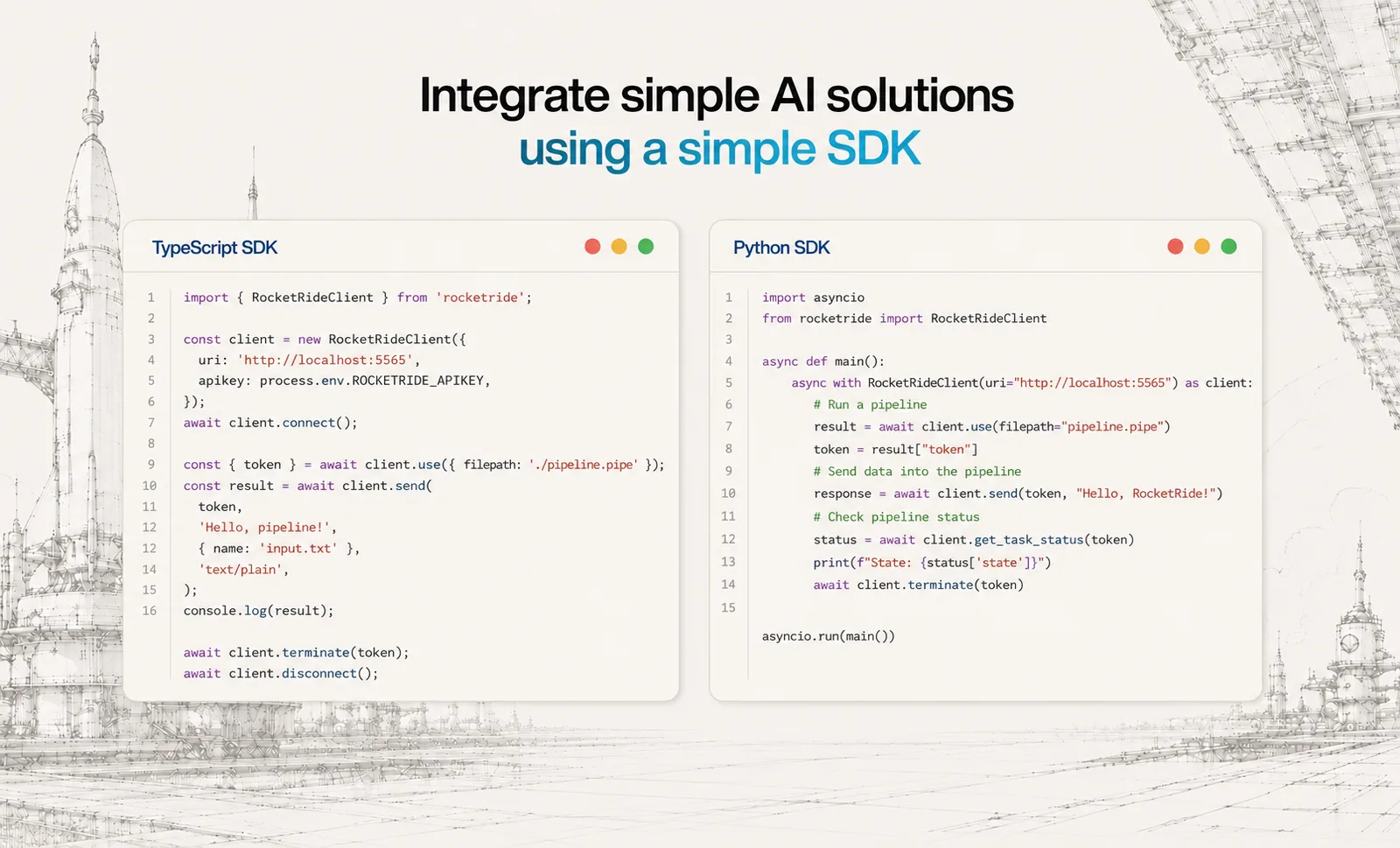
- Python, TypeScript and MCP SDKs for calling pipelines from apps or exposing them to AI assistants
- Pipelines stored as portable `.pipe` JSON that runs unchanged locally, in Docker, on-prem or on RocketRide Cloud
Getting started
The project's own on-ramp is the IDE extension with a local engine and an example pipeline that needs no API keys; the SDK then turns that pipeline into a function your code can call.
Install the extension and start a local engine

Search for RocketRide in your IDE's extension marketplace (VS Code Marketplace or Open VSX), open the RocketRide panel and, when asked how to run the server, pick Local. That pulls the engine into your IDE with no sign-up.
Open and run an example pipeline
Open `examples/document-processor.pipe` from the repo. It takes a PDF or image, extracts the text (including text inside images), finds names, addresses and other personal data, and returns a cleaned copy using local models. Press ▶ on the source node; because the source is a `webhook`, it then waits for input.
Call it from Python
Run this from the folder you opened in your IDE — the extension writes the engine's connection details into a `.env` there and the SDK reads them automatically. TypeScript works the same way with `npm install rocketride`.
pip install rocketrideSend data through the pipeline
import asyncio
from rocketride import RocketRideClient


async def main():
    async with RocketRideClient() as client:
        run = await client.use(filepath='examples/document-processor.pipe')
        out = await client.send(
            run['token'], 'Alice Smith, 12 Elm St, Springfield.', objinfo={'name': 'note.txt'}, mimetype='text/plain'
        )
        print(out)
        await client.terminate(run['token'])


asyncio.run(main())
Deploy the engine with Docker
For a self-hosted engine, pull the server image and create a container on port 5565, then point clients at it with `ROCKETRIDE_URI=ws://localhost:5565`.
docker pull ghcr.io/rocketride-org/rocketride-engine:latest
docker create --name rocketride-engine -p 5565:5565 ghcr.io/rocketride-org/rocketride-engine:latest
Commands and code are distilled from the project's own documentation — always check the official repo for the latest.
When to use it
- Reach for it when you want to build a RAG or document-processing pipeline visually but still keep it as reviewable JSON in git
- Reach for it when a document workflow — OCR, entity extraction, PII redaction — has to run on local models on your own infrastructure
- Reach for it when you want to wrap an AI pipeline as a single SDK call from an existing Python or TypeScript service, or expose it to assistants over MCP
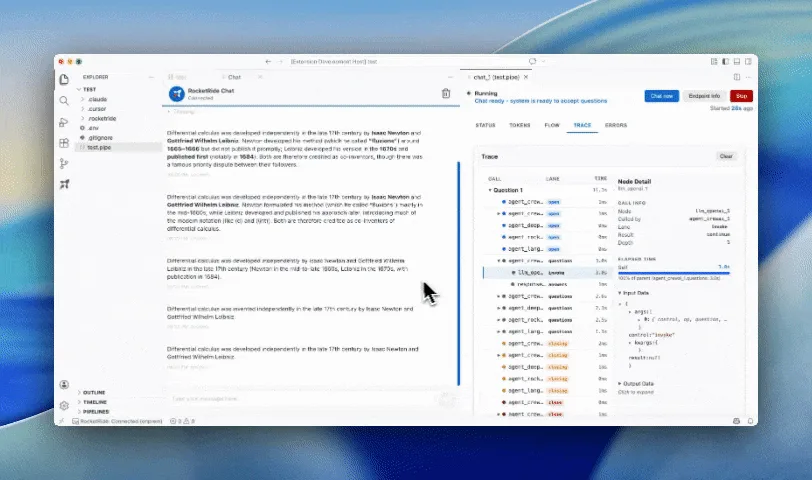
- Reach for it when you need to trace token usage, call trees and latency per node before scaling a pipeline to production
How RocketRide compares
RocketRide alongside other open-source app frameworks tools AI/TLDR tracks, ranked by GitHub stars.
| Tool | Stars | What it does |
|---|---|---|
| LangChain | ★ 148k | A widely used Python and JavaScript framework for building LLM applications by composing models, prompts, tools, retrievers, and memory into chains. |
| LlamaIndex | ★ 52.6k | A data framework for connecting language models to your own documents and data sources, with built-in agent and retrieval (RAG) tooling. |
| Haystack | ★ 26.8k | An orchestration framework from deepset for building modular LLM pipelines and agents for search, RAG, and question answering. |
| Jina | ★ 21.9k | Jina-serve is a Python framework for building, scaling, and deploying AI services and multi-step pipelines that communicate over gRPC, HTTP, and WebSockets. |
| RocketRide | ★ 17.7k | An MIT-licensed AI pipeline builder and C++ runtime — wire LLMs, vector stores, OCR and agents on a canvas inside your IDE, then call the pipeline from Python or TypeScript |
| LLM | ★ 12.6k | Simon Willison's plugin-extensible CLI and Python library for prompting remote and local models, logging every prompt and response to SQLite, and generating embeddings. |
| Prompt Flow | ★ 11.3k | Microsoft's toolkit for building LLM apps as executable flows that link prompts, Python code, and tools, with tracing, batch evaluation, and deployment. |
| Rig | ★ 8.9k | A Rust library for building LLM-powered applications, giving one unified interface over 20+ model providers and 10+ vector stores plus an agent runtime with streaming, tools, and OpenTelemetry GenAI tracing. |