In plain English
An AI agent is, at its core, three things: a language model, a set of tools, and a loop. The model reads the conversation so far, decides whether to call a tool or give a final answer, and — if it calls a tool — your code executes that tool and feeds the result back. Repeat until done. That is the entire pattern. Every agent framework in existence is a packaged version of this same loop with extra features bolted on.
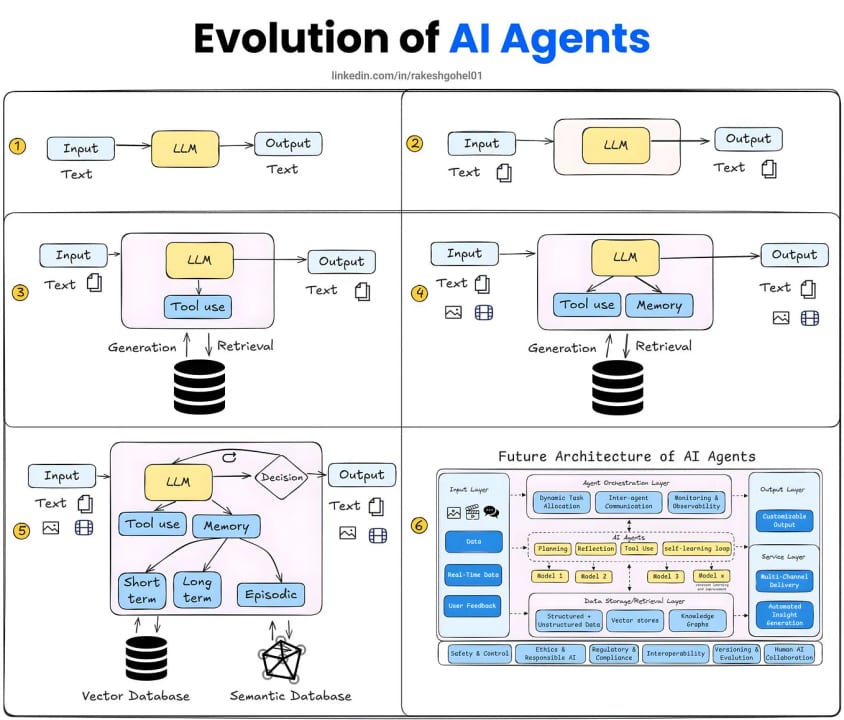
A useful analogy: think of the loop as a game of telephone between a very smart colleague and your codebase. Your colleague (the model) reads the latest message, either answers or says "go look up X for me," and then waits. You run the lookup, hand the result back, and your colleague continues. The loop keeps going until your colleague has enough information to stop asking and just answer.
Understanding this bare-metal pattern is the most valuable thing you can do before adopting a framework. Once you have seen the raw loop, LangGraph's nodes, CrewAI's roles, and the OpenAI Agents SDK's Runner all become recognizable — they are dressing on the same skeleton. When a framework behaves unexpectedly, you will know exactly what layer of the skeleton to look at.
Why building without a framework first matters
Most tutorials skip straight to pip install langchain and leave engineers with a working prototype they cannot debug. When the agent calls the wrong tool, loops unexpectedly, or returns a garbled answer, the fix requires understanding the loop — but the loop is hidden behind framework abstractions. Going bare-metal first gives you that mental model before any abstraction gets in the way.
There is also a practical argument: for a large class of real production agents, a raw API loop is the right choice. If your agent calls two or three tools, runs for at most five steps, and has no complex branching, the overhead of adopting a framework — its dependency tree, its version-churn, its opinionated abstractions — adds cost with no benefit. At Anthropic's own research blog on building effective agents, the recommendation is explicit: start with direct API usage; many patterns can be implemented in a handful of lines of code.
Finally, every new LLM API capability (extended thinking, computer use, model-specific tool formats) lands in the provider SDK weeks before frameworks surface it. If you understand the raw loop, you can use new capabilities the day they ship. If you only know the framework layer, you are on a waiting list.
How the bare-metal loop works
The loop has four moving parts: a message history, a tool registry, the model call, and a dispatch function. On every iteration you call the model, inspect whether it produced tool calls or a final answer, execute any tool calls, append the results to the message history, and loop. The loop exits when the model's finish_reason (OpenAI) or stop_reason (Anthropic) indicates it is done rather than requesting more tools.
The four building blocks
- Message history — a plain list of
{role, content}dicts. Every user message, every assistant reply, and every tool result lives here. The model sees the full list on every turn; this is how it keeps context. - Tool definitions — JSON schema objects that describe each function: its name, a description the model reads, and the parameter types. You pass these on every call so the model knows what it can ask for.
- The model call — a single
POSTto the provider's chat endpoint. You send the message history plus the tool definitions; the model returns either a text answer or a structured tool-call request. - The dispatch function — a
dict(orswitch) mapping tool names to actual Python or TypeScript functions. When the model requestsget_weather, your code looks it up here and runs it.
A working implementation in Python
The following uses the OpenAI Python SDK (openai>=1.0) with the standard tool-calling format. The same structure works with the Anthropic SDK — the field names change (tool_use blocks instead of tool_calls, stop_reason: "tool_use" instead of finish_reason: "tool_calls") but the loop logic is identical.
import json
from openai import OpenAI

client = OpenAI()  # reads OPENAI_API_KEY from env

# ── Tool definitions ────────────────────────────────────────────
TOOL_DEFINITIONS = [
    {
        "type": "function",
        "function": {
            "name": "get_weather",
            "description": "Return the current temperature for a city.",
            "parameters": {
                "type": "object",
                "properties": {
                    "city": {"type": "string", "description": "City name"}
                },
                "required": ["city"],
            },
        },
    }
]

# ── Tool implementations ─────────────────────────────────────────
def get_weather(city: str) -> str:
    # Replace with a real API call in production.
    return f"The temperature in {city} is 22 C and sunny."

TOOL_REGISTRY = {"get_weather": get_weather}

# ── The agent loop ────────────────────────────────────────────────
def run_agent(user_message: str, max_steps: int = 20) -> str:
    messages = [{"role": "user", "content": user_message}]

    for step in range(max_steps):
        response = client.chat.completions.create(
            model="gpt-5.5",
            messages=messages,
            tools=TOOL_DEFINITIONS,
        )
        msg = response.choices[0].message
        finish = response.choices[0].finish_reason

        # Append the assistant turn to history.
        messages.append(msg.to_dict())

        if finish == "stop":
            # Model is done — return its text answer.
            return msg.content or ""

        if finish == "tool_calls":
            # Execute each requested tool and feed results back.
            for tc in msg.tool_calls:
                fn_name = tc.function.name
                fn_args = json.loads(tc.function.arguments)
                result = TOOL_REGISTRY[fn_name](**fn_args)
                messages.append({
                    "role": "tool",
                    "tool_call_id": tc.id,
                    "content": str(result),
                })
            # Loop again — let the model continue.
            continue

    # Hard cap reached — ask the model for a best-effort answer.
    messages.append({"role": "user", "content": "Max steps reached. Summarise what you found."})
    fallback = client.chat.completions.create(model="gpt-5.5", messages=messages)
    return fallback.choices[0].message.content or ""


if __name__ == "__main__":
    answer = run_agent("What is the weather in Paris right now?")
    print(answer)
The entire agent is about 60 lines of real Python. There is no hidden magic. Every line is traceable: you can add a print(messages) anywhere and see exactly what the model saw.
Dissecting each part of the loop
Message history is your agent's only memory
The model has no state between calls. Every turn, you send the full history and it re-reads everything. This means memory is just list management: you decide what to keep, what to trim, and what to summarise. Frameworks build elaborate memory subsystems on top of this, but the underlying mechanism is always the same list that you are managing manually here.
Tool definitions are a contract, not code
The JSON schema you pass in tools is a description for the model, not executable code. The model reads the description field heavily — it is how the model decides when to call a tool. A vague description like "gets data" leads to unreliable tool selection. A precise description like "Returns the real-time temperature in Celsius for a given city name" produces consistent behavior. Writing good tool descriptions is as important as writing the function itself.
Finish reason is the loop's exit signal
OpenAI uses finish_reason: "tool_calls" when the model wants to call a tool and "stop" when it is done. Anthropic uses stop_reason: "tool_use" and "end_turn" respectively. Always check this field — do not try to infer intent from whether the message has a tool call attached; edge cases exist where both are present at the same time. Treat finish_reason as authoritative.
The max-steps guard is not optional
Without a hard cap, a buggy tool or an ambiguous task can drive the model into an infinite loop that exhausts your API budget in minutes. A runaway loop calling a frontier model can cost hundreds of dollars before you notice. The standard production value is 15–25 steps. When you hit the cap, do not silently error out — append a message asking for a best-effort summary and make one final call without tools. The model gets to synthesise whatever it gathered rather than returning nothing.
| Provider | Tool-call stop reason | Done stop reason | Tool result role |
|---|---|---|---|
| OpenAI | finish_reason: "tool_calls" | finish_reason: "stop" | role: "tool" |
| Anthropic | stop_reason: "tool_use" | stop_reason: "end_turn" | role: "user", type: "tool_result" |
| Google Gemini (OpenAI-compat) | finish_reason: "STOP" (inconsistent) | finish_reason: "STOP" | role: "tool" |
When the raw loop is not enough
The bare loop handles a surprisingly large share of real agent use cases. But there are clear signals that you have outgrown it and a framework would genuinely help:
- Multiple agents that hand off to each other. Once you need Agent A to call Agent B as if it were a tool, you are managing nested loops and inter-agent message formats. CrewAI or the OpenAI Agents SDK's handoff model exist precisely for this.
- Branching conditional logic with more than two or three paths. A plain
if/elsetree becomes unreadable fast. LangGraph's directed graph model — where nodes are steps and edges are conditions — is genuinely clearer for complex workflows. - Durable state that must survive process restarts. The raw loop holds state in a Python list that evaporates when your server crashes. LangGraph's checkpointing and AWS Strands Agents' durable execution let an agent resume mid-task after a failure.
- Observability at scale. Logging a
print(messages)works during development. A production agent running thousands of tasks per day needs traces, token cost per step, and error attribution. Frameworks that integrate with LangSmith, Langfuse, or OpenTelemetry save significant custom plumbing. - Teams without Python/TypeScript expertise. Visual builders like Dify and Flowise are not wrappers over a raw loop — they are full products. If your builders are non-engineers, skip the loop discussion and go straight to no-code tooling.
A good rule of thumb from teams that have built agents in production: if you can describe your agent's control flow in five bullet points or fewer, you probably do not need a framework. If describing it requires a flowchart with branches and decision diamonds, a framework's abstractions start earning their keep.
Going deeper
Parallel tool calls
Both OpenAI and Anthropic models can request multiple tool calls in a single response. The response contains a list of tool_calls (OpenAI) or a list of tool_use blocks (Anthropic), not just one. Your dispatch loop must handle all of them before continuing. Running them in parallel with asyncio.gather or Promise.all is worth doing for tools that involve I/O: a weather lookup and a calendar fetch that each take 200ms become a 200ms wait instead of a 400ms wait.
import asyncio
import json

async def dispatch_all(tool_calls, registry):
    """Execute all requested tool calls in parallel."""
    async def run_one(tc):
        fn = registry[tc.function.name]
        args = json.loads(tc.function.arguments)
        # If the function is a coroutine, await it; otherwise run in executor.
        if asyncio.iscoroutinefunction(fn):
            result = await fn(**args)
        else:
            loop = asyncio.get_event_loop()
            result = await loop.run_in_executor(None, lambda: fn(**args))
        return {
            "role": "tool",
            "tool_call_id": tc.id,
            "content": str(result),
        }
    return await asyncio.gather(*[run_one(tc) for tc in tool_calls])
Streaming the agent response
By default the loop blocks until the full model response arrives. For a user-facing agent, streaming the text output dramatically improves perceived latency. The pattern is to open a streaming call, accumulate tool_calls deltas until the stream closes, then execute tools and loop. Both the OpenAI and Anthropic Python SDKs expose streaming iterators. The loop logic is unchanged; you just read from a stream rather than a single response object.
System prompt design for tool-using agents
The system prompt of a tool-using agent should explicitly tell the model what it can and cannot do. Good patterns include: telling the model to call tools rather than guess ("always look up current data using the provided tools rather than relying on your training knowledge"), instructing it to stop when it has a high-confidence answer rather than calling additional tools "just in case," and giving it a persona that matches the task domain. A system prompt that is too short produces an agent that hallucinate tool results; one that is too restrictive produces an agent that calls tools unnecessarily on simple questions.
Migrating from raw loop to a framework
When you eventually do move to a framework, the raw loop you built transfers cleanly. Your tool implementations stay the same — they are just plain functions. Your tool definitions stay the same — the JSON schema format is standard. The only thing that changes is the orchestration layer: instead of your for step in range(max_steps) loop, you call the framework's runner. The migration is mostly mechanical, and having built the loop yourself means you will recognise what the framework is doing on your behalf.
FAQ
Do I need LangChain to build an AI agent?
No. An agent is a while loop that calls an LLM, executes tool calls, and appends results to a message list. You can implement the entire pattern in roughly 50–70 lines of Python or TypeScript using only the provider's official SDK. LangChain and other frameworks add value when your workflow is complex, but they are not required.
What is the minimum code needed for a working agent?
You need four things: a message history list, a tool definitions array (JSON schema), a call to the model's chat endpoint, and a dispatch function that maps tool names to your functions. A working single-tool agent in Python is about 50 lines. The loop exits when the model's finish_reason is "stop" (OpenAI) or stop_reason is "end_turn" (Anthropic).
Why does the agent loop sometimes run forever?
Infinite loops happen when a tool always fails or returns ambiguous data, leaving the model unable to make progress. The fix is a hard step cap (15–25 iterations is typical for production). When the cap is hit, make one final call without tools and ask the model for a best-effort summary of what it gathered. Never let the loop exit silently.
Can I use the same loop pattern with Anthropic Claude?
Yes. The loop logic is identical. The field names differ: Anthropic uses stop_reason: "tool_use" instead of finish_reason: "tool_calls", and tool results go back as role: "user" messages with a tool_result content block instead of role: "tool" messages. The Anthropic Python SDK documentation covers the exact message format.
How do I handle multiple tool calls in a single model response?
Both OpenAI and Anthropic models can request several tool calls at once. Always iterate over the full tool_calls list (OpenAI) or tool_use blocks (Anthropic), execute all of them, and append all results before looping. Missing one tool result causes the model to stall or hallucinate. Running them with asyncio.gather in parallel is a good practice for I/O-bound tools.
When does a raw API loop stop being enough and require a framework?
The raw loop is usually sufficient for a single agent with up to around ten tools and simple linear logic. You outgrow it when you need multiple agents handing off to each other, branching state that survives process restarts, or production-grade tracing and cost monitoring. At that point a framework's abstractions pay for their learning curve.