In plain English
Most of the popular tools for building AI agents — the ones that wire a model to your data, your tools, and a multi-step plan — were written for Python. If your product, your team, and your whole codebase already live in TypeScript and run on Node.js, that's an awkward fit. You either bolt a separate Python service onto your stack or stitch together a pile of half-typed JavaScript libraries by hand.
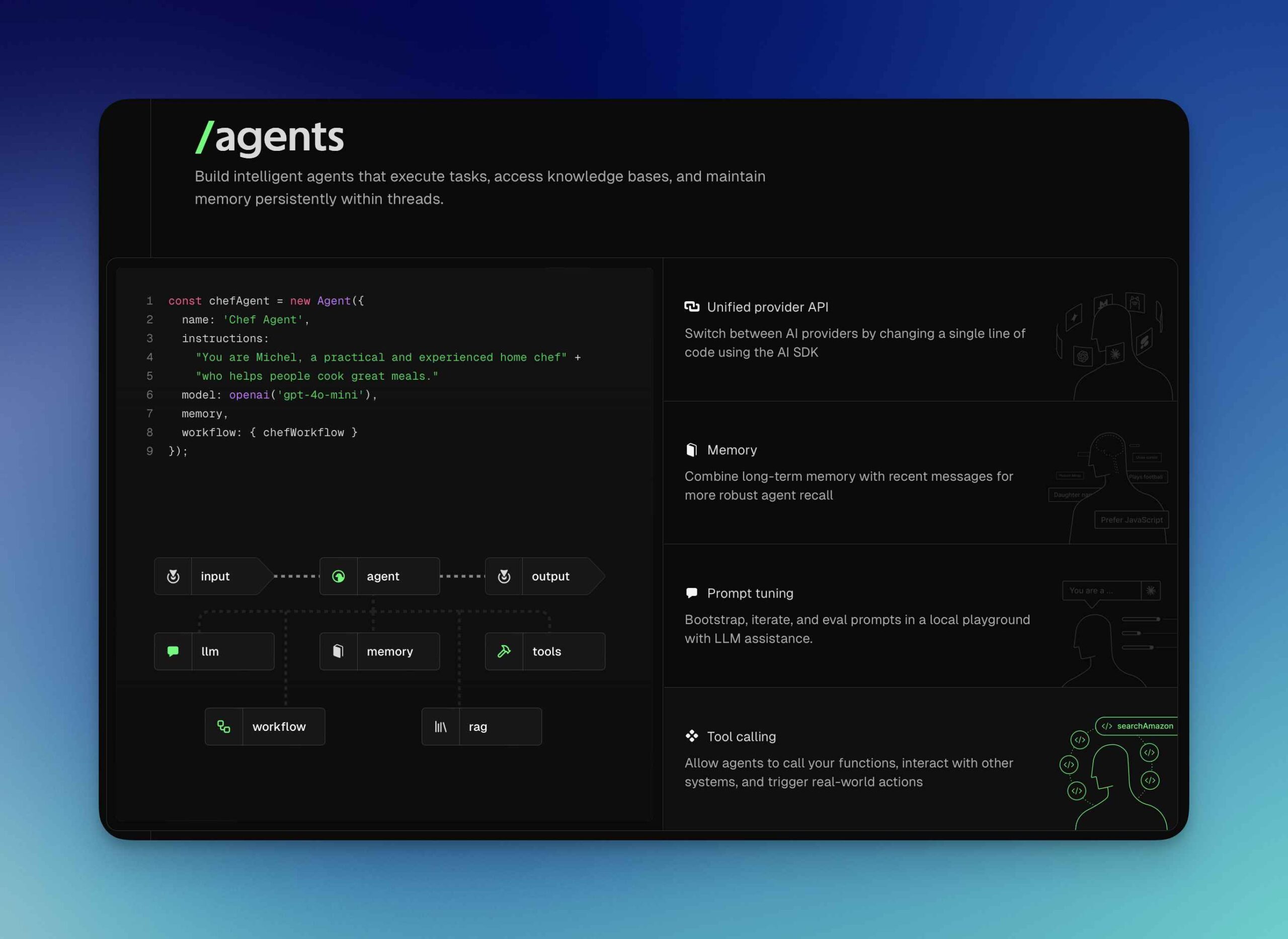
Mastra is a framework that answers "what if the agent stack spoke TypeScript natively?" It gives JavaScript and TypeScript teams one place to build the pieces of a serious AI app — agents, workflows, RAG, tools, memory, and evals — all written in TypeScript, with real types flowing through the whole thing.
Think of it like a modern web framework, but for AI features instead of pages. Just as Next.js gives a React team routing, data fetching, and rendering in one opinionated box, Mastra gives an AI team agents, step orchestration, and retrieval in one box — so you stay in the language and tooling you already know, and your editor can autocomplete and type-check the AI parts the same way it does the rest of your app.
Why it matters
For a long time, a TypeScript team that wanted to build something beyond a single chat call faced a frustrating choice. Mastra exists to remove that choice.
The problem it solves
- No language switch. Your app, your auth, your database client, and your deployment are already TypeScript. Pulling in a Python agent framework means running a second runtime, a second dependency manager, and a network hop between them. Mastra keeps the agent logic in the same codebase as the rest of the product.
- Types you can trust end to end. When a tool's inputs, an agent's structured output, and a workflow's step results are all typed, the compiler catches a whole class of bugs before you ever call the model — a misspelled field, a wrong shape, a missing argument. That feedback loop is the main reason app developers reach for static typing in the first place.
- One stack instead of five libraries. Building an AI feature usually means an agent loop, retrieval over your docs, persistent memory across turns, and some way to test quality. Wiring those together from separate npm packages is fragile. Mastra ships them as parts of one framework that already know how to talk to each other.
Who should care? Full-stack and front-end-leaning teams shipping AI features inside an existing JavaScript product — a Next.js SaaS app, a Node backend, an internal tool. If you're already comfortable in Python, a Python-first framework like LangChain or LlamaIndex is perfectly reasonable. Mastra matters precisely when leaving TypeScript would cost you more than it's worth.
How it works
Mastra is built from a few core primitives. You define each one as a typed TypeScript object, then compose them. The three you'll meet first are tools, agents, and workflows — and they stack on top of each other.
Tools: typed actions the model can call
A tool is a function the model is allowed to call, wrapped with a schema that describes its inputs and outputs. Mastra validates those schemas (using a schema library such as Zod), so the arguments the model produces are checked against the expected shape before your code runs. A tool might search a database, hit an API, or send an email — see what an AI agent is for why giving a model tools is the whole point.
Agents: a model plus instructions, tools, and memory
An agent bundles a language model, a system instruction, a set of tools, and optional memory. When you call it, Mastra runs the familiar agent loop: the model reads the request, decides whether to call a tool, Mastra runs the tool and feeds the result back, and the loop repeats until the model produces a final answer. Because Mastra is model-agnostic, you can point an agent at different providers (such as Claude, GPT, or Gemini) without rewriting your logic.
Workflows: durable, step-based orchestration
Sometimes you don't want the model to freely decide every step — you want a defined sequence. A Mastra workflow is a graph of typed steps you chain together (.then(...)), with branching, parallel steps, and loops. The key feature is durability: a workflow can suspend (for example, to wait on human approval or a slow job) and later resume from where it left off, surviving restarts. Steps can call agents or tools, so workflows and agents compose.
On top of these, Mastra adds RAG helpers (chunking, embedding, and querying a vector database so agents can answer from your documents — see what RAG is), memory so a conversation persists across turns, evals to score output quality, and a local dev playground plus deployment helpers. The flow from a user request through these pieces looks like this:
A worked example
Here's the shape of a tiny Mastra agent with one tool. It's simplified to show the structure — a typed tool, an agent that uses it, and a call — not a copy-paste-ready program. Notice that the tool's input and output are described by schemas, so the types are known before any model runs.
import { Agent } from "@mastra/core/agent";
import { createTool } from "@mastra/core/tools";
import { anthropic } from "@ai-sdk/anthropic";
import { z } from "zod";

// 1) A tool: a function the model may call, with typed I/O.
const getWeather = createTool({
  id: "get-weather",
  description: "Get the current weather for a city.",
  inputSchema: z.object({ city: z.string() }),
  outputSchema: z.object({ tempC: z.number(), summary: z.string() }),
  execute: async ({ context }) => {
    // context.city is typed as string here.
    return await fetchWeather(context.city); // your real API call
  },
});

// 2) An agent: model + instructions + the tools it can use.
const travelAgent = new Agent({
  name: "travel-agent",
  instructions: "Help users plan trips. Use tools for live facts.",
  model: anthropic("claude-sonnet-4-6"),
  tools: { getWeather },
});

// 3) Call it. Mastra runs the tool loop and returns the answer.
const res = await travelAgent.generate("What should I pack for Oslo today?");
console.log(res.text);
The important part isn't the syntax — it's that inputSchema and outputSchema make the tool's contract explicit. Your editor knows context.city is a string, and Mastra validates whatever the model asks for against that schema before execute runs. To turn this single agent into a fixed sequence (validate input, then retrieve, then summarize, then email), you'd wrap those steps in a workflow and chain them with .then(...), gaining the suspend/resume durability described above.
Mastra vs the alternatives
A TypeScript team weighing how to build agents usually compares three options. They're not strict rivals — many apps mix them — but each occupies a different spot on the "how much does the framework do for me" scale.
| Option | What it gives you | Best when |
|---|---|---|
| Mastra | An end-to-end TypeScript stack: agents, durable workflows, RAG, memory, evals, dev playground | You want batteries-included structure for a non-trivial AI app and want to stay in TypeScript |
| Vercel AI SDK | A lighter TypeScript toolkit for model calls, streaming, tool use, and UI hooks | You mainly need a clean, typed way to call models and stream to a UI, and will orchestrate yourself |
| Python frameworks | Mature, large ecosystems (LangChain, LlamaIndex, and others) with the widest set of integrations | Your team is already Python-first, or you need an integration that only exists in that ecosystem |
Mastra and the Vercel AI SDK aren't opposites — Mastra builds on top of the AI SDK's model-provider layer, so you get the SDK's clean access to many models plus Mastra's higher-level agent, workflow, and RAG primitives. For a focused look at the lighter-weight choice, see AI SDK vs LangChain in TypeScript.
The honest framing: if your AI feature is one model call with streaming, you may not need Mastra at all — the AI SDK alone is plenty. Mastra earns its place when you have several moving parts (multi-step flows, retrieval, persistent memory, evaluation) and want them to fit together with shared types rather than be glued by hand.
When to use it (and common pitfalls)
Good fits
- A TypeScript or full-stack JavaScript team building AI features inside an existing app (Next.js, Node, etc.) who'd rather not run a separate Python service.
- Apps with multiple primitives at once — an agent plus RAG over your docs plus memory across turns plus a multi-step workflow — where a unified stack pays off.
- Workflows that need durability: long-running jobs, human-in-the-loop approval steps, or anything that must survive a restart and resume cleanly.
Common pitfalls
- Reaching for a framework too early. If your feature is a single prompt with streaming, Mastra is more structure than you need. Start with a plain model call or the AI SDK and adopt Mastra when the complexity actually arrives.
- Confusing agents with workflows. An agent lets the model decide the steps; a workflow fixes the steps in advance. Using a free-roaming agent where you needed a deterministic, auditable sequence (or vice versa) is a frequent design mistake — pick based on how much control you need.
- Skipping evals. Because Mastra makes it easy to ship, it's tempting to ship untested. The built-in evals exist so you can measure output quality and catch regressions; treat them as part of the build, not an extra.
- Trusting tool inputs blindly. Schema validation checks the shape of a tool's arguments, not their intent. A model can still be steered by prompt injection hidden in retrieved text into calling a tool you didn't expect. Keep sensitive tools guarded with your own checks.
Going deeper
Once the core primitives click, a few areas are worth exploring as your app grows.
Memory and state. Real assistants need to remember context across turns and sessions. Mastra's memory layer persists conversation history and can store longer-term facts, so an agent isn't starting cold on every request. Deciding what to remember — and what to forget — becomes a real design question at scale.
MCP and external tools. Beyond tools you write yourself, agents increasingly connect to standardized external tool servers via the Model Context Protocol. Mastra can act as an MCP client so your agents reach tools and data sources that speak that standard, instead of every integration being bespoke.
Evals as a habit, not an event. The interesting part of Mastra's evals isn't running them once — it's wiring them into your workflow so quality is measured continuously as prompts, models, and data change. This mirrors the broader move to treat LLM output like any other thing you'd regression-test in CI.
Deployment and runtime. Because it's TypeScript-native, a Mastra app deploys like other Node/JavaScript code — including serverless and edge runtimes — rather than needing a separate Python environment. That operational simplicity is a quiet but real part of why teams pick a TS-native stack.
The honest open questions are the same ones every agent framework faces. A unified stack is convenient but couples you to one project's choices — see framework lock-in. The TypeScript ecosystem is younger than Python's, so some integrations land later. And no framework removes the hard parts of agents: making retrieval good, keeping the model on task, and proving the output is actually correct. Mastra's bet is that for TypeScript teams, doing all of that in one typed language beats the alternative — and for many app developers, it does.
FAQ
What is Mastra in AI?
Mastra is a TypeScript-native framework for building AI applications. It gives JavaScript and TypeScript teams an end-to-end, typed stack — agents, durable workflows, RAG, memory, and evals — in one place, so they can build serious AI features without switching to a Python framework.
Is Mastra a Python or TypeScript framework?
Mastra is TypeScript-first. Its whole point is to let JavaScript/TypeScript teams build agents and workflows in their own language, with static types flowing through tools, agent outputs, and workflow steps, rather than running a separate Python service.
What is the difference between a Mastra agent and a Mastra workflow?
An agent lets the model decide the steps: it reads a request and chooses which tools to call in a loop until it answers. A workflow is a predefined graph of typed steps you chain yourself, with branching and durable suspend/resume. Use an agent when the path depends on the input; use a workflow when you want a fixed, repeatable sequence.
How is Mastra different from the Vercel AI SDK?
The Vercel AI SDK is a lighter toolkit for calling models, streaming responses, and basic tool use. Mastra builds on top of that model layer and adds higher-level primitives — agents, durable workflows, RAG, memory, and evals. If you only need clean model calls, the AI SDK may be enough; Mastra helps when you have several moving parts to orchestrate.
How does Mastra compare to LangChain?
Both give you agents, tools, and RAG, but LangChain is Python-first (with a JavaScript port) and has the larger, older ecosystem, while Mastra is designed natively for TypeScript with strong static typing across the stack. A TypeScript team often picks Mastra to stay in one language; a Python-first team often picks LangChain for its breadth of integrations.
Do I need a framework like Mastra to build an AI agent?
No. A simple feature — one prompt with streaming, or a basic tool call — can be built directly against a model API or with a light toolkit. A framework like Mastra pays off once you combine several pieces (multi-step workflows, retrieval, persistent memory, evaluation) and want them to fit together with shared types instead of being wired by hand.