In plain English
Most tutorials for building with large language models assume you write Python. But a huge share of the world's backend systems run on Java and Spring Boot — banks, insurers, retailers, telecoms. If that's your world, you don't want to bolt a Python microservice onto a mature Spring stack just to call a model. You want to call the model the same way you call a database or an HTTP service today.
Spring AI is the official Spring project that does exactly that. It brings LLM calls, tool use, retrieval-augmented generation, and structured output into the Spring framework using the idioms Java developers already know: dependency injection, auto-configuration, starters, and fluent builder APIs. If you've used Spring's RestClient or WebClient, the main entry point — ChatClient — will feel immediately familiar.
Think of Spring AI as the JDBC of language models for the JVM. Just as JDBC gave Java one consistent way to talk to Postgres, MySQL, or Oracle, Spring AI gives you one consistent way to talk to OpenAI, Anthropic, Google, Ollama, or a dozen other providers. You swap a dependency and some properties; your application code barely changes.
Why it matters
The hard part of shipping an AI feature in an enterprise is rarely the model call itself — it's everything around it. Spring AI matters because it solves the integration problems that a raw HTTP client leaves you to handle by hand.
- It speaks Spring. Models, vector stores, and embedding clients are ordinary Spring beans. You
@Autowiredthem, configure them inapplication.properties, and test them with the same tools you already use. No new mental model, no parallel runtime. - Portability across providers. Your code depends on the
ChatModel/ChatClientinterface, not on OpenAI's SDK or Anthropic's SDK. Switching providers — or running a local model with Ollama for development and a hosted one in production — is a dependency-and-config change, not a rewrite. - Structured output that maps to your types. A backend rarely wants a wall of prose; it wants a typed object it can persist or return as JSON. Spring AI maps model output straight into your Java records and POJOs, so the model becomes just another typed data source.
- RAG and tools without glue code. Retrieval-augmented generation, document ingestion, and tool/function calling are first-class features with sensible defaults, rather than something you stitch together from scratch.
Who should care? Any team that already lives in Spring Boot and is asked to add a chatbot, a document-search feature, a summarizer, or an internal agent — and would rather extend their existing service than stand up a separate Python stack to maintain, deploy, and secure. For those teams, Spring AI is the path of least resistance into the world of LLM-powered applications.
How it works
Spring AI follows the classic Spring shape: a starter dependency pulls in auto-configuration, properties wire up credentials and the model name, and you inject a small number of fluent client beans to do the work. The central abstraction is ChatClient.
The ChatClient request lifecycle
ChatClient wraps a lower-level ChatModel with a builder-style, fluent API. You build a request — system text, user text, options, tools, output type — call it, and convert the response. Everything between the build and the response is where Spring AI's features hook in.
A minimal call looks like idiomatic Spring. You inject a ChatClient.Builder (auto-configured for whatever provider starter is on the classpath) and chain a few methods:
@RestController
class ChatController {

    private final ChatClient chatClient;

    ChatController(ChatClient.Builder builder) {
        this.chatClient = builder.build();
    }

    @GetMapping("/joke")
    String joke(@RequestParam String topic) {
        return chatClient.prompt()
                .system("You are a concise, friendly assistant.")
                .user("Tell me a short joke about " + topic)
                .call()
                .content();   // -> the model's reply as a String
    }
}
Structured output: response → POJO
Instead of .content() (a raw String), you can ask for .entity(Type.class). Spring AI instructs the model to return data matching your type's shape, then parses the response into a real Java object. The model becomes a typed source you can return or persist directly.
record Recipe(String title, List<String> ingredients, List<String> steps) {}

Recipe recipe = chatClient.prompt()
        .user("A simple recipe for vegetable soup")
        .call()
        .entity(Recipe.class);   // parsed JSON -> Recipe instance
Advisors: the interceptor pattern for LLM calls
Advisors are Spring AI's way of intercepting and enriching each request — the same idea as servlet filters or Spring's HandlerInterceptor, applied to model calls. An advisor can inject retrieved documents (this is how RAG plugs in), attach conversation history (chat memory), or log every prompt and response. You add them once on the builder and every call runs through the chain.
Tools and RAG in Spring AI
Two features turn a chatbot into something genuinely useful: letting the model call your code, and letting it read your documents. Spring AI ships both with Java-native ergonomics.
Tool (function) calling
With tool calling, the model can request that the framework run one of your methods — to look up live data, hit an internal API, or perform an action — then continue reasoning with the result. In Spring AI you annotate a plain method with @Tool; the framework generates the schema, presents it to the model, executes the method when asked, and feeds the return value back into the conversation.
class WeatherTools {

    @Tool(description = "Get the current temperature for a city")
    String currentTemperature(@ToolParam(description = "City name") String city) {
        // call your own service / API here
        return weatherService.tempFor(city);   // e.g. "18C"
    }
}

String answer = chatClient.prompt()
        .user("Should I bring a jacket in Oslo right now?")
        .tools(new WeatherTools())   // model may call currentTemperature
        .call()
        .content();
Retrieval-augmented generation
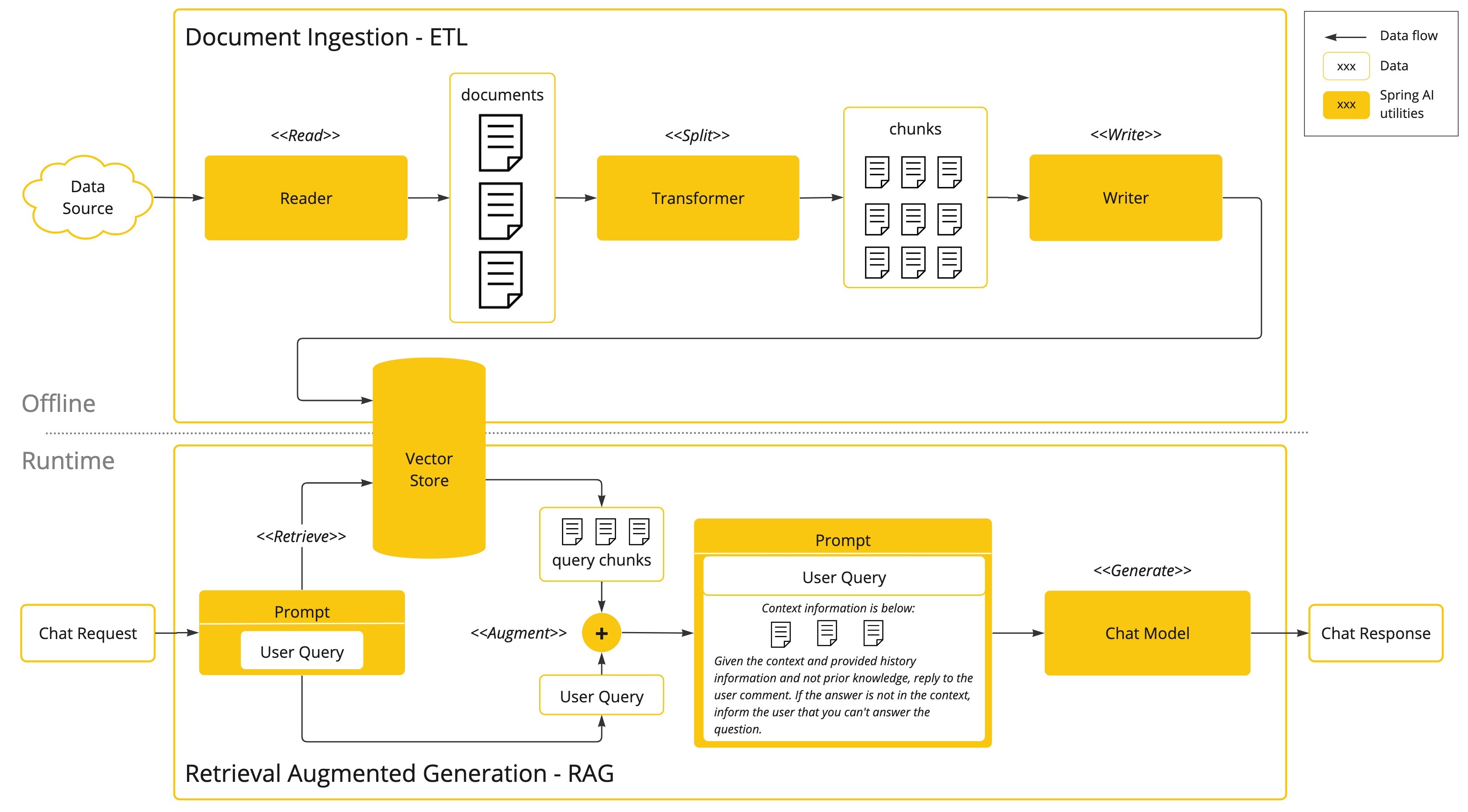
Spring AI has full support for RAG: an ETL pipeline to read and split documents, an EmbeddingModel to turn chunks into vectors, a VectorStore interface with adapters for 18+ databases (PGVector, Pinecone, Qdrant, Weaviate, Redis, and more), and a QuestionAnswerAdvisor that retrieves relevant chunks and injects them into the prompt automatically.
Because the advisor handles retrieval, wiring RAG onto an existing ChatClient is often a one-line addition: build the client with .defaultAdvisors(new QuestionAnswerAdvisor(vectorStore)) and every prompt is grounded in your documents.
Spring AI vs LangChain4j
If you're on the JVM, the two main options are Spring AI and LangChain4j. Both are mature, both cover chat, tools, RAG, and structured output. The honest difference is less about features and more about fit with your stack and your taste.
| Dimension | Spring AI | LangChain4j |
|---|---|---|
| Origin | Official Spring portfolio project | Independent community project |
| Best fit | Teams already on Spring Boot | Any JVM app (Quarkus, plain Java, Spring) |
| Core feel | Spring idioms: beans, starters, auto-config | Inspired by Python LangChain's abstractions |
| Tools / function calling | @Tool annotated methods | @Tool annotated methods / AI Services |
| RAG support | ETL + VectorStore + advisors | Embedding store + content retrievers |
| Dependency injection | Native Spring DI | Framework-agnostic; Spring/Quarkus starters exist |
A simple rule of thumb: if your application is already a Spring Boot service and you value tight integration with the rest of the Spring ecosystem, Spring AI is the natural choice. If you're on a different JVM framework (like Quarkus) or want a library that doesn't assume Spring, LangChain4j is the more neutral fit. Neither is a wrong answer — they're converging on the same capabilities, just from different cultural starting points.
Common pitfalls
Spring AI removes a lot of boilerplate, but a few mistakes trip up newcomers — most of them about treating the model like an ordinary, deterministic service when it isn't.
- Forgetting the model is non-deterministic. The same prompt can return different text run to run. Don't write assertions that expect an exact string; test the shape (does it parse into the POJO? does it call the right tool?) rather than the exact words.
- Treating structured output as guaranteed.
.entity(Type.class)is reliable but not magic — a model can still produce output that fails to map. Handle parse failures and consider validating the result, especially for anything user-facing. - Leaking the wrong dependency. Each provider has its own starter (OpenAI, Anthropic, Ollama, and so on). Pull in the one you actually configured; mixing starters or mismatching the configured model name with the dependency on the classpath is a frequent first-run error.
- Ignoring cost and tokens. Every call has a token cost and latency. Long RAG contexts and chatty tool loops add up fast. Watch your context window usage and retrieve only the chunks you need.
- Trusting retrieved or tool data blindly. Documents and external API results pulled into the prompt are untrusted input that can carry prompt injection. Fence retrieved content clearly and never let it act as instructions.
Going deeper
Once the basics click — ChatClient, structured output, tools, advisors, RAG — Spring AI has plenty of depth to grow into. A few directions worth knowing.
Chat memory and conversations. Out of the box each call is stateless. Spring AI provides a ChatMemory abstraction and advisors that attach prior turns to a conversation id, so you can build multi-turn assistants without managing history by hand. Pair this with a persistent store to survive restarts.
Streaming responses. For chat UIs you usually don't want to wait for the full answer. ChatClient exposes .stream() returning a reactive Flux, so tokens arrive incrementally — a natural fit for Spring WebFlux and server-sent events.
Observability. Because it's a Spring project, Spring AI integrates with Micrometer to emit metrics and traces for model calls — token counts, latency, errors — which you can ship to your existing observability stack. This matters a lot once an LLM feature is in production and you need to see what it costs and where it's slow.
Agents, MCP, and evaluation. Beyond single calls, you can compose tools, memory, and retrieval into agentic loops where the model decides what to do next, and Spring AI has support for the Model Context Protocol to plug in standardized external tools and data sources. There's also an evaluation API to check whether answers stay faithful to retrieved context — the same discipline that separates a demo from a dependable system.
The durable lesson is the same one that applies to every LLM framework: the framework makes the plumbing easy, but the quality of your application still lives in your data and prompts. Spring AI's contribution is to let a Java team reach that real work without leaving the ecosystem they already know how to build, test, deploy, and operate.
FAQ
What is Spring AI used for?
Spring AI is the official Spring project for building LLM-powered features inside Java and Spring Boot applications. It handles chat completions, tool/function calling, retrieval-augmented generation (RAG), structured output mapping to POJOs, and embeddings — all using familiar Spring idioms like dependency injection and auto-configuration.
What is the ChatClient in Spring AI?
ChatClient is Spring AI's main entry point: a fluent, builder-style API for talking to chat models, modeled after Spring's WebClient and RestClient. You build a request with system and user text, optionally attach tools or an output type, call it, and convert the response to a String or a typed Java object.
Does Spring AI support multiple model providers?
Yes. Spring AI is provider-agnostic by design. Your code depends on the ChatModel/ChatClient interface, and the concrete provider — OpenAI, Anthropic, Google, Ollama, and many others — is chosen by which starter dependency you include and how you configure properties. Switching providers is mostly a config change, not a rewrite.
Spring AI vs LangChain4j — which should I use?
Both are mature JVM options covering chat, tools, RAG, and structured output. Spring AI is an official Spring portfolio project that fits naturally if you're already on Spring Boot. LangChain4j is an independent, framework-neutral library that's a better fit for Quarkus or plain Java. Pick the one whose idioms match your stack.
How does Spring AI return structured output instead of plain text?
Instead of calling .content() for a raw String, you call .entity(YourType.class). Spring AI instructs the model to return data matching your type's shape and then parses the response into a real Java record or POJO, so the model output becomes a typed object you can return or persist directly.
Does Spring AI support RAG and vector databases?
Yes. Spring AI includes an ETL pipeline for loading and chunking documents, an EmbeddingModel for vectorizing them, a VectorStore interface with adapters for 18+ databases (PGVector, Pinecone, Qdrant, Weaviate, Redis, and more), and a QuestionAnswerAdvisor that retrieves relevant chunks and injects them into the prompt automatically.