In plain English
Semantic Kernel is an open-source SDK from Microsoft for building applications powered by large language models. Its job is orchestration: it sits between your application code and the model, and it gives you a clean way to mix plain LLM prompts with real code, external APIs, and memory — all behind one consistent interface. The name captures the idea: it's a small kernel (a central coordinator) that handles the semantic work of turning natural-language requests into actions.
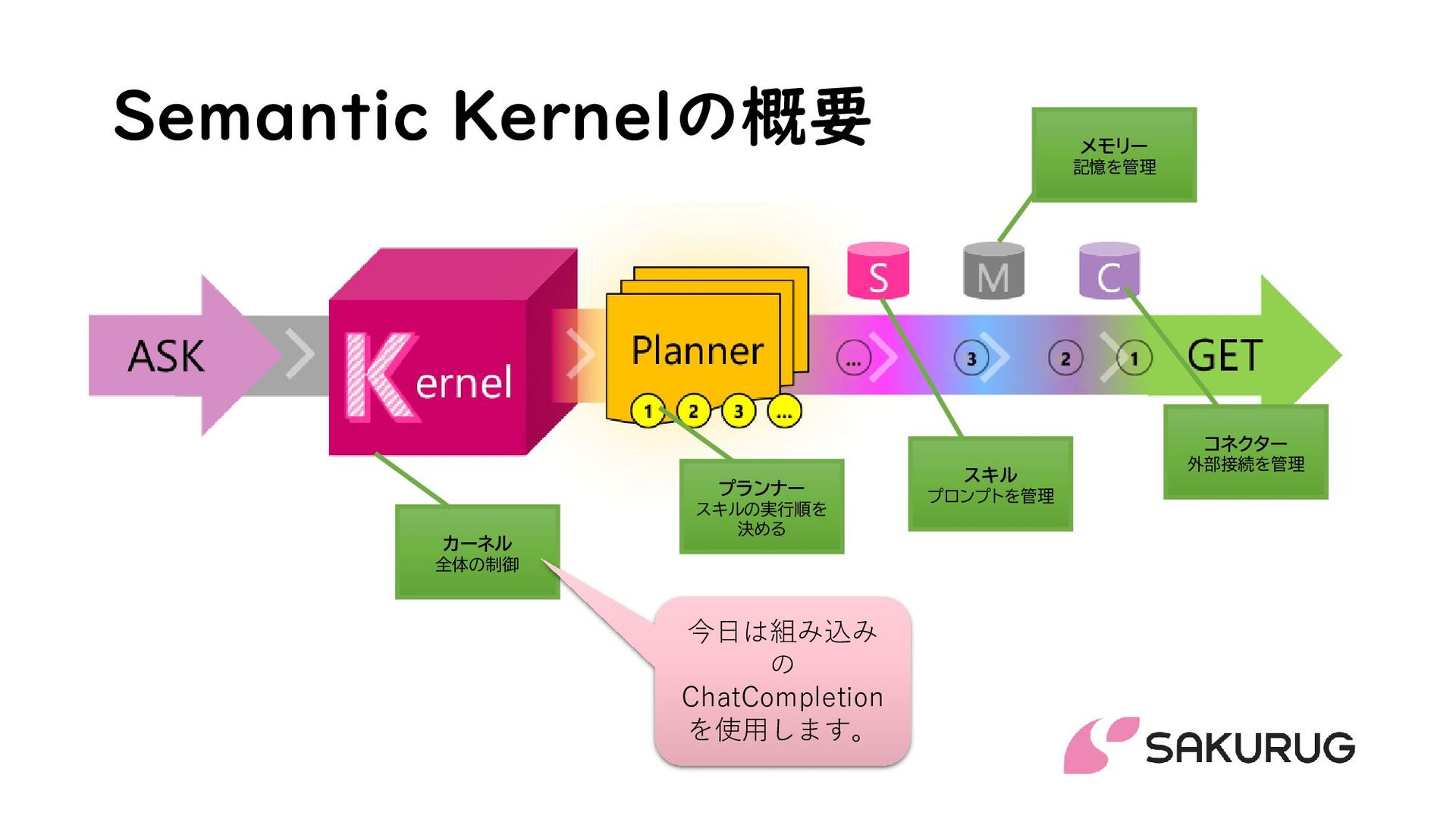
Here's the analogy. Think of the kernel as an office manager. You (the application) hand the manager a task in plain language — "email the new client a summary of last quarter's numbers." The manager doesn't do everything personally; they know which specialists to call. One employee writes prose (that's the LLM). Another pulls numbers from the database (that's a piece of normal code). A third sends email (that's an API). The manager's value isn't doing any single job — it's knowing who to call, in what order, and how to pass results between them. Semantic Kernel is that manager for your AI app.
What makes Semantic Kernel distinctive is its home turf. It was created by Microsoft and is a first-class citizen in C# / .NET, with full support for Python and Java as well. For a company already running on the Microsoft stack — Azure, .NET services, Microsoft 365 — Semantic Kernel is often the most natural way to add LLM features without leaving the ecosystem or rewriting everything in Python.
Why it matters
Calling an LLM once is easy: send a prompt, get text back. Real products need much more than that. They need the model to do things — look up a customer record, run a calculation, call a payment API, remember what was said three turns ago. The gap between "a model that talks" and "a model that acts on your systems" is exactly the gap an orchestration framework fills.
Semantic Kernel exists to close that gap in a way that fits enterprise software. The problems it targets:
- Mixing prompts and code cleanly. Some steps are best written as a prompt ("summarize this email politely"); others must be real, deterministic code ("charge $49.00 to this card"). Semantic Kernel lets both live as the same kind of object — a function — so the model can call either one the same way.
- Letting the model choose tools safely. Instead of you hard-coding which function runs, you register a set of functions and let the model decide which to call, with what arguments. The kernel handles the calling, argument parsing, and feeding results back.
- Staying in the .NET / Java world. Most LLM tooling assumes Python. If your production systems are C# or Java, bolting on a Python service for AI adds operational cost. Semantic Kernel is native to those languages, so the AI logic ships inside the same codebase your team already maintains.
- Swapping models without rewrites. The kernel abstracts the model provider. You can target Azure OpenAI today and a different provider tomorrow by changing configuration, not your business logic.
Who cares most? Teams building internal copilots, document and data assistants, and workflow automation on top of existing enterprise systems — especially anywhere the surrounding code is already C# or Java. If you are starting fresh in Python with no Microsoft-stack constraints, frameworks like LangChain or LlamaIndex are equally valid choices; Semantic Kernel's strongest pull is the enterprise and cross-language story.
How it works
Semantic Kernel is built from a few core building blocks. Understanding these four — the kernel, plugins, functions, and memory — is understanding the whole framework. Everything else is detail layered on top.
The kernel: the central container
The kernel is the heart of the SDK — a dependency-injection container that holds your configured AI services (a chat model, an embeddings model), your registered plugins, and shared settings. When your app wants the AI to do something, it goes through the kernel. The kernel resolves which model to call and which functions are available, runs the request, and returns the result. You build one kernel at startup and reuse it.
Functions: the unit of work
Everything the kernel can invoke is a function, and there are two flavors. A native function is ordinary code — a C# or Python method you mark with an attribute / decorator ([KernelFunction] in C#) and a clear description. A prompt function (historically called a semantic function) is a templated prompt to the LLM, with placeholders for variables. The point of this unification is powerful: the model can call a math routine written in C# and a "write a friendly reply" prompt with exactly the same mechanism. Code and prompts become interchangeable tools.
from semantic_kernel.functions import kernel_function

class MathPlugin:
    @kernel_function(
        name="add",
        description="Add two numbers and return the sum.",
    )
    def add(self, a: float, b: float) -> float:
        return a + b

# The description matters: the model reads it to decide
# when to call this function and what arguments to pass.
Plugins: grouping functions together
A plugin is just a named collection of related functions — a class whose methods are kernel functions, or a folder of prompt templates. A WeatherPlugin might hold get_forecast and get_current_temp; an EmailPlugin might hold send and search_inbox. You register a plugin with the kernel, and all its functions become callable. (In the earliest versions these were called skills; the project renamed them to plugins to align with the broader plugin ecosystem.)
Letting the model call functions automatically
The modern way to get multi-step behavior is automatic function calling. You register your plugins, turn on function-calling behavior, and send the user's request. The model inspects the available function descriptions, decides which to call and with what arguments, and the kernel executes those calls and feeds the results back — looping until the model produces a final answer. This is the same tool-calling loop that powers AI agents generally, expressed through Semantic Kernel's function abstraction.
Memory: facts and history
Out of the box the model remembers nothing between calls. Semantic Kernel provides memory in two senses: conversation history (the running chat transcript you pass on each turn) and a vector-store / memory connector layer for long-term knowledge. The connectors plug the kernel into vector databases — Azure AI Search, Qdrant, Redis, Postgres/pgvector, and others — so you can store embeddings and retrieve relevant facts at query time. That is how you build RAG on top of Semantic Kernel.
Planners vs. automatic function calling
A planner was Semantic Kernel's original way to handle multi-step tasks. Given a goal in plain language and the list of available functions, a planner asks the model to produce a plan — an ordered sequence of function calls — which the kernel then executes. The classic planners produced plans as structured output: early ones emitted a sequence or an XML/JSON plan, and the later HandlebarsPlanner emitted a Handlebars template describing the whole flow.
Here's the important context for anyone learning Semantic Kernel today. As LLMs gained reliable native function/tool calling, the ecosystem shifted away from separate up-front planners toward letting the model call functions step by step in a loop. Microsoft now generally steers new code toward automatic function calling rather than the older standalone planners. You will still see planners in tutorials and older projects, so it helps to know both — but for new work, function calling is usually the recommended starting point.
| Aspect | Planner (classic) | Automatic function calling (modern) |
|---|---|---|
| When the plan is made | Up front, before execution | Step by step, during execution |
| Who decides next step | A generated plan | The model, each turn |
| Adapts to results mid-task | Harder — plan is fixed | Naturally — sees each result |
| Recommended for new code | Legacy / specific cases | Yes, the default path |
Semantic Kernel vs. LangChain
The most common comparison is with LangChain, the dominant Python LLM framework. They solve overlapping problems with different center of gravity, and the right choice usually comes down to your language and your stack rather than raw capability.
- C# / .NET first; also Python & Java
- Functions unify code and prompts
- Plugins group related functions
- Strong Azure / Microsoft-stack fit
- Enterprise, DI-style architecture
- Python first (JS/TS too)
- Chains and agents as core idea
- Huge third-party integration catalog
- Provider-agnostic, community-driven
- Fast prototyping, broad ecosystem
Semantic Kernel's mental model is functions and plugins registered on a kernel, with the model calling them. LangChain's historical model is chains (and agents) — composing steps into a flow. In practice both can build the same apps: a chatbot, a RAG assistant, a tool-using agent. The deciding factors tend to be: What language is your codebase? (.NET or Java strongly favors Semantic Kernel; Python with no constraints favors LangChain.) What cloud are you on? (Azure-heavy shops get smoother integration with Semantic Kernel.) How much do you value a vast prebuilt integration catalog? (LangChain's breadth is hard to match.)
| If you... | Lean toward |
|---|---|
| Build on .NET / C# or Java | Semantic Kernel |
| Run primarily on Azure / Microsoft 365 | Semantic Kernel |
| Work in Python with no stack constraints | LangChain or LlamaIndex |
| Want the largest catalog of ready integrations | LangChain |
| Need a document-/RAG-centric toolkit | LlamaIndex or Haystack |
These are tendencies, not laws. Semantic Kernel's Python SDK is fully capable, and plenty of Python teams pick it for its clean function model. For a broader view of the tradeoffs across the field, see how to choose an agent framework.
Going deeper
Once the core model clicks, a few directions are worth knowing as you move toward production.
Agents and multi-agent orchestration
Semantic Kernel added an Agent abstraction on top of the function model — an agent is a configured persona (instructions + a model + a set of plugins) that you can converse with. Beyond a single agent, the framework supports multi-agent patterns where several agents collaborate or take turns on a task, each owning its own tools. If you are exploring multi-agent designs, it is worth comparing with dedicated multi-agent frameworks like AutoGen and CrewAI to see different takes on the same problem.
Filters, telemetry, and governance
Enterprise use needs guardrails. Semantic Kernel exposes filters (hooks that run before and after a function or prompt) so you can add input validation, logging, content checks, or block a call entirely. It also integrates with OpenTelemetry for tracing and metrics, which matters once you have function-calling loops fanning out across many model and tool invocations and need to see where time and tokens go.
Model Context Protocol and external tools
Modern Semantic Kernel can consume tools exposed over the Model Context Protocol (MCP), the emerging open standard for connecting models to external tools and data sources. Wiring MCP servers in as plugins lets your kernel reach a growing ecosystem of ready-made tools without writing a custom connector for each one.
Where the ecosystem is heading
Microsoft has signaled a convergence of its agent tooling — bringing the strengths of Semantic Kernel together with its AutoGen research project under a unified Microsoft Agent Framework direction. The practical takeaway for a learner: the core ideas you learn here — a kernel that orchestrates, functions that unify code and prompts, plugins that group them, and function calling that lets the model drive — are durable concepts that carry forward even as the brand and packaging evolve. Learn the mental model, and the specific API surface is easy to follow.
FAQ
What is Semantic Kernel used for?
Semantic Kernel is Microsoft's open-source SDK for orchestrating LLMs inside an application. You use it to combine natural-language prompts with real code and external APIs, let the model call those functions automatically, and add memory or RAG — most often in C# / .NET, Java, or Python apps, especially on the Microsoft and Azure stack.
Is Semantic Kernel only for C# and .NET?
No. C# / .NET is its first-class home, but Semantic Kernel also has full SDKs for Python and Java that share the same kernel, plugin, function, and memory model. Feature parity can lag slightly between languages, so check the docs for the SDK you are using.
What is the difference between a plugin and a function in Semantic Kernel?
A function is the unit of work the kernel can invoke — either a native function (ordinary code) or a prompt function (a templated LLM prompt). A plugin is simply a named group of related functions. You register plugins with the kernel, and all their functions become callable by your app or by the model.
Are planners still recommended in Semantic Kernel?
For most new projects, no — Microsoft generally steers toward automatic function calling, where the model picks and calls functions step by step in a loop. Planners, which compute a full multi-step plan up front, still exist and appear in older tutorials, but function calling is the usual default now.
Semantic Kernel vs LangChain — which should I choose?
Choose based on your stack. Semantic Kernel is the natural pick for C# / .NET or Java codebases and Azure-heavy environments. LangChain is Python-first with a larger third-party integration catalog and faster prototyping for pure-Python teams. Both can build chatbots, RAG, and tool-using agents.
Is Semantic Kernel free and open source?
Yes. Semantic Kernel is open source under the MIT license and maintained by Microsoft at github.com/microsoft/semantic-kernel. It is a library you embed in your own application, not a paid hosted service, though you still pay your LLM provider for model usage.