In plain English
Haystack is an open-source Python framework from deepset for building production-ready applications powered by large language models. Its defining idea is the pipeline: every LLM app you build in Haystack is an explicit, inspectable graph of components — retrievers, generators, rankers, prompt builders, routers — wired together with typed connections. Nothing runs in the dark; you can see, test, and swap every piece.
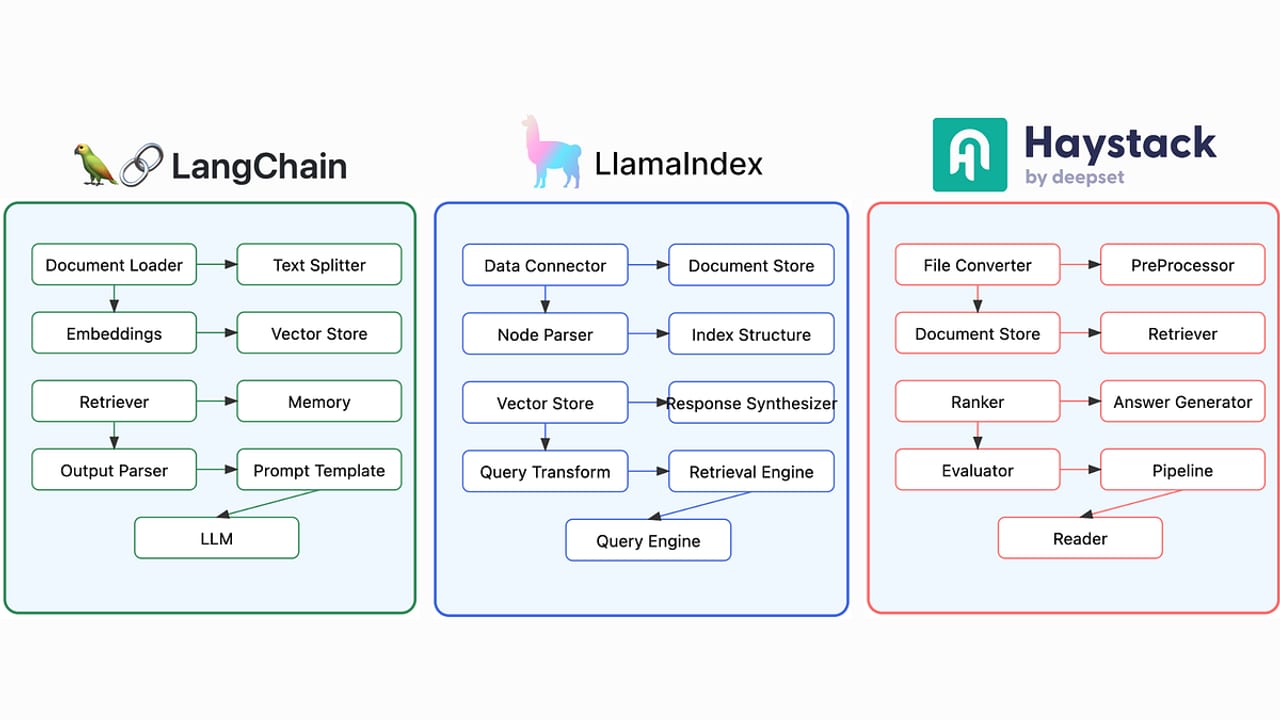
Here's the analogy. Think of a car assembly line. Each station has one job — weld the chassis, fit the engine, paint the body — and the stations are connected by a conveyor belt so the output of one becomes the input of the next. Haystack pipelines work the same way. A retriever station pulls relevant documents from your knowledge base, a prompt-builder station formats them into a template, and a generator station sends the result to an LLM and returns the answer. You can inspect every station, hot-swap it for a different supplier, or add a new quality-check station anywhere on the line.
Haystack is built by deepset, a Berlin-based AI company focused on enterprise NLP and RAG systems. The current major version is Haystack 2.x, which was a ground-up redesign released in 2024 that replaced the earlier document-centric API with the explicit directed-graph pipeline model that now defines the framework. You install it with pip install haystack-ai.
Why it matters
Most LLM frameworks let you write an app quickly by chaining calls in Python — but they hide what's happening inside those calls. That invisibility is fine for a demo, and painful for a production system. When answers degrade, which step broke? When you want to swap the retriever algorithm for a new one, how do you do it without touching unrelated code? When you want to serialize your entire pipeline, ship it to another environment, and reload it identically, is that even possible?
Haystack's answer is to make the pipeline the first-class citizen of the application. Every component — whether a built-in InMemoryEmbeddingRetriever or a custom class you wrote yourself — has declared, typed input and output sockets. The framework validates that connections between components are type-compatible before the code runs. The whole pipeline can be serialized to YAML or JSON, saved to disk, diffed in version control, and reloaded in a fresh Python process without any code changes.
This matters most in three production scenarios: RAG systems where you need to compare retriever strategies and measure which one actually improves answer quality; multi-step pipelines where you need to route queries conditionally, run steps in parallel, and verify outputs at each stage; and teams where different engineers own different pipeline components and you need clean boundaries to avoid stepping on each other. Haystack's explicit model turns what would be invisible side effects into visible, testable contracts.
How it works
Haystack models every application as a directed multigraph of components. A Pipeline object holds the nodes (components) and the edges (connections between their output sockets and input sockets). At runtime the framework walks the graph in topological order, passing typed data between nodes. If any connection is type-incompatible, Haystack raises an error at wiring time — not at runtime when a user is watching.
Components and sockets
A component is any Python class decorated with @component. It must implement a run() method that accepts named inputs and returns a dictionary of named outputs. The @component.output_types decorator declares the names and types of those outputs so the framework can validate connections statically. Every built-in — SentenceTransformersTextEmbedder, InMemoryEmbeddingRetriever, ChatPromptBuilder, OpenAIChatGenerator, BM25Retriever, and dozens more — follows exactly the same contract. So does any custom component you write yourself.
from haystack import component

@component
class WordCounter:
    """Counts words in a string — a trivial custom component example."""

    @component.output_types(word_count=int)
    def run(self, text: str) -> dict:
        return {"word_count": len(text.split())}
Building and running a pipeline
You create a Pipeline, add components by name, then call connect() to wire output sockets to input sockets. The string notation is "component_name.socket_name". Finally, pipeline.run() executes the graph and returns a dictionary of all component outputs. The async variant, AsyncPipeline, runs independent branches in parallel automatically — no extra code needed.
from haystack import Pipeline
from haystack.components.embedders import SentenceTransformersTextEmbedder
from haystack.components.retrievers.in_memory import InMemoryEmbeddingRetriever
from haystack.components.builders import ChatPromptBuilder
from haystack.components.generators.chat import OpenAIChatGenerator
from haystack.dataclasses import ChatMessage
from haystack.document_stores.in_memory import InMemoryDocumentStore

# Build the document store and add documents first (omitted for brevity)
document_store = InMemoryDocumentStore()

# Assemble the pipeline
rag = Pipeline()
rag.add_component("embedder", SentenceTransformersTextEmbedder())
rag.add_component("retriever", InMemoryEmbeddingRetriever(document_store=document_store))
rag.add_component("prompt", ChatPromptBuilder(template=[
    ChatMessage.from_user(
        "Answer using only these documents:\n{% for d in documents %}{{ d.content }}{% endfor %}\n\nQuestion: {{ query }}"
    )
]))
rag.add_component("llm", OpenAIChatGenerator(model="gpt-5.5"))

# Wire the graph
rag.connect("embedder.embedding", "retriever.query_embedding")
rag.connect("retriever.documents", "prompt.documents")
rag.connect("prompt.prompt", "llm.messages")

# Run it
result = rag.run({"embedder": {"text": "What is the refund window?"}, "prompt": {"query": "What is the refund window?"}})
print(result["llm"]["replies"][0].text)
Document stores and the indexing pipeline
Before you can retrieve, you must ingest. Haystack separates indexing pipelines (which read raw files, chunk them, embed them, and write them to a document store) from querying pipelines (which embed a user question and retrieve relevant chunks). The document store is the shared state between them. Built-in stores include InMemoryDocumentStore for local development and integrations for production-scale backends: OpenSearch, Elasticsearch, Weaviate, Qdrant, Pinecone, pgvector, and others — each available as an installable package from the haystack-ai integrations registry.
Haystack vs. LangChain: when each wins
Haystack and LangChain are the two most widely used Python LLM frameworks, and they reflect genuinely different philosophies. Understanding the tradeoff saves time when choosing for a new project.
- Explicit pipeline graph
- Typed, validated connections
- YAML/JSON serialization built-in
- Evaluation components included
- Swap any node independently
- Steeper initial wiring cost
- Chain and agent abstractions
- Vast integration catalog
- Quick prototyping with LCEL
- Evaluation via LangSmith
- Flexible but implicit data flow
- Easier first 30 minutes
Haystack's explicit pipeline model means more upfront wiring — you have to name every component and connect every socket. That friction pays off when you need to swap a retriever algorithm, A/B-test a re-ranker, or hand a pipeline YAML to a non-engineer to configure. The serialized YAML is a complete, human-readable description of your application: what model, what retriever, what prompt template, what document store. That makes Haystack a strong choice for enterprise teams that need auditability and for RAG-heavy workloads where systematic evaluation matters.
LangChain's breadth of integrations and the fluency of its LangChain Expression Language (LCEL) make it faster to get something working in a first session. Teams that need complex, multi-step agentic reasoning — where the agent decides at runtime what to do next rather than following a fixed graph — often find LangChain's agent primitives more ergonomic. Neither framework is universally better; they optimize for different parts of the problem.
| Criterion | Choose Haystack | Choose LangChain |
|---|---|---|
| Primary use case | RAG, document search, structured pipelines | Agents, chains, diverse tool orchestration |
| Team size | Multi-engineer, clear component ownership | Solo or small team moving fast |
| Auditability | Must serialize, diff, version pipelines | Less of a priority |
| Evaluation | Want built-in RAG metrics in-pipeline | Using LangSmith or external eval |
| Data flow | Explicit, typed, validated | Implicit, flexible, duck-typed |
Agents, tools, and async pipelines
Haystack 2.x added a full agent system alongside its traditional pipelines. An Agent component wraps an LLM in a tool-calling loop: it calls the model, inspects whether the model wants to invoke a tool, executes that tool, feeds the result back, and loops until the model produces a final answer. This is the same ReAct-style loop you find in other agent frameworks, but expressed as a first-class Haystack component that can be embedded inside a larger pipeline.
Tools are passed to the Agent as any of three types: ComponentTool wraps a single Haystack component (a retriever, an API caller, a calculator) so the model can invoke it by name; PipelineTool wraps an entire Haystack pipeline as one callable tool, letting you compose complex multi-step tools without exposing their internals to the model; and MCPTool / MCPToolset connects to any Model Context Protocol server to load external tools from the growing MCP ecosystem.
from haystack.components.agents import Agent
from haystack.components.tools import PipelineTool
from haystack.components.generators.chat import OpenAIChatGenerator

# Wrap an existing retrieval pipeline as one callable tool
retrieval_tool = PipelineTool(
    name="search_knowledge_base",
    description="Searches company documents and returns relevant passages.",
    pipeline=rag,  # the pipeline we built earlier
    input_mapping={"query": "embedder.text"},
    output_mapping={"llm.replies": "results"},
)

agent = Agent(
    chat_generator=OpenAIChatGenerator(model="gpt-5.5"),
    tools=[retrieval_tool],
)

response = agent.run(messages=[ChatMessage.from_user("What is our refund policy?")])
print(response["messages"][-1].text)
For pipelines where independent components don't depend on each other's outputs, AsyncPipeline (a drop-in replacement for Pipeline) automatically detects which branches can run concurrently and executes them in parallel. An indexing pipeline that runs text embedding and image embedding in parallel, for example, gets both done simultaneously rather than sequentially — with no change to the component code, only to the pipeline class used.
Going deeper
Once your basic pipeline works, production concerns tend to dominate iteration. A few patterns experienced Haystack teams reach for:
Hybrid retrieval and re-ranking
Pure vector search misses queries that hinge on exact terms — product codes, names, version numbers. Hybrid retrieval combines a BM25 keyword retriever with an embedding retriever, then merges results with a document joiner. Adding a re-ranker (SentenceTransformersDiversityRanker or a cross-encoder ranker) as a downstream component then re-scores the merged list by relevance to the query before it hits the prompt. In practice, hybrid + re-rank consistently outperforms either pure strategy alone on real-world question-answering benchmarks.
Conditional routing
Not every query needs the same pipeline path. Haystack provides router components like MetadataRouter, ConditionalRouter, and FileTypeRouter that inspect component outputs and direct data to different branches. A router can send factual questions to a RAG branch, calculation questions to a code interpreter branch, and off-topic queries to a rejection branch — all within one pipeline object. This eliminates the if/else spaghetti that otherwise ends up scattered across application code.
Hayhooks: deploying pipelines as HTTP endpoints
Hayhooks is an official open-source companion package that wraps any Haystack pipeline as an HTTP server. Point it at a pipeline YAML file and you get auto-generated OpenAI-compatible /chat/completions endpoints and streaming support with minimal configuration. This is the recommended path for serving Haystack pipelines in production without writing a custom FastAPI wrapper.
| Advanced technique | Haystack component | What it solves |
|---|---|---|
| Hybrid retrieval | InMemoryBM25Retriever + InMemoryEmbeddingRetriever + DocumentJoiner | Exact-term and semantic misses |
| Re-ranking | SentenceTransformersDiversityRanker, cross-encoders | Poorly ordered retrieval results |
| Conditional routing | ConditionalRouter, MetadataRouter | Different query types need different paths |
| Parallel execution | AsyncPipeline (drop-in) | Independent steps are blocking each other |
| Pipeline-as-tool | PipelineTool | Agent needs to call a multi-step process |
| HTTP deployment | Hayhooks package | Serving pipelines without custom API code |
The deepest investment is in systematic evaluation. Haystack's built-in evaluators let you measure context relevance (did the retriever find the right passages?) and faithfulness (is the answer grounded in what was retrieved?) as part of the pipeline itself. Wiring an evaluator to your pipeline output and logging the scores for each run is how teams move from "seems to work" to "we have a number, it improved, and we can prove it." Combined with LLMOps observability tooling, this is the difference between a prototype and a system that gets better over time.
FAQ
What is the difference between Haystack and LangChain for building RAG apps?
Both build RAG apps, but Haystack uses an explicit, typed pipeline graph where every component and connection is declared and validated before the code runs. LangChain uses chains and agents with more implicit data flow. Haystack wins on auditability, serialization, and built-in RAG evaluation; LangChain wins on breadth of integrations and speed-to-prototype for complex agent tasks.
Is Haystack free and open source?
Yes. Haystack is open source under the Apache 2.0 license and maintained by deepset. You install it with pip install haystack-ai. deepset also offers a commercial platform called deepset Cloud for managed pipeline hosting, but the core framework is entirely free.
What is a Haystack component and how do I write a custom one?
A component is any Python class decorated with @component that implements a run() method. The @component.output_types decorator declares the names and types of outputs so the framework can validate connections. Any class that follows this contract can be added to a pipeline alongside built-in components — no subclassing or registration required.
Can Haystack pipelines be serialized and versioned?
Yes — YAML serialization is a core feature. Call pipeline.dumps() to get a YAML string representing every component, its parameters, and every connection. Call Pipeline.loads(yaml_str) to reconstruct it identically in a new process. Committing pipeline YAMLs to git lets you diff and review prompt template changes or model upgrades the same way you review code.
Does Haystack support agents and tool calling?
Yes. Haystack 2.x includes an Agent component that wraps an LLM in a tool-calling loop. Tools can be single components (ComponentTool), entire pipelines (PipelineTool), or external MCP servers (MCPToolset). Agents are themselves components, so they can be embedded inside larger pipelines.
Which vector databases does Haystack support?
Haystack ships with InMemoryDocumentStore for development and testing. Production integrations — available as separate installable packages — cover OpenSearch, Elasticsearch, Weaviate, Qdrant, Pinecone, pgvector, and others. Each integration provides a document store plus matching retriever components so you swap the backend without changing pipeline logic.