In plain English
Google ADK (Agent Development Kit) is an open-source, code-first framework for building AI agents and multi-agent systems. Google announced it at Cloud Next in April 2025. You install it with pip install google-adk (Python) or the equivalent npm package for TypeScript, and you describe agents as plain Python or TypeScript objects — no drag-and-drop required.
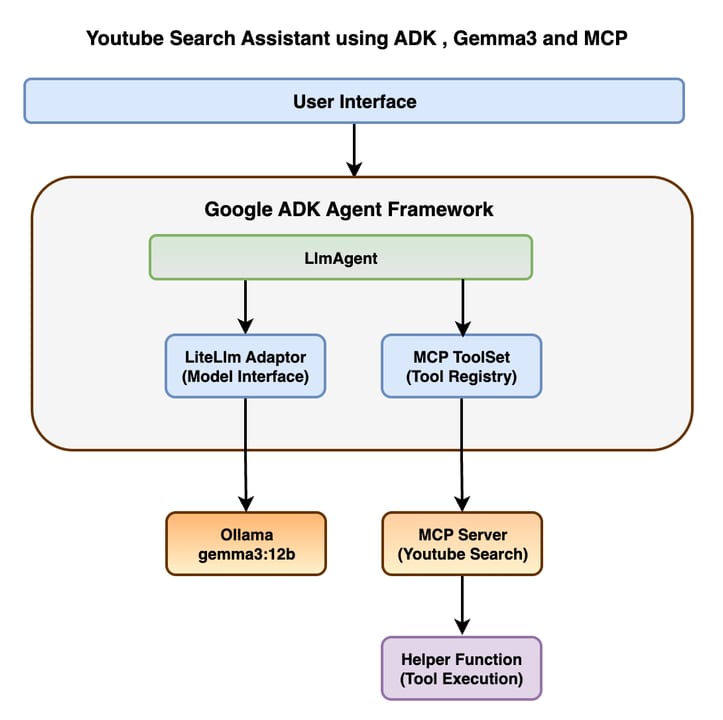
The everyday analogy: think of ADK as a staffing agency for software bots. You hire a coordinator (the root agent), describe what it manages, then hire specialists (sub-agents with narrow roles like research, writing, or database look-ups). The coordinator knows who to call for each job, and ADK handles all the communication plumbing between them. You define the org chart; ADK runs the office.
At the lowest level, a single ADK agent is an LlmAgent: a model (by default Gemini, but anything reachable through Vertex AI Model Garden or LiteLLM will work), a natural-language instruction, and a list of tools. ADK's runtime calls the model, executes whatever tool the model requests, feeds the result back, and repeats until the model declares the task done. You write the what; the framework handles the loop.
Why it matters
Before ADK, building a reliable multi-agent system on Google Cloud required stitching together raw Gemini API calls, custom tool-execution loops, manual state passing between agents, and bespoke deployment scripts. Each team solved the same plumbing differently and reinvented the same bugs. ADK gives that plumbing a name and a contract, so the engineering conversation can move up the stack.
The framework solves three concrete problems that trip up teams building their first production agents:
- Orchestration boilerplate. Writing a reliable agent loop — tool calls, error handling, retries, result injection back into context — is tedious and surprisingly subtle. ADK's runtime does it for you.
- Multi-agent coordination. Splitting work across specialist agents that share state, delegate cleanly, and stay within their scope is hard to design by hand. ADK's agent-tree model enforces clean handoff boundaries.
- Path to production. Getting from a local prototype to a horizontally-scaled cloud service normally requires a separate containerization and orchestration project. ADK's built-in
adk deploycommand targets Cloud Run or Vertex AI Agent Engine directly.
For teams already using Google Cloud, ADK is especially compelling because it integrates natively with Vertex AI for model serving, Cloud Run for hosting, and Gemini's built-in tools like Google Search grounding and sandboxed code execution — capabilities that would otherwise require separate API integrations.
How it works
ADK's architecture has four layers: agents, tools, sessions + state, and the runner that wires them together.
Agents
Every entity in ADK is an agent. There are two families: LlmAgent (calls a language model to reason about what to do next) and Workflow Agents (deterministic orchestrators that never call an LLM themselves — they just route execution). Within the workflow family there are three built-in shapes: SequentialAgent, ParallelAgent, and LoopAgent. Agents form a tree: a parent delegates work to children; children can be LLM agents or further workflow agents. Only the currently active agent can pass control to another agent in its immediate subtree, which keeps routing predictable.
Workflow agent shapes
| Agent type | What it does | Best for |
|---|---|---|
| SequentialAgent | Runs sub-agents one after another; each sees the previous output in shared state | Pipelines where step B needs step A's result |
| ParallelAgent | Runs all sub-agents concurrently, then merges results into shared state | Independent research or analysis tasks that can fan out |
| LoopAgent | Runs sub-agents in a cycle until max_iterations is hit or a sub-agent calls exit_loop | Iterative refinement — e.g. draft → critique → revise |
Tools
Tools are typed Python functions that an LlmAgent can invoke. ADK inspects the function's name, docstring, type hints, and parameters to auto-generate the schema it passes to the model. There are four categories:
- Function tools — regular Python functions you write. ADK wraps them automatically.
- Built-in tools —
google_searchfor real-time web grounding,code_executionfor sandboxed Python eval inside Gemini. Note: you can attach only one built-in tool per agent. - MCP tools — ADK's
MCPToolsetconnects to any Model Context Protocol server over stdio or SSE, so existing MCP tooling works out of the box. - Agent-as-tool — wrap a child agent as a tool callable by the parent, enabling hierarchical delegation with a clean input/output contract.
Sessions, state, and the runner
ADK's Session object is the conversation boundary — it holds the message history and a mutable state dict that all agents in the same tree can read and write. The Runner (or InMemoryRunner for local testing) drives the event loop: receive a user turn, route to the active agent, execute tool calls, write state updates, emit the response, repeat. Deploying to Vertex AI Agent Engine hands the session management off to Google's managed service; you stop worrying about horizontal scale.
Building your first ADK agent
The minimum viable ADK agent is roughly 15 lines of Python. Here is a weather-lookup agent that demonstrates the full pattern: defining a custom tool, attaching it to an LlmAgent, and running it with the in-memory runner.
from google.adk.agents import LlmAgent
from google.adk.runners import InMemoryRunner

# 1. Define a tool — any typed Python function works.
def get_weather(city: str) -> str:
    """Return current weather conditions for the given city."""
    # In production, call a real weather API here.
    return f"Sunny, 22 C in {city}"

# 2. Build the agent — model, instruction, tools.
agent = LlmAgent(
    name="WeatherAgent",
    model="gemini-3.5-flash",
    instruction="You are a helpful weather assistant. Use get_weather for any city lookup.",
    tools=[get_weather],
)

# 3. Run it locally.
runner = InMemoryRunner(agent=agent)
for event in runner.run(user_id="u1", session_id="s1", message="What's the weather in Tokyo?"):
    if event.is_final_response():
        print(event.content)
To compose a multi-agent pipeline, swap the single agent for a SequentialAgent that chains two or more LlmAgent instances. Each agent writes its output into ctx.state, which the next agent reads automatically.
from google.adk.agents import LlmAgent, SequentialAgent

researcher = LlmAgent(
    name="Researcher",
    model="gemini-3.5-flash",
    instruction="Research the topic and write a factual summary. Store it in state['summary'].",
    output_key="summary",  # ADK writes the output to state automatically
)

writer = LlmAgent(
    name="Writer",
    model="gemini-3.5-flash",
    instruction="Take state['summary'] and rewrite it as an engaging blog post.",
    input_key="summary",
)

pipeline = SequentialAgent(
    name="ResearchAndWrite",
    sub_agents=[researcher, writer],
)ADK vs LangGraph vs CrewAI
ADK is not the only agent framework, and it won't be the right choice for every team. Here is how it stacks up against the two most popular alternatives.
- Code-first, Python/TS/Java/Go
- Built-in SequentialAgent, ParallelAgent, LoopAgent
- Native Gemini + Vertex AI integration
- A2A protocol for cross-framework agent calls
- Best for: Google Cloud teams, multi-agent pipelines
- Watch out: strict file structure, built-in tool limits
- Graph/state-machine model — nodes + edges
- Fine-grained control over every transition
- LangSmith for observability and tracing
- Largest search interest; most tutorials online
- Best for: complex branching logic, deep observability needs
- Watch out: steeper learning curve, more boilerplate
- Role-based abstraction — crew, agents, tasks
- Lowest boilerplate; 20 lines to start
- Intuitive 'team of people' mental model
- Growing ecosystem and integrations
- Best for: rapid prototyping, non-engineers
- Watch out: less control over execution details
The key differentiator for ADK is its native Google Cloud integration. If your production environment is already Vertex AI and you want to ship Gemini-powered agents without extra glue code, ADK removes significant friction. Conversely, if you need platform-agnostic portability or you're primarily using OpenAI models, LangGraph or CrewAI may be more practical starting points.
It's also worth noting that these frameworks are becoming complementary rather than mutually exclusive. ADK supports the A2A (Agent-to-Agent) protocol, meaning an ADK agent can call a LangGraph agent as a remote sub-agent and vice versa. Vertex AI Agent Engine can host agents built with any of the three frameworks. The winner-take-all framing misses the real story: each framework covers a different slice of the design space.
Deployment: from laptop to Vertex AI
ADK's deployment story is one of its strongest selling points. You move through three environments with the same agent code:
- Local development —
adk runstarts an interactive CLI session;adk webopens a visual step-through debugger at localhost where you can inspect every tool call and state change. - Cloud Run —
adk deploy cloud_runcontainerizes and deploys the agent as a scalable HTTPS endpoint in minutes. - Vertex AI Agent Engine — the fully managed, auto-scaling runtime. You call
client.agent_engines.create(agent=app, ...)and Agent Engine handles sessions, horizontal scale, and SLA. Requiresgoogle-cloud-aiplatform[agent_engines,adk].
Agent Engine is the production target for most teams. It manages the Session lifecycle server-side, meaning you don't build or operate any session store. When a user sends a follow-up message, Agent Engine routes it back to the correct session and its accumulated state automatically.
Going deeper
Once you're comfortable with LlmAgent and the three workflow agent types, several advanced capabilities unlock significantly more sophisticated systems.
A2A (Agent-to-Agent) protocol
ADK is a first-class participant in Google's open A2A protocol — a standard for agent-to-agent communication across frameworks and even across companies. An ADK agent can expose itself as an A2A server, and any A2A-compatible client (including agents built in LangGraph, CrewAI, or a completely custom stack) can call it. This matters for enterprise deployments where different teams own different agent services and need standardized handoff contracts.
MCP tool consumption
The MCPToolset class lets any ADK agent consume tools from Model Context Protocol servers over stdio or SSE. This means the growing ecosystem of MCP servers — file systems, databases, GitHub, Slack integrations — is immediately available to ADK agents without writing any wrapper code. ADK can also expose its tools as an MCP server for other clients.
Evaluation and testing
ADK ships a built-in evaluation framework accessible via adk eval. You define test cases with expected outputs or intermediate steps, and the runner scores your agent against them. This is separate from unit-testing your tool functions (which you should also do) — it specifically tests the agent's decision-making: did it call the right tool, in the right order, with the right arguments?
Streaming and multimodal conversations
ADK supports bidirectional audio and video streaming through Gemini Live, enabling voice-to-voice agent interactions with near-realtime latency. This is not common in other agent frameworks and reflects Google's broader investment in the Gemini multimodal stack. If your agent use-case involves a voice interface — customer support, in-car assistant, live tutoring — ADK's streaming support is a significant advantage.
Callbacks and custom workflow templates
Beyond the three built-in workflow agents, ADK lets you subclass BaseAgent and implement _run_async_impl to create fully custom orchestration logic — conditional branching, human-in-the-loop approval gates, dynamic sub-agent lists assembled at runtime. Callbacks (before/after model calls and tool executions) let you add logging, guardrails, or telemetry without modifying agent logic.
FAQ
Is Google ADK only for Gemini models?
No. ADK defaults to Gemini but is model-agnostic. You can use any model accessible through Vertex AI Model Garden or any provider supported by LiteLLM (including Anthropic Claude, Meta Llama, and Mistral). The tightest native integrations — built-in Google Search grounding, code execution, streaming — do require Gemini.
What is the difference between Vertex AI Agent Builder and Google ADK?
Vertex AI Agent Builder (sometimes called Agent Engine) is the managed runtime — it handles hosting, scaling, and session management for deployed agents. ADK is the development framework you use to write those agents in code. They are complementary: you build with ADK locally, then deploy to Agent Engine. You can also deploy non-ADK agents (LangGraph, CrewAI) to Agent Engine.
How does Google ADK handle state between agents in a pipeline?
ADK maintains a shared state dict on the Session object. Any agent in the tree can read from and write to it. Workflow agents like SequentialAgent pass state automatically between steps: set output_key on an upstream agent and input_key on the downstream one, and ADK handles the transfer without explicit code.
Can I use Google ADK with LangGraph or CrewAI together?
Yes, through the A2A (Agent-to-Agent) protocol. ADK agents can call remote A2A-compliant agents regardless of which framework built them, and vice versa. Vertex AI Agent Engine also hosts agents from all three frameworks side by side. The frameworks are interoperable at the deployment level.
What Python version and package do I need to get started with ADK?
ADK requires Python 3.11 or higher. Install it with pip install google-adk. For Vertex AI Agent Engine deployment, you also need pip install google-cloud-aiplatform[agent_engines,adk]. A quickstart can have a working agent in under 20 minutes.
Does Google ADK support TypeScript?
Yes. ADK ships official SDKs for Python, TypeScript/JavaScript, Java, Go, and Kotlin. Python is the most mature as of mid-2026. The core concepts — LlmAgent, SequentialAgent, tools — are available in all languages with consistent APIs.