In plain English
You keep hearing three terms — chatbot, workflow, and agent — used almost interchangeably to describe anything AI-powered. They are not the same thing. The cleanest way to tell them apart is to ask one question: who decides what happens next?
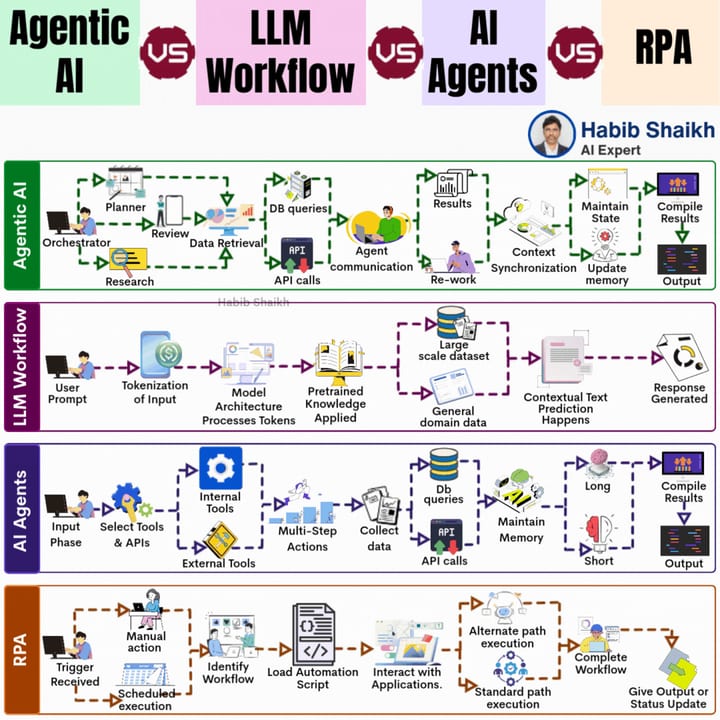
Picture a restaurant. A chatbot is a waiter who answers questions: "What's the soup of the day?" One question, one answer, done. A workflow is a kitchen assembly line: each station does its fixed job in a fixed order — grill, plate, garnish, out. Nobody on the line improvises; the recipe is written in advance. An agent is an experienced chef handed a fridge full of ingredients and told "make something impressive for tonight's guests". The chef decides what to cook, checks what's available, adjusts when something is missing, and keeps iterating until the dish is ready.
In software terms: a chatbot sends one prompt, gets one reply. A workflow chains several LLM calls along a path you hard-coded. An agent gives the LLM the power to choose its own path — deciding at runtime which tools to call, in what order, and when to stop. Everything else is elaboration on that single axis of control.
Why it matters
Picking the wrong pattern is one of the most common mistakes teams make when adding AI to their products. Choosing an agent when a workflow would do costs you latency, money, and unpredictability. Choosing a chatbot when you need actions means the user has to do all the work themselves.
The distinction matters because each pattern has a completely different cost profile and failure mode:
- Chatbots are cheap and fast. They fail when the task has more than one step or requires real-world actions.
- Workflows are predictable and auditable. They fail when the task is unpredictable enough that you can't pre-code every branch.
- Agents are flexible and autonomous. They fail — or get expensive — when the task is simple enough that the model's decision-making is overkill, or when the model makes a wrong choice mid-run.
Anthropic's guidance in Building Effective Agents is direct: start with the simplest solution that works and only add complexity when you feel the pain. Many production AI systems that look agentic from the outside are actually well-designed workflows — and that is a feature, not a shortcoming.
How each pattern works
The three patterns sit on a spectrum from fully scripted to fully autonomous. Here is what each one looks like under the hood.
- One prompt in, one reply out
- No tools, no external actions
- User drives every turn
- Stateless (or simple memory)
- Example: Q&A assistant, FAQ bot
- Fixed sequence of LLM calls
- Steps defined by your code
- LLM fills in blanks at each stop
- Predictable, auditable, fast
- Example: translate → summarize → email
- LLM decides steps at runtime
- Uses tools to act on the world
- Loops until goal is met
- Flexible but less predictable
- Example: research and book a flight
The chatbot pattern
A chatbot is a conversation loop driven by the user. Your code does one thing: take the user's message, append it to the conversation history, call the LLM, return the reply. No tools. No loops. No decisions by the model about what to do next. The model is purely a responder. Modern LLM-powered chatbots (as opposed to rule-based bots that match keywords) can handle nuanced, open-ended questions with high fluency, but they are still fundamentally one-turn machines — the intelligence is in the reply, not in any action the bot takes.
The workflow pattern
A workflow is a graph of steps you define in code. Each step might call an LLM (to classify, summarize, translate, extract), call an external API, or run a deterministic function. The routing logic — which step comes next, what branches exist, when to stop — lives entirely in your code. The LLM is a smart worker at each station; it does not choose which station to visit. Workflows are the right default for tasks with a predictable shape: content pipelines, document processing, multi-step form handling, triage routing. They are faster, cheaper, and far easier to debug than agents.
The agent pattern
An agent replaces your routing code with the model's own judgment. You give it a goal and a set of tools; it decides what to do next, issues a tool call, reads the result, and repeats. The model is in the driver's seat. It can call tools in any order, revisit steps it already tried, or take a completely different approach if the first one fails. The loop continues until the model decides it is done (or hits a safety cap you set). This flexibility is exactly what you need when the path to the goal is genuinely unknown in advance.
When to use each
The hype cycle around agents makes it tempting to reach for them by default. The practitioners' rule of thumb runs the other way: use the simplest thing that works, and earn your way up to an agent.
| Use this | When the task looks like this | Real example |
|---|---|---|
| Chatbot | Single question, single answer; no state needed between turns; the user drives every exchange | Customer FAQ, document Q&A, a support deflection bot |
| Workflow | Steps are known in advance; the path does not depend on runtime discoveries; auditability and speed matter | Resume screening → score → draft feedback email; nightly content digest |
| Agent | Steps depend on what the model discovers; the task is open-ended; failure to complete is worse than extra cost or latency | Book cheapest flight given constraints; fix a failing test suite; autonomous research report |
Notice the agent row: the key phrase is "steps depend on what the model discovers". If you can enumerate the steps before the run starts, you don't have an agent problem — you have a workflow problem, and workflows are better at that.
The "agentic workflow" middle ground
In practice you will hear the phrase agentic workflow a lot. It describes a hybrid: the outer shell is a workflow (steps defined in code, deterministic routing), but one or more of those steps uses an agent loop internally. For example: a document processing pipeline where each document passes through fixed stages, but the extraction stage gives the LLM a set of tools and lets it decide how to parse each page. The outer workflow gives you predictability and auditability; the inner agent gives you flexibility where the content is genuinely variable. This combination dominates production systems because it keeps the unpredictable parts isolated and testable.
Tradeoffs and pitfalls
Each pattern carries its own set of failure modes. Knowing them in advance saves a lot of debugging.
Chatbot pitfalls
- No memory by default. Without explicit conversation history management, each message is treated in isolation. Users get confused when the bot forgets what they just said.
- Hallucinations on factual queries. A chatbot with no retrieval tool will confidently invent answers. Add a search or lookup tool — or accept that the scope is limited to what the model knows.
- "It just answers" is sometimes not enough. Users who expect the bot to do something (update a record, issue a refund) get frustrated when it only explains how they could do it themselves.
Workflow pitfalls
- Brittleness at the edges. A workflow that handles 98% of inputs gracefully will hard-fail on the 2% that don't fit the expected shape. Build explicit fallback branches or human escalation paths.
- Prompt drift. The LLM powering each step gets upgraded over time. A prompt that worked last month may produce different output with the new model version. Pin model versions and run regression tests.
- Over-engineering simple tasks. A five-stage workflow to answer a single question is just a slow, expensive chatbot. Audit regularly.
Agent pitfalls
- Error compounding. Each loop step can fail. A 10-step run where each step is 95% reliable succeeds only about 60% of the time (0.95^10). Guard with retries, validation after tool calls, and step budgets.
- Runaway costs. An agent that gets confused can loop many times before hitting a cap. Always set a maximum number of steps and a token budget. Log every run.
- Prompt injection. If the agent reads external content (web pages, emails, documents), that content can contain hidden instructions that hijack the agent's behavior. Sanitize tool outputs.
- Non-determinism in production. The same goal produces a different execution path each run. You cannot unit-test an agent the way you test normal code. Build evals that score whether the goal was achieved across many runs, not whether the path matched a golden trace.
Going deeper
Once you have the taxonomy straight, the real engineering questions begin. The most important is evaluation: how do you know your agent or workflow is working correctly when the outputs are free-form natural language or multi-step action sequences? A chatbot is relatively easy to evaluate — you compare replies to a reference set. A workflow is testable step-by-step. A full agent needs an end-to-end harness that scores goal completion across hundreds of varied runs, not just a handful of hand-picked examples.
Designing for the right level of autonomy
Autonomy is a dial, not a switch. Most tasks do not need a fully autonomous agent. Anthropic's Building Effective Agents names several workflow primitives you can use before reaching for full autonomy: prompt chaining (pass one output as the next input), routing (classify first, then choose a branch), parallelization (fan out identical work across multiple inputs), orchestrator–subagent patterns (a planning step delegates to specialized workers), and evaluator–optimizer loops (one LLM grades another's output). Compose these building blocks and you get most of the power of agents with much of the reliability of workflows.
Human-in-the-loop checkpoints
For tasks where a mistake is costly — sending an email to thousands of users, issuing a refund, deleting data — consider requiring a human approval step before the irreversible action. This is called a human-in-the-loop checkpoint. You can add these inside both workflows and agents: the run pauses, surfaces a summary of what it's about to do, and waits for a human to confirm before proceeding. Many teams start with every action requiring approval, then remove checkpoints one-by-one as confidence in the system grows.
Observability and tracing
A chatbot is easy to inspect: you see the conversation. A workflow can be logged step-by-step. An agent is harder: a failed 30-step run has 30 potential points of failure. Invest in tracing from day one. Tools like LangSmith, Langfuse, and Anthropic's own tracing hooks let you replay every step of a run, see exactly which tool was called, what it returned, and how the model reasoned about the result. Without tracing, debugging an agent failure is guesswork.
The practical default
When building a new AI feature, a useful default sequence: start with a single LLM call and see how far it gets. If you need structure, add a workflow. If the workflow's branching logic becomes impossibly complex because you can't predict inputs, introduce an agent for that subproblem only. Most mature production systems end up as workflows with a few well-bounded agent subproblems inside them — not free-ranging agents in control of everything.
FAQ
What is the main difference between an AI agent and a chatbot?
A chatbot responds to a single message and hands control back to the user. An AI agent can take actions, call tools, and loop through multiple steps on its own initiative — it decides what to do next rather than waiting for the user to direct every move.
What is an agentic workflow, and how is it different from a pure agent?
An agentic workflow is a hybrid: the outer structure is a deterministic pipeline (steps defined in code), but one or more steps inside use an agent loop. It gives you the predictability of a workflow with targeted flexibility where inputs are genuinely variable. A pure agent lets the model control the entire execution path, which is more flexible but harder to make reliable in production.
When should I use a workflow instead of an agent?
Use a workflow when you can draw the execution steps on a whiteboard before the run starts — when the path does not depend on what the model discovers at runtime. Workflows are faster, cheaper, and much easier to debug. Reach for an agent only when the right sequence of steps is genuinely unknown in advance.
Are most AI products today actually agents?
Most production AI systems are workflows or agentic workflows — not fully autonomous agents. Pure agents where the model controls the entire execution path are still difficult to ship reliably at scale. Many things marketed as "agents" are really well-engineered workflows with a few LLM calls.
Why are AI agents more expensive than chatbots or workflows?
Every loop iteration in an agent is one or more additional LLM calls. A task that takes 10 steps costs roughly 10x what a single-call chatbot costs, plus the compute for any tools. Agents also tend to use longer contexts because every prior step accumulates in the prompt. Always set step limits and token budgets before deploying an agent.
Can a chatbot become an agent just by adding tools?
Yes — this is exactly what happens when you add tool use to a single-turn LLM call and then wrap it in a loop. The chatbot becomes an agent the moment the model is allowed to call a tool, read the result, and decide the next step on its own. The loop and the model's control over routing are what make it an agent.