In plain English
An MCP server is a small, long-running process that wraps a capability — a calculation, a database query, a file operation — and exposes it to any AI host (Claude Desktop, Cursor, your own agent loop) through a standard JSON-RPC protocol. Think of it like a USB-C adapter: your capability is the device, the MCP protocol is the port, and the AI host is the laptop. Once you have the adapter, the laptop can use the device without any custom drivers.
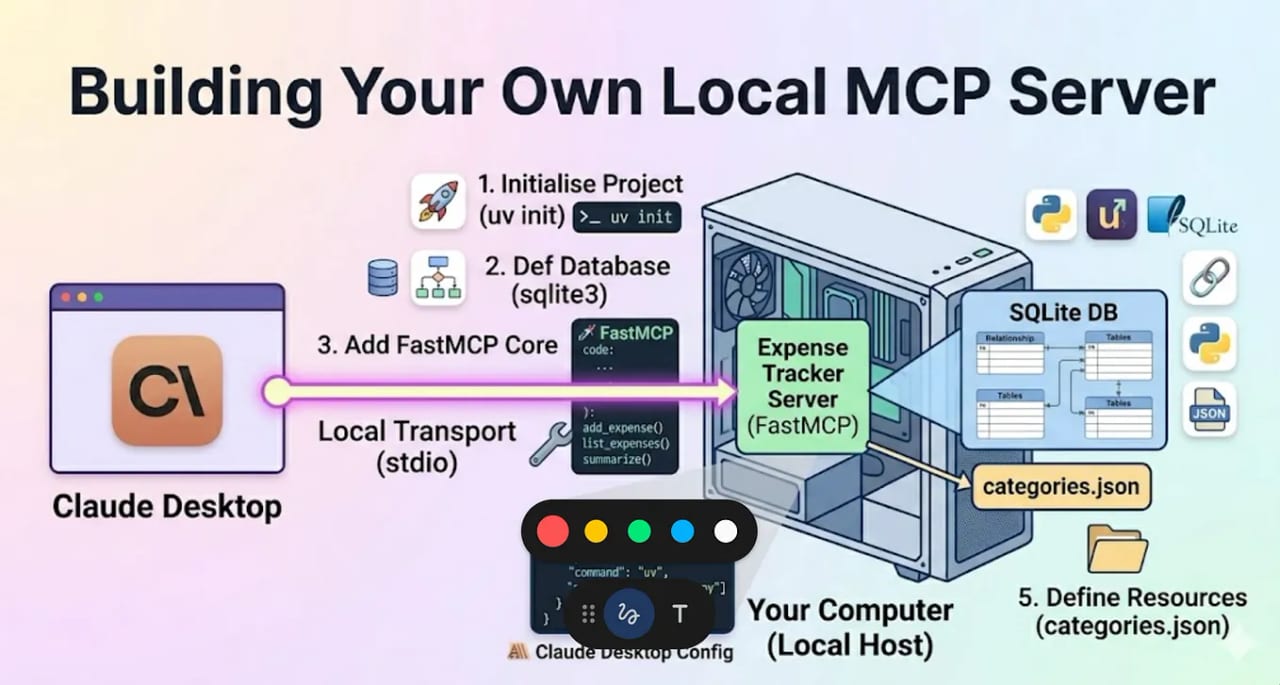
This article is a hands-on walkthrough. You will install the official SDK, write a real tool function, run it locally over stdio, test it with the MCP Inspector, and wire it into Claude Desktop — all in about 30 minutes. By the end you will have a template you can extend with your own business logic. Both Python (with FastMCP) and TypeScript (with McpServer) are covered; follow the language you prefer.
Why build your own server
Hundreds of community MCP servers already exist for popular services — GitHub, Postgres, Google Drive, Slack, and more. The moment you need to connect an AI to your own system — an internal API, a proprietary database, a domain-specific calculation — you need to write your own server. The payoff is high: write it once, and every MCP-compatible AI host your team uses gets that capability automatically, with no further integration work.
The other reason to build your own: control. Community servers are maintained by third parties, may log your data, and update on someone else's schedule. A server you own runs in your infrastructure, uses your credentials, and does exactly what you specify.
- Internal APIs — HR systems, billing data, CRMs, and internal knowledge bases that no public server covers
- Local tooling — shell commands, file watchers, build system integration, dev-environment introspection
- Regulated or air-gapped environments — data that must not leave your network
- Custom logic — calculations, transformations, and validations specific to your domain that a generic server cannot express
How an MCP server works end to end
Before writing code, it helps to see the whole picture. When an AI host starts up, it launches your server as a subprocess (for stdio) or connects to it over HTTP. The two parties do a capability handshake, then the host asks your server what tools it offers. From that point on, whenever the model decides to call a tool, the host forwards the call to your server, your handler runs, and the result travels back to the model.
The SDK handles all of steps 1-4 for you. You only write the handler in step 6. Your tool's name and description are what the model reads when it decides whether to call it — treat the description like a mini-prompt.
Python walkthrough with FastMCP
FastMCP is the high-level layer built into the official mcp Python package. It turns a plain Python function into a fully described MCP tool with a single decorator — no JSON Schema to write by hand. The package is on PyPI and maintained by Anthropic.
Step 1: Install the SDK
# With uv (recommended — creates a virtual env automatically)
uv init my-mcp-server
cd my-mcp-server
uv add "mcp[cli]"

# Or with pip
pip install "mcp[cli]"
Step 2: Write the server
Create a file called server.py. The example below exposes one tool: fetch_word_count, which counts the words in a string. This is intentionally minimal — swap the function body for your own logic when you are ready.
# server.py
from mcp.server.fastmcp import FastMCP

# Name is shown in the host's tools UI
mcp = FastMCP("text-utils")

@mcp.tool()
def fetch_word_count(text: str) -> int:
    """Count the number of words in a block of text.

    Use this when the user asks how many words are in a passage,
    document excerpt, or any string they provide.

    Args:
        text: The text whose words should be counted.
    """
    # FastMCP reads the type hint (str -> int) to build the JSON Schema.
    # The docstring becomes the description the model sees.
    return len(text.split())

if __name__ == "__main__":
    # transport="stdio" is the default; explicit here for clarity
mcp.run(transport="stdio")Step 3: Test with the MCP Inspector
Before connecting a real AI host, test your server with the MCP Inspector — a browser-based tool that connects to your server, lists its tools, and lets you invoke them without any Claude configuration. It is the fastest way to catch schema mistakes.
# Run the Inspector and pass your server as the target
npx @modelcontextprotocol/inspector uv run server.py
The Inspector opens at http://localhost:6274. Click Tools, find fetch_word_count, enter a test string, and click Run Tool. You will see the raw JSON-RPC request and response alongside the result. Fix any errors here — it is much faster than debugging inside a full agent session.
Step 4: Connect to Claude Desktop
Open Claude Desktop's config file and add your server under mcpServers. The file is at ~/Library/Application Support/Claude/claude_desktop_config.json on macOS or %APPDATA%\Claude\claude_desktop_config.json on Windows.
{
  "mcpServers": {
    "text-utils": {
      "command": "uv",
      "args": [
        "--directory",
        "/absolute/path/to/my-mcp-server",
        "run",
        "server.py"
      ]
    }
  }
}
Completely quit and relaunch Claude Desktop. A hammer icon in the chat input bar confirms tools were discovered. Ask Claude "How many words are in this paragraph?" and paste some text — it should call fetch_word_count automatically.
TypeScript walkthrough with McpServer
The official TypeScript SDK (@modelcontextprotocol/sdk, version 1.11.x as of mid-2026) uses McpServer as the main class and Zod for input schema validation. Two project config settings trip up most people: you need "type": "module" in package.json and moduleResolution: "Node16" in tsconfig.json. Get those right and everything else is straightforward.
Step 1: Set up the project
mkdir my-mcp-server && cd my-mcp-server
npm init -y
npm install @modelcontextprotocol/sdk zod
npm install -D typescript @types/node
Edit package.json to add "type": "module" and a build script:
{
  "name": "my-mcp-server",
  "version": "1.0.0",
  "type": "module",
  "scripts": {
    "build": "tsc",
    "start": "node dist/index.js"
  },
  "dependencies": {
    "@modelcontextprotocol/sdk": "^1.11.0",
    "zod": "^3.24.0"
  },
  "devDependencies": {
    "typescript": "^5.7.0",
    "@types/node": "^22.0.0"
  }
}
Create tsconfig.json. The module and moduleResolution settings must both be Node16 — the SDK uses .js extension imports internally and older settings cause compile errors:
{
  "compilerOptions": {
    "target": "ES2022",
    "module": "Node16",
    "moduleResolution": "Node16",
    "outDir": "./dist",
    "rootDir": "./src",
    "strict": true,
    "esModuleInterop": true,
    "skipLibCheck": true
  },
  "include": ["src/**/*"]
}
Step 2: Write the server
Create src/index.ts. The same fetch_word_count example as Python, now in TypeScript. The input schema is written in Zod; the SDK converts it to JSON Schema before sending the tools list to the host.
// src/index.ts
import { McpServer } from "@modelcontextprotocol/sdk/server/mcp.js";
import { StdioServerTransport } from "@modelcontextprotocol/sdk/server/stdio.js";
import { z } from "zod";

const server = new McpServer({
  name: "text-utils",
  version: "1.0.0",
});

server.registerTool(
  "fetch_word_count",
  {
    description:
      "Count the number of words in a block of text. " +
      "Use this when the user asks how many words are in a passage.",
    inputSchema: {
      text: z.string().describe("The text whose words should be counted."),
    },
  },
  async ({ text }) => ({
    content: [
      {
        type: "text",
        text: String(text.trim().split(/\s+/).filter(Boolean).length),
      },
    ],
  })
);

async function main() {
  const transport = new StdioServerTransport();
  await server.connect(transport);
  // Use console.error (stderr) — NEVER console.log (stdout corrupts the transport)
  console.error("text-utils MCP server started on stdio");
}

main().catch((err) => {
  console.error(err);
  process.exit(1);
});Step 3: Build and test
npm run build

# Test with the Inspector
npx @modelcontextprotocol/inspector node dist/index.js
Step 4: Add to Claude Desktop
{
  "mcpServers": {
    "text-utils": {
      "command": "node",
      "args": ["/absolute/path/to/my-mcp-server/dist/index.js"]
    }
  }
}
Restart Claude Desktop. The hammer icon appears when tools are detected. You can also add an "env" field alongside "command" to pass API keys or other secrets to your server process without hardcoding them.
Common pitfalls and how to avoid them
Most MCP server failures fall into one of five categories. Knowing them up front saves hours of debugging:
| Pitfall | Symptom | Fix |
|---|---|---|
| Stray stdout in TypeScript | Server connects but tools never return results; Inspector shows parse errors | Replace every console.log() with console.error() |
| Relative path in host config | Claude Desktop shows no tools after restart | Use the absolute path to your project directory in the config JSON |
| Missing "type": "module" (TS) | TypeScript compile fails with Cannot find module errors | Add "type": "module" to package.json and set module/moduleResolution to Node16 in tsconfig |
| Vague tool description | Model calls the wrong tool or hallucinates arguments | Rewrite the description as a mini-prompt: what it does, what inputs mean, when to call it |
| Server not restarted after config change | Old tools still appear / new tools missing in Claude Desktop | Completely quit and relaunch Claude Desktop after every config edit |
Debugging checklist
- Run
npx @modelcontextprotocol/inspector <your server command>first — if Inspector can't connect, the bug is in your server, not the host config - If Inspector connects but tools are missing, check that you are registering tools before calling
mcp.run()/server.connect() - If tools appear but calls fail, inspect the raw JSON-RPC tab in the Inspector for schema validation errors
- If everything works in Inspector but not in Claude Desktop, compare the command in your host config against exactly what the Inspector used to launch the server
- Check stderr output — FastMCP and McpServer both log startup errors there
Going deeper
Adding a second tool with real I/O
Once your first tool works, adding more follows the same pattern. Here is a Python example that fetches the HTTP status code of a URL — a slightly more realistic tool that makes a network call:
import httpx

@mcp.tool()
def check_url_status(url: str) -> int:
    """Return the HTTP status code for a given URL.

    Use this to verify that a URL is reachable before citing it.
    Returns 0 if the request times out or the host is unreachable.

    Args:
        url: The full URL to check, including https://
    """
    try:
        response = httpx.get(url, timeout=5, follow_redirects=True)
        return response.status_code
    except Exception:
        return 0
Exposing a resource
Resources are read-only data sources the host loads as context — think of them like attached files. They are not called by the model directly; the host decides when to include them. Register one in Python with @mcp.resource():
@mcp.resource("config://app/schema")
def get_db_schema() -> str:
    """Current database schema (read-only, for context)."""
    return open("schema.sql").read()
Using environment variables for secrets
Your server runs as a subprocess, so it inherits the environment variables you pass in the host config. Never hardcode API keys in source. Pass them through the env field in the host JSON config:
{
  "mcpServers": {
    "my-api-server": {
      "command": "uv",
      "args": ["--directory", "/path/to/project", "run", "server.py"],
      "env": {
        "MY_API_KEY": "sk-..."
      }
    }
  }
}
Read the key with os.environ["MY_API_KEY"] (Python) or process.env.MY_API_KEY (TypeScript). The host injects the env vars into the subprocess environment before launch.
When to move to Streamable HTTP
The stdio transport is ideal for local, single-user servers. Switch to the Streamable HTTP transport when you need multiple users to share one server, the server must run in the cloud, or you need stateful connections. The HTTP+SSE transport from the 2024-11-05 spec was deprecated in March 2025; use Streamable HTTP (available since the 2025-03-26 spec) for all new remote servers. Your tool handler code is identical regardless of transport — only the mcp.run() call changes.
Security rules for production servers
- Validate all inputs beyond what JSON Schema checks — path traversal, SQL injection, and other business-logic attacks pass schema validation cleanly
- Scope credentials tightly — give the server's service account only the permissions it actually needs
- Return structured errors with
isError: trueinstead of throwing unhandled exceptions; unhandled exceptions can leak stack traces and internal paths - Add bearer-token auth on any Streamable HTTP server — an open HTTP endpoint is an unauthenticated remote execution risk
- Audit destructive tools — tools that write, delete, or send should be clearly labelled in their description so the model knows to confirm with the user before calling them
FAQ
Which language is better for building an MCP server, Python or TypeScript?
Both are fully supported by the official SDKs and work identically from the host's perspective. Python with FastMCP is the fastest to prototype — a decorator and a docstring are all you need. TypeScript is a natural fit if your team already works in Node.js or you want strict compile-time types on your tool schemas. Choose based on your team's existing stack.
Do I need to write JSON Schema manually?
No. FastMCP (Python) generates JSON Schema automatically from your function's type hints and docstring. The TypeScript SDK accepts Zod schemas and converts them. You only need to write raw JSON Schema if you use the low-level SDK primitives or need schema features the high-level wrappers do not expose.
My server works in the MCP Inspector but not in Claude Desktop. What should I check?
First verify the path in your host config is absolute and points to the correct project directory. Second, confirm the command and args in the config exactly match what you ran in the Inspector. Third, completely quit and relaunch Claude Desktop after every config change — a restart is required for changes to take effect. Finally, check stderr output for startup errors; FastMCP and McpServer both log there.
Can I run multiple tools in one server?
Yes — you can register as many tools, resources, and prompts as you like in a single server instance. There is no limit. In practice, keep a server focused on one domain (e.g. one server for your CRM, another for your file system) so the tool list stays short and the model can choose accurately. A long, unfocused list of tools increases the chance of the model picking the wrong one.
What happens if my tool raises an exception?
An unhandled exception causes the server to return an error to the host, which the model sees as a tool failure. The better pattern is to catch exceptions inside your handler and return a response with isError: true and a plain-English explanation. That way the model can tell the user what went wrong and, in an agentic loop, decide how to recover — rather than crashing the session.
Can I connect my MCP server to AI clients other than Claude Desktop?
Yes. MCP is an open standard supported by Claude Desktop, Claude Code, Cursor, Windsurf, VS Code Copilot, and an increasing number of other hosts. A server you write today connects to any of them without changes — you just add it to each host's config file. That write-once, connect-anywhere property is the main value of building on the standard.