In plain English
Every MCP server can expose up to three kinds of capabilities: tools, resources, and prompts. The spec calls these the three primitives, and they are deliberately kept small — the designers considered more but concluded that overlap and confusion would follow. These three shapes cover everything a server needs to offer.
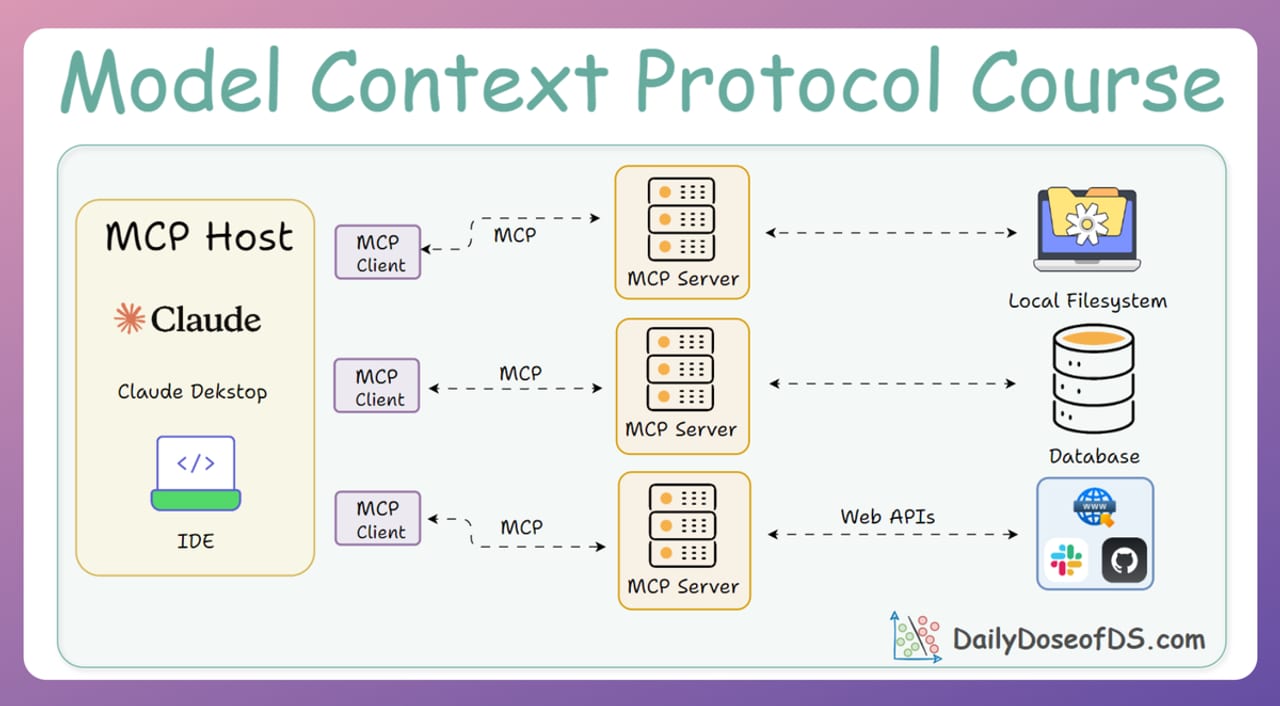
The simplest way to hold them in your head is a three-word vocabulary. Tools are verbs: things the AI can do (run a query, send an email, create a file). Resources are nouns: data the app can read (a README, a database schema, a sensor reading). Prompts are scripts: structured conversation starters that the user can invoke (a code-review checklist, a bug-report template, a commit-message generator).
The analogy that makes the control model click: imagine a professional assistant working at a reception desk. The assistant (the model) can pick up the phone and call a supplier whenever the job requires it — that is a tool. The office manager (the application) decides which folders are already on the desk before the assistant sits down — those are resources. The client (the user) walks in and hands the assistant a pre-printed form to fill out — that is a prompt. Different hands, different moments, different purposes.
Why the distinction matters
Every MCP tutorial shows you how to register a tool, so most server authors default to tools for everything. That works, but it leaves capability on the table and creates real problems as servers grow more complex.
Security surface: Tools imply execution — the model can call them autonomously, at any point in a conversation, any number of times. If you expose a read_config_file function as a tool, the model can invoke it without the user knowing, on any conversation turn. Wrapping the same data as a resource means the application decides when and whether it is loaded. Resources are read-only by definition; tools are not.
Performance: Resources are cacheable. A schema file or a README that never changes can be loaded once and kept in the client. A tool call goes over the wire every time. Using tools for static data burns latency and tokens unnecessarily.
Predictability and UX: Prompts let you package expert workflows and surface them directly in the host UI — as slash commands in Claude Desktop, as menu items in Cursor, as quick-action buttons in custom clients. Instead of relying on the user to know exactly how to phrase a bug report or code review request, a prompt presents a ready-made template they can invoke in one click and fill in the blanks.
How each primitive works
All three primitives share the same underlying transport (JSON-RPC 2.0 over stdio or HTTP/SSE), but they use different RPC methods and have different lifecycle guarantees.
- Controlled by: the model
- Invoked via: tools/call
- Can have side effects: yes
- Cacheable: no
- Defined with: name + description + JSON Schema input
- Returns: text, images, or embedded resources
- Controlled by: the application
- Invoked via: resources/read
- Can have side effects: no (read-only)
- Cacheable: yes
- Defined with: URI + MIME type + optional template
- Returns: text or binary blob
- Controlled by: the user
- Invoked via: prompts/get
- Can have side effects: no
- Cacheable: yes
- Defined with: name + description + argument list
- Returns: sequence of PromptMessage objects
Tools: the model decides
A tool is a function the server exposes and the model invokes autonomously. When a user asks "deploy the latest build to staging", the model evaluates the tools it knows about, picks deploy_build, constructs the arguments, and sends a tools/call request. The model made that decision — the user did not select the tool by name.
Each tool definition has three mandatory fields: a name (unique identifier), a description (what the model reads to decide whether to use it — write this carefully), and an inputSchema (a JSON Schema object describing the arguments). The server responds with a list of content blocks: text, images, audio, or embedded resource references.
// TypeScript SDK — registering a tool
server.tool(
  "search_docs",
  "Search the internal knowledge base and return the top matches.",
  { query: z.string(), maxResults: z.number().default(5) },
  async ({ query, maxResults }) => {
    const hits = await knowledgeBase.search(query, maxResults);
    return {
      content: [{ type: "text", text: JSON.stringify(hits) }]
    };
  }
);
Resources: the application decides
Resources represent data that the host application loads for context. Each resource has a URI (file:///path/to/readme.md, postgres://db/schema, config://app/settings), a MIME type, and content (text or binary). The client calls resources/list to discover what is available, then resources/read with a specific URI to fetch the content.
Resource templates extend this with URI templates: a server can expose a pattern like file:///{path} that lets clients construct valid URIs dynamically. This is how a filesystem server exposes "any file" without pre-enumerating every path.
// TypeScript SDK — registering a static resource
server.resource(
  "app-config",
  "config://app/settings",
  { mimeType: "application/json" },
  async () => ({
    contents: [{
      uri: "config://app/settings",
      text: JSON.stringify(await loadConfig())
    }]
  })
);

// Resource template for any file path
server.resource(
  "file",
  new ResourceTemplate("file:///{path}", { list: undefined }),
  { mimeType: "text/plain" },
  async ({ path }) => ({
    contents: [{ uri: `file:///${path}`, text: await fs.readFile(path, "utf8") }]
  })
);
Prompts: the user decides
A prompt is a reusable conversation template. The server defines a name, a description, and optional typed arguments. When the user triggers it (by typing a slash command, clicking a quick action, or selecting from a menu), the host calls prompts/get with the name and any argument values, and the server returns a list of PromptMessage objects. Those messages are injected into the conversation before the model sees anything.
# Python SDK — registering a prompt
@mcp.prompt()
def git_commit(changes: str) -> list[PromptMessage]:
    """Generate a well-structured Git commit message."""
    return [
        PromptMessage(
            role="user",
            content=TextContent(
                type="text",
                text=(
                    "Write a concise Git commit message for these changes.\n"
                    "Follow the Conventional Commits format.\n\n"
                    f"Changes:\n{changes}"
                )
            )
        )
]Choosing the right primitive
The control model is the clearest decision heuristic: ask who should decide when this capability is invoked. If the model should pick it autonomously based on conversation context, that is a tool. If the application should load it as background context before the model starts reasoning, that is a resource. If the user should explicitly trigger a structured interaction, that is a prompt.
| Scenario | Right primitive | Why |
|---|---|---|
| Create a GitHub issue | Tool | Has a side effect; model decides based on user intent |
| Read the repo README for context | Resource | Static data; application loads it; no side effect |
| Write a standardized bug report | Prompt | User picks it; structures the conversation up front |
| Query live database rows | Tool | Dynamic, potentially mutating, model-driven |
| Expose the DB schema | Resource | Static metadata; app loads it once; cacheable |
| Run a code review workflow | Prompt | User-invoked; defines the analysis frame before model responds |
| Send a Slack message | Tool | Side effect; model triggers it |
| List available Slack channels | Resource | Reference data; loaded for context, not actions |
Client support and common pitfalls
Tools enjoy universal support across every MCP-compatible host. If you are building a server for the broadest possible audience, tools are safe. Resources and prompts have narrower but growing support: Claude Desktop, Cursor, and most major clients handle resources well; prompts surface as first-class slash commands in Claude Desktop and as quick actions in Cursor, but some lighter clients ignore the prompts capability entirely.
The practical implication: if your server's value depends on prompts, document which clients support them and test end-to-end. Do not assume every MCP host will surface your prompts in the UI — check the host's capability negotiation on connect.
Pitfall 1 — Turning everything into a tool
The most common error. Because tools are the most familiar MCP concept and show up in every hello-world tutorial, developers default to building a tool for every capability. The result: a read_readme tool, a get_schema tool, a load_config tool — all of which should be resources. Tools carry implicit execution cost, security surface, and autonomy risk. Static, read-only data should almost always be a resource.
Pitfall 2 — Overly rigid prompts
Prompts that prescribe every sentence produce robotic output. The goal of a prompt template is to frame what to analyze and impose structure (use these sections, follow this format) — not to dictate how the model reasons. Leave room for the model to apply judgment within the frame you set.
Pitfall 3 — Missing the description on tools
The model uses your tool's description field to decide whether to call it. A vague description like "Gets stuff" will cause the model to either never use the tool or call it randomly. Write descriptions that specify the tool's purpose, when to use it, and what format to expect back. Think of it as documentation written for the model, not for a human.
Going deeper
The three primitives interact in non-obvious ways as servers grow more sophisticated. A tool can return an embedded resource reference rather than raw text — the model receives a pointer, and the client can fetch the full resource later. This keeps large payloads out of the conversation context while still making them available. The 2025-06-18 spec formalizes this with structured content types in tool responses.
Resource subscriptions (supported in clients that advertise the subscribe capability) let a client register interest in a resource URI. When the resource changes — a file is edited, a config reloads — the server pushes a notifications/resources/updated message. The client can then re-read the resource without polling. This pattern is essential for live context: editor buffers, real-time dashboards, or streaming sensor data.
Prompt + resource composition is a powerful pattern documented in the official MCP blog: a prompt template can embed resource references in its returned messages. For example, a review_pr prompt can return a message that includes both the instruction text and an embedded reference to git://diff/HEAD. The model receives the instruction and the diff in one clean package, without the application having to manually stitch them together.
Capability negotiation happens at connection time via the initialize handshake. Clients declare what they support; servers respond with which primitives they expose. This means a server can safely advertise all three primitives even if some clients ignore resources or prompts — the protocol gracefully degrades. When building a production server, inspect the capabilities object from the client to decide which primitives are worth advertising for that session.
As MCP matures, new primitives have been proposed but consistently rejected in favor of extending the existing three. The 2026 roadmap (published on the official MCP blog) focuses on improving sampling, roots, and elicitation within the existing shape rather than adding a fourth primitive. Understanding tools, resources, and prompts deeply is a stable investment — the vocabulary is not going to change.
FAQ
Can a single MCP server expose all three primitives at once?
Yes. A server can register tools, resources, and prompts in any combination. Most real-world servers expose at least tools and resources together. The client discovers all advertised capabilities during the initialize handshake and can use whichever ones it supports.
What happens if a client does not support resources or prompts?
MCP uses capability negotiation: the client declares what it supports during the handshake, and the server only sends capability lists that match. If a client does not advertise resource support, the server simply does not send a resources/list. The connection still works; tools remain available.
Can an MCP tool also read data, or are tools only for writes?
Tools can read data — a search_docs or get_weather tool is perfectly valid. The distinction from resources is not read vs. write; it is model-controlled vs. application-controlled and dynamic vs. cacheable. If the data changes on every call or requires model-side reasoning to decide when to fetch it, a tool is appropriate. If it is reference data the app loads once for background context, use a resource.
How do MCP prompts differ from system prompts?
A system prompt is baked into the host application and the user cannot see or change it. An MCP prompt is defined by the server, advertised to the client, and explicitly chosen by the user at conversation time. It returns a sequence of messages that get injected into the conversation — it is more like a template the user runs on demand than a background instruction the app hides.
Are MCP resource URIs standardized, or can I invent my own scheme?
You can use any URI scheme that is valid for your context. Common choices are file:// (local files), postgres:// or db:// (database objects), and custom schemes like config:// or git://. The protocol does not restrict schemes. Whatever URI you register with resources/read, your server must be able to resolve it — the URI is just an opaque identifier from the protocol's perspective.
What is the difference between a prompt argument and a tool input parameter?
Both are key-value pairs the caller provides, but they serve different roles. Tool input parameters are passed to a function that runs server-side code and may cause side effects. Prompt arguments are substituted into a message template and returned as conversation messages — no server-side execution happens. Prompts are templates; tools are functions.