In plain English
MCP lets an AI app connect to outside tools and data through a server. When that server runs locally on your own machine as a subprocess (the stdio transport), there's nothing to log into — the server already runs as you, with your files and your environment variables. It inherits your machine's trust automatically.
A remote MCP server is different. It lives on the internet at an https:// address and serves many people at once. It has no idea who you are. If it exposes your email, your calendar, or your company's database, it cannot just hand that data to anyone who sends a request. It needs to answer one question first: who is calling, and what are they allowed to do? That question is what MCP authorization solves.
Think of a hotel. A local MCP server is your own house — you walk in freely because it's yours. A remote MCP server is the hotel safe in your room. The front desk (an authorization server) checks your ID and gives you a key card. The safe (the MCP server) doesn't check your passport itself; it just trusts the key card and only opens for a valid one. You can hand that card to a bellhop to fetch something, the card works only for your safe, it expires at checkout, and the desk can deactivate it the moment you report it lost. MCP authorization is exactly this pattern, built on OAuth 2.1.
Why it matters
The moment an MCP server leaves your laptop and becomes a hosted service, three problems appear that local servers never had to worry about.
- Identity. A remote server faces strangers. It must distinguish you from everyone else on the internet before it returns a single row of your private data. Without authentication there is no safe way to host it.
- Scoped permission. You rarely want to grant an AI app everything. Maybe it can read your calendar but not delete events; send one Slack channel but not browse your DMs. OAuth scopes let the user grant a narrow slice of access instead of all-or-nothing.
- Revocability. A long-lived password you paste into a config file is a liability — if it leaks, the attacker has it forever and you may never know. An OAuth access token is short-lived and revocable: you can cut off an app's access from the authorization server without changing your actual password.
Why not just paste an API key into the AI app's config? People do, and for a personal script it's fine. But a raw API key is a single secret that usually grants full account access, never expires on its own, and has to be copied into every client that wants in. OAuth replaces that with a flow where the user approves access in their browser, the app never sees the password, and the resulting token is narrow, expiring, and revocable. That difference is what makes a public, multi-user MCP server safe to operate.
Who should care? Anyone building or connecting a hosted MCP server. A SaaS company exposing its product to AI assistants. A team that wants its internal MCP server reachable from a cloud-hosted agent rather than only from laptops. Anyone who has clicked "Connect" on a remote MCP server and seen a browser consent screen pop up — that screen is MCP authorization at work.
How it works
MCP authorization is a subset of standard OAuth 2.1 — the same family of flows that powers "Sign in with Google" buttons across the web. It does not invent new cryptography; it reuses the proven OAuth machinery and pins down how MCP clients and servers should wire it together. Three roles do all the work.
- *MCP server = OAuth resource server.* It holds the protected data and tools. Its only auth job is to check that an incoming request carries a valid access token meant for it, then serve the request. It does not handle passwords or login screens.
- Authorization server = the front desk. It talks to the user (shows the login and consent screen) and issues access tokens. It can be hosted by the same company as the MCP server or be a completely separate identity provider.
- MCP client = the AI app. It discovers where to authenticate, runs the OAuth flow on your behalf, stores the resulting token, and attaches it to every request to the MCP server.
The flow, step by step
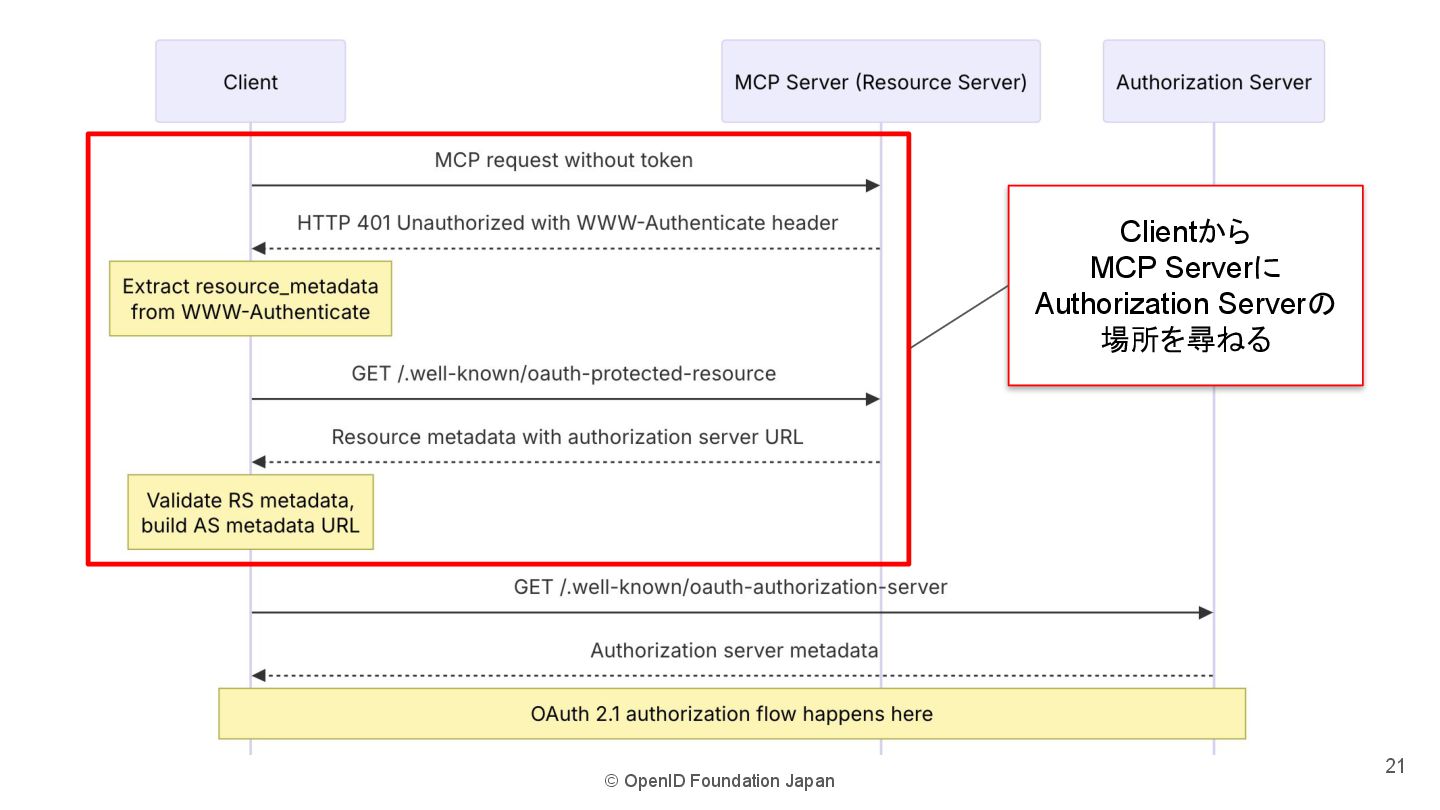
The first time the client calls a protected MCP server, it has no token, so the server refuses and tells the client where to go authenticate. The client then runs the standard OAuth browser flow, gets a token, and retries. From then on, every request carries that token.
Walking through it: the client sends a request with no token. The MCP server replies HTTP 401 Unauthorized with a WWW-Authenticate header that points to its protected resource metadata — a small published document (at /.well-known/oauth-protected-resource) that names which authorization server to use. The client reads that, fetches the authorization server's own metadata to find its endpoints, then opens your browser so you can log in and approve the requested scopes. After you consent, the client receives a short-lived access token (often with a refresh token). It puts that token in the Authorization header on every future request, and the server validates it before responding.
Two details make this secure and worth knowing by name. PKCE (Proof Key for Code Exchange) is required: the client generates a one-time secret so that even if the authorization code is intercepted in transit, an attacker can't redeem it. And the resource parameter (RFC 8707) is required: the client states exactly which MCP server the token is for, and the server validates that the token's audience matches itself. That binding stops a token meant for one server from being replayed against another.
Tokens, scopes, and what they actually mean here
Two words do most of the heavy lifting in any OAuth conversation. Getting them straight makes the whole flow click.
| Term | What it is | Why it matters in MCP |
|---|---|---|
| Access token | A short-lived string the client attaches to each request as Authorization: Bearer <token> | Proves the request is allowed right now. Expires on its own, so a leak has a limited blast radius. |
| Scope | A label for one slice of permission, e.g. calendar.read | Lets the user grant narrow access. The server enforces it; an out-of-scope action returns 403, not 200. |
| Refresh token | A longer-lived credential used to get a fresh access token without re-prompting the user | Keeps the connection working over days without making you log in every hour. For public clients it must be rotated on each use. |
| Audience | The specific server a token was issued for (set via the resource parameter) | The MCP server rejects any token not minted for itself, blocking token-replay across services. |
The status codes a remote MCP server returns map cleanly onto these ideas, and reading them is the fastest way to debug an auth problem:
- 401 Unauthorized — no token, or the token is invalid/expired. The fix is to (re)authenticate. On the very first request this is expected: it's how the server tells the client where to authenticate.
- 403 Forbidden — the token is valid, but it lacks the scope for this action. The user authenticated but didn't grant enough permission. The fix is a broader scope, not a new login.
- 400 Bad Request — the authorization request itself was malformed (e.g. a missing required parameter).
Why local servers skip all this
It's worth being explicit about why a stdio server needs no OAuth while an HTTP server does — it's not an oversight, it's the security model. The two live in completely different trust environments.
- Runs as a subprocess of your app
- Already executes as *you*
- Reads secrets from the environment
- Single user — your machine
- No login, no tokens, no OAuth
- Runs on a server on the internet
- Faces anonymous callers
- Must verify identity per request
- Many users at once
- OAuth tokens, scopes, expiry
A local server launched over stdio is part of your session. It can already read the files you can read and run the commands you can run, so adding a login screen would be pure theatre — the trust boundary is your operating-system account, and you're already inside it. The right way to give a local server a secret (an API key for some service it calls) is an environment variable, exactly as the spec recommends.
A remote server has no such boundary to lean on. Anyone on the planet can send it an HTTP request. The only thing standing between a stranger and your data is the access token, which is why the full OAuth apparatus — identity, scopes, expiry, audience binding — only shows up here. If you're choosing between the two transports, the transports article covers the tradeoffs beyond auth.
Common setup mistakes
Authorization is the part of building a remote MCP server people get wrong most often, usually because OAuth has many moving parts and the failure mode is a confusing 401 loop. The biggest pitfalls:
- Skipping audience validation. The most dangerous mistake: a server that accepts any valid-looking token instead of checking the token was issued for it. That lets an attacker reuse a token minted for another service. The spec is blunt here — the server must validate the audience and reject tokens that aren't meant for it.
- Token passthrough. If your MCP server calls an upstream API, do not forward the client's token to it. That's a separate trust boundary. The MCP server should act as its own OAuth client to the upstream service and obtain a different token. Passing tokens through causes the classic "confused deputy" vulnerability.
- Forgetting the resource parameter. A client that omits it can't get an audience-bound token, which then can't be safely validated. The spec requires clients to send it on both the authorization and token requests.
- Long-lived or non-revocable tokens. Issuing access tokens that never expire defeats half the point of OAuth. Keep access tokens short-lived and rotate refresh tokens, so a leaked token stops working quickly.
- Misreading 401 as a bug. The first 401 is supposed to happen — it's the server's way of advertising where to authenticate. Treat it as the start of the flow, not an error to suppress.
Going deeper
The flow above is the conceptual core, but a few finer points separate a demo from a server you'd run in production.
Separating the resource server from the authorization server. The spec deliberately keeps these roles distinct even when one company runs both. The MCP server holds data and validates tokens; the authorization server handles login and issues them. This split means you can put an existing identity provider (your company SSO, or a managed auth service) in front of an MCP server without rebuilding login logic. The MCP server just publishes which authorization server to trust via its protected resource metadata.
Discovery is metadata-driven, not hardcoded. Notice that the client never has the authorization server's address baked in. It learns it at runtime: a 401 points to the resource metadata, which names the authorization server, whose own metadata then lists the exact endpoints. This indirection (built on RFC 9728 and RFC 8414) is what lets one generic MCP client talk to many different servers, each with its own identity provider, without per-server configuration.
The confused-deputy problem. When an MCP server sits between a client and a third-party API, an attacker can try to trick it into using its own trusted position to act on stolen credentials. The defenses are strict audience validation, never passing tokens through unchanged, and — for proxy servers using a shared client ID — getting fresh user consent per client. This is the subtlest part of the threat model and the reason the spec spends so much of its security section on token handling.
Where this fits in the bigger picture. Authorization is what turns MCP from a local developer convenience into infrastructure that hosted AI agents can safely use over the network. Once you understand it, the natural next steps are learning the rest of the protocol — what servers actually expose via tools, resources, and prompts — and trying it hands-on by building your own MCP server. The single durable lesson: a remote server's safety rests entirely on validating that each token is current, scoped, and meant for this server — so most of your auth effort belongs in token validation, not in the login screen.
FAQ
Does MCP use OAuth for authorization?
Yes. MCP authorization is based on OAuth 2.1 — it implements a selected subset of the OAuth specs. A remote MCP server acts as an OAuth resource server, a separate authorization server handles login and issues tokens, and the AI app acts as the OAuth client. It applies to HTTP-based remote servers, not local stdio ones.
Why don't local MCP servers need authorization?
A local server launched over the stdio transport runs as a subprocess of your app, so it already executes with your machine's permissions and can read what you can read. There's no anonymous caller to authenticate. The spec says stdio servers should retrieve credentials (like an upstream API key) from the environment instead of running an OAuth flow.
What's the difference between a 401 and a 403 from an MCP server?
A 401 Unauthorized means there's no valid token — you need to authenticate (and the very first 401 is how the server tells the client where to authenticate). A 403 Forbidden means your token is valid but lacks the scope for this specific action. So 401 is "who are you?" and 403 is "you're known, but not allowed to do this."
What is the resource parameter in MCP authorization?
It's a value (defined by RFC 8707) that the client sends during the OAuth flow to state exactly which MCP server the token is for. The MCP server then validates that the token's audience matches itself and rejects tokens issued for anything else. This audience binding stops a token meant for one server from being replayed against another.
Can I just use an API key instead of OAuth for a remote MCP server?
For a personal, single-user script it can work, but a raw API key is usually full-access, never expires, and must be copied into every client. OAuth is preferred for hosted, multi-user servers because the user approves access in their browser, the app never sees the password, and the resulting token is scoped, short-lived, and revocable.
What is Dynamic Client Registration in MCP?
It's an OAuth feature (RFC 7591) that lets an MCP client register itself with an authorization server it has never met before and obtain a client ID automatically, with no manual setup. MCP clients and authorization servers should support it because it lets a client connect to brand-new MCP servers on the fly instead of needing every server pre-configured.