In plain English
When you start a coding agent in your project — whether that's Claude Code, OpenAI Codex, Cursor, or a dozen others — the agent has no idea what your project is. It doesn't know your build command, your test runner, your naming conventions, or the three files you never want touched. AGENTS.md and CLAUDE.md are the solution: plain Markdown files you drop into your repository that the agent reads before it does anything, giving it the standing briefing it needs to operate intelligently on your code.
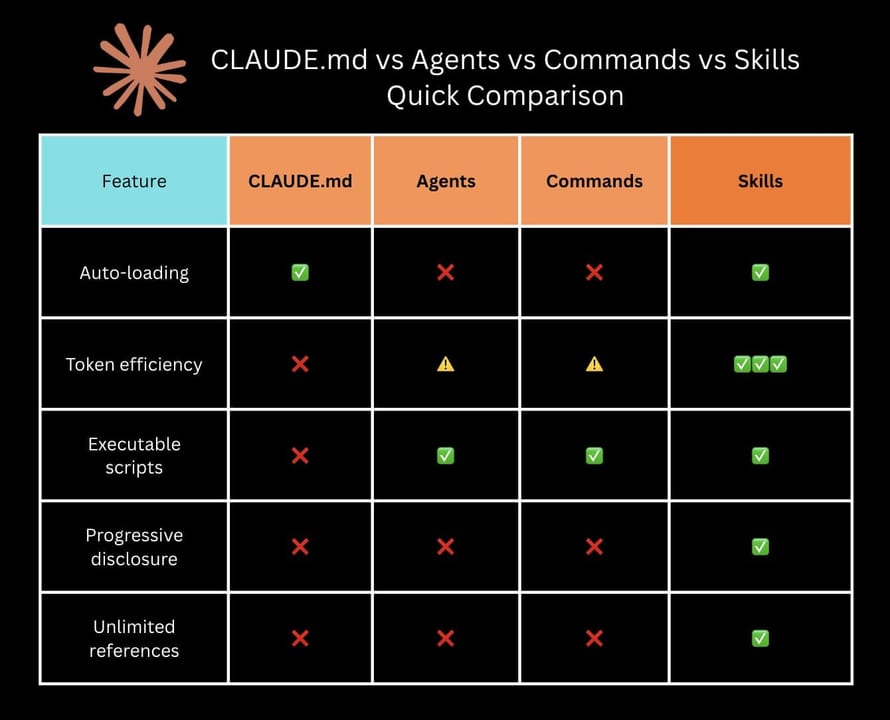
Think of them as the onboarding document you'd hand a skilled new contractor on day one. A good onboarding doc doesn't re-explain what TypeScript is — the contractor already knows. It tells them this specific project: run bun test to run the tests, don't edit anything under vendor/, and the API client lives in src/lib/api.ts. That's exactly what a context file does for an agent.
The two files serve the same purpose but come from different ecosystems. CLAUDE.md is Anthropic's native format for Claude Code — it's loaded into Claude's context window at the start of every session. AGENTS.md is an open standard originally published by OpenAI for Codex and donated to the Linux Foundation's Agentic AI Foundation (AAIF) in December 2025, alongside Anthropic's Model Context Protocol (MCP). By early 2026, AGENTS.md had been adopted by over 60,000 open-source projects and more than 18 agent tools — including Codex, Cursor, Devin, Gemini CLI, GitHub Copilot, Warp, and VS Code.
Why it matters
Coding agents are stateless by default. Every new session, the agent starts cold with no memory of what happened last time. Without a context file, you have to re-explain your project every single conversation: what the build command is, which files are generated (don't edit!), what testing framework you use, how the codebase is organized. That repetition wastes time and tokens, and it's easy to forget something critical.
With a context file, that ground truth lives in the repo. Commit it once, and every agent session — yours, your teammates', or an automated CI agent — starts with the same accurate briefing. Updates to the file are code changes, so they go through the same review process as everything else.
What goes wrong without one
- Wrong build commands. An agent guesses
npm run buildwhen you usebun run build, gets an error, spends turns debugging a non-problem. - Editing generated files. The agent helpfully rewrites
src/generated/schema.ts— which is overwritten bybun codegenon every build, losing the changes immediately. - Wrong test scope. Running the full test suite (two minutes, cloud cost) when you just wanted the agent to run one fast unit test (
bun test -- auth.test.ts). - Ignored conventions. The agent uses
anyin TypeScript, violating a rule that isn't enforced by the linter but that your team cares about. - Redundant explanations. You paste the same "our API client is in
src/lib/api.tsand always typed" note into every session prompt.
A well-written context file prevents all of these by giving the agent ground truth before it takes a single action. The file pays for its token cost many times over in avoided mistakes and skipped re-explanations.
How agents read these files
The mechanics differ slightly between tools, but the principle is the same: at session start, the agent discovers context files by traversing the directory tree and concatenates them into its context window, where they act like part of the system prompt for the entire session.
CLAUDE.md: a layered hierarchy
Claude Code discovers CLAUDE.md files at multiple levels, and all of them load simultaneously — they combine rather than replacing each other. Files closer to your working directory take precedence when there is a conflict:
| Level | Path | Purpose |
|---|---|---|
| Global | ~/.claude/CLAUDE.md | Personal preferences applied to every project on your machine |
| Project root | ./CLAUDE.md | Team-shared standards; commit this to version control |
| Local project | ./CLAUDE.local.md | Personal overrides for this project; add to .gitignore |
| Subdirectory | ./src/CLAUDE.md | Rules scoped to one part of the repo (e.g. frontend vs. backend) |
This lets you keep personal habits ("always output concise diffs") at the global level while the team-shared rules live in the repo. A developer can override for their own workflow without touching the committed file.
AGENTS.md: root-to-leaf layering
Codex (and other AGENTS.md-aware tools) walk the directory tree in the opposite direction: from the repo root down to the current directory. An AGENTS.md at the root sets baseline rules; an AGENTS.md in src/frontend/ adds or overrides rules for that subtree. The instruction chain is assembled root-first, so deeper files can add specifics without rewriting the whole baseline. Codex also supports AGENTS.override.md at any level to force-override the layer below.
What to put in (and leave out)
Every line in your context file gets loaded into every session — it's always in the context window, always consuming tokens. A 2,000-token CLAUDE.md across 30 messages costs you 60,000 tokens just on the persistent instructions. The golden rule is: include only what changes the agent's behavior and isn't obvious from the code itself.
High-value content to include
- Exact build and test commands.
bun run build,bun test,bun test -- --testPathPattern=<filename>— wrapped in backticks so the agent can run them verbatim. - Single-file test commands. Agents default to running the full suite; tell them the scoped command so they don't waste minutes on an unrelated change.
- Files and directories to never touch.
vendor/,dist/,src/generated/,.envfiles, migration files that should be generated by a tool — list these explicitly. - Architecture decisions that aren't obvious. The API client pattern, how auth state flows, why the build has two steps rather than one.
- Tech-stack specifics. Strict TypeScript (no
any), Bun not Node, which CSS methodology, which test framework. - Project-specific warnings. Known footguns, deprecated patterns still present in old code that the agent shouldn't replicate.
- Key file locations. Where the router lives, where shared utilities are, where to add new components.
What to leave out
- Generic best practices. "Write clean code" wastes tokens — the agent will follow those anyway, and vague instructions are less useful than specific ones.
- Code style rules a linter enforces. If ESLint or Prettier already handles it, don't duplicate it. LLMs are in-context learners and will match existing code style by observation.
- Full API documentation. Link to the docs or a local
docs/directory instead of pasting entire specifications — those belong in files the agent fetches when needed, not in the standing context. - Task-specific instructions. If a rule only applies to one task, put it in the prompt for that task, not in the permanent context file.
- Redundant explanations of what the agent already knows. Skip "TypeScript is a typed superset of JavaScript" — these burn tokens on things the model already knows deeply.
A minimal, practical template
# Project: My App

## Commands
- Install: `bun install`
- Dev server: `bun dev` (port 5173)
- Build: `bun run build`
- Typecheck: `bun run typecheck`
- Test all: `bun test`
- Test one file: `bun test -- <filename>`
- Lint: `bun run lint`

## Do not modify
- `src/generated/` — regenerated by `bun codegen` on every build
- `bun.lock` — only update via `bun install`
- `dist/` — build output, never edit manually
- `.env`, `.env.local` — secrets; never commit

## Architecture
- API client: `src/lib/api.ts` — always typed, never use fetch directly
- Router: `src/routes/` — file-based, matches Vite convention
- State: Zustand store in `src/store/`

## Conventions
- Strict TypeScript — no `any`, no `as` casts without a comment explaining why
- Tests co-located with source: `foo.ts` → `foo.test.ts`
- All dates as ISO strings; no Date objects in API responsesAGENTS.md vs CLAUDE.md vs other instruction files
The landscape of agent context files is larger than just two options. Different tools have their own native formats, and knowing which file to create (or whether to create all of them) depends on which agents you use.
- Native to Claude Code
- Hierarchical, multi-level
- Global + project + local
- Injected as system prompt
- Supports @file imports
- Open standard (Linux Foundation)
- Root-to-leaf layering
- 18+ tools support it
- Codex, Cursor, Devin, Gemini CLI
- No special schema required
- Native to GitHub Copilot
- Lives in .github/
- Applies repo-wide
- Path-scoped variants supported
- AGENTS.md used alongside it
GitHub Copilot reads .github/copilot-instructions.md for repo-wide instructions. Notably, when both an AGENTS.md and a .github/copilot-instructions.md exist in the same repo, GitHub Copilot uses instructions from both. This means maintaining one AGENTS.md at the root covers most tools, while tool-specific files can layer additional instructions on top without duplicating the common rules.
The practical recommendation for most teams: commit an AGENTS.md to the repo root to handle the broad ecosystem, and add a CLAUDE.md or CLAUDE.local.md for Claude Code-specific layering (personal global config, team project file, or individual developer overrides). The cost of having both is low — they share most of the same content, and the agent that reads each file is different.
Common pitfalls and how to avoid them
Context files are easy to create and surprisingly easy to get wrong. Here are the patterns that undermine them most often.
Letting the file go stale
The most common problem: the build command in CLAUDE.md still says npm run build six months after you migrated to Bun. The agent runs the wrong command, gets an error, and wastes turns debugging a lie in its own instructions. Treat the context file as code: update it in the same pull request as the change it documents. Some teams add a reminder in their PR template: "Did you update CLAUDE.md / AGENTS.md?"
Writing rules the agent ignores
Instructions get ignored when they're vague, buried, or contradicted by the code itself. "Follow best practices" means nothing. A rule buried in paragraph ten of a 400-line file is unlikely to surface. And if the existing codebase is full of any casts, writing "never use any" in CLAUDE.md creates a contradiction the agent has to guess how to resolve. Write specific rules, keep the file short, and fix the code the rule is trying to enforce. If you need the agent to avoid a pattern, remove that pattern from the codebase first.
Putting secrets or sensitive info in the file
CLAUDE.md is usually committed to version control. AGENTS.md almost always is. Neither should contain API keys, passwords, database connection strings, or any credential — not even as an example. If an agent needs a credential, provide it via environment variable and document the variable name in the context file: API_KEY env var (ask the team for value) is fine; the actual key value is not.
One enormous file instead of layered files
It's tempting to dump everything into a single root-level file. Instead, use the layering system for what it's designed for. Frontend-specific rules belong in src/frontend/AGENTS.md or a subdirectory CLAUDE.md, not in the root file that every backend agent session also reads. Targeted files mean the agent is working with relevant instructions for its current task, not wading through context for a different part of the codebase.
Going deeper
Once you have a working context file, a few advanced patterns let you get more out of it — and help you think about what it means for agentic workflows at scale.
Auto-memory and agent-written updates
Claude Code has a built-in auto-memory system: over time it records things it discovers about your project in ~/.claude/projects/<project>/memory/ — file naming patterns, dependencies, conventions it inferred from your code. You can view this with /memory inside a session. More powerfully, you can ask the agent to update CLAUDE.md itself: if it discovers something worth preserving ("this migration pattern breaks if run twice"), telling it to append a note to CLAUDE.md means future sessions benefit from that learning. This is a lightweight form of agent-maintained documentation.
Context files in CI and automated agents
When you run a coding agent in CI — to triage issues, review PRs, or auto-fix lint — the context file is even more important because there's no human in the loop to correct a wrong assumption. A CI agent that runs npm test because AGENTS.md is missing or stale will fail loudly and expensively. For automated agents, verify your context file is accurate before you set them loose on unattended workflows. The context file effectively becomes part of your CI configuration.
The zero-hallucination principle
Everything in a context file should be verifiably true. If you write a command, run it and confirm it works. If you document a file path, check the file exists. Agents treat the context file as authoritative — a wrong URL, a renamed command, or a described pattern that was removed from the codebase six months ago are all forms of hallucination-by-proxy: you're putting false information into the agent's most trusted source. Keep context files honest the same way you'd keep a specification document honest.
The AGENTS.md standard is still evolving
The AAIF's AGENTS.md specification is intentionally minimal — plain Markdown, no required schema, no tooling dependency — to maximize adoption. Discussion is ongoing about optional structured sections (machine-readable build commands, capability declarations) that would let tools consume the file programmatically rather than feeding it to the model as freeform text. Following the AAIF repository or the Agentic AI Foundation's working groups is the best way to track where the format goes from here.
FAQ
What is the difference between AGENTS.md and CLAUDE.md?
CLAUDE.md is Anthropic's native context file, read automatically by Claude Code at the start of every session. AGENTS.md is an open standard (now governed by the Linux Foundation's Agentic AI Foundation) designed to be read by any agent tool — including Codex, Cursor, Devin, Gemini CLI, and GitHub Copilot. The content is similar, but CLAUDE.md supports a hierarchical layering system (global, project, local) while AGENTS.md uses a root-to-leaf layering model. Claude Code does not automatically read AGENTS.md — use a symlink or the @AGENTS.md import inside CLAUDE.md to bridge them.
Does AGENTS.md work with GitHub Copilot?
Yes. When both an AGENTS.md and a .github/copilot-instructions.md file exist in a repository, GitHub Copilot uses instructions from both. This makes AGENTS.md a good baseline file — commit it once to cover Codex, Cursor, Devin, and Copilot, and add .github/copilot-instructions.md only for Copilot-specific overrides.
How long should a CLAUDE.md or AGENTS.md file be?
Target under 200 lines. Both files are loaded into the agent's context window for every session — every line costs tokens on every turn. A 1,000-line file not only consumes a large fraction of your context budget but also buries critical rules so deep that the agent is less likely to apply them consistently. Write only what changes the agent's behavior and isn't already obvious from the code itself.
Can I have AGENTS.md files in subdirectories, or only at the repo root?
Both formats support subdirectory files. AGENTS.md-aware tools like Codex build a layered instruction chain from the repo root down to the current directory — a file in src/frontend/AGENTS.md adds rules that apply only when the agent is working in that subtree. Similarly, Claude Code loads CLAUDE.md files from any directory it reads, with deeper files taking higher priority. Use this to scope frontend, backend, and infrastructure rules to the relevant part of the codebase.
Should I commit CLAUDE.md to version control?
The project-root CLAUDE.md should be committed — it contains team-shared standards that everyone (and every automated agent) benefits from. The local variant CLAUDE.local.md should be added to .gitignore because it's for personal preferences that don't belong on other machines. Your global ~/.claude/CLAUDE.md lives in your home directory and is never in any repository.
What happens if my AGENTS.md has wrong or outdated information?
The agent treats the file as authoritative, so stale information causes real problems: wrong build commands trigger confusing errors, outdated file paths send the agent hunting in the wrong place, and deprecated patterns get replicated across new code. Treat the context file as you would a specification: update it in the same pull request as the change it documents, and verify every command and path you write is actually correct.