In plain English
GitHub Copilot is an AI assistant built into your code editor. As you type, it suggests the next line — or the next ten lines — of code. You press Tab to accept, Escape to dismiss, and keep going. That's the core of it.
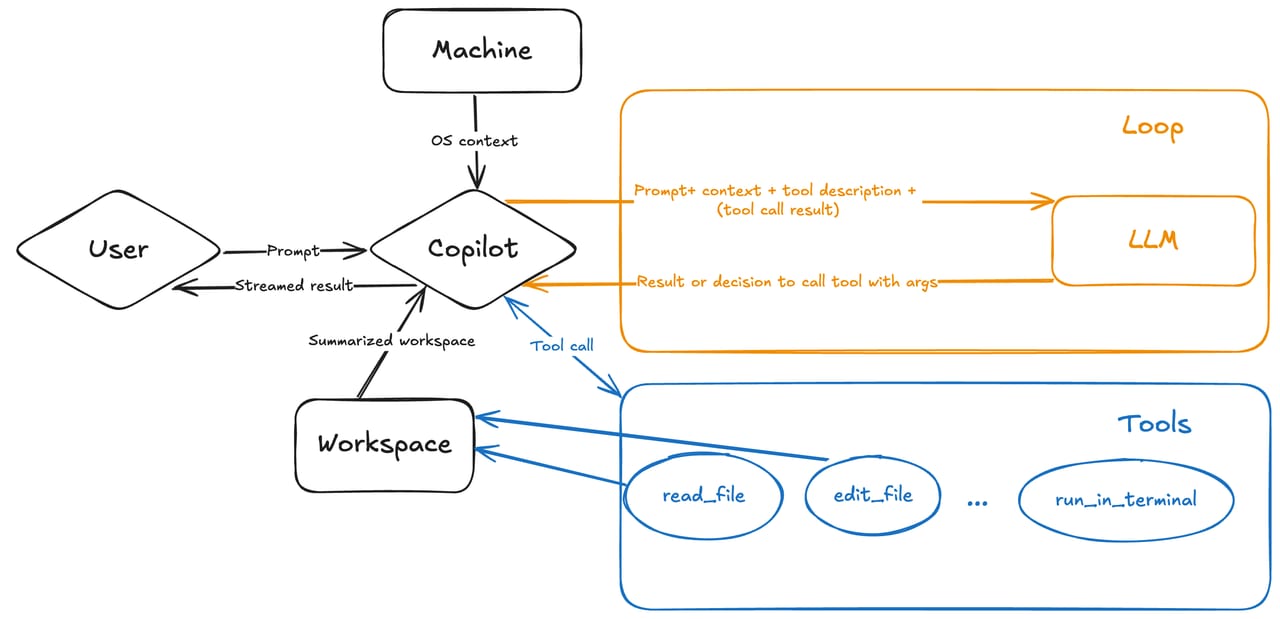
But Copilot has grown well beyond line completions. Today it's really three layers in one product: inline completions that suggest code as you write, a chat interface where you can ask questions and request rewrites, and an agent that can plan and execute multi-step coding tasks on your behalf — both inside your editor and in the cloud on a GitHub issue.
The everyday analogy: imagine a very experienced programmer sitting next to you. When you're mid-sentence in a function, they lean over and quietly finish the thought. When you're stuck on a bug, you can swivel to them and ask "why is this returning undefined?" and get a real explanation. And when you have a well-defined ticket — "add unit tests for the auth module" — you can hand it to them and come back 15 minutes later to review what they did. Completions, chat, and agent are those three modes.
Why it matters
Writing code involves a lot of boilerplate — getter/setter pairs, try/catch wrappers, import statements, test scaffolding, SQL queries that follow a familiar shape. These aren't the hard parts of a project, but they eat time and invite typos. Copilot handles them fast.
Beyond speed, there's the research cost. Before Copilot, a developer would stop, open a browser, search for the right API method, read Stack Overflow, copy an example, adapt it, and switch back to the editor. Copilot collapses that round-trip: it surfaces the pattern directly in your editor, in context, without breaking your flow.
At the team level, Copilot helps with consistency. A junior developer inherits best-practice patterns from the same models that trained on high-quality open-source code. A senior developer offloads the repetitive scaffolding while staying in control of architecture decisions. With 26 million users and the highest workplace adoption rate of any AI coding tool as of 2026, Copilot has become part of the default toolchain for many professional teams.
- Less boilerplate — repetitive patterns (tests, CRUD endpoints, config files) appear with a keystroke
- Fewer browser round-trips — API signatures and usage examples surface in your editor
- Faster onboarding — new codebases become readable faster with inline explanations from chat
- Lower friction on tedious tasks — renaming, refactoring, and docstring generation stop feeling like chores
- Agentic delegation — well-scoped tasks can be handed to Copilot's coding agent entirely
How it works
Copilot is a cloud-based service. Your editor captures a snapshot of the code around your cursor — the lines before and after it, your open file, and other open tabs — and packages that into a prompt. That prompt is sent to a large language model hosted by GitHub. The model predicts the most likely continuation, and the result comes back as a suggestion in your editor.
GitHub has recently expanded the model's context window to 192k tokens for chat, meaning it can hold a large slice of your codebase in view at once. For inline completions, the window is smaller but still spans the whole function you're in and several neighbouring functions. The model itself can be changed: paid plans let you pick from current frontier models — GPT, Claude (Sonnet and Opus), Gemini, and more — depending on the task.
The three operational modes
Copilot's three modes use the same underlying models but have very different interaction patterns.
| Mode | How you use it | What the AI does | Your role |
|---|---|---|---|
| Inline completions | Keep typing; press Tab | Predicts the next token(s) | Accept, reject, or cycle alternatives |
| Chat | Open the chat panel; ask a question | Answers, explains, rewrites, debugs | Read, iterate, apply suggestions manually |
| Agent mode (in-editor) | Describe a task in chat; enable agent mode | Plans, edits files, runs terminal commands, iterates | Review and approve each step |
| Coding agent (cloud) | Assign a GitHub issue to Copilot | Branches repo, writes code, opens a draft PR | Review the pull request |
Inline completions are unlimited on all paid plans and do not consume premium request credits. Chat, agent mode, and the coding agent consume credits (or AI Credits under the new usage-based billing that launched June 2026). The free tier includes 2,000 completions and 50 premium requests per month.
Getting suggestions worth accepting
Copilot's completions are only as good as the context it can see. A few habits dramatically increase the acceptance rate of suggestions.
Open related files
Copilot looks at your open editor tabs when constructing its context. If you're implementing a function that depends on a type defined in another file, open that file in a tab. The model will have the type signature in view and generate compatible code rather than guessing.
Write a comment before the function
A one-line comment — // Returns the total price including tax and discount — is a much stronger signal than the function name alone. Copilot treats comments as intent declarations and uses them to steer completions toward what you actually need.
Use a copilot-instructions.md file
Create a file at .github/copilot-instructions.md in your repository. This file is Copilot's standing brief — the project's coding conventions, preferred libraries, naming rules, and test patterns. Copilot reads it on every request, so you avoid repeating context in every prompt. Think of it as the README you write for the AI.
Use chat for explanations, not just generation
Chat's @workspace participant can reference your whole project. Asking "what does this function do?" or "where is this variable modified?" gets you answers grounded in your actual codebase rather than generic documentation. Use this before accepting a completion you're not sure about.
Copilot vs. Claude Code and Cursor
GitHub Copilot is not the only AI coding tool, and in 2026 the category is crowded. The three names that come up most often side by side are Copilot, Cursor, and Claude Code. They take fundamentally different approaches.
- Plugin for any editor
- $0 free / $10 Pro / $39 Pro+
- Completions + chat + agent
- Stays in your editor
- Best IDE compatibility
- AI-native VS Code fork
- $20/month
- Deep editor AI integration
- Composer for multi-file edits
- Best in-editor experience
- Terminal / CLI agent
- $20/month (Max plan)
- Autonomous task execution
- 1M token context window
- Best for complex delegation
Copilot's strongest advantage is breadth: it works in VS Code, JetBrains, Visual Studio, Vim, and Xcode, and at $10/month (or free) it's the most accessible option. If your team is on mixed editors and can't standardize on a single tool, Copilot is often the default.
Cursor's advantage is the depth of its in-editor experience — the whole IDE was designed around AI, so features like Composer (simultaneous edits across many files via a visual diff) are more polished than anything a plugin can achieve inside an existing editor.
Claude Code's advantage is autonomous task completion on complex, multi-file work. Its 1M-token context window and SWE-bench Verified benchmark scores make it the strongest choice when you want to hand off a large, well-defined task and come back to review a PR. Many developers run Copilot in their editor for day-to-day coding and Claude Code in the terminal for bigger tasks.
Going deeper
Once you're comfortable accepting completions and using chat, the higher-leverage features are worth exploring. These aren't required for everyday use, but they're where the productivity gains compound.
Agent mode for multi-step tasks
Agent mode (generally available in VS Code and JetBrains as of March 2026) lets Copilot plan a task, identify which files need to change, propose edits across all of them, run terminal commands like npm test or pytest, check the output, and iterate until the task succeeds — all in one go. You keep approval control: every terminal command is shown before it runs. Use it for tasks like "add input validation to all API endpoints" or "refactor this module to use async/await".
The coding agent for async work
The Copilot coding agent runs fully asynchronously in the cloud inside a GitHub Actions environment. You assign a GitHub issue to Copilot (or prompt it in VS Code), and it branches the repository, explores the codebase, writes code, passes tests, and opens a draft pull request for your review. It pushes commits as it works, so you can watch progress. This is designed for well-scoped, clearly specified issues — the same kind of ticket you'd hand to a junior developer with good instructions.
Multi-model selection
Paid Copilot plans let you switch the underlying model. The options include the GPT family (fast, reliable general-purpose), Claude Sonnet (strong reasoning for complex chat tasks), Claude Opus (available on Pro+, best for difficult agentic tasks), and Gemini models. Inline completions use a fast specialized model by default — the model picker primarily affects chat and agent. A practical rule: use the fast default model for completions and quick chat, switch to a reasoning-optimized model for architectural discussions or agent tasks.
Next Edit Suggestions
Next Edit Suggestions (NES) is a newer mode that predicts where you'll want to edit next rather than just what to type now. After you accept a change in one place, Copilot anticipates the related change you'll need elsewhere in the same file or a related file, and pre-generates it. This is especially useful during refactoring sessions where one name change cascades through a codebase.
FAQ
Is GitHub Copilot free?
Yes, there is a free tier. Copilot Free gives you 2,000 inline code completions and 50 premium requests per month at no cost. Paid plans start at $10/month (Pro, 300 premium requests) and $39/month (Pro+, 1,500 requests with access to the most capable models, including Claude Opus). Business and Enterprise plans are billed per seat and include admin controls.
Does GitHub Copilot work in my editor?
Copilot supports VS Code, JetBrains IDEs (IntelliJ, PyCharm, WebStorm, etc.), Visual Studio, Vim/Neovim, Eclipse, and Xcode. It also runs in GitHub.com's browser interface, so you can use chat and code search without opening a local editor.
What is the difference between Copilot agent mode and the Copilot coding agent?
Agent mode runs synchronously inside your editor. You give it a task, it plans and executes edits and terminal commands in real time, and you see every step. The coding agent runs asynchronously in the cloud: you assign it a GitHub issue, it spins up a GitHub Actions environment, codes the solution, and opens a draft PR for you to review. Agent mode is for interactive work; the coding agent is for delegating tasks while you do other things.
Does Copilot train on my private code?
For paid plans (Pro, Business, Enterprise), GitHub's default policy is that your code is not used to train Copilot models. On the free tier, code prompts and suggestions may be used to improve the model unless you opt out in your GitHub settings. Enterprise accounts get additional data governance controls and audit logs.
How do I get better suggestions from GitHub Copilot?
The most impactful habit is providing more context: open related files in editor tabs so Copilot can see type definitions and usage patterns; write a short comment above the function describing its intent; and create a .github/copilot-instructions.md file with your project's coding conventions. The model can only predict well from what it can see — better context yields better completions.
How does GitHub Copilot compare to Cursor or Claude Code?
Copilot is a plugin that works inside your existing editor, making it the most accessible option across different IDEs. Cursor is an AI-native editor (a VS Code fork) with deeper in-editor AI integration. Claude Code is a terminal-based agent optimized for autonomous multi-file task completion with a very large context window. Many developers use Copilot for daily coding and Claude Code for larger delegated tasks. The tools increasingly overlap in features.