In plain English
You wrote a Python script that calls an LLM, cleans some data, or scores a model. It works in your terminal. Now a teammate wants to try it — and suddenly you're staring at the gap between "a script that runs" and "a thing other people can click." Normally that gap means HTML, CSS, JavaScript, a web server, and a frontend framework. For a quick demo, that's a mountain of work for a molehill of value.
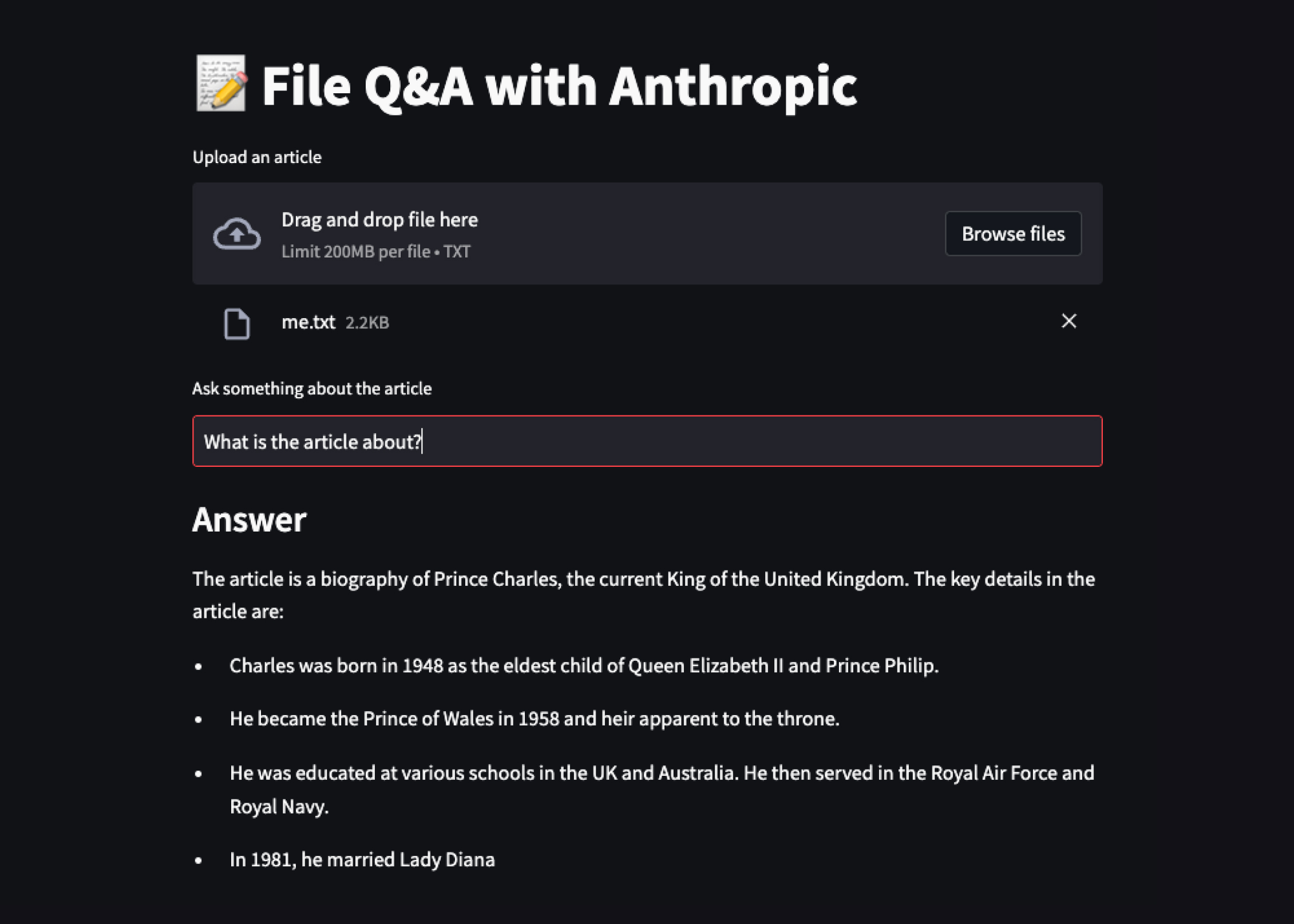
Streamlit is a Python library that closes that gap. You keep writing a normal top-to-bottom Python script, but instead of print() you call things like st.title(), st.text_input(), and st.write(). Streamlit reads your script and renders a real web app in the browser — text boxes, sliders, buttons, charts, chat bubbles — with no HTML or JavaScript anywhere. You stay in the one language you already know.
Think of it like a smart document that runs your code. In a normal document you type words and they appear. In a Streamlit script, you type Python and the output appears — a widget here, a chart there, an answer from your model below. You describe the page in the order things should show up, and Streamlit turns that description into a live, clickable UI.
Why it matters
The hard part of shipping an AI idea is rarely the model — it's everything around the model. A prompt that works in a notebook is invisible to your boss, your users, or a customer. Streamlit exists to make that last mile cheap, so you can show the idea instead of describing it.
- No frontend skills required. You don't need HTML, CSS, React, or a server framework. If you can write a Python
forloop, you can build a usable UI. That removes the single biggest blocker for data scientists and ML engineers, who know Python but not web development. - Demos in minutes, not days. A working chat interface or a "upload a PDF and ask questions" tool is a few dozen lines. That speed is why Streamlit became the default way to prototype an AI feature before committing to a full product build.
- Internal tools without a frontend team. Dashboards, data-labeling helpers, prompt-testing playgrounds, model-comparison pages — the boring-but-essential internal apps that would never justify a real web project get built in an afternoon.
- Shareable. A Streamlit app runs as a normal web server, so a colleague opens a URL and uses it. No "clone my repo and run the notebook" friction. Streamlit also offers free community hosting to put a demo online.
This is exactly why so many beginner AI projects start here. When you build a first chatbot or a chat-with-PDF tool, Streamlit is usually the layer that turns your model-calling code into something a person can actually use.
How it works
Streamlit's whole design rests on one idea that surprises people at first: the entire script re-runs from top to bottom every time the user interacts with the app. Click a button, type in a box, move a slider — Streamlit throws away the previous render and runs your .py file again, start to finish.
That sounds wasteful, but it's the secret to why Streamlit is so simple. You never write "event handlers" or "on click do X" callbacks like in JavaScript. You just write a straight-line script that reads the current widget values and produces output. Streamlit handles the loop of interaction → re-run → re-render for you.
Widgets are just variables
A widget call both draws the control and returns its current value. name = st.text_input("Your name") puts a text box on the page and gives you back whatever the user typed, as a normal Python string. On the next re-run, the box keeps its value and your variable holds it. So reading user input is as simple as reading a variable.
import streamlit as st

st.title("Greeting demo")

# This draws a text box AND returns what the user typed.
name = st.text_input("What's your name?")

# This draws a slider AND returns its current number.
shouts = st.slider("How excited?", min_value=1, max_value=5, value=1)

if name:
    st.write("Hello, " + name + "!" * shouts)
You run it from the terminal with streamlit run app.py. Streamlit starts a local web server and opens the page in your browser. Every keystroke or slider move re-runs those few lines and updates the screen. There is no separate UI file — what you see above is the whole app.
Caching and session state: the two escape hatches
"Re-run everything" raises two obvious worries, and Streamlit answers each with a small tool:
- "Won't it re-do expensive work every click?" Wrap slow work — loading a model, reading a big file, calling a database — in
@st.cache_resourceor@st.cache_data. Streamlit runs it once and reuses the result across re-runs, so only the cheap UI code repeats. - "Won't it forget everything between runs?" By default, yes — local variables reset each run. To remember things across re-runs (a chat history, a logged-in user, a counter), you store them in
st.session_state, a dictionary that survives for the length of the browser session.
A tiny AI chat app
Here is where Streamlit shines for AI: a working chat interface in well under 30 lines. Streamlit ships dedicated chat widgets — st.chat_input for the message box pinned at the bottom and st.chat_message for the bubbles — so you don't build any of that yourself. The two escape hatches above do the heavy lifting: cache the client, keep the history in session state.
import streamlit as st
from anthropic import Anthropic

st.title("Chat with Claude")

# Cache the client so we don't recreate it on every re-run.
@st.cache_resource
def get_client():
    return Anthropic()  # reads ANTHROPIC_API_KEY from the environment

client = get_client()

# Keep the conversation across re-runs.
if "messages" not in st.session_state:
    st.session_state.messages = []

# Redraw the whole conversation each run.
for msg in st.session_state.messages:
    with st.chat_message(msg["role"]):
        st.markdown(msg["content"])

# The input box returns the new message (or None) each run.
if prompt := st.chat_input("Ask something..."):
    st.session_state.messages.append({"role": "user", "content": prompt})
    with st.chat_message("user"):
        st.markdown(prompt)

    reply = client.messages.create(
        model="claude-sonnet-4-6",
        max_tokens=500,
        messages=st.session_state.messages,
    )
    answer = reply.content[0].text
    st.session_state.messages.append({"role": "assistant", "content": answer})
    with st.chat_message("assistant"):
        st.markdown(answer)
Read it through the re-run lens: when you send a message, the whole script runs again. The for loop redraws every past bubble from session_state, the new message gets appended and sent to the model, and the reply is appended and drawn. Next time, that reply is part of the history the loop redraws. The same pattern powers a chat-with-PDF app — you just add an st.file_uploader and retrieval before the model call.
Streamlit vs the alternatives
Streamlit is one of several Python tools for putting a UI on code, and the most common question is how it differs from Gradio (a sibling library popular for wrapping a single model) and from a real web framework like React with a backend API. They aim at different points on the effort-versus-control line.
- Full multi-widget app from one script
- Dashboards, internal tools, AI demos
- Re-run-the-script model
- Python only, no frontend code
- Medium control over layout
- Wraps one function/model in a UI
- Quick model demos, Hugging Face Spaces
- Inputs → function → outputs
- Python only, fewest lines
- Least layout control
- Production consumer products
- High traffic, custom UX, real auth
- Component + event model
- Needs frontend + backend skills
- Full control over everything
| You want to… | Reach for |
|---|---|
| Show a model demo in the fewest possible lines | Gradio |
| Build a small multi-page tool or dashboard in Python | Streamlit |
| Ship a polished public product with custom design and scale | A real web framework |
A useful rule of thumb: *Gradio wraps a function, Streamlit wraps a script, a web framework wraps a product.* For most beginner and internal AI work, Streamlit sits in the comfortable middle — more flexible than Gradio, far less work than a full stack.
Common pitfalls
Almost every early Streamlit confusion traces back to forgetting the re-run model. Keep these in mind and most surprises disappear.
- Expensive work without caching. Loading a model or a large file at the top of the script, uncached, makes the app crawl — it reloads on every interaction. Wrap it in
@st.cache_resource(for objects like clients/models) or@st.cache_data(for data like dataframes). - Losing state between runs. Plain variables reset each run. Anything that must persist — chat history, a counter, an uploaded result — belongs in
st.session_state, not a normal variable. - Treating it like an event-driven framework. There are no
onClickcallbacks in the React sense. You don't "handle a click"; you check a widget's returned value (if st.button(...)) inside the normal top-to-bottom flow. - Heavy compute on the main thread. A long model call blocks the whole app while it runs. For long jobs, show an
st.spinner, stream output as it arrives, and cache results so the work isn't repeated. - Assuming it's production-grade for scale. Streamlit is superb for demos and internal tools, but it runs your script per session and isn't built like a high-traffic consumer backend. Don't push it past what it's for.
Going deeper
Once the re-run model clicks, the rest of Streamlit is mostly a catalog of widgets and layout helpers. A few directions worth knowing as your apps grow:
Layout and structure. st.sidebar puts controls in a left panel, st.columns lays widgets side by side, st.tabs and st.expander organize dense pages, and dropping multiple .py files in a pages/ folder gives you a multi-page app with automatic navigation. This is usually enough structure for an internal tool without touching any CSS.
Fragments and partial reruns. The blunt "re-run everything" model has a sharper option: @st.fragment lets a piece of the app re-run on its own without re-running the whole script. For apps with one slow section and several fast widgets, this avoids redoing the slow part on every unrelated click.
Streaming LLM output. Rather than waiting for a full model response, you can stream tokens as they generate and display them live with st.write_stream. For chat apps this is the difference between a frozen screen and a response that types itself out — a big perceived-speed win for the same model.
Deployment. Locally you run streamlit run app.py. To share, Streamlit Community Cloud hosts public apps for free straight from a GitHub repo, or you can containerize the app and run it on any normal server or cloud host, since it's just a Python web process.
Where to go next. With the basics down, the natural step is building a real project: a chatbot on an LLM API, a semantic search app, or adding AI to an app you already have. Streamlit is the UI layer; the interesting work is the model logic you wire behind it. If you later outgrow the re-run model — needing custom design, fine-grained interactivity, or large-scale traffic — that's the signal to graduate to a dedicated frontend with Streamlit's app serving as the proven prototype you migrate from.
FAQ
What is Streamlit used for?
Streamlit is a Python library for turning a script into an interactive web app without writing any HTML, CSS, or JavaScript. It is most used for AI and data demos, dashboards, prompt-testing playgrounds, and internal tools — anywhere you need to put a clickable UI on Python code quickly.
Do I need to know HTML, CSS, or JavaScript to use Streamlit?
No. That is the whole point of Streamlit — you write only Python, calling functions like st.text_input and st.write, and Streamlit renders the web UI for you. If you can write a basic Python script, you can build a Streamlit app.
Why does my Streamlit app re-run the whole script on every click?
That is Streamlit's core design: every interaction re-runs your .py file from top to bottom and redraws the page. It keeps the code simple (no event callbacks), but it means expensive work should be cached with @st.cache_resource or @st.cache_data, and anything that must persist between runs should live in st.session_state.
What is the difference between Streamlit and Gradio?
Gradio wraps a single function or model in a UI in the fewest possible lines, which is ideal for quick model demos, especially on Hugging Face. Streamlit wraps a whole script, giving you more flexibility to build multi-widget apps, dashboards, and internal tools. Roughly: Gradio for a one-function demo, Streamlit for a small full app.
Can I build a chatbot with Streamlit?
Yes, and it is one of its most common uses. Streamlit has built-in chat widgets (st.chat_input and st.chat_message); you store the conversation in st.session_state and call any LLM API in between. A working chat UI fits in well under 30 lines of Python.
Is Streamlit good enough for production?
It is excellent for demos, dashboards, and internal tools, and you can deploy it for real users. It is not designed to be a high-traffic public consumer product with custom design and heavy concurrency — for that you would move to a dedicated frontend framework with a backend API, often using your Streamlit app as the validated prototype.