What Is Pinecone?
Pinecone is a fully managed vector database — a cloud service that stores and searches embeddings at any scale, without you operating a single server. You send it vectors, it indexes them, and you query it milliseconds later to find the most semantically similar ones.
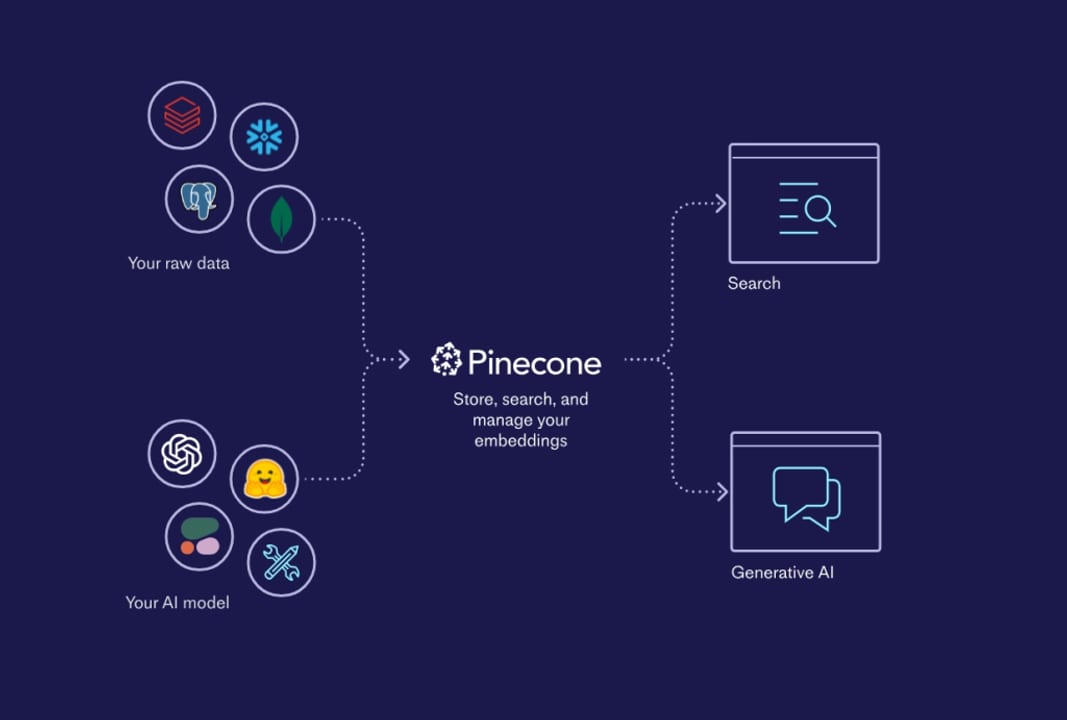
Think of it like a managed database service (the way AWS RDS handles PostgreSQL) but optimised entirely for one query type: "find the N vectors most similar to this query vector." Unlike keyword databases that match exact strings, Pinecone matches meaning — so a search for "affordable laptop" can surface results tagged "budget notebook" because their embeddings land close together in vector space.
The analogy that clicks for most builders: a relational database is a grid of rows and columns, a document database is a pile of JSON objects, and Pinecone is a map of meaning. Every item you store gets pinned at a coordinate determined by its embedding model. Querying is asking, "what is pinned nearest to this coordinate?"
Why Builders Use Pinecone
The clearest use case is Retrieval-Augmented Generation (RAG): you embed a knowledge base of documents, store the vectors in Pinecone, and at inference time retrieve the most relevant chunks to give an LLM factual context. Without fast similarity search at that retrieval step, the whole pipeline bottlenecks on latency — or you end up brute-force scanning millions of vectors on every request.
Before managed vector databases existed, teams building semantic search had to run FAISS or Annoy on a self-managed server, wire up their own replication, handle index rebuilds when data changed, and monitor disk I/O themselves. That hidden ops cost is exactly what Pinecone removes.
- RAG / LLM grounding — retrieve the freshest, most relevant context chunks before calling an LLM
- Semantic search — return results by meaning rather than keywords; handles synonyms and paraphrases naturally
- Recommendation systems — find items similar to what a user just viewed or purchased, based on content or behaviour embeddings
- Duplicate and anomaly detection — surface near-duplicate documents or flag vectors that land far from all clusters
- Multi-tenant SaaS — one Pinecone index can serve thousands of customers, each isolated in their own namespace
Pinecone is a particularly good fit when your team has no dedicated infrastructure engineers, when your vector count is expected to grow unpredictably, or when compliance requirements (SOC 2, HIPAA BAA) would take months to certify on a self-hosted stack. If you already run Kubernetes and want fine-grained cost control, self-hosted alternatives like Qdrant or Weaviate can be more economical at high volume — but the break-even is higher than most teams expect.
How Pinecone Works Under the Hood
Pinecone's current architecture is serverless: vectors are stored in immutable files on object storage (like S3), and compute nodes are spun up on demand to answer queries. This separates storage cost from query cost, which is why Pinecone can offer a generous free tier — an index with millions of stored vectors costs almost nothing if nobody is querying it.
Indexes
An index is the top-level container. Every index is configured at creation time with three immutable settings: the vector dimension (must match your embedding model — e.g. 1536 for text-embedding-3-small), the distance metric (cosine, euclidean, or dotproduct), and the infrastructure type (serverless or legacy pod-based). You cannot change dimension or metric after creation, so choose them to match your embedding model.
Namespaces
Within an index, records are partitioned into namespaces — isolated buckets that never leak into each other's queries. Every upsert and every query targets exactly one namespace (defaulting to an empty-string namespace if you omit it). Namespaces are created lazily on first upsert and never need explicit setup.
The canonical pattern is one namespace per tenant: if you are building a document assistant for multiple companies, give each company a namespace such as org-acme or org-globex. Queries from ACME never hit GLOBEX vectors, even though they share one index and one bill. Inactive namespaces in serverless indexes consume only storage, not compute.
Records and Metadata
Each record stored in Pinecone has three parts: a string id (unique within a namespace), a values array (the embedding), and an optional metadata object (arbitrary key-value pairs like {"source": "docs", "page": 12}). Metadata enables pre-filter or post-filter queries — you can narrow a search to only vectors where source == "docs" without scanning unrelated records.
Upsert vs. Update
Pinecone uses the term upsert (update-or-insert): if a record with that id already exists in the namespace it is replaced, otherwise it is created. This makes re-indexing safe — run the same pipeline twice and you get idempotent results with no duplicates.
Using Pinecone in Practice
Pinecone's Python SDK makes the common operations — create an index, upsert vectors, query — straightforward. The snippet below shows the full round-trip: create a serverless index, upsert a couple of records with metadata, and run a similarity search filtered by genre.
from pinecone import Pinecone, ServerlessSpec

# 1. Connect
pc = Pinecone(api_key="YOUR_API_KEY")

# 2. Create a serverless index (dimension must match your embedding model)
if "my-index" not in pc.list_indexes().names():
    pc.create_index(
        name="my-index",
        dimension=1536,          # e.g. OpenAI text-embedding-3-small
        metric="cosine",
        spec=ServerlessSpec(cloud="aws", region="us-east-1")
    )

index = pc.Index("my-index")

# 3. Upsert records into a namespace
index.upsert(
    vectors=[
        {
            "id": "doc-1",
            "values": [0.1, 0.2, 0.3],   # replace with real embeddings
            "metadata": {"genre": "tutorial", "lang": "en"}
        },
        {
            "id": "doc-2",
            "values": [0.4, 0.5, 0.6],
            "metadata": {"genre": "reference", "lang": "en"}
        },
    ],
    namespace="user-123"
)

# 4. Query — find top-3 most similar, filtered by metadata
results = index.query(
    vector=[0.15, 0.25, 0.35],    # query embedding
    top_k=3,
    namespace="user-123",
    filter={"genre": {"$eq": "tutorial"}},
    include_metadata=True
)

for match in results["matches"]:
print(match["id"], match["score"], match["metadata"])In a real RAG pipeline you would replace the placeholder [0.1, 0.2, 0.3] values with actual embeddings from your model. You can batch upserts up to 100 vectors per call (or use the async upsert_async method for higher throughput). Pinecone reports writes as immediately searchable — there is no separate indexing delay after an upsert on serverless.
Pinecone Pricing: How the Numbers Work
Pinecone serverless bills on three independent dimensions: storage, read units (RUs), and write units (WUs). Because they are decoupled, a large dormant index costs almost nothing, and a small hot index costs proportionally to its query volume.
| Metric | Free tier (Starter) | On-demand rate |
|---|---|---|
| Storage | 2 GB included | ~$0.33 / GB / month |
| Read units (RUs) | 1 M RU / month | $8.25 per 1 M RUs |
| Write units (WUs) | 2 M WU / month | $2.00 per 1 M WUs |
| Indexes | Up to 5 indexes | Unlimited on paid plans |
| Namespaces per index | Up to 100 | Unlimited on paid plans |
A read unit is consumed per query based on namespace size: roughly 1 RU per 1 GB of namespace data scanned, with a minimum of 0.25 RUs per query. A small 10 MB namespace costs a fraction of a cent per thousand queries. A write unit is consumed per upsert based on vector count and dimension.
The Starter (free) plan is limited to AWS us-east-1, one project, and two users — enough for prototyping and learning. The Standard plan starts at a $50/month minimum and removes regional and user restrictions. The Enterprise plan starts at $500/month and adds dedicated read nodes (flat-fee query pricing), SLA guarantees, and compliance features.
For high-throughput production workloads — thousands of queries per second sustained — Dedicated Read Nodes replace per-query billing with a flat monthly fee. This is the break-even point where Pinecone's economics converge with self-hosted alternatives, and it is worth recalculating if your RU bill starts climbing past a few hundred dollars per month.
Managed Pinecone vs. Self-Hosted: When to Switch
The honest answer is: Pinecone wins on time to production, self-hosted wins on cost at scale. The crossover point is higher than most teams expect, but it is real.
| Concern | Pinecone (managed) | Qdrant / Weaviate (self-hosted) |
|---|---|---|
| Ops overhead | None — Pinecone handles replication, backups, upgrades | Your team manages clusters, shards, and restores |
| Time to first query | Minutes — create index, upsert, query | Hours to days — provision infra, tune config, monitor |
| Cost at low volume | Free tier covers most prototypes and small apps | Cloud VM cost even when idle |
| Cost at high volume | RU billing adds up fast beyond ~5 M queries/day | Fixed infra cost; can be 5-10x cheaper at 100 M+ vectors |
| Compliance out of the box | SOC 2 Type II; HIPAA BAA available | You inherit responsibility for your own infra posture |
| Customisation | Limited — Pinecone controls the index internals | Full control: HNSW params, quantisation, disk vs. RAM |
A useful decision heuristic: if your team does not have a dedicated infrastructure engineer and your monthly budget for vector search is under $500, Pinecone is almost always the right first choice. If you are building a product that will eventually serve millions of users and cost control matters, plan a migration path to a self-hosted solution — but start on Pinecone to validate the product first.
Going Deeper: Advanced Pinecone Patterns
Once you have the basics working, several advanced features unlock more powerful retrieval pipelines.
Sparse-Dense Hybrid Search
Pinecone supports hybrid search by storing both a dense embedding vector (values) and a sparse vector (sparse_values) per record. The sparse vector can hold BM25 term weights, letting Pinecone combine semantic similarity with lexical keyword matching in a single query. This is especially valuable for domain-specific language — product codes, medical abbreviations, or internal jargon — where a pure dense search may miss exact-match terms.
Metadata Filtering
Metadata filters use a MongoDB-style query language ($eq, $ne, $in, $gte, etc.). Filters are applied during ANN search in serverless indexes (not as a post-processing step), which means they reduce scanned vectors and cost RUs proportional to the filtered namespace size, not the full namespace.
# Only return vectors from the last 30 days in the 'en' language
results = index.query(
    vector=query_embedding,
    top_k=5,
    namespace="docs",
    filter={
        "lang": {"$eq": "en"},
        "published_ts": {"$gte": 1_700_000_000}
    },
    include_metadata=True
)
Inference API (Integrated Embeddings)
Pinecone's Inference API lets you skip the separate embedding step: you send raw text and Pinecone calls a hosted embedding model (such as multilingual-e5-large) on your behalf before upserting or querying. This simplifies the pipeline but ties you to Pinecone's model selection and adds per-token cost on top of standard RU/WU billing.
Integrated Reranking
For higher-precision RAG, Pinecone offers a reranker that runs a cross-encoder over the top-k vector search results before returning them. Cross-encoders are slower than bi-encoder ANN search, so the pattern is always: vector search first to get a candidate set (e.g. top 50), then rerank to a final top 5. Running the reranker inside Pinecone's data plane avoids shipping 50 documents back across the network just to score them.
Pinecone Assistant
Pinecone Assistant is a higher-level product (GA as of 2025) that handles the full RAG loop — you upload files, Pinecone chunks them, embeds them, stores the vectors, and provides a chat API endpoint. It is a shortcut that trades flexibility for simplicity, useful for internal tools and rapid prototypes where you do not need to control chunk size, overlap, or retrieval scoring.
FAQ
Is Pinecone free to use?
Yes — the Starter plan is permanently free. It includes up to 5 indexes, 2 GB of storage, 1 M read units and 2 M write units per month, all on AWS us-east-1. That is enough to build and demo most prototypes without spending anything.
What is the difference between an index and a namespace in Pinecone?
An index is the top-level container with a fixed dimension and distance metric — think of it as a database. A namespace is a logical partition within an index that isolates records so queries in one namespace never return results from another. The standard multi-tenant pattern is one index shared by all users, with one namespace per user or organisation.
Does Pinecone support filtering by metadata?
Yes. Every record can carry arbitrary metadata key-value pairs. At query time you can attach a filter (e.g. {"status": {"$eq": "published"}}) and Pinecone applies it during the ANN search, not as a separate post-processing pass. Supported operators include $eq, $ne, $gt, $gte, $lt, $lte, $in, $nin, and $and / $or combinators.
What does 'serverless' mean for Pinecone — does my index go to sleep?
No — serverless in Pinecone's context means your vectors live on persistent object storage and compute is provisioned on demand per query. There is no cold-start penalty the way there is with a Lambda function. Your index is always queryable; you just do not pay for idle compute time between queries.
How does Pinecone pricing compare to running FAISS or Qdrant yourself?
At low to moderate query volumes (under a few million queries per day), Pinecone is often cheaper once you factor in engineering time and cloud VM cost. At very high volumes — tens of millions of queries per day or 100 M+ vectors — self-hosted Qdrant or Weaviate can be 5-10x cheaper in raw infrastructure cost, but require dedicated operations effort.
Can I change the dimension or metric of an existing Pinecone index?
No. Dimension and distance metric are set at index creation and are immutable. If you switch embedding models (for example, from a 768-dimensional model to a 1536-dimensional one), you must create a new index and re-upsert all vectors into it.