In plain English
Qdrant (pronounced "quadrant") is an open-source vector database and similarity-search engine written in Rust. You store numerical vectors — the kind that embedding models produce — alongside structured metadata called a payload. When you run a query, Qdrant finds the vectors closest to your query vector and can simultaneously filter on payload fields, so you get semantic relevance and business logic in a single round-trip.
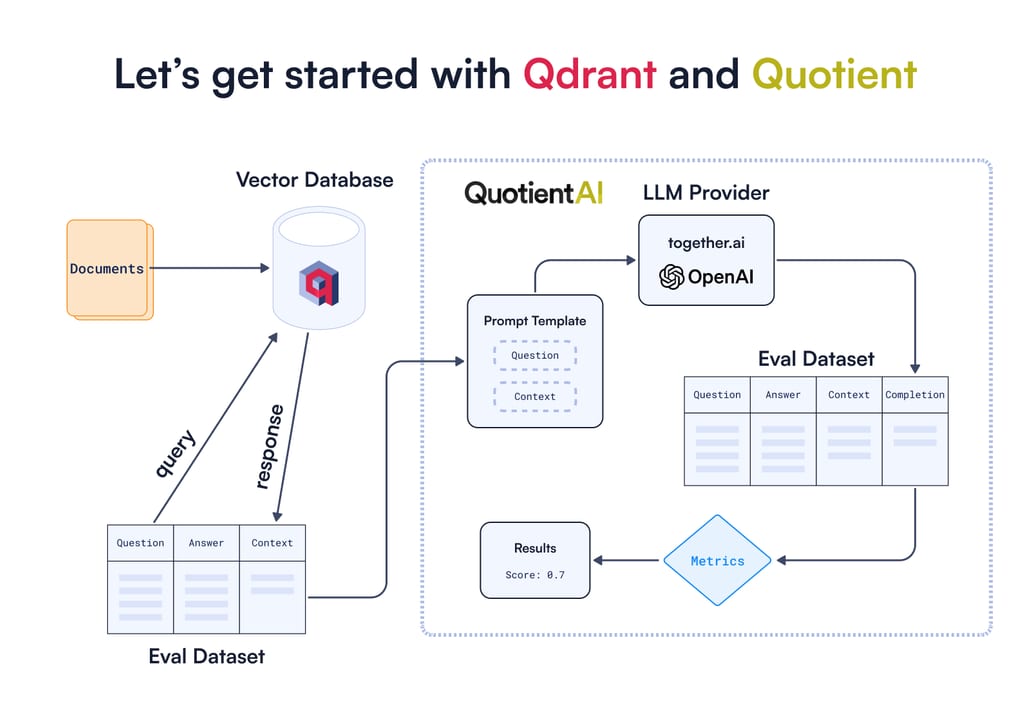
A useful analogy: imagine a massive library where every book has two cards. The first card is a cluster of coordinates describing what the book is about — its meaning in high-dimensional space. The second card is a label with structured facts: author, year, genre, price. Qdrant lets you say "find books closest in meaning to this description, but only if genre = 'sci-fi' and year > 2010." A traditional search index can do the second part; a pure vector index handles the first. Qdrant does both, simultaneously, without scanning every row.
Qdrant is maintained by Qdrant Inc. and lives on GitHub at github.com/qdrant/qdrant. As of early 2026 the project had surpassed 29,000 GitHub stars and 250 million downloads. It is available as a self-hosted Docker image, a managed Qdrant Cloud service, and a Hybrid Cloud option that lets you run the managed control plane against your own infrastructure.
Why it matters for builders
Modern AI applications — RAG chatbots, semantic search, recommendation engines, long-term agent memory — all share the same core requirement: given an embedding, quickly find the most relevant other embeddings, with constraints. A plain approximate-nearest-neighbour library like FAISS handles the vector part but has no concept of filtering on metadata. A SQL database handles filtering brilliantly but cannot do vector similarity efficiently. Qdrant is built from the ground up to solve both at once.
Here is why that combination matters in practice:
- RAG (Retrieval-Augmented Generation) — before calling an LLM, you need to retrieve the most relevant document chunks. With payload filtering you can restrict retrieval to the right tenant, project, or date range without a separate pre-filter step.
- E-commerce semantic search — find products "similar to this description" but filtered by brand, category, and price range in one query.
- Multi-tenant SaaS — store all customer data in one collection, filter by
customer_idin every query. No schema changes per tenant, no separate collections to manage. - Recommendation systems — surface items semantically close to what a user is viewing, filtered by availability or region.
- Agent memory — give an AI agent a persistent key-value store where values are retrieved by semantic similarity, not exact key lookup.
How Qdrant works under the hood
Qdrant's data model has three nested levels: the collection is the top-level namespace; inside it live points, each of which carries a vector (or multiple named vectors) and an optional payload. At query time, Qdrant uses a modified HNSW graph — one that is payload-aware — to find approximate nearest neighbours while respecting filter conditions.
Collections
A collection is a named container that holds a set of points sharing the same vector dimensionality and distance metric. When you create a collection you declare the size (number of dimensions, e.g. 1536 for text-embedding-3-small) and the distance (one of Cosine, Dot, or Euclid). You cannot change these after creation, so choosing them up front matters. Collections support multiple named vectors — meaning a single point can carry both a dense semantic embedding and a sparse keyword embedding — which is how Qdrant implements hybrid search.
Points
A point is a single record inside a collection. It has three parts: a unique id (integer or UUID), one or more vector values, and an optional payload dictionary. You upsert points using client.upsert(). The payload can contain arbitrary JSON-compatible data — strings, numbers, booleans, arrays, nested objects — and any field can later be indexed for fast filtering.
Payloads and payload indexing
Payloads are what make Qdrant more than a plain ANN index. By default, payload fields are stored but not indexed — full-collection scans would be needed to filter on them. You call create_payload_index() to tell Qdrant to build a dedicated index for a specific field. Once indexed, filtering on that field is sub-millisecond and integrates seamlessly with the HNSW graph traversal. The official recommendation is to create all payload indices before ingesting data, so the graph is built with filter awareness from the start.
The Filterable HNSW algorithm
Standard HNSW graphs build connections across the entire dataset. Qdrant extends this with Filterable HNSW: for each indexed payload value, it builds a subgraph containing only the points that match that value. During a filtered query, Qdrant traverses the subgraph for the active filter conditions rather than the full graph. This avoids the "post-filter" trap where you retrieve far more candidates than needed just to have enough pass the filter — a problem that causes recall collapse at high selectivity. The result is that Qdrant can deliver near-identical recall on filtered queries as on unfiltered ones, which is a significant engineering differentiator.
Getting started: from zero to filtered search
The quickest way to run Qdrant locally is via Docker. One command gives you a server listening on port 6333 with a web UI at port 6333/dashboard.
docker run -p 6333:6333 -p 6334:6334 \
    -v $(pwd)/qdrant_storage:/qdrant/storage:z \
    qdrant/qdrant
Install the Python client with pip install qdrant-client. Then create a collection, upsert some points with payloads, and run a filtered similarity search:
from qdrant_client import QdrantClient
from qdrant_client.models import (
    Distance, VectorParams, PointStruct,
    Filter, FieldCondition, MatchValue
)

# Connect to local Qdrant instance
client = QdrantClient(host="localhost", port=6333)

# Create a collection — 4 dimensions, cosine distance
client.create_collection(
    collection_name="products",
    vectors_config=VectorParams(size=4, distance=Distance.COSINE),
)

# Index the 'category' payload field before inserting data
client.create_payload_index(
    collection_name="products",
    field_name="category",
    field_schema="keyword",
)

# Upsert points with vectors + payloads
client.upsert(
    collection_name="products",
    points=[
        PointStruct(id=1, vector=[0.05, 0.61, 0.76, 0.74],
                    payload={"name": "Hiking boots", "category": "footwear", "price": 120}),
        PointStruct(id=2, vector=[0.19, 0.81, 0.75, 0.11],
                    payload={"name": "Running shoes", "category": "footwear", "price": 90}),
        PointStruct(id=3, vector=[0.36, 0.55, 0.47, 0.94],
                    payload={"name": "Winter jacket", "category": "outerwear", "price": 200}),
        PointStruct(id=4, vector=[0.18, 0.01, 0.85, 0.80],
                    payload={"name": "Rain coat", "category": "outerwear", "price": 150}),
    ],
)

# Search for footwear similar to a query vector
results = client.query_points(
    collection_name="products",
    query=[0.2, 0.7, 0.8, 0.5],          # query vector
    query_filter=Filter(
        must=[
            FieldCondition(
                key="category",
                match=MatchValue(value="footwear"),
            )
        ]
    ),
    limit=2,
)

for r in results.points:
print(r.id, r.payload["name"], r.score)Filter operators
Qdrant's filter DSL composes with must (AND), should (OR), and must_not (NOT) clauses. Inside each clause you can use MatchValue, MatchAny, Range, GeoBoundingBox, IsEmpty, and more. Here are the most common patterns:
| Use case | Filter pattern |
|---|---|
| Exact match on a string field | FieldCondition(key="status", match=MatchValue(value="active")) |
| Numeric range | FieldCondition(key="price", range=Range(gte=50, lte=200)) |
| Match any of a list | FieldCondition(key="tag", match=MatchAny(any=["rag","llm"])) |
| Exclude by field | must_not=[FieldCondition(key="archived", match=MatchValue(value=True))] |
| Nested combination | must=[...], should=[...] — mix clause types freely |
Qdrant vs Pinecone: which should you pick?
Qdrant and Pinecone are the two names developers most often compare when choosing a vector database. They target similar problems from very different angles — one is open-source and infrastructure-first, the other is a fully managed SaaS.
| Qdrant | Pinecone | |
|---|---|---|
| Open source | Yes (Apache 2.0) | No (proprietary SaaS) |
| Written in | Rust | Proprietary |
| Self-hosting | Docker, Kubernetes, bare metal | Not available |
| Managed cloud | Qdrant Cloud (free tier available) | Core product (free tier available) |
| Filtered search | Filterable HNSW — deep integration | Post-filter; metadata filtering available |
| Hybrid search | Dense + sparse (BM42/SPLADE) built-in | Hybrid search available on serverless |
| Multiple vectors per point | Yes — named vectors | Yes (serverless namespaces) |
| Typical p99 latency | 5–15 ms self-hosted | 50–120 ms managed (varies by tier) |
| Cost at scale | Your infra cost only (self-hosted) | Usage-based; can be expensive at high QPS |
| Best fit | Performance-critical, cost-sensitive, data-sovereignty needs | Teams wanting zero ops overhead |
The decision is rarely about features — both cover the essentials. It comes down to operational model: if you have infrastructure engineers and want maximum control over performance, latency, and cost, Qdrant self-hosted is compelling. If you need to ship fast with no infrastructure work and are comfortable with SaaS pricing, Pinecone removes all friction. Qdrant Cloud is the middle ground: managed service, Qdrant's performance characteristics, with a free tier to start.
Going deeper
Hybrid search with sparse and dense vectors
Dense vectors (from transformer embedding models) excel at semantic similarity but can miss exact keyword matches — a user searching for "GPT-5" by that exact name may not get it back if the embedding space is dominated by surrounding context. Sparse vectors solve this: they represent text as token-weight pairs where most weights are zero, similar to TF-IDF, but are more accurate. Qdrant supports both in a single collection via named vectors (dense and sparse slots on the same point). A hybrid query sends both types of vectors and combines the results with Reciprocal Rank Fusion (RRF) or a custom re-ranking function.
In July 2024 Qdrant released BM42, a new sparse vectorisation algorithm designed to replace BM25 in hybrid RAG pipelines. BM42 uses transformer attention scores to weight tokens rather than term frequency, producing average sparse vectors of only ~5.6 non-zero elements per document — dramatically smaller than SPLADE, which averages hundreds — while matching or exceeding BM25 recall. Available via fastembed starting with Qdrant v1.10.0.
Quantization for memory savings
A 1536-dimensional float32 vector takes 6 KB. At 10 million points that is ~60 GB of RAM just for vectors. Qdrant ships three quantization modes to shrink this: Scalar Quantization (int8) reduces memory to ~25% with minimal recall loss; Product Quantization (PQ) goes further, to ~5–10% of original size, at the cost of more recall degradation; Binary Quantization (1 bit per dimension) is the most extreme and works best with high-dimensional models like OpenAI text-embedding-3-large that are robust to binarization. Enable quantization when creating a collection and Qdrant reranks using the full vectors for the final top-k, so recall stays acceptable.
Collections with multiple named vectors
Named vectors let a single point carry several independent vector representations. A typical pattern in a multi-modal application: one vector from a text embedding model for the document body, another from a CLIP model for the associated image. Both live on the same point alongside a shared payload. Queries can target either named vector, enabling cross-modal search without duplicating payload data.
from qdrant_client.models import VectorParams, Distance

# Collection with two named vector spaces
client.create_collection(
    collection_name="multimodal",
    vectors_config={
        "text": VectorParams(size=1536, distance=Distance.COSINE),
        "image": VectorParams(size=512, distance=Distance.COSINE),
    },
)
Distributed deployments and sharding
For datasets in the hundreds of millions of vectors, a single node runs out of RAM. Qdrant supports distributed deployments via a Raft-based cluster. Collections are split into configurable shards, and shards are replicated across nodes for fault tolerance. You can set replication factor and shard count when creating a collection. The Python client handles routing transparently — your application code does not change between single-node and cluster deployments.
The web UI and REST / gRPC APIs
Qdrant ships a built-in web dashboard at http://localhost:6333/dashboard that shows your collections, lets you run test queries, inspect points, and monitor system metrics — useful during development without writing any code. Under the hood every operation is available as both a REST endpoint (port 6333) and a gRPC interface (port 6334). The Python, TypeScript, Rust, and Go clients use gRPC for performance-sensitive bulk operations and REST for management calls.
FAQ
What is the difference between a point and a vector in Qdrant?
A vector is just the array of numbers produced by an embedding model. A point is the full record: a unique id, one or more vectors, and an optional payload dictionary of structured metadata. You never store bare vectors in Qdrant — every vector lives inside a point.
Do I have to index payload fields to use them in filters?
No, but you should. Unindexed fields work in filters but Qdrant will scan all points to evaluate them, which is slow at scale. Calling create_payload_index() for any field you filter on regularly gives you sub-millisecond filtering that integrates with the HNSW graph. The official guidance is to index payload fields before ingesting data.
Is Qdrant suitable for production workloads or just prototyping?
Qdrant is production-grade. It is deployed by companies running billions of vectors in mission-critical RAG and search applications. Qdrant is listed in the Forrester Wave for Vector Databases (Q3 2024) and GigaOm's Radar for Vector Databases. The Rust codebase is designed for predictable latency under concurrent load, which matters at production traffic levels.
How does Qdrant compare to pgvector for a team already on Postgres?
pgvector is convenient because it lives inside your existing Postgres database, but it does not yet match Qdrant on filtered-search performance or native hybrid search at scale. For small datasets (under a few million vectors) with moderate query rates, pgvector is often sufficient and simpler to operate. For large datasets, strict latency SLAs, or complex payload filtering, Qdrant is the stronger choice.
What is BM42 and when should I use it?
BM42 is Qdrant's sparse vectorisation algorithm, released in 2024, designed to replace BM25 in hybrid search pipelines. It uses transformer attention scores to weight tokens rather than raw term frequency, producing much smaller sparse vectors than SPLADE while matching or beating BM25 recall. Use it when you want hybrid search (semantic + keyword) and want to avoid the memory cost of full SPLADE sparse vectors.
Can I run Qdrant without Docker?
Yes. Pre-compiled binaries for Linux, macOS, and Windows are available on the Qdrant releases page on GitHub. For Python development, QdrantClient(":memory:") spins up an embedded in-process instance with no external process at all — useful for unit tests and quick experiments.