In plain English
An embedding model turns each piece of text into a list of numbers — a vector — that captures its meaning. Your semantic search works because chunks about similar topics produce vectors that sit close together. Every stored vector in your database was created by one specific model.
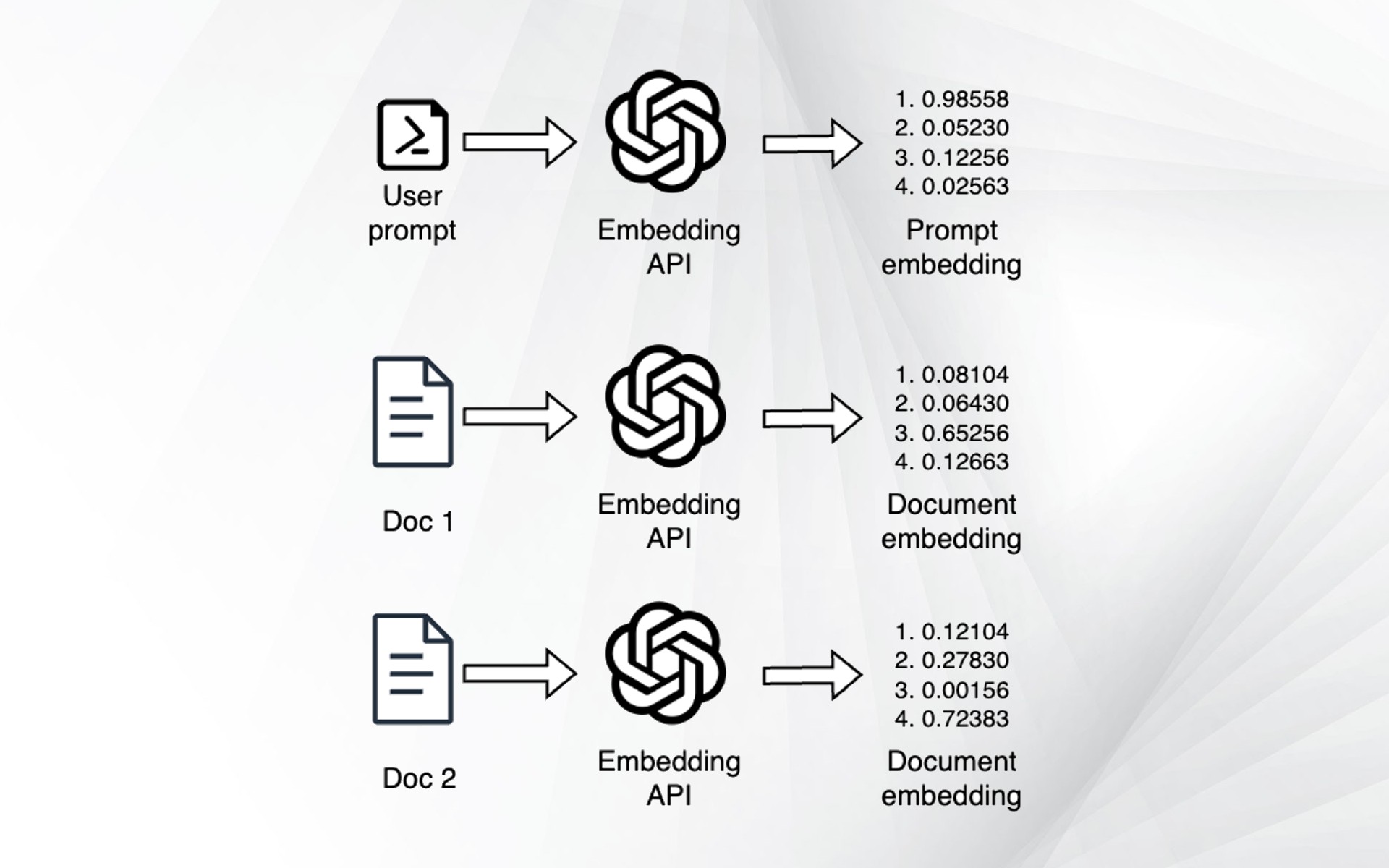
Embedding model migration is the job of swapping that model for a newer or better one. The catch that surprises most builders: you cannot just point your code at the new model and carry on. Every vector you already stored was written in the old model's private language, and the new model speaks a different one. To keep search working, you have to re-embed everything — run all your documents through the new model and rebuild the index from scratch.
Here's an everyday analogy. Imagine a library where every book's location is decided by a secret filing scheme that only one librarian understands. Searching works because you ask that same librarian where to look. Now you hire a new librarian with a better scheme. If you ask the new librarian to find a book using the old librarian's shelf numbers, they point you to the wrong shelf every time. The fix is not to translate the numbers — it's to re-file every book under the new scheme before you let the new librarian answer questions. Re-embedding is that re-filing.
Why it matters
Embedding models improve fast, and a better model usually means visibly better search: more relevant results, better handling of long or multilingual text, sometimes lower cost per token. So upgrading is tempting and often worth it. The danger is that a naive upgrade fails silently.
If you flip the embedding model in your code but leave the old vectors in the database, nothing crashes. There's no error, no exception, no red log line. Queries still return some results — they're just wrong. The new query vector is being compared against old vectors from an incompatible space, so the "nearest" neighbors are essentially noise. Your search quietly degrades to near-random, and you may not notice until users complain that the answers got worse.
- Silent corruption. No crash means no alert. Relevance just rots, which is the worst kind of bug to catch in production.
- Dimension mismatches. Many new models output a different vector length than the old one (say 1536 vs 1024). If the dimensions differ, the database often does throw an error on write or query — which is annoying, but at least honest.
- It's all-or-nothing. You can't migrate "half" your documents and compare across the two halves. A query vector is only meaningful against vectors from the same model.
- Re-embedding has a real cost. Running millions of chunks through an embedding API takes time and money, and you need a plan that doesn't take search offline while it runs.
Anyone running a RAG system, a recommendation engine, or any vector search in production will hit this the first time they want to adopt a newer embedding model. Knowing the safe playbook before you start saves you from a corrupted index and an awkward incident review.
How it works
To understand why you must re-embed, you need one fact: each embedding model defines its own vector space. The numbers only have meaning relative to all the other numbers that same model produces. Two models can both turn the word "refund" into a vector, but those two vectors live in different coordinate systems. The distance between them is meaningless — it doesn't tell you the words are similar or different, it tells you nothing at all.
There is no reliable way to "convert" old vectors into the new space. People sometimes hope for a translation matrix, but in practice it's lossy and not worth it — re-embedding from the original text is both simpler and correct. So the mechanism of a migration is: keep the source text, run it all through the new model, and build a fresh index.
- "refund" → [0.12, -0.44, ...]
- 1024 dimensions
- Distances meaningful here
- Only vs other old vectors
- "refund" → [-0.71, 0.08, ...]
- 1536 dimensions
- Distances meaningful here
- Only vs other new vectors
The safe migration playbook
The standard zero-downtime approach is build the new index alongside the old one, then cut over atomically. You never compare across the two. The five steps:
- Create a separate index/collection for the new model. Never overwrite the old one in place. The new one has the new model's dimension and its own configuration. The old index keeps serving live traffic the whole time.
- Turn on dual-write. From now on, every new or updated document gets embedded by both models and written to both indexes. This keeps the new index from falling behind while you backfill the history.
- Backfill the existing documents. Run a batch job that pulls every document from your source of truth, embeds it with the new model, and writes it to the new index. This is the slow, expensive part — design it to be resumable.
- Verify quality. Run your evaluation set against both indexes and compare. Only proceed if the new index is at least as good. This is your safety gate.
- Cut over, then keep a rollback path. Switch query traffic to the new index in one flip (a config flag or feature toggle). Keep the old index around for a while so you can switch back instantly if something looks wrong.
A worked example: backfill that's safe to re-run
The backfill is the riskiest step because it's long-running. The golden rule is make it resumable and idempotent — if it crashes at 60%, you restart and it continues, and re-processing a document that already moved over does no harm. Below is the shape of a backfill that re-embeds documents into a new collection in batches, tracking progress so a restart picks up where it left off.
from new_embed import embed_new   # the NEW embedding model

BATCH = 256

def backfill(start_after=None):
    """Re-embed all docs into the new collection. Resumable by doc id."""
    cursor = start_after
    while True:
        # Pull a page of docs from your SOURCE OF TRUTH (DB, not the
        # old vector index) ordered by a stable key like the doc id.
        docs = source.fetch_page(after=cursor, limit=BATCH)
        if not docs:
            break

        texts = [d.text for d in docs]
        vectors = embed_new(texts)        # NEW model -> new-dim vectors

        # Upsert by id, so re-running a batch overwrites cleanly
        # (idempotent). The new collection has the NEW dimension.
        new_index.upsert([
            {"id": d.id, "vector": v, "metadata": d.metadata}
            for d, v in zip(docs, vectors)
        ])

        cursor = docs[-1].id
        checkpoint.save(cursor)           # so a crash can resume here
        print(f"backfilled up to {cursor}")

if __name__ == "__main__":
backfill(start_after=checkpoint.load())Two practical numbers to plan around: embedding APIs charge per token, so estimate total_tokens × price_per_token before you start; and they rate-limit, so a few-million-chunk backfill may run for hours. Batch your requests, respect the rate limit, and checkpoint often.
In-place vs blue-green migration
There are two broad ways to run the cutover. The blue-green approach (a second index, then an atomic flip) is what the playbook above describes and what most teams should use. The in-place approach overwrites the same index as you go. It's simpler to set up but risky, because for a while the index holds a mix of old and new vectors — and mixed vectors mean broken search.
| Blue-green (new index) | In-place (overwrite) | |
|---|---|---|
| Search during migration | Old index, fully correct | Mixed vectors → degraded |
| Rollback | Instant — flip back | Hard — old data gone |
| Storage needed | ~2× during migration | 1× |
| Different dimensions OK | Yes — separate config | Usually blocked by the DB |
| Risk | Low | High |
| Best for | Production search | Tiny / disposable indexes |
The blue-green cost is real but temporary: you pay for roughly double the vector storage until you delete the old index after a successful cutover. For anything user-facing, that's a cheap insurance premium against silently corrupting search. Only reach for in-place when the index is small enough to rebuild from scratch in minutes and nobody depends on it being up.
Common pitfalls
- Mixing models in one index. The cardinal sin. Even one batch embedded by the wrong model pollutes results. Keep each index single-model, always.
- Forgetting the query path. You re-embedded all documents but left the query still using the old model. Now queries and documents are in different spaces — same corruption, just from the other side. Switch the query embedding at the exact moment you cut over.
- Ignoring dimension changes downstream. A new dimension may break a hardcoded vector size, an index configuration, or a database column type. Check every place the dimension is assumed.
- No verification gate. Cutting over because the backfill finished is not the same as cutting over because the new index is better. Always compare on an evaluation set first.
- Deleting the old index too early. Keep it for a grace period after cutover so rollback is one flip away. Delete it only once the new index has been healthy in production for a while.
- A non-resumable backfill. A multi-hour job with no checkpoint that dies at hour three means starting over and paying twice. Make it resumable from day one.
Going deeper
Shadow traffic before cutover. Beyond an offline evaluation set, you can send a copy of real production queries to both indexes and log the results without showing the new ones to users. Comparing live behavior catches problems your eval set never anticipated, and it builds confidence before the flip.
Versioning and metadata. Stamp each vector (or each index) with the model name and version in its metadata. When something looks off months later, you'll know exactly which model produced which vectors — and a future you attempting the next migration will thank you.
Hybrid search softens the blow. If your system blends vector search with keyword search (hybrid search), the keyword half keeps working regardless of which embedding model you're on. It won't make a half-migrated index correct, but it makes overall relevance more robust during and after a transition.
Don't migrate on a whim. Each migration is real work and real cost, so it should clear a bar: a measurably better model on your data, a meaningful cost reduction, or a needed capability (longer context, more languages). Use a held-out evaluation set to decide — and revisit how to choose an embedding model so the model you migrate to is one you won't want to leave in six months.
Where to go next. If you're also deciding where the vectors live, see how to choose a vector database — some make blue-green migrations easier with aliases that let you swap which index a name points to atomically. And if dimensions are the part biting you, embedding dimensions explained covers why different models produce different lengths and what that costs.
FAQ
Can you mix embeddings from different models in one database?
No. Each model produces vectors in its own private coordinate space, so distances between vectors from two different models are meaningless. Mixing them gives near-random search results with no error to warn you. Each index must use exactly one embedding model for both documents and queries.
Do I really have to re-embed everything to switch embedding models?
Yes. There's no reliable way to convert old vectors into the new model's space, so you must run every document's original text through the new model and rebuild the index. This is why you should always keep the source text stored alongside each vector.
What happens if I just change the model and keep the old vectors?
Search degrades silently. If the dimensions match, queries still return results — but they're essentially noise, because the new query vector is being compared against old, incompatible vectors. If the dimensions differ, the database usually throws an error on write or query instead.
How do I migrate embedding models with zero downtime?
Use a blue-green approach: build a new index for the new model, dual-write new documents to both indexes, backfill all existing documents into the new index, verify quality against an evaluation set, then cut over query traffic in one atomic flip. Keep the old index for a grace period so you can roll back instantly.
Why do different embedding models have different vector dimensions?
The dimension is a design choice baked into each model's architecture — one model might output 1024 numbers per text, another 1536 or 3072. A different dimension is one more reason old and new vectors aren't comparable, and it can break code or index configs that assume a fixed size.
How much does re-embedding a large corpus cost?
Embedding APIs charge per token, so estimate total tokens times the per-token price before you start. The other cost is time: rate limits mean a multi-million-chunk backfill can run for hours, so batch your requests and checkpoint progress so a crash can resume rather than restart.