In plain English
When you fine-tune an LLM, the training script exposes a handful of hyperparameters — numbers you set before training starts that control how the learning process unfolds. They don't describe what to learn (that's your dataset's job), they describe how fast, how many times, and how many examples at once the model trains. Get them roughly right and the model improves predictably. Get them badly wrong and you'll either waste compute watching nothing happen, or overwrite the model's existing knowledge and make it worse.
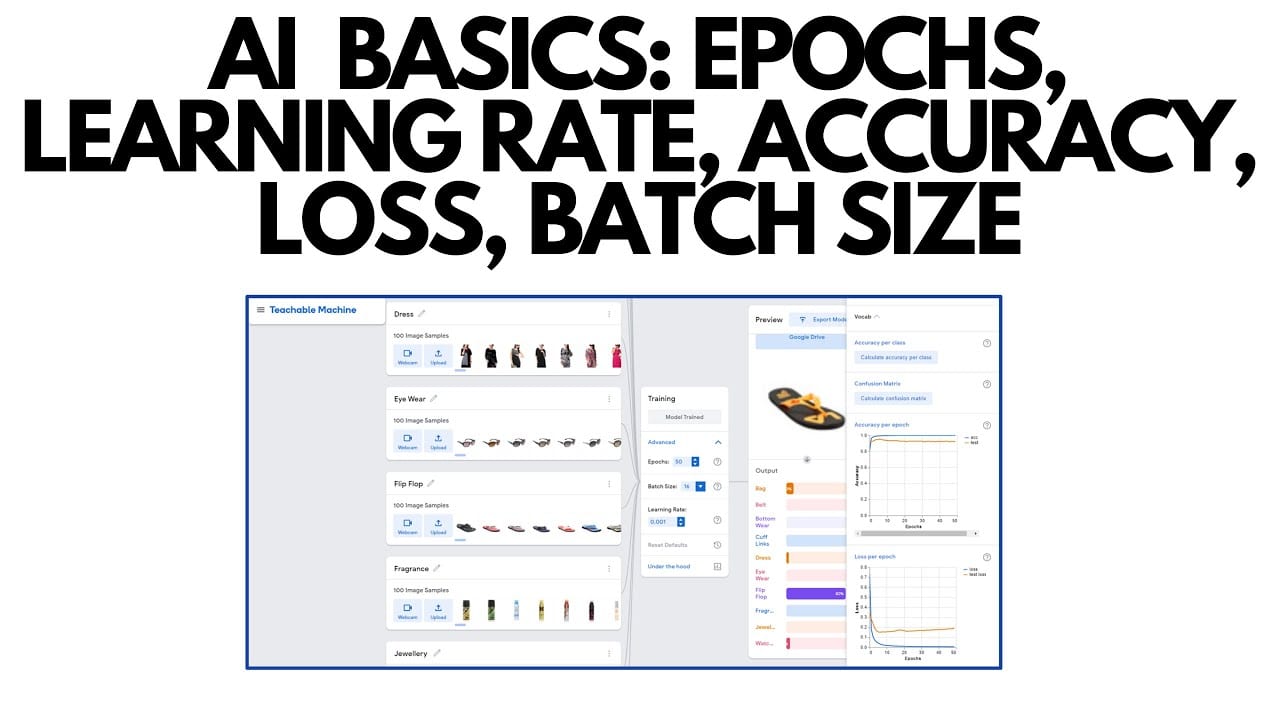
A useful analogy: imagine teaching someone a new skill with a set of flashcards. The learning rate is how dramatically you revise your approach after every wrong answer — if it's too high you're constantly overcorrecting; too low and you barely adjust at all. The number of epochs is how many times you flip through the whole deck — once might not be enough for it to stick, but drilling the same fifty cards a hundred times leads to rote memorization without real understanding. The batch size is how many cards you review before pausing to consolidate what you've learned — a bigger stack between pauses is more efficient but needs more working memory.
There are many other hyperparameters (weight decay, warmup steps, optimizer betas, LoRA rank and alpha), but learning rate, epochs, and batch size are the three you will encounter in virtually every training script and every hosted fine-tuning UI. Understanding these three carries you most of the way.
Why it matters
Hyperparameters have an outsized impact on whether a fine-tuning run succeeds or fails — and failures are often silent. The training loss can go down, the run can complete without errors, and the model can still come out noticeably worse than the base on your real task. The two classic failure modes are direct opposites of each other.
- Overfitting: the model memorizes your training examples instead of learning the underlying pattern. It scores perfectly on examples it has already seen and falls apart on anything new. Caused by too many epochs, a learning rate that's too high, or a training set that's too small and repetitive.
- Underfitting (or no learning): the model barely changes. It still behaves like the base model and ignores what you showed it. Caused by a learning rate that's too low, too few epochs, or a training set with too little signal.
Both failures cost money — you pay for the compute whether or not the run produces something useful. And catching the problem requires a held-out validation set: a slice of your data the model never trains on, whose loss you track throughout training. The validation loss is the single most important number to watch.
How it works
Training works by repeatedly showing the model examples from your dataset, measuring how wrong its predictions are (the loss), and nudging the weights in the direction that reduces that error. The three hyperparameters each control a different dimension of this loop.
Learning rate
The learning rate (LR) controls the size of each weight update. After backpropagation computes the gradient — the direction to move each weight — the learning rate is multiplied by that gradient to determine how far to actually step. A value of 2e-4 means each weight moves 0.0002 times the gradient magnitude per step.
For full fine-tuning of large models, typical ranges are 1e-5 to 5e-5. For LoRA / QLoRA fine-tuning — where only newly initialized adapter weights are being trained — you can use higher rates, typically 1e-4 to 2e-4, because the frozen base weights act as a safety net. Unsloth's published guide recommends starting LoRA runs at 2e-4 and exploring down to 5e-6 if the run is unstable.
Raw constant learning rates are rarely used. The standard practice is a learning rate schedule: the rate starts low during a short warmup phase (to let the optimizer stabilize before taking big steps), rises to the peak value, and then decays — usually following a cosine curve — back toward zero by the end of training. A typical warmup ratio is 3-10% of total training steps.
Epochs
One epoch is one complete pass through your entire training dataset. At the end of epoch 1, every example has been shown to the model exactly once. An LLM already learned a vast amount during pretraining, so fine-tuning generally needs far fewer passes than training from scratch.
Practical defaults: 1 to 3 epochs for most instruction-tuning runs, 3 to 5 epochs when the training set is larger and the task is more specialized. OpenAI's fine-tuning API defaults to 3-4 epochs depending on dataset size. Beyond 5 epochs the risk of overfitting rises sharply, and beyond 10 epochs the validation loss is almost always going the wrong way unless your dataset is extremely large and diverse.
Batch size
The batch size is the number of training examples processed together before the optimizer takes a weight-update step. A batch size of 16 means the model sees 16 examples, their losses are averaged into one gradient, and then one update step happens.
Larger batches give smoother, more stable gradient estimates and train faster in wall-clock time — but consume proportionally more GPU memory. Smaller batches update the weights more frequently, which can sometimes help escape local minima, but the noisier gradients make convergence less predictable. The standard recommendation is to use the largest batch size your GPU memory allows, commonly 8 to 32 for fine-tuning runs on consumer hardware.
When memory is the constraint, gradient accumulation lets you simulate a larger effective batch without needing more VRAM. Instead of updating weights after every batch, you accumulate gradients across several small batches and update once. A physical batch size of 4 with gradient accumulation of 4 steps is mathematically equivalent to a batch size of 16. The Unsloth guide targets an effective batch size of 16 (e.g., batch 2 with accumulation 8) as a stable default.
Practical defaults and a starting config
The table below summarizes the starting values that appear most consistently across published guides, library documentation, and practitioner recommendations as of 2025-2026. These are starting points, not guarantees — you should always monitor validation loss and adjust.
| Hyperparameter | LoRA / QLoRA default | Full fine-tuning default | Notes |
|---|---|---|---|
| Learning rate | 2e-4 | 2e-5 to 5e-5 | Cosine schedule with 3-10% warmup steps |
| Epochs | 1-3 | 2-4 | Stop early if val loss rises |
| Batch size (per device) | 2-8 | 1-4 | Scale up with gradient accumulation |
| Effective batch size (target) | 16-32 | 16-64 | Use grad accumulation to hit this |
| Warmup ratio | 0.03 (3%) | 0.03-0.10 | Higher warmup for unstable runs |
| LR schedule | cosine | cosine or linear | Constant LR is rarely competitive |
Here is a minimal but realistic TrainingArguments config using Hugging Face Transformers. It follows the defaults above and enables cosine scheduling with warmup.
from transformers import TrainingArguments

args = TrainingArguments(
    output_dir="my-fine-tuned-model",

    # Epochs and batch size
    num_train_epochs=3,
    per_device_train_batch_size=4,
    per_device_eval_batch_size=4,
    gradient_accumulation_steps=4,       # effective batch = 4 * 4 = 16

    # Learning rate + schedule
    learning_rate=2e-4,                  # LoRA default; use 2e-5 for full fine-tune
    lr_scheduler_type="cosine",
    warmup_ratio=0.03,                   # 3% of steps used for warmup

    # Evaluation and early stopping
    evaluation_strategy="steps",
    eval_steps=50,
    save_strategy="steps",
    save_steps=50,
    load_best_model_at_end=True,         # keeps the checkpoint with lowest val loss
    metric_for_best_model="eval_loss",
    greater_is_better=False,

    # Stability
    fp16=True,                           # use bf16=True on Ampere GPUs
    logging_steps=10,
)Reading loss curves to catch overfitting
Every serious fine-tuning run should log both training loss and validation loss throughout training. Plotting them together gives you the most direct signal about what your hyperparameters are doing — far more useful than the final loss number alone.
- Training loss falls steadily
- Validation loss tracks closely
- Both converge and plateau
- Small gap between train and val loss
- Action: run is good, can stop here
- Training loss keeps falling
- Validation loss plateaus then rises
- Gap between curves widens over time
- Model memorizing training examples
- Action: stop earlier, reduce epochs or LR
- Both losses stay flat or fall very slowly
- Loss barely moves from initial value
- No divergence but no improvement either
- LR too small or dataset has no signal
- Action: raise LR, check data quality
The overfitting signature is the one to watch most carefully: training loss falls while validation loss flattens or rises. When you see validation loss climb for two or three consecutive evaluation checkpoints, the model is memorizing. The right response is early stopping — keeping the checkpoint from just before the divergence began rather than the final checkpoint from the end of training.
The setting load_best_model_at_end=True in Hugging Face Transformers does this automatically: it tracks the best validation loss seen during the run and restores that checkpoint at the end, even if later checkpoints had lower training loss. This is worth enabling on every run.
Practical signs that overfitting is happening
- Training loss approaches zero while val loss stays stubbornly flat — especially common with small datasets (under 500 examples).
- The model starts reproducing training examples verbatim when prompted with similar inputs.
- Output diversity collapses — you see the same phrasing, structures, or filler sentences regardless of input variation.
- General capability degrades — the model gets slightly worse at things outside the training distribution, like a simple factual question it previously answered correctly.
How the three hyperparameters interact
Learning rate, epochs, and batch size are not independent. Changing one often requires you to revisit another — particularly the learning rate and batch size relationship.
Batch size and learning rate scale together. The standard heuristic, known as linear scaling, says that if you double the batch size, you should roughly double the learning rate to maintain the same effective update per example. In practice this relationship holds loosely for the batch size ranges common in fine-tuning (8-64), but breaks down at extremes. When in doubt: run a quick 1-epoch sweep at batch sizes of 8, 16, and 32 and compare validation loss to find your hardware's sweet spot before committing to a full run.
Epochs and dataset size interact. The number of training steps — not epochs — is what actually controls how much the model updates. With 500 examples, a batch size of 8, and 3 epochs, you get roughly 188 optimizer steps. With 5,000 examples under the same settings, you'd get 1,875 steps. Smaller datasets need fewer epochs because the model sees each example proportionally more often per step count. A useful cross-check: aim for a total of roughly 500-2,000 optimizer steps for typical fine-tuning tasks, and adjust epoch count to hit that range given your dataset size.
For LoRA, the rank and learning rate interact. LoRA's r parameter (rank) controls how much capacity the adapter has. Higher rank (32-64) means more parameters to train, so you may need a slightly lower learning rate to keep training stable. Lower rank (8-16) is more constrained and can tolerate a slightly higher rate. The alpha parameter is typically set equal to the rank (alpha = r) or double it (alpha = 2r) — this controls the relative scaling of the adapter outputs.
| Scenario | Recommended adjustment |
|---|---|
| Small dataset (< 500 examples) | Use 1-2 epochs max; lower LR slightly |
| Large dataset (> 10,000 examples) | 3-5 epochs; standard LR is fine |
| Model losing general coherence | Lower learning rate; reduce epochs |
| Model not learning your format | Increase epochs by 1-2; check data quality |
| Out-of-memory on GPU | Halve batch size; double gradient accumulation steps |
| Very unstable loss (spikes) | Lower LR; increase warmup ratio to 0.05-0.10 |
Going deeper
Once you have the basics dialed in, a few more advanced techniques become relevant — particularly for longer runs, larger models, or when you need to squeeze out the last few percentage points of quality.
Layer-wise learning rate decay (LLRD)
Not all layers need the same learning rate. The intuition: early transformer layers hold low-level language representations that are broadly useful and should change very little. Later layers are more task-specific and benefit from slightly larger updates. Layer-wise learning rate decay applies a multiplier (typically 0.8-0.9 per layer) so that each successive layer from the top receives a slightly smaller learning rate. Research from 2024 shows this can improve downstream performance compared to a flat global rate, particularly for full fine-tuning of larger models.
Hyperparameter search
Manual tuning is practical for small runs, but systematic search pays off when compute budget allows. The most efficient approach is 1-epoch sweeps: hold epoch count fixed at 1, sweep over 3-5 learning rate values (e.g., 5e-5, 1e-4, 2e-4, 5e-4), pick the one that produces the lowest validation loss, then tune epochs. This avoids the expensive mistake of running many full multi-epoch runs to find the right learning rate. Libraries like Optuna and Ray Tune integrate with Hugging Face Trainer to automate this.
Weight decay and regularization
Weight decay (AdamW's weight_decay parameter, commonly 0.01) is a light regularizer that penalizes large weight values — it nudges the model toward smaller, more generalizable updates and is another tool against overfitting. It's usually left at the default of 0.01 for fine-tuning, but raising it slightly to 0.05 or 0.1 can help when you're seeing signs of overfitting and don't want to reduce the learning rate.
When training loss hits zero
A training loss of exactly 0.0 is almost always a problem. With a small dataset and too many epochs, the model can memorize every training example — the loss hits zero because it has learned to reproduce the training set perfectly. This is the clearest overfitting signal you will see, and the fix is almost always to reduce epochs and re-run from the base checkpoint. A healthy fine-tuning run ends with a training loss in the range of 0.5-1.5 for most instruction-tuning tasks, not near zero.
FAQ
How many epochs should I use to fine-tune an LLM?
Start with 1-3 epochs for most tasks. Three to five epochs is reasonable when your dataset is larger and the task is specialized. Beyond five epochs, overfitting risk climbs sharply unless your dataset is very large and diverse. The right number is determined by validation loss, not a fixed rule — stop when validation loss plateaus or starts rising.
What learning rate should I use for fine-tuning?
For LoRA and QLoRA fine-tuning, 2e-4 is the most commonly recommended starting point. For full fine-tuning of a large model, start lower: 1e-5 to 5e-5. Pair any learning rate with a cosine decay schedule and a short warmup phase (3-5% of total steps) — a flat constant learning rate is rarely competitive.
What batch size should I use for LLM fine-tuning?
Use the largest batch size your GPU memory allows, targeting an effective batch size of 16-32. If your hardware can only fit a batch of 2 or 4 in memory, use gradient accumulation to simulate the larger batch — accumulating over 4 steps with a batch of 4 gives an effective batch of 16.
How do I know if my fine-tuned model is overfitting?
The clearest signal is a diverging loss curve: training loss keeps falling while validation loss plateaus or rises. Other signs include outputs that closely echo training examples verbatim, loss of output diversity, and degraded performance on tasks outside the training distribution. Always hold out a validation split and evaluate on it regularly during training.
What is gradient accumulation and when should I use it?
Gradient accumulation lets you simulate a larger batch size without extra GPU memory. Instead of taking an optimizer step after every batch, you accumulate gradients across several small batches and update once. Use it when your GPU can only hold a small batch (1-4 examples) but you want the stability of an effective batch of 16 or more.
Does changing batch size mean I also need to change the learning rate?
Often yes. A common heuristic is linear scaling: if you double the batch size, double the learning rate. The intuition is that a larger batch gives a more accurate gradient estimate per step, so you can afford a bigger step. In practice this rule holds loosely for the typical fine-tuning batch size range of 8-64, but you should verify with a quick validation loss comparison before committing to a long run.