In plain English
A rate limit is a ceiling on how much you can ask an LLM provider to do in a short window. Every provider — OpenAI, Anthropic, Google, and the rest — enforces them so that no single customer can flood the shared servers. When you cross a ceiling, the API stops you with a 429 Too Many Requests error instead of answering.
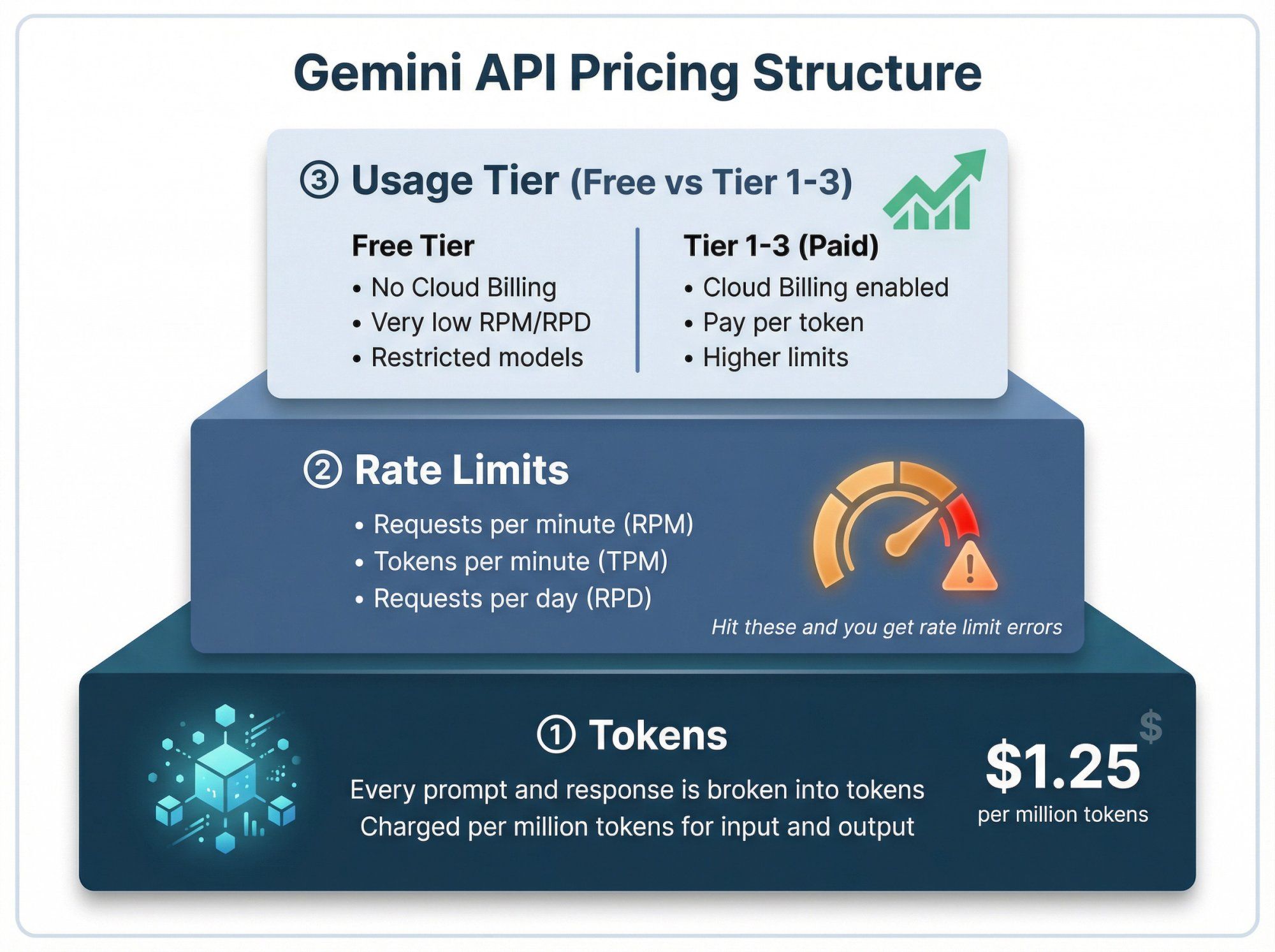
Think of a busy coffee shop with one barista. There are two natural limits on how fast you can order. First, the barista can only take so many separate orders per minute, no matter how small each one is — that's your requests per minute (RPM). Second, the barista can only make so many cups of coffee per minute in total, whether that's one giant order of twenty or twenty tiny orders of one — that's your tokens per minute (TPM). You can hit either ceiling first, and the slower one is what actually holds you up.
For LLMs, a token is a chunk of text — very roughly three-quarters of a word. TPM counts both the text you send in and the text the model writes back. So a single request that sends a 50,000-token document and asks for a long answer can eat a big slice of your per-minute token budget all by itself, even though it's only one request.
Why it matters
Rate limits are the single most common reason a working prototype falls over the moment real traffic arrives. The code is fine; the throughput isn't. Understanding the ceilings before you ship is what separates an app that scales smoothly from one that throws 429s at your users during a launch.
- They cap your real-world throughput. Your app's maximum speed isn't set by how fast the model thinks — it's set by whichever rate limit you hit first. If you don't know your TPM ceiling, you can't predict how many users you can serve per minute.
- They rise as you spend — but not instantly. Providers group accounts into usage tiers. New accounts start low; as your cumulative spend and account age grow, you're promoted to higher tiers with bigger limits. You can't simply ask for a 10× limit on day one.
- They're per-model. A cheap, fast model usually has far more generous limits than a flagship one. The limit you measured on one model tells you nothing about the next.
- They interact with cost. The same forces that drive your token usage up (long prompts, big outputs) also drive you toward the TPM ceiling. Controlling one often controls the other — see LLM API pricing.
The flip side of the ceiling is the 429 error you get when you cross it. This article is about the limits themselves — what they are, why you hit them, and how to raise them. For the recovery side — catching the 429, reading retry-after, and backing off correctly — see how to handle 429 errors. The two fit together as cause and effect: this is the cause, that is the cure.
How it works
Every request you send is checked against several meters at once. The two you'll meet most often are RPM and TPM, but most providers run more than one token meter and sometimes a daily meter on top.
The ceilings a single request is checked against
| Limit | What it counts | Why it exists |
|---|---|---|
| RPM | Number of API calls per minute | Stops a flood of tiny requests overwhelming the queue |
| TPM | Input + output tokens per minute | Stops a few huge requests monopolizing compute |
| ITPM / OTPM | Input tokens and output tokens metered separately (on some providers) | Lets the provider price and protect the expensive output path on its own |
| RPD / TPD | Requests or tokens per day | A slower, coarser cap for fair daily usage |
Some providers (Anthropic, for example) split the token meter into input tokens per minute (ITPM) and output tokens per minute (OTPM), because output tokens cost the model far more to produce. Others use one combined TPM number. Either way, the principle holds: the request that lands you over any meter gets the 429.
How TPM is estimated up front
Here's the subtle part. The model hasn't written its answer yet when your request arrives, so the provider can't know the exact output token count in advance. To protect the TPM meter, it estimates your output using your max_tokens value and reserves that much budget the moment the request is accepted. If you set max_tokens to 4,000 but the model only writes 200, you were still charged against your limit for something close to the reservation while the request was in flight.
Once the request runs, the provider reconciles the estimate with the actual output and the meters tick over second by second. The meters refill continuously — they don't reset on a hard 60-second boundary — so the moment some of your usage ages out of the rolling window, headroom returns.
Usage tiers: how limits grow
You don't pick your rate limits — your usage tier does. Providers place each account in a tier, and the tier sets your RPM and TPM for every model. Promotion is automatic and is driven by trust signals: how much you've spent in total, how long your account has been active, and whether you've cleared any payment holds.
The numbers below are illustrative shapes, not any provider's exact figures — they change often, so always read your provider's dashboard for the real values. The point is the pattern: each tier multiplies the one below it.
| Tier | Typical unlock | Relative limits |
|---|---|---|
| Free / Tier 1 | New account, first payment | Lowest — fine for prototyping |
| Tier 2 | A modest cumulative spend + a few days | Several times higher |
| Tier 3–4 | Larger cumulative spend over weeks | Order-of-magnitude higher |
| Tier 5 / Scale | Sustained high spend, sometimes a sales conversation | Production-grade; custom limits available |
- You can't skip the line by asking. Because tiers are spend-and-time gated, the reliable way up is to run real traffic and let cumulative spend accrue. Some providers let you pre-pay credits to reach a higher tier sooner.
- *Higher tiers raise all* limits at once** — RPM, TPM, and daily caps move together, across every model.
- Enterprise / Scale tiers are negotiated. Above the published tiers, you talk to the provider and they provision custom limits for your workload.
Reading the rate-limit headers
You don't have to guess where you stand. Every response carries rate-limit headers that report your limits and exactly how much budget is left right now. Logging these turns rate limiting from a mystery into a dial you can watch.
| Header (typical) | Meaning |
|---|---|
x-ratelimit-limit-requests | Your RPM ceiling for this model |
x-ratelimit-remaining-requests | Requests left in the current window |
x-ratelimit-limit-tokens | Your TPM ceiling for this model |
x-ratelimit-remaining-tokens | Tokens left in the current window |
retry-after | On a 429: seconds to wait before retrying |
Header names vary slightly by provider (Anthropic prefixes its token headers per meter, e.g. input vs output), but the shape is the same everywhere: a limit, a remaining, and — on a 429 — a retry-after. Read remaining, not just the limit: it tells you how close you are before you trip.
import anthropic

client = anthropic.Anthropic()

# .with_raw_response gives you the HTTP headers alongside the parsed body.
raw = client.messages.with_raw_response.create(
    model="claude-haiku-4-5",
    max_tokens=300,
    messages=[{"role": "user", "content": "Hello"}],
)

h = raw.headers
print("requests left:", h.get("anthropic-ratelimit-requests-remaining"))
print("input tokens left:", h.get("anthropic-ratelimit-input-tokens-remaining"))
print("output tokens left:", h.get("anthropic-ratelimit-output-tokens-remaining"))

message = raw.parse()  # the normal Message object
print(message.content[0].text)Budgeting concurrency under both ceilings
The practical question is: how many requests can I run in parallel without tripping a limit? The honest answer is you must satisfy both ceilings at once, and pick the one that binds first. Here's the simplest way to reason about it.
A worked example
Suppose your tier gives you 500 RPM and 200,000 TPM on a model. Each of your requests uses about 1,000 input tokens and you set max_tokens to 1,000, so budget roughly 2,000 tokens per request. Now compare the two ceilings:
- RPM ceiling: 500 requests per minute, full stop.
- TPM ceiling: 200,000 tokens ÷ 2,000 tokens per request = 100 requests per minute before you run out of token budget.
- The binding limit is TPM — it caps you at 100 req/min, well below the 500 RPM you're allowed. Adding more parallel workers past that point just produces
429s.
Flip the numbers and the conclusion flips too. If each request were tiny (200 tokens total), TPM would allow 1,000 req/min but RPM would cap you at 500 — now RPM binds. The lesson: always compute both, and size your worker pool to the smaller one.
- Few tokens of headroom each
- TPM runs out first
- Lower max_tokens to fit more
- RPM is barely touched
- Plenty of token headroom
- RPM runs out first
- Batch many into one call to fit more
- TPM is barely touched
Going deeper
Once the basic model clicks, a handful of nuances separate a client that survives rate limits from one that uses every drop of its quota.
Prompt caching changes the math. If your requests share a large fixed prefix (a long system prompt, a big document), prompt caching can let the cached portion count differently toward your token meter on repeat calls — meaning more effective throughput for the same TPM ceiling. It's one of the few levers that raises your real capacity without a tier bump.
The max_tokens reservation is a real lever. Because TPM is estimated from max_tokens up front, two apps with identical traffic can have very different throughput purely because one over-reserves output budget. Audit your max_tokens values: a request that realistically returns 150 tokens should not reserve 4,000. Trimming the reservation is free headroom.
Limits are per-model, so spread the load. If you're hammering a flagship model's TPM ceiling, routing the easy requests to a cheaper, faster model with much higher limits frees the expensive quota for the hard work. Choosing the right model per task is a throughput decision as much as a cost one — see how to choose an LLM model.
Concurrent requests can't read each other's budget. If you fire 50 parallel requests at once, every one of them is checked against the same remaining budget at roughly the same instant — they don't see each other's consumption until responses start coming back. This is why a sudden burst trips 429s even when your average rate is well under the limit. Smooth the burst with a client-side rate limiter (a token-bucket or a small semaphore) so requests trickle out rather than stampede.
SDKs retry for you — but tune it. The official SDKs automatically retry 429s with exponential backoff (the Anthropic SDK defaults to a couple of retries). That's a safety net, not a strategy: if you're consistently over your limit, retries just delay the inevitable. Fix the root cause — lower concurrency, smaller max_tokens, a higher tier, or a batch path — and treat retries as the cushion for occasional bursts. The mechanics of catching and backing off live in handling 429 errors.
The durable takeaway: rate limits aren't an obstacle to route around, they're a budget to plan against. Know your tier, watch your headroom in the response headers, size concurrency to whichever of RPM or TPM binds first, and keep max_tokens honest. Do that, and you'll extract close to your full quota without ever surprising a user with a 429.
FAQ
What is the difference between RPM and TPM in an LLM API?
RPM (requests per minute) caps how many separate API calls you can make, regardless of size. TPM (tokens per minute) caps the total text you move — input plus output tokens — across all those calls. They run as separate meters at the same time, and you get throttled the moment you cross either one.
Does TPM count both input and output tokens?
Yes. TPM counts the tokens you send in and the tokens the model writes back. Because the output isn't written yet when your request arrives, the provider estimates output from your max_tokens value and reserves that budget up front — so a large max_tokens consumes your limit even if the actual reply is short. Some providers (like Anthropic) meter input and output separately as ITPM and OTPM.
How do I increase my LLM API rate limit?
Rate limits are set by your usage tier, which rises automatically with cumulative spend and account age — you generally can't just request a higher limit on a new account. Run real traffic (or pre-pay credits where the provider allows) to climb tiers, which raises RPM and TPM together. At the top, enterprise or scale tiers are negotiated directly with the provider for custom limits.
Why am I getting 429 errors when my average request rate seems low?
Almost always a burst. If you fire many requests in parallel, they're all checked against the same remaining budget at nearly the same instant — they can't see each other's consumption — so a spike trips the limit even though your one-minute average is fine. Smooth the burst with a client-side rate limiter, and check whether TPM (not RPM) is the ceiling you're hitting. For recovery, see handling 429 errors.
How many requests can I run in parallel?
Compute both ceilings and take the smaller. Divide your TPM by the tokens per request (input + your max_tokens reservation) to get the TPM-bound request rate, then compare it to your RPM. Size your worker pool to whichever number is lower — adding workers past that point only produces 429s.
Are rate limits the same for every model?
No. Limits are per-model, and cheaper, faster models usually have far more generous RPM and TPM than flagship models. A useful tactic is to route easy requests to a high-limit cheap model and reserve the flagship's tighter quota for the hard work.