In plain English
When you call an LLM API in the normal way, you are standing at the front of a fast-food counter: you place an order, the kitchen drops everything to make it, and you get your burger in two minutes. That speed costs money — the provider has to keep hot servers idle, ready to respond to your next request in milliseconds.
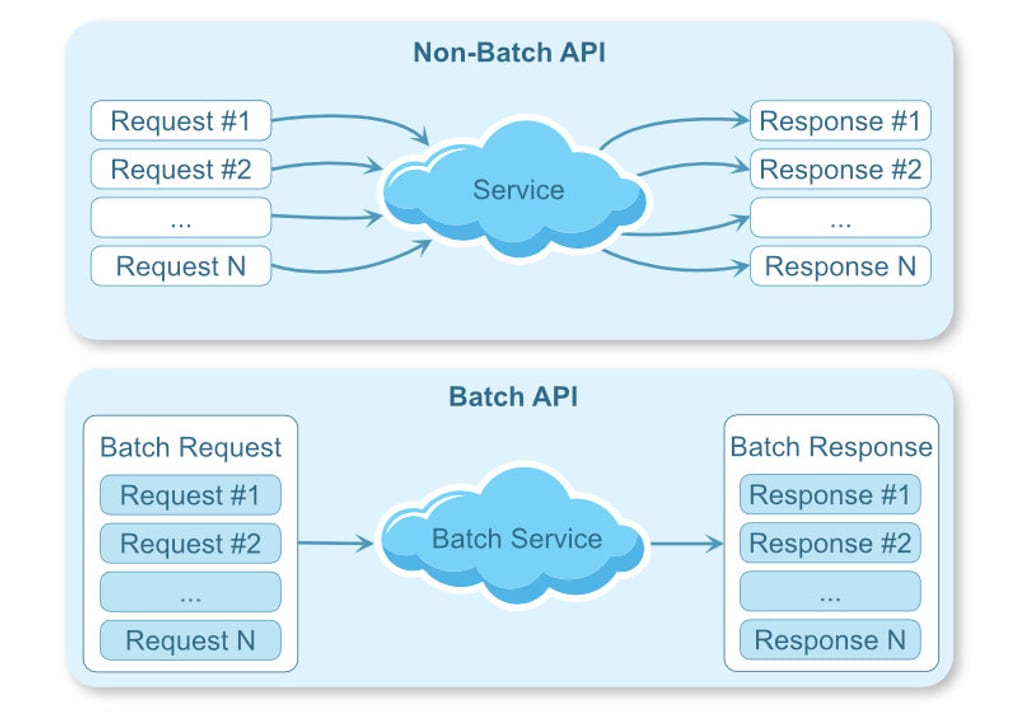
A batch API works like a catering order instead. You hand over a list of a thousand requests — classify these reviews, summarise these documents, score these responses — and the provider says: "we'll process all of this whenever we have spare capacity, and have it ready for you within 24 hours." Because the provider can schedule your job during off-peak hours and pack requests together efficiently, they pass half the savings on to you: 50% off, every token, every model.
The tradeoff is simple: you give up real-time responses in exchange for a flat price cut. If your workload can wait — and many workloads genuinely can — a batch API is the single largest cost reduction available from any major LLM provider today.
Why it matters
Most AI engineering work has two very different demand patterns sitting inside the same application: a latency-sensitive path (a user is waiting for an answer right now) and a latency-tolerant path (nightly enrichment, weekly evals, a one-time data migration). Routing every request through the same real-time endpoint is the most common source of unnecessary LLM spend.
What a 50% cut actually means at scale
Suppose you run a weekly pipeline that re-classifies 200,000 product descriptions using claude-sonnet-4-6 (input $3.00/MTok, output $15.00/MTok). Each description averages 300 input tokens and 50 output tokens.
Realtime API (weekly):
  Input:  200,000 x 300 tokens = 60M tokens × $3.00/M  = $180.00
  Output: 200,000 x  50 tokens = 10M tokens × $15.00/M = $150.00
  Weekly total: $330.00   →   Annual: $17,160

Batch API (same job, 50% off):
  Input:  60M tokens × $1.50/M  = $90.00
  Output: 10M tokens × $7.50/M  = $75.00
  Weekly total: $165.00   →   Annual: $8,580

Annual saving: $8,580 — just by changing the endpoint.
That calculation does not require any prompt engineering, model downgrade, or quality trade-off. The only thing that changes is the delivery time.
- Evaluation pipelines — running LLM judges over test sets, which always run overnight anyway
- Historical backfills — enriching records that existed before an LLM feature was added
- Content classification at scale — tagging, moderation, sentiment scoring on large corpora
- Bulk summarisation — generating digests, abstracts, or SEO meta descriptions in bulk
- Synthetic data generation — producing fine-tuning examples or training annotations
- Nightly feature engineering — extracting structured fields from unstructured text for downstream ML
- RAG pre-processing — generating embeddings or cleaning documents before indexing
How it works
Every batch API follows the same four-step lifecycle regardless of provider. You prepare a file of requests, upload it, poll for completion, and download the results. Requests are identified by a custom_id you assign — the results come back in arbitrary order, so the custom_id is how you reunite each result with the original input.
OpenAI Batch API walkthrough
OpenAI's batch endpoint accepts up to 50,000 requests per batch file with a maximum file size of 200 MB. Each line in the JSONL file is a self-contained API call including the endpoint path and request body.
from openai import OpenAI
import json

client = OpenAI()

# Step 1: build the JSONL input file
requests = [
    {
        "custom_id": f"item-{i}",
        "method": "POST",
        "url": "/v1/chat/completions",
        "body": {
            "model": "gpt-5.5",
            "messages": [
                {"role": "system", "content": "Classify sentiment as positive, negative, or neutral."},
                {"role": "user", "content": review_text}
            ],
            "max_tokens": 10
        }
    }
    for i, review_text in enumerate(reviews)  # reviews is a list of strings
]

with open("batch_input.jsonl", "w") as f:
    for req in requests:
        f.write(json.dumps(req) + "\n")

# Step 2: upload the file
batch_file = client.files.create(
    file=open("batch_input.jsonl", "rb"),
    purpose="batch"
)

# Step 3: create the batch job
batch = client.batches.create(
    input_file_id=batch_file.id,
    endpoint="/v1/chat/completions",
    completion_window="24h"
)
print(f"Batch submitted: {batch.id}")

# Step 4: poll for completion
import time
while True:
    batch = client.batches.retrieve(batch.id)
    print(f"Status: {batch.status} — {batch.request_counts.completed}/{batch.request_counts.total}")
    if batch.status in ("completed", "failed", "expired", "cancelled"):
        break
    time.sleep(60)

# Step 5: download and parse results
if batch.output_file_id:
    content = client.files.content(batch.output_file_id).text
    results = {}
    for line in content.strip().split("\n"):
        row = json.loads(line)
        results[row["custom_id"]] = row["response"]["body"]["choices"][0]["message"]["content"]
Anthropic Message Batches API walkthrough
Anthropic's equivalent is the Message Batches API, which accepts up to 10,000 requests per batch. Unlike OpenAI's file-upload approach, Anthropic takes the list of requests directly in the POST body as a JSON array.
import anthropic
import time

client = anthropic.Anthropic()

# Step 1: build request list
requests = [
    anthropic.types.beta.messages.MessageBatchRequestParam(
        custom_id=f"doc-{i}",
        params={
            "model": "claude-haiku-4-5",
            "max_tokens": 256,
            "messages": [{"role": "user", "content": f"Summarise in one sentence: {doc}"}]
        }
    )
    for i, doc in enumerate(documents)
]

# Step 2: submit the batch
batch = client.beta.messages.batches.create(requests=requests)
print(f"Batch ID: {batch.id}")

# Step 3: poll until processing_status == 'ended'
while True:
    batch = client.beta.messages.batches.retrieve(batch.id)
    if batch.processing_status == "ended":
        break
    time.sleep(60)

# Step 4: stream results and reconcile via custom_id
for result in client.beta.messages.batches.results(batch.id):
    if result.result.type == "succeeded":
        text = result.result.message.content[0].text
print(f"{result.custom_id}: {text}")Batch vs. realtime: choosing the right path
Not every job belongs in a batch queue. The central question is whether the result is on the critical user path. If a human or a downstream system is waiting synchronously for the answer, use the realtime endpoint. If the answer will be stored and consumed later — by a dashboard, a database, a model trainer, or a report — batch is almost always the right choice.
| Signal | Use realtime | Use batch |
|---|---|---|
| User is waiting | Yes — interactive chat, copilots, live Q&A | No — user sees the result later |
| Latency requirement | < 5 seconds | Minutes to hours is acceptable |
| Request volume | Variable, bursty, low per-session count | High and predictable (hundreds to millions) |
| Request timing | Triggered by live events | Scheduled: nightly, weekly, on-demand backfill |
| Examples | Chatbot, code autocomplete, API copilot | Evals, classification, enrichment, fine-tune data gen |
| Cost sensitivity | Latency cost already baked into product SLA | Cost is a first-class concern; saving 50% is meaningful |
The middle ground: async with a tight deadline
Some workloads fall between the two extremes — for example, generating a personalised report that a user expects within 10 minutes of requesting it. Batch APIs are not the right fit here because the 24-hour window is too loose. Instead, consider async task queues (Celery, BullMQ, Temporal) with realtime API calls, or a smaller provider with dedicated throughput tiers. The 50% batch discount is specifically for jobs that can genuinely wait.
Common pitfalls and how to avoid them
Partial failures
A batch job can partially fail — some requests succeed, others hit token limits, content policy filters, or transient errors. OpenAI provides a separate error_file_id alongside output_file_id; Anthropic marks individual results with result.type == "errored". Always parse both outputs and implement retry logic for failed rows rather than treating the batch as all-or-nothing.
Forgetting to persist the batch ID
If your process crashes after submitting but before receiving results, you need the batch_id to resume polling. Store it durably — in a database, a file, or a task queue — immediately after submission. Losing the ID does not lose the work (the batch still runs), but it makes recovery significantly harder.
Not budgeting for enqueued tokens
Both OpenAI and Anthropic track enqueued token limits separately from per-minute rate limits. If you submit 20 million tokens in a batch, those tokens count against your batch queue until the job completes. Submitting multiple large batches simultaneously can exhaust this quota and cause subsequent submissions to be rejected. Stagger large jobs or check your remaining queue capacity before submitting.
Using batch for streaming-dependent features
Batch APIs deliver results only after the entire request completes — there is no streaming of partial tokens. Any feature that relies on progressive rendering (showing words as they appear) must use the realtime endpoint. Batch is purely a store-and-forward model.
Going deeper
The 50% batch discount is table stakes — all three major providers (OpenAI, Anthropic, Google) match it. As you scale batch usage, several more advanced patterns become relevant.
Provider comparison at a glance
| Provider | API name | Max requests/batch | Completion window | Supported models |
|---|---|---|---|---|
| OpenAI | Batch API | 50,000 requests / 200 MB | 24 hours | GPT-5 series, embeddings, and more |
| Anthropic | Message Batches API | 10,000 requests | 24 hours | Claude Opus, Sonnet, and Haiku models |
| Gemini Batch API (Vertex AI) | No per-job limit published | 24 hours | Gemini 3 Pro, Gemini 3 Flash, and others |
Anthropic's 300K output token extension
Anthropic's batch endpoint supports an extended output limit unavailable on the synchronous API. By adding the header anthropic-beta: output-300k-2026-03-24, individual batch requests can return up to 300,000 output tokens — useful for generating very long documents, complete codebases, or exhaustive reports in a single request. This feature is batch-only and is one of the few cases where a batch API offers a capability the realtime API lacks.
Orchestrating large batch pipelines
For jobs with millions of rows, a single batch submission is rarely sufficient. Common patterns include: fan-out (split the corpus into chunks of 10,000–50,000 rows, submit parallel batches, merge results); pipeline chaining (the output of batch job A feeds batch job B as a downstream enrichment step); and workflow orchestration (tools like Temporal, Prefect, or Airflow checkpoint batch IDs to survive process restarts and retry failed shards independently).
Cost stack: combining batch with other savings
- Batch + smaller model: Use a cheap model (Haiku, GPT-5 nano) for a first-pass classification pass, then batch only the uncertain or high-stakes cases to a stronger model. Can cut costs by 90%+ versus running everything through a flagship model.
- Batch + prompt caching: Long shared system prompts are cached across requests in the same batch window, compounding the 50% batch discount with a 10× cache-read saving on the repeated prefix.
- Batch + structured output: Constraining responses to JSON saves output tokens — shorter completions mean lower cost per request, multiplied across the entire batch.
- Batch + compression: For document-heavy jobs, summarise or chunk documents before batching rather than sending raw 100K-token inputs. Reducing average input length often has a bigger impact than the discount itself.
Monitoring batch health in production
In production, treat batch jobs like database migrations: track submission time, expected completion, actual completion, partial failure rate, and cost per request. A batch that silently completes with a 20% error rate looks like a success from the outside but produces a corrupted downstream dataset. Log the request_counts.errored / request_counts.completed ratio on every completed batch and alert when it exceeds a threshold.
FAQ
Does the batch API produce lower-quality responses than the realtime API?
No. The same model runs the same inference — batch scheduling only changes when the request is processed, not how. The outputs are identical in quality to realtime calls on the same model with the same parameters.
How long does a batch job actually take in practice?
The SLA is 24 hours, but most small batches (under a few thousand requests) complete within minutes to an hour. Larger jobs or periods of high provider load can push turnaround toward the full 24-hour window. Do not hard-code sub-hour expectations into production pipelines.
What happens to requests that fail inside a batch?
Partial failures are normal and expected. OpenAI puts failed rows in a separate error_file_id; Anthropic marks individual results with result.type == "errored". Your code should always check for errors, collect failed custom_ids, and resubmit them in a follow-up batch or via the realtime API.
Can I cancel a batch job after submitting it?
Yes. OpenAI and Anthropic both expose a cancel endpoint. Requests already completed before cancellation are still billed; in-flight and queued requests are cancelled without charge. This is useful if you submit a job with bad input and want to avoid wasting the full budget.
Do batch API calls count against my realtime rate limits?
No — batch requests draw from a separate enqueued-token quota that is independent of your per-minute realtime limit. This means you can run heavy batch jobs without throttling your live production traffic. However, the enqueued quota itself has a limit, so submitting very large batches back-to-back can temporarily block new batch submissions.
Is there a minimum batch size to get the discount?
No. Even a single-request batch submitted to the batch endpoint receives the 50% discount. In practice, submitting single requests this way only makes sense if you genuinely do not need the response for up to 24 hours — but there is no minimum enforced by the providers.