In plain English
Every LLM API is, at its core, a plain HTTP endpoint. You send a POST request to a URL, attach your API key in a header, put your messages in a JSON body, and get a JSON response back. That's it — no magic. Two different code paths can perform this exact same round trip: raw HTTP (writing the request yourself using curl, fetch, httpx, or any HTTP library) and an official SDK (a pre-packaged library from the provider such as pip install anthropic or npm install openai).
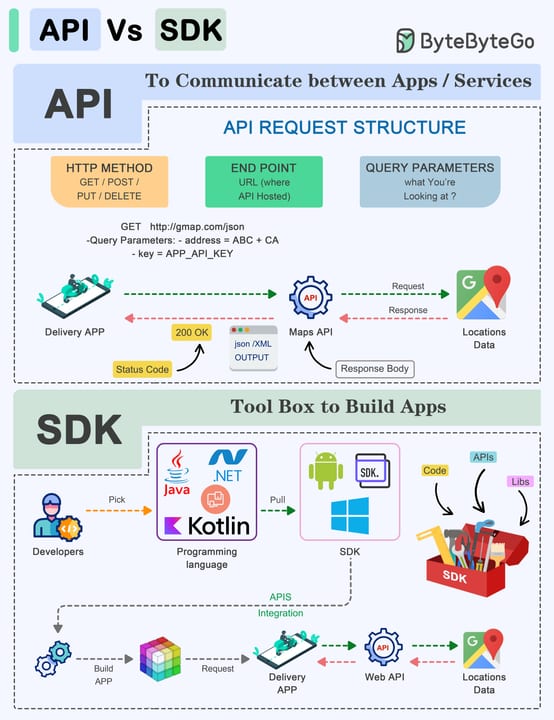
A good analogy is booking a flight. You can go directly to the airline's website and fill out every field yourself — departure airport, seat preference, baggage, payment. That's raw HTTP. Or you can use a travel app that pre-fills common preferences, remembers your passport, retries if the booking fails, and alerts you to problems automatically. That's the SDK. Both book the same flight on the same airline. The SDK is a convenience layer, not a different transport. But convenience layers can hide surprising amounts of work.
Why it matters
This choice comes up on day one of every LLM project, and getting it wrong costs time later. Pick raw HTTP when you don't need the overhead; skip the SDK on a platform where installing packages is painful or impossible. Pick the SDK when you want production reliability without reinventing the wheel.
The stakes are real in both directions. A beginner who starts with raw HTTP sees the exact JSON that travels over the wire — which builds genuine understanding and makes debugging easier. But a team that ships raw HTTP to production and skips retries, timeouts, and streaming parsers will be writing all of that boilerplate themselves, usually the hard way, after something breaks.
The choice also matters when you work across multiple providers. Several providers — Mistral, Together AI, Groq, Fireworks, and others — expose OpenAI-compatible endpoints, which means the OpenAI SDK (or a raw HTTP call shaped like OpenAI's) can reach them without code changes. Knowing why those endpoints look the same helps you port across providers quickly.
- Learning the API — start with
curlor rawfetch. Seeing the naked request and response makes the API concrete and makes SDK behavior less mysterious later. - Prototyping and scripts — either works fine; the SDK saves setup time once you have it installed.
- Production services — the official SDK is almost always the better default: retries, type safety, and streaming are handled for you.
- Edge runtimes, Pyodide, or dependency-constrained environments — raw HTTP using the platform's built-in
fetchorhttpxis often the only practical option.
How it works
Under both approaches the wire protocol is identical: an HTTP POST carrying a JSON body to the provider's endpoint, with the API key in a header. The diagram below shows both paths converging at the same network call.
- Write request body by hand
- Set headers manually (auth, content-type, api-version)
- Parse JSON response yourself
- Retry on 429 / 5xx yourself
- Parse SSE stream for streaming
- Pass a Python/JS object to a function
- SDK sets headers from your env var
- Returns a typed object, not raw JSON
- Retries automatically (2x by default)
- Streaming helper wraps SSE for you
The HTTP layer is the same in both cases — the request that leaves your machine and the response that comes back are byte-for-byte equivalent. What differs is how much of the surrounding plumbing you write versus receive pre-built.
What the SDK is quietly doing for you
- Authentication — the SDK reads your API key from an environment variable (
ANTHROPIC_API_KEY,OPENAI_API_KEY) and injects it into every request header so you never manually writeAuthorization: Bearer ...orx-api-key: .... - Automatic retries with exponential backoff — the Anthropic and OpenAI Python and TypeScript SDKs retry transient failures (rate-limit
429responses, server-side5xxerrors) up to two times by default, with a short wait between attempts. You get this for free; in raw HTTP you must write it yourself. - Typed return objects — instead of reaching into a raw dict for
response['choices'][0]['message']['content'], the SDK gives youmessage.content[0].text. Your editor autocompletes, and typos become compile-time errors instead of runtime crashes. - Streaming helpers — parsing Server-Sent Events (SSE) in raw HTTP requires a small but fiddly loop. The SDK wraps this in a
stream()context manager or an async iterator so you writefor chunk in stream:instead of implementing the SSE parser. - Version negotiation — Anthropic's API requires an
anthropic-versionheader on every request. The SDK sets this automatically, and when the provider updates the required version, an SDK upgrade handles it for you. - Timeout management — the SDK applies reasonable per-request timeouts so a hung server doesn't block your process indefinitely.
Side-by-side: the same call both ways
The code below makes the identical request to Anthropic's Messages API — first with raw curl, then with the Python SDK, then with the TypeScript SDK. Compare the three and you can see exactly what the SDK saves you.
Raw HTTP (curl)
curl https://api.anthropic.com/v1/messages \
  -H "x-api-key: $ANTHROPIC_API_KEY" \
  -H "anthropic-version: 2023-06-01" \
  -H "content-type: application/json" \
  -d '{
    "model": "claude-sonnet-4-6",
    "max_tokens": 256,
    "messages": [
      {"role": "user", "content": "What is the capital of France?"}
    ]
  }'
You can see all three required headers (x-api-key, anthropic-version, content-type) spelled out manually. The response arrives as raw JSON — you parse it yourself.
Python SDK
# pip install anthropic
import os
from anthropic import Anthropic

client = Anthropic()  # reads ANTHROPIC_API_KEY from env automatically

message = client.messages.create(
    model="claude-sonnet-4-6",
    max_tokens=256,
    messages=[{"role": "user", "content": "What is the capital of France?"}],
)

print(message.content[0].text)  # typed — editor autocompletes this
TypeScript SDK
// npm install @anthropic-ai/sdk
import Anthropic from '@anthropic-ai/sdk';

const client = new Anthropic(); // reads ANTHROPIC_API_KEY from env

const message = await client.messages.create({
  model: 'claude-sonnet-4-6',
  max_tokens: 256,
  messages: [{ role: 'user', content: 'What is the capital of France?' }],
});

console.log(message.content[0].text); // fully typed
// message.usage.input_tokens — token counts also typed
The SDK versions are shorter, the return values are typed, and no header management is visible. The same SDK shape applies to OpenAI (from openai import OpenAI) and Google's Gemini (from google import genai) — provider SDKs follow closely parallel patterns, so learning one makes the others easy to pick up.
When raw HTTP genuinely beats the SDK
The SDK is the right default for most projects, but there are real cases where raw HTTP is the better call.
- Your language has no official SDK. The major providers ship Python, TypeScript/Node, and sometimes Go or Java SDKs. If you're working in Rust, PHP, Ruby, Elixir, or most other languages, raw HTTP with that language's standard HTTP client is the path. The wire protocol is simple and well-documented.
- Dependency budgets are tight. In a Cloudflare Worker, a Pyodide notebook, or a minimal Docker layer, adding an SDK and its transitive dependencies may cost more than it saves. A single
fetch()call with three headers is often cleaner. - You're building a thin proxy or gateway. If your service is forwarding requests on behalf of other callers — for logging, cost tracking, or key rotation — you may want to work with the raw HTTP bytes directly rather than deserializing and re-serializing through an SDK.
- Debugging a tricky request. Stripping the SDK out and sending raw
curlremoves a layer of abstraction. You see exactly what leaves your machine and exactly what comes back, with no middleware in between. - Learning how the API actually works. Writing the raw request once — headers, body, parsing the response JSON by hand — gives you a mental model that makes the SDK's behavior obvious. It's worth doing at least once even if you use the SDK forever after.
Going deeper
Once you're past the basics, two directions are worth exploring: SDK internals, and the multi-provider abstraction layer that sits above any individual SDK.
What to look at inside the SDK source
Both the Anthropic and OpenAI SDKs are open source on GitHub. Reading the _base_client.py (Anthropic) or _base_client.py (OpenAI) files is illuminating: you'll find the retry loop, the backoff table, how SSE is parsed, and how the SDK decides which errors are retryable. This is the most direct way to answer 'exactly what is the SDK doing that I'd have to do myself?'
OpenAI-compatible endpoints
Many third-party providers — Mistral, Together AI, Fireworks, Groq, and others — expose endpoints that are wire-compatible with OpenAI's Chat Completions format. This means you can point the OpenAI SDK at a different base_url and use any of those providers with zero code changes. The same trick works with local inference servers like Ollama and LM Studio. If you're already fluent in raw HTTP, you can also send OpenAI-shaped requests to those endpoints without any SDK at all.
# Point the OpenAI SDK at a different provider's OpenAI-compatible endpoint
from openai import OpenAI

client = OpenAI(
    api_key="your-key-here",
    base_url="https://api.groq.com/openai/v1",  # Groq example
)

# Everything else is identical — same method, same response shape
response = client.chat.completions.create(
    model="llama-3.3-70b-versatile",
    messages=[{"role": "user", "content": "Hello!"}],
)
Multi-provider abstraction SDKs
If your project needs to swap between providers — or let the caller choose — there are abstraction-layer SDKs that sit above any single provider SDK. Vercel's AI SDK (npm install ai) and LiteLLM (pip install litellm) both expose a single unified interface that internally routes to Anthropic, OpenAI, Gemini, or local models. You write provider-agnostic code once; switching providers is a one-line config change rather than a rewrite. These tools also add their own retry, caching, and observability layers on top of the provider SDKs below them.
A useful mental model for choosing: raw HTTP is the protocol; the official provider SDK is a typed client for one provider; a multi-provider SDK is a router across clients. Start at the level of abstraction your project actually needs — you can always add a layer later, but stripping one out mid-project is painful.
FAQ
Should I use the official SDK or raw HTTP for my first LLM project?
Use raw HTTP (curl) once to see what the request and response actually look like, then switch to the official SDK for any code you'll keep. The SDK handles retries, auth headers, and type safety for you. Running curl first means you understand what the SDK is abstracting, which makes debugging much faster later.
What does the Anthropic Python SDK actually do that I can't do myself?
It injects the required x-api-key and anthropic-version headers automatically, retries transient failures (rate limits, server errors) up to twice with exponential backoff, wraps streaming Server-Sent Events in a clean iterator, and returns typed objects with autocomplete instead of raw dicts. You can replicate all of this — but that's several hundred lines of tested code you get for free with pip install anthropic.
Can I call the OpenAI API without installing the SDK?
Yes. The OpenAI Chat Completions endpoint is a plain HTTPS POST to https://api.openai.com/v1/chat/completions with an Authorization: Bearer YOUR_KEY header and a JSON body. Any HTTP client — curl, JavaScript fetch, Python httpx, or Rust's reqwest — can make this call. The SDK is a convenience wrapper, not a requirement.
Is the OpenAI SDK compatible with other providers like Anthropic or Groq?
Not with Anthropic directly, because Anthropic's Messages API has a different request and response shape. However, many providers — Groq, Mistral, Together AI, Fireworks, and others — expose OpenAI-compatible endpoints. You can point the OpenAI SDK at those by setting a custom base_url, and it works without code changes. Anthropic's own endpoint requires either their SDK or a correctly shaped raw HTTP request.
Does the SDK add latency compared to raw HTTP?
In practice, no. The SDK is a thin wrapper that runs in your process; it does not add a network hop. The slight overhead of object serialization and deserialization is microseconds compared to a round-trip network call that typically takes hundreds of milliseconds. For any real application the latency difference between SDK and raw HTTP is unmeasurable.
What are the signs that I should switch from raw HTTP to an SDK?
If you find yourself writing a retry loop for rate limits, parsing SSE chunks to implement streaming, or repeatedly typing out authentication headers, those are the exact problems the SDK solves. Also switch if you're using TypeScript and want autocomplete on the response — the SDK's type definitions alone are often worth the install.