In plain English
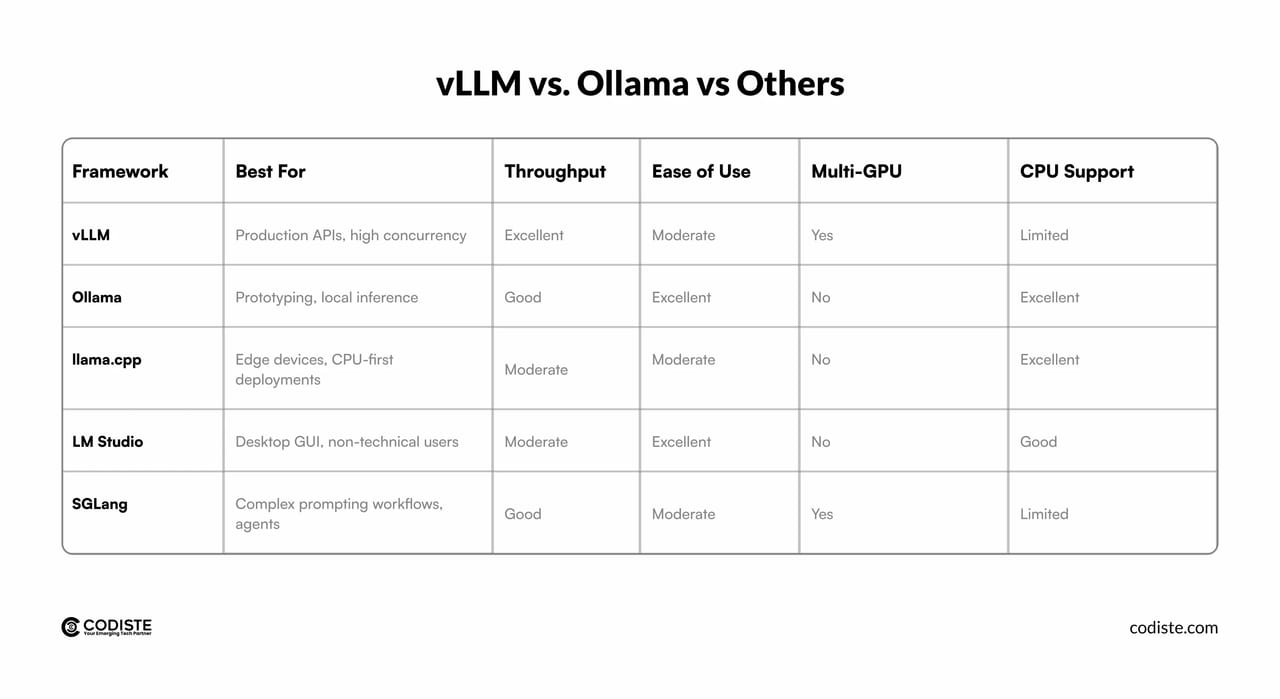
Ollama and vLLM both let you run open-weight language models locally — but they answer different questions. Ollama asks: how do I get a model running on my laptop in under five minutes? vLLM asks: how do I serve a model to hundreds of concurrent users as efficiently as possible? Picking the wrong one for your stage of development wastes either your time (setting up vLLM when you only need a quick prototype) or your users' patience (leaving Ollama in production when your traffic has outgrown it).
A useful mental model: Ollama is like a single-user espresso machine — beautiful, simple, and perfect for you and maybe a guest or two. vLLM is like a commercial espresso bar with multiple baristas working in shifts — far more complex to set up, but the only sensible choice when a queue of customers is forming. The espresso is the same model; the machinery is what differs.
Why the choice matters
Most AI engineering projects start with Ollama — and that is the right call. But teams that skip understanding the distinction often hit a wall: they ship Ollama into a product, concurrency increases, latency spikes, and they are suddenly debugging a production incident instead of building features. Knowing the break-even point in advance means you plan the migration before it becomes urgent.
- Developer experience — Ollama installs in one command, downloads models with
ollama pull, and requires zero GPU configuration. vLLM requires Python, CUDA, and a modern NVIDIA GPU. That setup cost is real. - Concurrency ceiling — Ollama defaults to processing 4 requests in parallel (controlled by
OLLAMA_NUM_PARALLEL). Under higher load, additional requests queue. vLLM has no hardcoded parallel limit; it fills the GPU's entire available memory budget with concurrent requests via continuous batching. - Hardware flexibility — Ollama runs on Mac (Apple Silicon via Metal), Windows, Linux, and even CPU-only. vLLM requires NVIDIA CUDA (AMD ROCm support exists but is less mature). If your machine is a MacBook, Ollama is your only real option of the two.
- Throughput at scale — Red Hat's August 2025 benchmark showed vLLM achieving roughly 793 tokens per second versus Ollama's 41 TPS on the same hardware under load — a roughly 19x gap that only widens as concurrency increases.
- Model format — Ollama uses GGUF (the llama.cpp quantized format). vLLM uses Hugging Face safetensors. You cannot point vLLM at an Ollama model file; migrating requires re-downloading the HF checkpoint.
How each engine works under the hood
The performance gap between the two tools is not accidental — it comes from fundamentally different architectural priorities.
Ollama's architecture: simplicity first
Ollama wraps llama.cpp, a C++ inference engine that runs GGUF-format quantized models. When you call ollama run, it loads the model into memory (GPU VRAM if available, otherwise CPU/RAM), exposes a REST API, and processes requests. Requests beyond the OLLAMA_NUM_PARALLEL limit are queued in a first-in-first-out queue (default depth 512). The design goal is zero-friction setup, not throughput maximization. Ollama handles one model at a time by default (OLLAMA_MAX_LOADED_MODELS=1), swapping models in and out of VRAM as needed.
vLLM's architecture: throughput engineering
vLLM was built by the UC Berkeley Sky Computing Lab and introduced two mechanisms that together transform how a GPU serves LLMs. PagedAttention manages the KV cache — the growing scratchpad of intermediate attention results — using a technique borrowed from OS virtual memory. Instead of reserving one large contiguous block per request, it allocates small 16-token pages on demand and tracks them through a per-request block table. Memory waste falls from 60–80% to under 4%, meaning many more requests fit in VRAM simultaneously. Continuous batching completes the picture: rather than waiting for an entire batch to finish before starting the next, vLLM checks after every single token step whether any request has finished, frees its pages, and admits a waiting request immediately. The GPU never idles waiting for the slowest member of a static batch.
- Request arrives at REST API
- Queued if > OLLAMA_NUM_PARALLEL active
- llama.cpp processes GGUF model
- KV cache in contiguous VRAM block
- Response streams back
- Slot freed, next request starts
- Request arrives at OpenAI-compatible API
- Scheduler checks memory budget
- PagedAttention allocates KV pages on demand
- Continuous batching groups with live requests
- Every token step: evict done, admit new
- Response streams back; pages freed immediately
What this means for latency and throughput
At very low concurrency (1–2 users), Ollama and vLLM produce similar time-to-first-token. Ollama's low overhead can actually win by a small margin for a single user. The gap opens as concurrency climbs. At 16+ concurrent users, vLLM's continuous batching keeps the GPU saturated while Ollama's parallel limit causes a queue to build. By 128 concurrent requests, benchmarks show vLLM delivering 3–19x more total throughput. Ollama's inter-token latency stays stable — because it is throttling requests and keeping its active set small — but many users are simply waiting longer to get into that active set at all.
When to use Ollama vs vLLM
The decision is mostly about the number of simultaneous users and the hardware you have available.
| Situation | Use Ollama | Use vLLM |
|---|---|---|
| Hardware | MacBook, Windows PC, CPU-only, any GPU | NVIDIA GPU (CUDA required) |
| Users | 1–5 concurrent | 5+ concurrent, growing load |
| Setup time | You want running in < 5 min | You can invest an hour + Docker/Python env |
| Stage | Prototyping, experimentation, demos | Staging environment, production serving |
| Model format | GGUF (quantized, smaller files) | Hugging Face safetensors |
| Throughput priority | Latency for one user matters more | Total tokens/sec across all users matters most |
| Ops burden | Zero — single binary | Needs monitoring, GPU memory tuning, restarts |
Ollama is not a toy
It is worth resisting the framing that Ollama is only for hobby projects. Many serious engineering use cases live permanently on Ollama: a developer's local coding assistant, a private RAG setup for a single researcher, an offline air-gapped deployment, or a CI pipeline that needs a small model to run tests. Ollama does these jobs well and requires zero infrastructure. The case for vLLM only opens when concurrency or throughput requirements grow beyond what Ollama's architecture can satisfy.
How to migrate from Ollama to vLLM
When you are ready to graduate from Ollama to vLLM, the migration has three steps: install vLLM, find the equivalent Hugging Face checkpoint, and update your client URL. There is no application-layer rewrite required if you have been using the OpenAI-compatible endpoint.
Step 1: Install vLLM and start the server
# Install vLLM (Python 3.9+, CUDA 11.8+ required)
pip install vllm

# Serve an open-weight model from Hugging Face
# (the same model family you ran with ollama pull)
vllm serve <hf-org>/<Model-Instruct> \
  --max-model-len 8192 \
  --gpu-memory-utilization 0.90

# API is now available at http://localhost:8000/v1
Step 2: Find the equivalent Hugging Face model
Ollama uses GGUF files; vLLM uses Hugging Face safetensors. You cannot point vLLM at a .gguf file. The mapping is usually straightforward: an ollama pull model tag corresponds to a matching meta-llama (or other publisher) repository on Hugging Face. vLLM supports quantized variants (AWQ, GPTQ, FP8) available on HF, so you can still use a smaller model if VRAM is limited — pick a quantized checkpoint rather than the full BF16 one.
Step 3: Update your client
from openai import OpenAI

# Before (Ollama)
client_ollama = OpenAI(
    base_url="http://localhost:11434/v1",
    api_key="ollama",
)

# After (vLLM) — one line changes
client_vllm = OpenAI(
    base_url="http://localhost:8000/v1",
    api_key="not-required",
)

# The rest of your code — messages, streaming, temperature — is identical
response = client_vllm.chat.completions.create(
    model="<hf-org>/<Model-Instruct>",
    messages=[{"role": "user", "content": "Hello!"}],
)
print(response.choices[0].message.content)Running both in parallel during transition
A low-risk migration strategy is to run vLLM alongside Ollama (different ports) and route a small fraction of traffic to vLLM first. Confirm output quality matches, then shift traffic gradually — 10%, 50%, 100%. Both processes share the same GPU if they are not running simultaneously, or you can deploy them on separate machines. Because the API is identical, a single proxy like Nginx can split traffic by percentage without touching application code.
Going deeper
Once you understand the core trade-off, a few advanced areas are worth knowing about before you commit to either tool in production.
Ollama tuning for higher concurrency
If you need moderate concurrency but vLLM's CUDA requirement is a blocker (e.g., you only have Apple Silicon or AMD hardware), Ollama can be tuned. The key environment variables are OLLAMA_NUM_PARALLEL (how many requests share the active model slot, default auto-selects 4 or 1 based on available memory), OLLAMA_MAX_LOADED_MODELS (how many distinct models stay resident in VRAM), and OLLAMA_MAX_QUEUE (how many requests are buffered before Ollama starts returning 503s, default 512). Increasing OLLAMA_NUM_PARALLEL uses more VRAM because it effectively multiplies the context length — four parallel requests at 2K context consume the same KV memory as one request at 8K context. Tune conservatively and benchmark.
# Example: allow up to 8 parallel requests on a high-VRAM machine
export OLLAMA_NUM_PARALLEL=8
export OLLAMA_MAX_LOADED_MODELS=2
export OLLAMA_MAX_QUEUE=1024
ollama serve
vLLM prefix caching for shared context
vLLM supports automatic prefix caching (--enable-prefix-caching): when multiple requests share a common prefix — a system prompt, a retrieved document chunk — vLLM computes that prefix's KV pages once and reuses them across all matching requests. For RAG workloads and agent loops that resend the same context repeatedly, this can reduce time-to-first-token from seconds to milliseconds. This feature has no equivalent in Ollama.
Multi-GPU serving with tensor parallelism
Models that do not fit in a single GPU's VRAM can be sharded across multiple GPUs using vLLM's tensor parallelism flag. A single vllm serve command with --tensor-parallel-size 4 will coordinate four GPUs and present them as one API endpoint — no additional orchestration code needed. Ollama has no equivalent; you would need to use llama.cpp's experimental multi-GPU support separately.
The emerging middle ground
The gap between Ollama and vLLM is narrowing from both sides. Ollama has steadily improved its concurrency handling and GPU utilization across releases. vLLM has worked to reduce its setup complexity, adding better Docker images and documentation. Tools like LiteLLM act as a unified proxy layer in front of either, letting you write one client that routes to Ollama in dev and vLLM in production transparently. If you are building a product, designing your application to talk to an OpenAI-compatible endpoint abstraction — not hard-coding localhost:11434 — is the single architectural decision that makes future migration painless.
FAQ
Is Ollama good enough for production?
Ollama works well in production for low-concurrency scenarios — internal tools, single-user assistants, small teams. It struggles when many users hit it simultaneously, because its default parallel limit (auto-selected as 4 or 1 based on available memory) means additional requests queue rather than being batched efficiently. If your p95 latency is acceptable and you have fewer than five concurrent users, Ollama is a perfectly valid production choice.
How much faster is vLLM than Ollama?
At low concurrency (1–2 users), the difference is small and sometimes favors Ollama due to lower overhead. Under realistic multi-user load, benchmarks published by Red Hat in 2025 showed vLLM achieving roughly 793 tokens per second versus Ollama's 41 TPS on the same hardware — a roughly 19x gap. More conservative benchmarks show a 3–5x advantage at 128 concurrent requests. The gap is largest when many requests are in flight simultaneously.
Can I run vLLM on a Mac or on CPU?
vLLM requires an NVIDIA GPU with CUDA support. It does not run on Apple Silicon (no Metal backend) or CPU-only machines. If you are on a Mac or a machine without an NVIDIA GPU, Ollama is effectively the better choice of the two — it runs natively on Apple Silicon via the Metal GPU backend and also works CPU-only, albeit slowly.
Do Ollama and vLLM use the same model files?
No. Ollama uses GGUF format — the quantized model format from llama.cpp, downloaded via ollama pull. vLLM uses Hugging Face safetensors format, downloaded automatically from huggingface.co. You cannot point vLLM at a .gguf file. When migrating, find the equivalent Hugging Face model repository and let vLLM download it. vLLM supports quantized checkpoints (AWQ, GPTQ, FP8) if VRAM is limited.
What is OLLAMA_NUM_PARALLEL and how does it affect performance?
OLLAMA_NUM_PARALLEL sets how many requests Ollama processes at the same time for a given loaded model. The default auto-selects 4 or 1 based on available memory. Raising it allows more simultaneous users but multiplies VRAM consumption — four parallel requests at a 2K context use the same KV memory as one request at 8K context. Increase it carefully and test for out-of-memory errors before deploying.
Is switching from Ollama to vLLM a big rewrite?
If you have used Ollama's OpenAI-compatible endpoint (/v1/chat/completions), the migration is essentially one line of code — changing the base_url in your OpenAI client. The bigger work is finding the equivalent Hugging Face checkpoint and setting up the CUDA environment for vLLM. If you used Ollama's native API format (/api/generate), those calls need to be refactored to the standard OpenAI format, which vLLM implements.