In Plain English
When you download a local LLM from Hugging Face or Ollama, the filename often looks like Llama-3.1-8B-Q4_K_M.gguf or mistral-7b-instruct.Q8_0.gguf. Those letters and numbers are the quantization level — the precision at which every weight in the model is stored. Picking the wrong one means either running out of RAM or leaving free performance on the table.
Think of it like an image saved at different JPEG quality settings. At 100% quality the file is large but pixel-perfect. At 40% quality the file is tiny but you might notice fuzziness on fine detail. Somewhere in the middle — say 75% — you get a file most people cannot distinguish from the original at a fraction of the size. Quantization works the same way, but instead of pixel colors you are compressing the billions of floating-point numbers that make up a model's weights.
FP16 stores each weight as a 16-bit floating-point number — the closest to the original training precision most consumer machines can handle. Q8 (also written Q8_0) stores each weight in 8 bits. Q4 stores it in just 4 bits. The quality difference between Q4 and Q8 on most tasks is smaller than you would expect: around 1–3% on standard benchmarks. The memory saving is enormous: a 7-billion-parameter model at FP16 weighs roughly 14 GB; the same model at Q4_K_M fits in about 4.5 GB.
Why It Matters for Local AI Builders
The single biggest barrier to running a capable open model on your own hardware is RAM. A 13-billion-parameter model at FP16 needs roughly 26 GB — more than most consumer GPUs have. The same model at Q4_K_M fits in about 8 GB, well within an RTX 3080 or Apple M2 Pro. Quantization is therefore not a nice-to-have; it is the technique that makes local AI practical at all.
Choosing the right level matters in two opposite directions. Too aggressive (Q2, Q3) and the model's reasoning degrades visibly — outputs become repetitive, factual errors creep in, and code generation breaks on anything non-trivial. Too conservative (full FP16 when Q5 would do) and you blow your VRAM budget on precision the model does not actually need, leaving no room for a longer context or a bigger model entirely.
For production deployments the stakes are higher. If you are running a coding assistant or a math tutor, the extra precision of Q5_K_M or Q8_0 pays for itself in correctness. If you are running a general-purpose chat assistant where users will not spot a 2% perplexity difference, Q4_K_M is optimal — it lets you serve more concurrent requests from the same GPU.
How Quantization Levels Work
Every modern LLM is made up of billions of weights — floating-point numbers that encode what the model has learned. During training these weights live in 32-bit (FP32) or 16-bit (FP16 / BF16) precision. Quantization converts them to lower-bit integers or block-scaled integers after training, shrinking the file and the runtime memory footprint.
Bits Per Weight
The number after Q tells you the target precision per weight. FP16 uses 16 bits. Q8 uses 8 bits. Q4 uses 4 bits. Because memory is proportional to bits, Q8 is roughly half the size of FP16, and Q4 is roughly one-quarter. The actual compression ratio is slightly less because quantization also stores small "scale" and "zero-point" correction values per block of weights.
The K-Quant System (Q4_K_M, Q5_K_S, Q6_K, ...)
Most GGUF files you encounter today use the K-quant method developed by the llama.cpp community. The naming follows the pattern Q<bits>_K_<size>. The K signals a smarter quantization algorithm that groups weights into blocks and finds the optimal scale per block, reducing rounding error compared to naive round-to-nearest approaches. The suffix S/M/L (Small, Medium, Large) describes a mixed-precision strategy: certain high-sensitivity tensors (attention projections, embedding layers) are stored at a higher precision than the bulk of the network.
- Q4_K_S — most tensors at 4-bit, sensitivity layers also at 4-bit. Smallest Q4 variant.
- Q4_K_M — most tensors at 4-bit, attention and feed-forward layers upgraded to 6-bit. The community default.
- Q5_K_S — most tensors at 5-bit, sensitivity layers at 5-bit.
- Q5_K_M — most tensors at 5-bit, key tensors upgraded to 6-bit. Best step up from Q4_K_M.
- Q6_K — most tensors at 6-bit. Very close to Q8 quality at meaningfully smaller size.
- Q8_0 — 8-bit, no mixed precision. Near-lossless, largest of the common quants.
The older Q4_0 and Q4_1 formats you may see on older model pages use a simpler quantization scheme without the per-block optimization. For the same bit-width, K-quants outperform them in both quality and sometimes speed. Prefer K-quant variants whenever they are available.
Size and Quality Tradeoffs by the Numbers
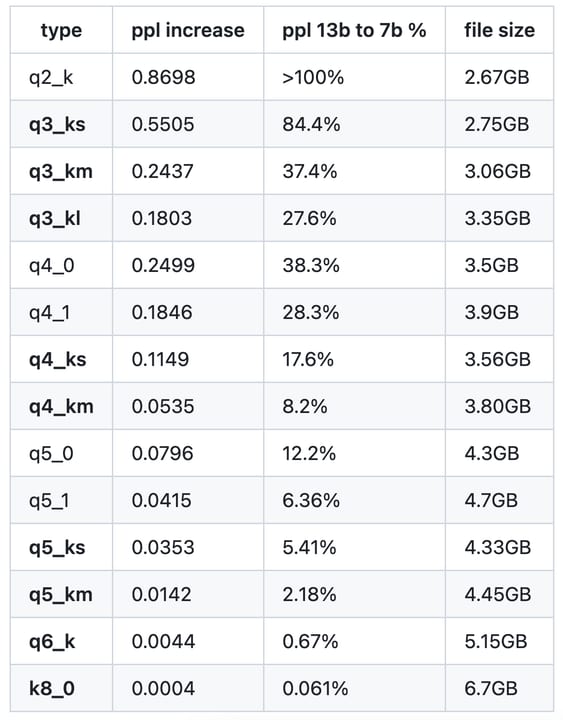
The table below shows measured file sizes and perplexity scores for a representative 7-billion-parameter model. Perplexity is measured on a standard text benchmark (WikiText-2) — lower is better. The FP16 baseline represents near-perfect precision for inference on consumer hardware.
| Format | Bits/weight | 7B size | 13B size | 70B size | Perplexity delta vs FP16 |
|---|---|---|---|---|---|
| FP16 | 16 | ~14 GB | ~26 GB | ~140 GB | baseline (0.00) |
| Q8_0 | 8 | ~7.2 GB | ~13.8 GB | ~74 GB | +0.01 to +0.05 |
| Q6_K | 6 | ~5.5 GB | ~10.7 GB | ~56 GB | +0.05 to +0.10 |
| Q5_K_M | ~5.5 | ~5.0 GB | ~9.6 GB | ~50 GB | +0.08 to +0.15 |
| Q4_K_M | ~4.5 | ~4.5 GB | ~8.2 GB | ~43 GB | +0.15 to +0.30 |
| Q3_K_M | ~3.5 | ~3.5 GB | ~6.3 GB | ~34 GB | +0.50 to +1.50 |
| Q2_K | ~2.5 | ~2.7 GB | ~5.0 GB | ~26 GB | +2.00 to +5.00+ |
Task-Sensitivity to Quantization
Not all tasks degrade equally as you lower precision. Research and community testing reveal a clear hierarchy:
- General chat, summarization, translation — nearly indistinguishable between Q4_K_M and Q8_0. Even Q3_K_M is passable for casual use.
- Structured output, JSON extraction, instruction following — noticeable degradation below Q4_K_M; Q5_K_M recommended.
- Code generation — measurable but small difference between Q4_K_M and Q5_K_M (~1–2% on HumanEval); larger gap below Q4.
- Multi-step math and logical reasoning — the most quantization-sensitive category. Q5_K_M or Q8_0 is advisable for agents doing arithmetic chains or formal proofs.
The Decision Guide: Matching Quant to Hardware
The right quantization level depends on three factors: how much VRAM (or unified memory) you have, the size of the model you want to run, and the task type. The rule of thumb is: pick the largest quant that fits comfortably in your GPU VRAM with at least 1–2 GB to spare for the context window and runtime overhead.
Hardware-Specific Recommendations
| Hardware | VRAM / RAM | Recommended quant | Notes |
|---|---|---|---|
| RTX 3060 / 4060 | 12 GB | Q4_K_M (7B or 13B) | Tight fit for 13B; watch context length |
| RTX 3080 / 4070 | 10–12 GB | Q4_K_M (13B) or Q5_K_M (7B) | Q5_K_M on 7B is the sweet spot |
| RTX 3090 / 4090 | 24 GB | Q8_0 (13B) or Q4_K_M (70B) | FP16 fits comfortably for 7B |
| Apple M2 / M3 (16 GB) | 16 GB unified | Q4_K_M (13B) or Q5_K_M (7B–8B) | llama.cpp uses Metal; very efficient |
| Apple M2 / M3 Pro (36 GB) | 36 GB unified | Q8_0 (13B) or Q4_K_M (70B) | One of the best value local setups |
| CPU only (32 GB RAM) | 32 GB system RAM | Q4_K_M (7B–13B) | Slow but usable; expect 2–6 tok/s |
If the model does not fully fit in VRAM, tools like llama.cpp and Ollama will offload some layers to system RAM. This keeps the model runnable but degrades inference speed significantly — CPU layers run at roughly 1/10th the speed of GPU layers. A smaller model fully in VRAM almost always beats a larger model partially offloaded.
Quant Names in Practice: Ollama, LM Studio, and Hugging Face
Each tool surfaces quantization levels slightly differently, but the underlying GGUF format and naming scheme is the same.
Ollama
Ollama model tags encode the quant level in the tag suffix. The untagged default (e.g., ollama pull mistral) always uses Q4_K_M. To get a specific quant, append the variant to the tag.
# Default (Q4_K_M)
ollama pull llama3.1:8b

# Explicitly Q8
ollama pull llama3.1:8b-instruct-q8_0

# Q5_K_M variant
ollama pull llama3.1:8b-instruct-q5_K_M

# Check which variant you have running
ollama show llama3.1:8b
LM Studio
LM Studio's model search shows GGUF variants side by side with their download size and quant label. You can sort by size or filter by quant type. When in doubt, LM Studio highlights the Q4_K_M variant as "recommended" for most hardware profiles.
Hugging Face
On Hugging Face, quantized GGUF files are usually published by community re-quantizers like bartowski or mradermacher. Each repository for a GGUF model lists every available quant as a separate file. The file naming is consistent: <ModelName>-<Params>B-<quant>.gguf. You can filter by file size in the repository's Files tab to quickly find the variant that fits your hardware.
Going Deeper
Once you have mastered the basic pick-a-quant decision, several advanced topics become relevant.
Dynamic / Importance-Aware Quantization
The K-quant system applies the same bit-width to all layers of the same type. More recent work — such as Unsloth's Dynamic GGUF quantization (released 2024–2025) — profiles which layers matter most during inference and assigns higher precision selectively. The result is a Q4-sized file with Q5 or Q6 quality on the layers where it counts. When you see "dynamic" or "iq" (importance-quantized) in a filename, this is the technique at work.
IQ Quants (imatrix)
The llama.cpp toolchain supports importance matrix (imatrix) quantization, where a small calibration dataset is run through the model before quantization to measure which weights activate most. The quantizer then protects high-activation weights with extra precision. IQ2, IQ3, and IQ4 variants produced this way consistently outperform naive Q2/Q3/Q4 at the same file size — they are the preferred choice when you must go below Q4.
KV Cache Quantization
Beyond model weight quantization, llama.cpp also supports quantizing the KV cache — the memory used to store context during inference. Setting --cache-type-k q8_0 (or lower) can halve the memory consumed by long contexts without touching the model weights at all. For 128k-context models, KV cache quantization often frees more memory than switching from Q5 to Q4 weights would.
GPTQ and AWQ: GPU-Native Alternatives
GGUF + K-quants target CPU-friendly inference via llama.cpp. If you are running on a GPU exclusively, GPTQ and AWQ (Activation-aware Weight Quantization) are alternatives that may deliver higher throughput. AWQ in particular uses a calibration set to identify and protect salient weights, achieving 4-bit quality comparable to Q4_K_M but with better GPU kernel support in frameworks like vLLM and Transformers. For pure GPU deployments serving many users, AWQ or GPTQ in vLLM often outperforms GGUF in tokens-per-second, even at the same bit-width.
FAQ
Which GGUF quant should I download for a 7B model with 8 GB of VRAM?
Q4_K_M is the default recommendation. It fits comfortably in 8 GB with room for context. If your VRAM is 10–12 GB, upgrade to Q5_K_M for noticeably better reasoning and code quality at the cost of about 500 MB extra.
How much quality do you actually lose going from Q8 to Q4?
On standard benchmarks like MMLU and perplexity, Q4_K_M is roughly 1–3% behind Q8_0 and about 2–4% behind FP16. For conversational chat and summarization that gap is imperceptible. For multi-step math or complex code, it is measurable but usually acceptable.
What does the K_M, K_S, or K_L suffix mean on a GGUF file?
K indicates the k-quant algorithm (better block-level optimization than older Q4_0 methods). S, M, L stand for Small, Medium, and Large — describing how aggressively the model upgrades sensitive layers to higher precision. Q4_K_M is the medium variant: most layers at 4-bit, attention layers at 6-bit.
Is FP16 always better than Q8 for local inference?
In quality terms, yes — FP16 retains the full training precision. In practice, Q8_0 is statistically indistinguishable from FP16 on nearly every benchmark (perplexity difference under 0.05 points). Unless you are doing research-grade accuracy tests, Q8_0 is effectively FP16 at half the memory cost.
Can I run Q4 models fully on CPU without a GPU?
Yes. Q4_K_M GGUF files are specifically designed to run on CPU via llama.cpp, Ollama, or LM Studio. A 7B model at Q4_K_M on a modern 8-core CPU produces about 2–8 tokens per second depending on your RAM speed. It is slow but fully functional for offline use.
Why does Ollama default to Q4_K_M instead of something higher?
Ollama targets the broadest possible hardware — most users have 8–16 GB of RAM or VRAM. Q4_K_M fits large capable models (7B–13B) in that budget while keeping quality high. Power users on higher-end hardware can explicitly pull q8_0 or fp16 variants.