In plain English
When you deploy an LLM feature, your monitoring system will happily show you one number: average response time. It might read 1.2 seconds. Looks fine. But hidden in that average are the ten users who waited eight seconds, the five requests that timed out entirely, and the dozen responses the model refused to answer at all. Average latency is the most-watched and least-useful metric on most LLM dashboards.
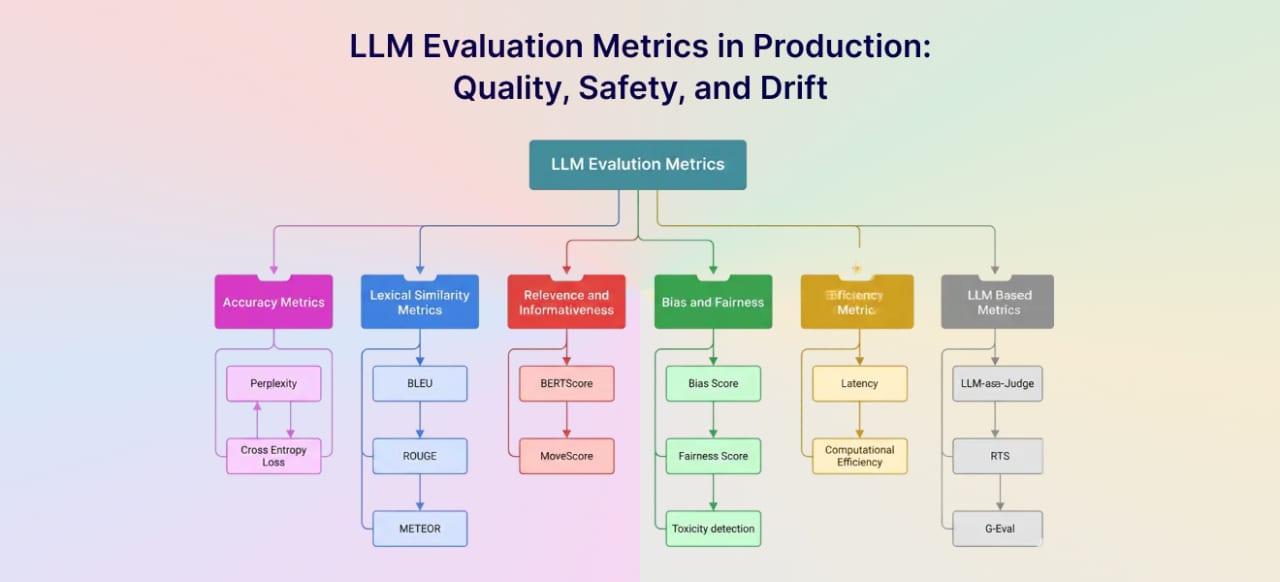
Think of it like measuring how long airport security takes. If you average everyone in the line, you get something reasonable. But what actually determines whether you miss your flight is the worst-case line — the moment a bag triggers a second scan, or a screener goes on break. The unlucky traveler doesn't care about the average; they care about the tail. LLM production metrics work the same way: the numbers that matter are the ones that describe your worst-case users, your real costs, and your quality failures — not the happy path average.
Why it matters
Unlike traditional web APIs, LLM responses have a fundamentally different performance shape. Response time scales with output length, not just input complexity. The same prompt that returns two sentences on one call might return twelve paragraphs on the next — and that difference is baked into how the model generates tokens, not something you control. This produces latency distributions with heavy right tails: the slowest requests can be 5x to 20x slower than the median.
Three categories of failure hide inside an acceptable average:
- Latency outliers. A p95 of 8 seconds with a mean of 1.5 seconds means 5% of your users are having a painful experience. In a product with 10,000 daily active users that is 500 people per day who may churn.
- Cost spikes. LLM costs are token-proportional. One rogue prompt template with a bloated system message, or an agent that loops unexpectedly, can spike your bill by 10x without touching average cost per request.
- Soft quality failures. The model returning HTTP 200 with "I cannot help with that" is a failure that looks like success to every classic monitoring tool. Refusals, hallucinations, and off-topic answers never throw exceptions.
Picking the right metrics is the difference between a dashboard that catches problems in minutes versus one that lets them fester for days while the average line stays flat.
How the metrics fit together
LLM production metrics fall into four buckets: latency, cost, reliability, and quality. Each bucket answers a different operational question, and each has at least one metric that looks reasonable on the surface but masks real problems underneath.
Latency: two numbers, not one
LLM APIs stream tokens, which means users experience latency in two phases. Time to First Token (TTFT) is the gap between sending the request and receiving the first byte of the response — this is what determines whether the interface feels responsive. Time Per Output Token (TPOT), sometimes called inter-token latency (ITL), is the average delay between consecutive tokens — this determines how fast the text streams. Total end-to-end latency is approximately TTFT + (TPOT × output_token_count).
For chat applications, TTFT under 500ms feels instant; over 2 seconds starts to feel broken. For code completion where the IDE inserts tokens as they arrive, TPOT above 50ms per token creates visible stuttering. These two numbers have different root causes: high TTFT usually points to queuing, prompt-processing load, or a cold inference backend; high TPOT points to model size, batch interference, or GPU memory pressure.
Cost: the per-request breakdown
API pricing is charged per token — typically with a higher rate for output tokens than input tokens. As of mid-2026, frontier model pricing ranges from roughly $0.25 to $15 per million input tokens and $1.25 to $75 per million output tokens depending on the model and provider. The critical insight is that output tokens cost more and you control them less — the model decides how verbose to be, and that variability is what creates cost spikes.
The most actionable cost metric is cost per request, broken down by feature or prompt template. Tracking total monthly spend tells you the bill; tracking per-request cost by template tells you which prompt is burning your money. A system message that grew from 200 to 2,000 tokens after a copy edit will double your input cost invisibly unless you alert on it.
Reliability: hard failures and soft ones
Hard failures are the errors that throw exceptions: provider timeouts, rate-limit 429 responses, network errors, and malformed outputs that fail JSON parsing. These are the easiest to track because they surface as non-2xx responses or caught exceptions. Soft failures are trickier — they return HTTP 200 but contain a useless response: safety-filter refusals, "I don't know" answers to questions the model should handle, and truncated outputs that hit the max-token limit mid-sentence.
Quality: what a 200 OK hides
Quality metrics require more setup than the others because there is no built-in signal — the API returns 200 whether the response is brilliant or nonsense. The practical entry points are refusal rate (what fraction of requests produce a model-generated refusal or unhelpful deflection), fallback rate (how often your guardrail layer redirects or rewrites a response), and LLM-as-judge eval score (a separate model call that rates each response for relevance, faithfulness, or task completion on a 1–5 scale).
Metrics reference: what to track and why
The table below is a starting dashboard for any LLM-powered feature. Start with the tier-1 metrics; add tier-2 once you have a baseline and want to dig deeper.
| Metric | Tier | What it catches | Alert threshold (starting point) |
|---|---|---|---|
| TTFT p95 | 1 | Slow prefill, queuing, cold starts | > 2s for chat; > 500ms for completion |
| End-to-end latency p95 | 1 | Overall user experience ceiling | > 10s for most apps |
| Error rate (hard) | 1 | Provider outages, rate limits, timeouts | > 1% over 5 min window |
| Cost per request (by template) | 1 | Prompt bloat, runaway agents, unexpected model selection | > 2× rolling 7-day average |
| Refusal / safety-filter rate | 1 | Model behavior shift, prompt drift, policy change | > 5% of requests |
| TPOT p95 | 2 | Streaming speed, batch interference | Model-specific; > 100ms/token is sluggish |
| Input vs. output token ratio | 2 | Prompt verbosity vs. generation verbosity | Flag if output tokens > 3× input |
| Rate-limit hit rate | 2 | Capacity planning, quota exhaustion | > 0.5% triggers quota review |
| Hallucination / faithfulness score | 2 | Content quality drift over time | < 0.8 on your eval scale |
| Cache hit rate | 2 | Effectiveness of semantic or prompt caching | < 20% means caching may not be worth the overhead |
Instrumentation and tooling
You can derive all the tier-1 metrics above from two things: structured logs on every LLM call, and a metrics aggregation layer that computes percentiles. The minimum payload to log on each request is shown below.
// Minimum structured log payload per LLM call
{
  trace_id: string,          // links all spans in one user request
  template_id: string,       // which prompt template drove this call
  model: string,             // e.g. "claude-sonnet-4-6"
  ttft_ms: number,           // milliseconds to first token
  total_latency_ms: number,  // end-to-end wall time
  input_tokens: number,
  output_tokens: number,
  cost_usd: number,          // computed from token counts * current rate
  finish_reason: string,     // "stop" | "max_tokens" | "content_filter" | "error"
  error_code?: string        // provider error code if finish_reason === "error"
}
From finish_reason alone you can compute error rate (error), refusal rate (content_filter), and truncation rate (max_tokens). From ttft_ms and total_latency_ms you get your latency percentiles. From input_tokens, output_tokens, and cost_usd you get per-template cost tracking.
Tooling landscape
Most teams instrument with one of three approaches: a dedicated LLM observability platform, an OpenTelemetry pipeline to an existing APM, or a simple structured-logging setup with a BI tool for aggregation.
- Langfuse (open source) — purpose-built LLM observability with tracing, prompt management, and cost tracking in one platform. Accepts traces via its own SDK or via the OpenTelemetry OTLP endpoint, so it works alongside existing Datadog or Honeycomb setups without changing application code.
- Datadog LLM Observability — integrates with the existing Datadog agent; surfaces token counts, latency percentiles, and quality evals inside the same dashboards as the rest of your infrastructure.
- OpenTelemetry + any backend — the GenAI semantic conventions (an active OpenTelemetry working group) standardize span attribute names for model name, token counts, and finish reason, so you can send the same instrumentation to Honeycomb, Grafana, Jaeger, or whatever backend you already run.
- LLM gateway layers (Portkey, LiteLLM, Bifrost) — proxy your API calls through a gateway that auto-instruments every request with token counts, latency, and cost attribution. Zero application-code changes, but adds a network hop.
Going deeper
Once you have the tier-1 dashboard running, the next layer is making your metrics actionable rather than just visible. A few patterns that experienced LLMOps teams reach for:
Segment by template, not just by model
Aggregating all LLM calls into one metric loses almost all diagnostic value. A p95 latency of 4s might mean your summarization template is slow, while your classification template runs in 300ms — but the aggregate hides the split. Tag every metric with template_id and feature_name, and set per-template alert thresholds. A single slow template with a cost regression is far easier to fix than a vague aggregate drift.
Alert on rate-of-change, not just absolute value
LLM usage patterns shift naturally — a marketing campaign drives more traffic, or a new model version changes token counts. Alerting on absolute thresholds (e.g., cost > $50/hour) creates noise during expected spikes. A more robust pattern is alerting on anomaly relative to a rolling baseline: if cost per request for a given template rises more than 50% above its 7-day moving average, that is almost always a bug (a prompt that grew, an agent loop, or a model routing change) rather than organic growth.
The cost of output tokens deserves its own signal
Output tokens are typically priced 3x to 5x higher than input tokens by frontier providers, and they are the hardest to predict because the model decides how verbose to be. Tracking the output-to-input token ratio as a time-series metric is surprisingly useful: a sudden increase often means a system prompt changed in a way that shifted the model toward longer responses, or a new model version has different verbosity defaults. Catching a 2x ratio increase early can halve your bill before it compounds.
Quality metrics require a feedback loop
LLM-as-judge scoring (running a secondary model call to rate each response) is the most scalable quality signal, but it costs money and adds latency. A practical approach is to score a sample of live traffic — say 5-10% of requests — and track the distribution of scores over time rather than scoring every request. Hallucination rates in production LLM apps have been reported in the 3-20% range on mixed tasks; if your sampled eval scores start drifting downward, that is a signal to investigate prompt drift, retrieval quality, or a model version change. Pair sampled scoring with 100% coverage of explicit user-feedback signals (thumbs up/down, correction events) to catch sudden regressions that sampling might miss.
The vanity metrics to ignore
Some numbers look good on a dashboard but do not help you ship better products:
- Mean (average) latency — misleading for all the reasons above. Replace it with p50 and p95. The p50 is what your median user experiences; the p95 is your SLA ceiling.
- Total tokens consumed — useful for billing reconciliation, but useless for debugging. Cost per request, split by template, is the actionable version.
- Requests per minute (alone) — traffic volume without quality or cost context tells you how busy you are, not how well you are doing. Pair it with error rate and cost per request at minimum.
- Provider uptime (from the provider's status page) — providers typically report incidents only when a large fraction of traffic is affected. Your own error rate and timeout rate will catch partial degradations and routing issues that never appear on a status page.
FAQ
What is TTFT and why does it matter more than total latency for chat apps?
TTFT (Time to First Token) is the delay between sending a request and receiving the first streamed token. In a streaming chat UI, the interface appears to start responding the moment TTFT completes — the user sees text appearing. Total latency only finishes when the last token arrives. For perceived responsiveness, TTFT is the number users feel first and is usually what triggers the impression of a slow or fast app.
Why is p95 latency the recommended metric instead of p99?
p99 captures the worst 1% of requests, which often includes genuine one-off outliers — cold starts, network blips, or unusually long outputs that cannot be avoided. p95 captures the experience of the unlucky-but-not-extreme 5%, which is a much larger group and often reflects systematic problems like queue saturation or prompt bloat. Both are worth tracking; p95 should drive your SLOs and alerts, while p99 is useful for diagnosing infrastructure ceiling issues.
How do I track cost per request when I have multiple LLM calls in one user request?
Sum the token counts across all LLM calls that share the same trace ID, then multiply by the per-token price for each model used. A tracing tool like Langfuse or an LLM gateway can do this aggregation automatically. The key is tagging every call with a trace_id and feature_name so costs roll up to the right dimension.
What is a refusal rate and is a higher refusal rate always bad?
Refusal rate is the fraction of requests where the model returns a safety-filter rejection or an unhelpful deflection instead of completing the task. Whether a high rate is bad depends on context — a coding assistant with a 10% refusal rate has a serious problem, while a children's education tool might intentionally aim for high refusal rates on off-topic queries. The useful signal is change over time: a sudden increase in refusal rate on a stable prompt template usually indicates a model version change, a new content policy rollout, or a drift in the input distribution.
Do I need a dedicated LLM observability tool, or can I use standard logging?
Standard structured logging can cover all the tier-1 metrics if you log the right fields on every call. Dedicated tools like Langfuse, Datadog LLM Observability, or Portkey add value at scale: automatic token counting, per-request cost attribution, prompt version tracking, and quality eval pipelines. Start with structured logs; graduate to a dedicated platform when you find yourself writing custom aggregations or missing prompt-level attribution.
How often should I sample live traffic for quality evaluation?
A 5-10% random sample is a practical starting point for LLM-as-judge scoring — enough to catch trend lines without doubling your inference costs. Always score 100% of requests that triggered a hard error, a safety filter, or an explicit negative user-feedback signal. As you gain confidence in your eval pipeline and identify high-risk prompt templates, increase sampling for those templates specifically.