In plain English
A prompt is every word you send to an AI model before it replies. Writing a good one is less about magic phrasing and more about giving the model the same information a competent human colleague would need to do the job well.
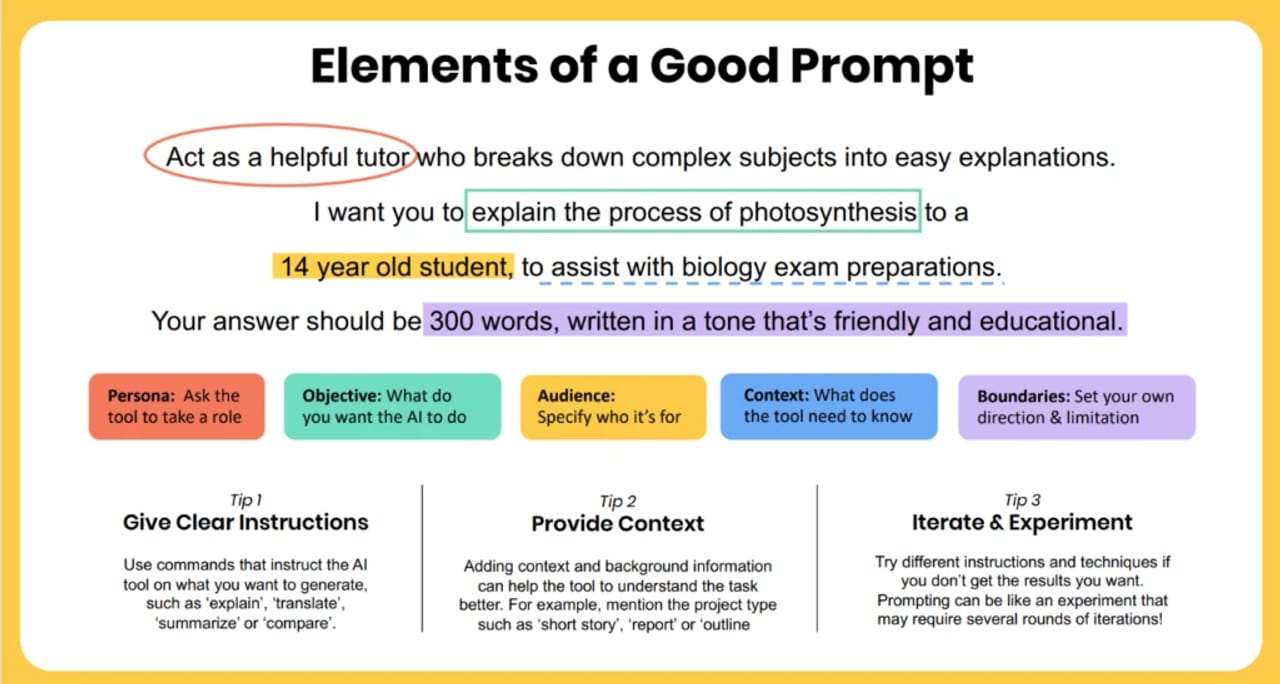
Think about what happens when you ask a new intern to "write something about our product." You will almost certainly get something — but probably not what you wanted. The intern doesn't know the audience, the length, the tone, or the goal. They make guesses, and the guesses miss. Now imagine you said: "Write a 150-word product description for first-time buyers, focusing on ease of setup. Use plain language, no jargon." Same person, completely different result.
Language models work exactly the same way. They are extremely good at completing a pattern — but only if you supply enough of the pattern to make the target unambiguous. Every improvement you make to a prompt is a way of narrowing the space of plausible completions until the one you actually want is the most likely one.
Why it matters
The gap between a mediocre prompt and a good one is not cosmetic. Studies run by teams at MIT Sloan and published guides from Harvard's IT team have consistently shown that context, specificity, and format instructions are the top three variables that separate useful AI responses from generic ones. OpenAI's official prompt engineering guidance makes the same point: more specific instructions reliably outperform vague ones, even with the same underlying model.
For individual users, this translates directly to time saved: fewer back-and-forth clarifications, fewer rewrites, less frustration. For developers building on LLM APIs, prompt quality is often the cheapest reliability lever available — a better-written system prompt can eliminate whole categories of failure modes without changing the model, the architecture, or the cost structure.
Prompt writing is also a transferable skill. The checklist in this article works across every major model family — GPT, Claude, Gemini, Llama-based local models — because the underlying need is the same: the model needs enough information to match your intent. Learning to write clearly for AI makes you better at delegating clearly to humans too.
- Faster results: a good first prompt reduces the number of follow-up exchanges needed.
- More consistent quality: structured prompts produce outputs that vary less between runs.
- Lower cost in production: shorter, clearer prompts use fewer tokens than rambling, hedge-everything prompts.
- Easier debugging: when a model misses the mark, a well-structured prompt makes it obvious which ingredient was wrong.
How it works: the anatomy of a good prompt
A well-formed prompt has five ingredients. You do not need all five every time — a simple factual question often needs only one or two — but for anything non-trivial, checking each one catches the most common failure modes.
1. Task — be precise about the verb
Start with a clear action verb: write, summarize, classify, translate, extract, rewrite, compare. "Tell me about X" is a trap — "about" is infinitely wide. "Summarize X in three bullet points" is a task. The more precisely you name what you want done, the less the model has to guess.
2. Context — who, what, why
Context answers: Who is the audience? What's the situation? Why does this matter? A product description for a developer API reference is completely different from one for a retail shopper, even if the product is the same. The model cannot infer audience from the product alone — you have to say it.
3. Format — define the shape of the output
Models default to whatever format fits the prompt style. Type a question and you get a paragraph. But if you need a numbered list, a JSON object, a table, or a reply under 100 words, you must ask for it. Harvard's AI guides and the official OpenAI help documentation both single out output format as the most commonly forgotten ingredient — and the one with the most immediate impact on usability.
4. Examples — show, don't just tell
For tasks involving tone, style, or fuzzy judgment calls, a single example is worth several paragraphs of adjectives. "Write in our brand voice" is nearly meaningless. "Write in our brand voice — here's a sentence we like: 'You're three steps away from a faster morning'" is something the model can actually replicate. This is the principle behind few-shot prompting, but you don't need to think of it in technical terms: just paste in one thing you liked.
5. Constraints — what to avoid or include
Constraints are the guardrails: no jargon, avoid mentioning competitors, assume the reader has no technical background, do not make up statistics. They are easiest to write after you have seen the model's first attempt — the first output always reveals which boundaries the model doesn't know about.
Before and after: real rewrites
The fastest way to internalize the checklist is to see vague prompts transformed into specific ones. Here are three rewrites, each illustrating a different ingredient upgrade.
| Before (vague) | After (specific) | What changed |
|---|---|---|
| Tell me about the French Revolution. | Summarize the three main economic causes of the French Revolution in plain language, suitable for a high-school student. Use three bullet points, one sentence each. | Task (summarize vs tell), format (bullets), audience (high-school), scope (economic causes only) |
| Write marketing copy for our product. | Write a 150-word product email for remote teams. Highlight three features: real-time collaboration, AI task prioritization, and Slack integration. Tone: friendly and direct. No buzzwords like 'synergy' or 'leverage'. | Format (word count + email), audience, three specific features, tone, explicit constraints |
| Fix this code. | This Python function is supposed to return the median of a list, but it raises an IndexError on an empty list. Fix only that bug — don't refactor anything else. Return just the corrected function. | Exact failure, scope limit, output shape (function only, no explanation) |
Notice that the "after" prompts are longer — but not wordy. Every added word resolves an ambiguity that would otherwise force the model to guess. Padding and vague adjectives ("please make it engaging and professional") add length without adding signal. Specifics ("under 150 words, for a non-technical audience, no acronyms") add signal without bloat.
The beginner's prompt checklist
Run through this list before hitting send. You don't need every item every time, but for any prompt longer than a casual chat message, checking each one takes under a minute and catches most of the common failure modes.
- Task verb is clear. I used a specific action word (write, summarize, classify, extract...) rather than "tell me about" or "help with".
- Audience is named. I specified who will read or use the output (developer, first-time buyer, non-technical manager...).
- Output format is explicit. I said how the reply should be shaped: bullet list, numbered steps, JSON, paragraph, table, word count.
- Scope is bounded. If the topic is broad, I narrowed it (not "summarize AI" but "summarize the key risks of LLMs in medical diagnosis in four sentences").
- At least one example is included if the task involves tone, style, or a judgment call.
- Key constraints are stated. I listed what to avoid, what to include, what the reader already knows.
- The prompt could only be interpreted one way. I re-read it and couldn't think of a plausible misreading.
A useful shortcut taught by MIT Sloan's AI teaching team is the ICC method: Instruction, Context, Constraints. For 80% of everyday tasks — summarizing a document, drafting an email, answering a factual question — those three elements are all you need. Save the full five-ingredient treatment for tasks where you've already tried ICC and the output fell short.
Iteration: the habit that matters most
No prompt guide can guarantee a perfect first result. Even experienced prompt engineers treat the first response as diagnostic information, not the final product. The professional workflow is simple: send the first draft, read the output for what's wrong (not just what's missing), then make one targeted fix at a time.
Changing one thing at a time is important. If you rewrite the entire prompt and the output improves, you don't know which change made the difference — and you can't replicate it reliably. Treat prompts the way a scientist treats an experiment: isolate the variable.
When a prompt reaches a stable, good-quality state, save it. Professionals store working prompts in a prompt library — a simple document or note file with a description, the full prompt text, and a note about which edge cases it handles. A well-maintained library of 10 prompts will save more time than any single perfect prompt ever could.
Going deeper
Once you are comfortable with the checklist, the next layer is structural formatting. For longer, multi-part prompts — especially those used in production systems — wrapping different sections in XML-style delimiters (<context>, <instructions>, <examples>) gives the model unambiguous boundaries between them. Anthropic's official guidance for Claude recommends this approach because it prevents the model from treating instructions as background text or examples as commands.
Role prompting is a related technique: opening with a persona like "You are a senior Python developer reviewing code for a junior engineer" shifts the model's register, assumed knowledge level, and tone in ways that can be hard to achieve with constraints alone. Research and real-world testing from teams building on both the OpenAI and Claude APIs show it consistently boosts performance on domain-specific tasks. The technique is simple enough to add to any prompt, but it interacts with the system prompt in multi-turn conversations — worth reading about before wiring it into a product.
At the production layer, prompts are no longer static strings — they become templates with variables ({{customer_name}}, {{document}}) that a system fills in at runtime. This is where prompt management tools like LangChain's hub, PromptLayer, or plain version-controlled files come in. The discipline around prompt templates — versioning, testing across model updates, A/B measurement — is increasingly called context engineering, a term Anthropic's engineering team began using in 2025 to describe the broader practice of curating everything that lands in a model's context window.
Finally, keep in mind that model families differ in their preferences. Reasoning models (such as GPT-5.5, Gemini 3 Deep Think, and DeepSeek-R1) respond best to goal statements with minimal demonstrations — they do their own deliberation and examples can interfere. General instruction-tuned models (GPT-5 series, Claude Sonnet, Gemini Flash) benefit strongly from the full checklist. When you switch model families, re-test your best prompts from scratch rather than assuming they transfer.
FAQ
How long should a prompt be?
As long as it needs to be and no longer. A factual question might need one sentence. A complex writing task might need ten lines. The problem is never length itself — it's vague filler. Every sentence should resolve an ambiguity or add a constraint. If you can remove a sentence without losing information, remove it.
Does saying 'please' or being polite help with AI prompts?
Polite phrasing does not improve the quality of model outputs. Modern instruction-tuned models are trained to follow commands stated plainly, and adding social pleasantries consumes tokens without adding signal. It won't hurt, but it won't help either — spend those words on specifics instead.
What is the most common mistake beginners make when writing prompts?
Being too vague about the output format. Most beginners focus on what they want the model to know, but not on the shape of the reply they need. Adding a simple format instruction — "reply in three bullet points" or "return a JSON object with these fields" — fixes more first-draft failures than any other single change.
Should I write prompts differently for ChatGPT versus Claude versus Gemini?
The five-ingredient checklist applies equally to all of them. There are minor differences — Claude tends to respond well to XML-delimited structure for complex prompts, and reasoning models prefer minimal examples — but specificity, context, and format instructions improve results on every model family. Master the fundamentals before learning model-specific tricks.
How do I get consistent results from the same prompt?
Set the model's temperature to a lower value (closer to 0) if you are using an API and need deterministic output. In chat interfaces, the main levers are prompt specificity and output format constraints — the tighter the specification, the narrower the range of valid responses, and the more consistent the actual output.
When should I give up on prompting and try fine-tuning instead?
When you have more than a few dozen high-quality input-output examples and the task requires consistent style, specialized knowledge, or very short outputs that resist instruction-following. For most tasks, prompt iteration gets you further than you'd expect before fine-tuning becomes worth the cost and complexity.