In plain English
A PDF is not a document — it is a set of drawing instructions. When you open a PDF viewer, it follows commands like "draw glyph 'A' at position (72, 144)" to paint text on screen. There is no concept of a sentence, paragraph, or table baked in. Every character is placed at an absolute (x, y) coordinate, with no guaranteed reading order, no semantic structure, and no way to distinguish a table cell from a heading without inspecting fonts, positions, and surrounding whitespace.
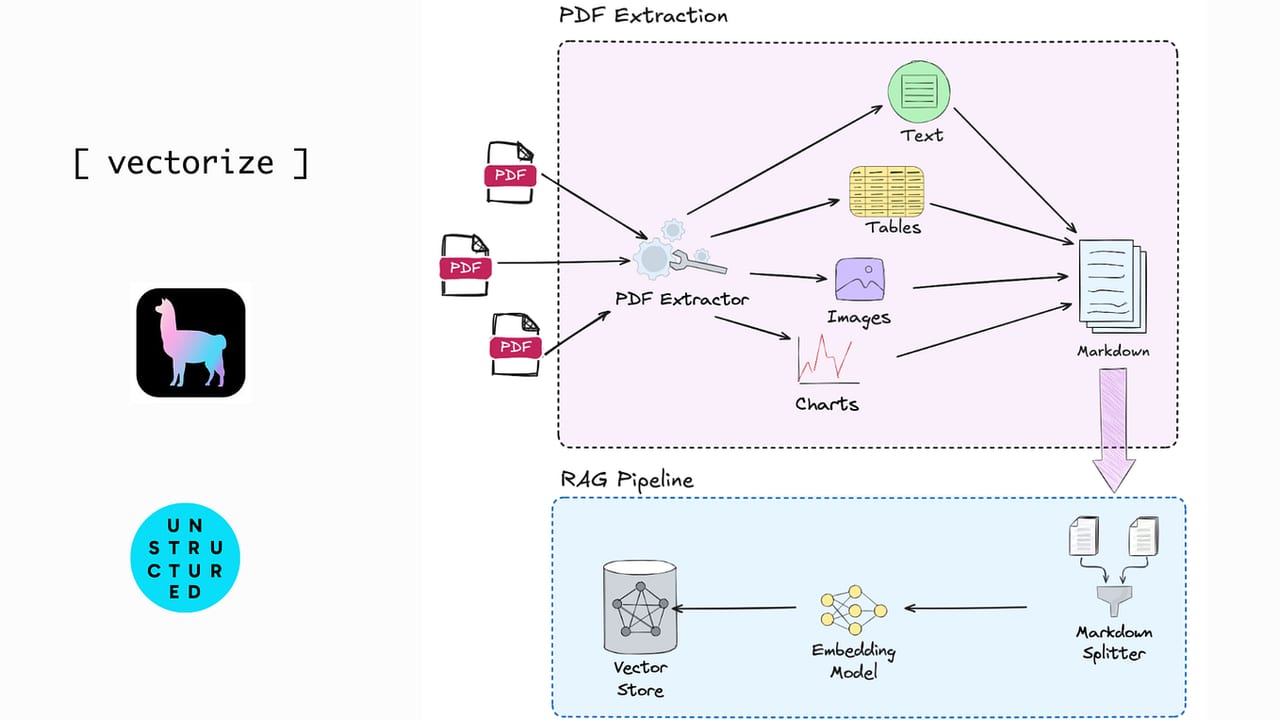
For a RAG pipeline, this is a serious problem. Before you can chunk and embed a PDF, you need to extract its text in reading order — and that extraction is where most RAG quality problems are born. The analogy: imagine someone scattered index cards across a floor, one card per word, and then took a photo of it. Your job is to reconstruct the original document from that photo. For a clean single-column page, it is straightforward. For a two-column academic paper with figures, footnotes, and embedded tables, it is genuinely hard.
Why PDF parsing quality decides RAG quality
Most teams building RAG systems underestimate how much damage bad PDF parsing does. Retrieval quality is commonly blamed on embedding models, chunk sizes, or vector search, but the actual root cause is often upstream: garbage in, garbage out at the extraction stage.
The failure chain is direct: bad parsing → broken text → noisy chunks → weak embeddings → missed retrieval → LLM hallucinations. A chunk that contains two mixed columns of an academic paper, or a table serialized as a random stream of numbers with no header context, will never embed to a useful vector — no matter how good your embedding model is.
- Multi-column layouts: a naive parser reads left-to-right across the full page width, mixing column A and column B into a word salad. The resulting chunks are semantically meaningless.
- Tables: a financial report table extracted as raw text loses all row/column relationships. The number "12.4" without its row label and column header is useless to both the retriever and the LLM.
- Scanned PDFs: a PDF created by scanning a paper document contains no text at all — just an embedded image. Standard text extractors return an empty string. The document is invisible to your RAG system.
- Header/footer contamination: page numbers, running headers, and watermarks get mixed into body text, polluting every chunk in the document.
- Reading-order scrambling: footnotes, sidebars, and captions frequently appear in the extracted stream in the wrong position — between the sentences they were typographically adjacent to, not logically related to.
How PDF parsing for RAG works
A production-grade PDF parsing pipeline has several stages. Simple extractors skip most of them; specialized tools attempt them all.
Stage 1: detecting whether OCR is needed
Before extracting text, a parser checks whether the PDF contains embedded text glyphs or only rasterized images. A scanned document typically has zero selectable text — every page is a JPEG or PNG embedded in a PDF wrapper. Some PDFs are mixed: a cover page scanned, body pages digital. A good pipeline handles both by running OCR only on image-heavy pages.
Stage 2: OCR for scanned pages
Optical Character Recognition (OCR) converts a page image into a character sequence. The classic open-source option is Tesseract, which works well on clean, high-resolution scans of printed text in supported languages. However, Tesseract struggles with complex layouts, tables with borderlines, rotated text, and dense scientific notation.
Modern alternatives use vision-language models (VLMs) to process the whole page image end-to-end, understanding spatial relationships rather than character-by-character recognition. Tools like Mistral OCR, Google Document AI, AWS Textract, and open-source models like PaddleOCR (now at version 3.0 with a visual understanding component) operate at the page level and handle tables, multi-column text, and handwriting far more reliably than Tesseract. As of 2025, several lightweight open-source VLM-based OCR models — including OlmOCR-2-7B, DeepSeek-OCR-3B, and Nanonets OCR2-3B — are competitive with commercial services on standard benchmarks.
Stage 3: layout analysis
Layout analysis identifies what type each region on a page is: a headline, a body paragraph, a figure caption, a table, a footnote. Without this step, all extracted text is treated as equal prose and reading order is guessed by y-coordinate alone. Tools like IBM's Docling use a dedicated layout model (DocLayNet, trained on 80,000+ annotated pages) to classify every bounding box before text extraction begins. This lets the pipeline skip figure captions, strip page numbers, and handle multi-column layouts by treating each column as a separate flow.
Stage 4: table extraction
Tables are the hardest problem in PDF parsing. A PDF table has no semantic encoding — it is just a grid of text boxes positioned near each other. Reconstructing rows and columns requires detecting cell boundaries, span merges, and header hierarchy from visual evidence (borders, whitespace, font weight) or a trained table-recognition model.
Docling's TableFormer model, trained on over a million tables, handles partial borders, empty cells, merged cells (colspan/rowspan), and hierarchical headers. LlamaParse exposes output_tables_as_HTML=True to emit tables as HTML rather than the flat markdown pipe format, which preserves span merges that GFM tables cannot represent. The choice of output format (Markdown vs. HTML vs. JSON) matters downstream: Markdown is the most LLM-friendly, but HTML is more structurally faithful for complex tables.
PDF parsing tools compared
The tool landscape has changed significantly since 2023. Basic text extractors are no longer the default choice for production RAG, replaced by layout-aware and VLM-powered parsers. Here is how the main options compare:
| Tool | Type | Layout analysis | Table extraction | OCR | Deployment | Best for |
|---|---|---|---|---|---|---|
| PyPDF / pdfminer | Basic extractor | None | None (raw text) | None | Local Python | Clean single-column digital PDFs, prototyping |
| PyMuPDF (fitz) | Fast extractor | Basic (bounding boxes) | Basic | None | Local Python | Fast extraction where layout is simple |
| Docling (IBM) | AI-powered, open source | DocLayNet model | TableFormer model | Via Tesseract / EasyOCR | Local / self-hosted | Local-first, open-source, multi-format |
| LlamaParse | Managed API | VLM-powered | HTML or Markdown | Built-in | Cloud API | Best output quality, complex layouts, LLM-ready |
| Unstructured.io | Document ETL | Detectron2 (hi-res mode) | Element-typed output | Built-in (hi-res) | OSS or Cloud | Production ETL pipelines, heterogeneous doc types |
| Google Document AI | Cloud API | Excellent | Excellent (merged cells) | Best-in-class | Google Cloud | Enterprise scale, complex tables, GCP ecosystem |
| AWS Textract | Cloud API | Good | Good | Good | AWS | AWS ecosystem, forms + tables focus |
| Marker | Open source VLM | Good | Markdown output | Built-in | Local GPU | Fast GPU-accelerated local parsing |
Docling is the standout open-source choice as of 2025-2026. Developed by IBM Research Zurich and contributed to the LF AI & Data Foundation, it has accumulated over 37,000 GitHub stars. Its TableFormer model handles the table-structure problem better than rule-based approaches, and its unified DoclingDocument representation covers PDFs, DOCX, PPTX, HTML, and more — useful if your corpus is not PDF-only.
LlamaParse is the strongest managed-API choice when output quality is the top priority. It treats parsing as a semantic reconstruction problem rather than a character-extraction problem, preserving reading order, nested tables, multi-column layouts, and visual context. The free tier covers 1,000 pages per day; paid plans charge $0.003 per page beyond the weekly free quota.
from docling.document_converter import DocumentConverter

converter = DocumentConverter()
result = converter.convert("annual_report.pdf")

# Export to Markdown for chunking
markdown_text = result.document.export_to_markdown()

# Or get structured element list (titles, tables, paragraphs)
for item, level in result.document.iterate_items():
print(type(item).__name__, repr(str(item)[:80]))import nest_asyncio
nest_asyncio.apply()
from llama_parse import LlamaParse
parser = LlamaParse(
api_key="llx-...",
result_type="markdown", # or "text"
output_tables_as_HTML=True, # better fidelity for complex tables
verbose=True,
)
documents = parser.load_data("quarterly_report.pdf")
# documents is a list of llama_index Document objects, ready for indexing
print(documents[0].text[:500])Strategies for tables in RAG
Tables deserve special attention because they concentrate high-value information (numbers, comparisons, specifications) in a format that breaks almost every default RAG assumption. A standard recursive text splitter has no concept of a table row — it will happily cut a table in half at a newline character.
Option 1: serialize tables as Markdown and keep them atomic
The simplest approach is to serialize each table as a GitHub-Flavored Markdown (GFM) table and treat the entire table as one chunk, regardless of size. This works well for tables under ~1,500 tokens. The table header is preserved in every chunk, so the LLM always has the column context. For larger tables, split by row ranges but always include the header row in each split.
Option 2: convert tables to natural-language sentences
For dense data tables with many rows (think a product catalogue or a financial statement), converting rows to natural language works well for retrieval: "Q3 2024 net revenue was $12.4 billion, up 18% year-over-year." This embeds cleanly and matches conversational queries directly. The downside is higher ingestion cost (you need an LLM call per table or per row group) and potential for hallucination if the conversion prompt is imprecise.
Option 3: multimodal table retrieval
An emerging alternative is to skip text serialization entirely and treat the table as an image, passing the page image (or a cropped table region) directly to a multimodal LLM at query time. Tools like ColPali (a vision-language retrieval model from arXiv:2407.01449) embed page images rather than extracted text, avoiding parsing altogether. This sidesteps serialization errors at the cost of higher inference latency and the need for a vision-capable embedding model.
Going deeper
The frontier of PDF parsing for RAG has moved toward treating parsing as a vision task rather than a text-extraction task. The core insight is that a human reads a PDF page as an image — they see the two-column layout, understand that a bordered grid is a table, recognize that a bold large-font line is a heading. Asking a vision-language model to do the same job sidesteps the entire PDF coordinate system.
IBM Granite-Docling-258M (released mid-2025) is a compact vision-language model specifically trained on document understanding. It uses a purpose-built markup language called DocTags to represent tables, code blocks, equations, and document hierarchy with high fidelity — and at 258M parameters it runs on CPU in a small memory budget, making it practical for on-premise document pipelines.
ColPali (arXiv:2407.01449) goes further: rather than parsing a PDF and then embedding text, it embeds page images directly using a PaliGemma-derived vision encoder. At retrieval time, a query is compared against all page embeddings, and the top-k pages are sent as images to a multimodal LLM. No text extraction at all — the pipeline short-circuits the parsing problem entirely. Benchmarks on visually complex document corpora show ColPali outperforming text-based RAG by significant margins on documents that are layout-intensive.
Tiered parsing pipelines are the practical production pattern for mixed corpora. Rather than routing every document through the most expensive parser, tier by document type and complexity: classify the PDF first (is it a scan? does it have tables? is it single-column?), then route cheap cases through a fast extractor like PyMuPDF and expensive cases through a VLM-powered parser. Research from Instill AI (2025) found that a hybrid approach combining heuristic extraction for clean pages with VLM parsing for complex pages achieves better fidelity than either method alone, while keeping median cost close to the cheap path.
For teams with cost constraints, the cloud OCR services (Google Document AI, AWS Textract, Azure Document Intelligence) charge roughly $1.50 per 1,000 pages as of 2025. Self-hosted open-source pipelines (Docling on CPU, PaddleOCR on GPU) run under $0.10 per 1,000 pages on commodity hardware. At 10 million pages per month, that gap is roughly $14,000/month — worth the engineering investment at scale, not worth it below a few hundred thousand pages.
FAQ
Why does my RAG system give wrong answers on PDF documents even with good embeddings?
The most common cause is bad PDF parsing upstream of the embedding step. If your extractor scrambled reading order, merged two columns, or silently skipped scanned pages, the chunks fed to your embedder are corrupted text. Good embeddings of bad text still produce bad retrieval. Inspect the raw extracted text from your parser before investigating the embedding or retrieval layer.
How do I tell if a PDF is scanned and needs OCR?
Try selecting text in your PDF viewer — if nothing highlights, the page is an image with no embedded text and will need OCR. Programmatically, tools like PyMuPDF can check whether a page contains text glyphs: if page.get_text() returns an empty or near-empty string on a page that clearly has content, OCR is needed. Many parsers (Docling, LlamaParse, Unstructured hi-res mode) detect this automatically per page.
What is the best output format for tables — Markdown, HTML, or JSON?
Markdown pipe tables are the most LLM-friendly and work well for simple tables. HTML preserves colspan/rowspan for tables with merged cells, which Markdown cannot represent. JSON (row objects with header keys) is the most programmatically usable. For most RAG pipelines, start with Markdown and switch to HTML only when you have tables with merged cells that carry structural meaning.
Can I use a free open-source tool or do I need a paid API for good PDF parsing?
Docling is free, open-source (MIT licensed), and delivers production-quality results including table structure recognition and multi-column layout handling. It runs on CPU without requiring a GPU. For most use cases it is the right default. Paid APIs like LlamaParse or Google Document AI offer higher accuracy on extremely complex documents (dense financial tables, scientific papers with complex notation) but the gap has narrowed significantly with Docling's 2025 updates.
How should I chunk a document that contains both prose and tables?
Use a parser that produces typed elements (Docling, Unstructured, LlamaParse), then apply element-aware chunking: split prose using your normal recursive or semantic strategy, but keep each table as an indivisible unit — never cut across a table boundary. If a table is too large for a single chunk, split by row ranges but always repeat the header row in every split. Both LlamaIndex and LangChain support element-type-aware splitting when the parser provides typed blocks.
What is ColPali and when should I use it instead of text-based PDF parsing?
ColPali is a retrieval model that embeds PDF page images directly using a vision-language model, bypassing text extraction entirely. Use it when your documents are highly visual — dense tables, charts, complex layouts — where text serialization loses critical structure. It requires a vision-capable embedding model and a multimodal LLM for generation. For text-dominant documents, standard text-based parsing remains faster and cheaper.