In plain English
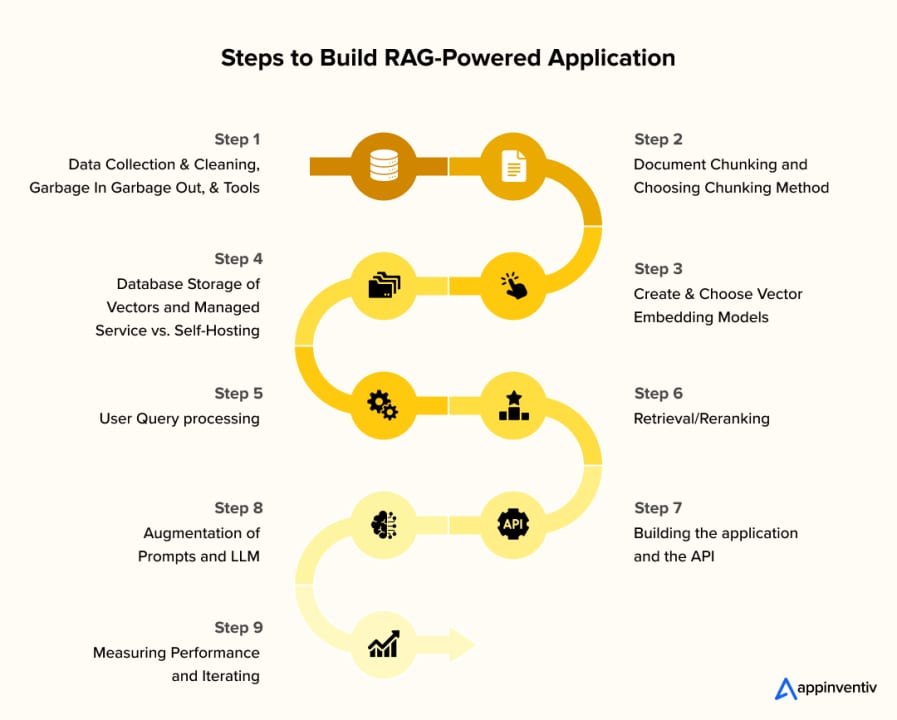
A RAG app is a short pipeline with two phases. In the offline phase you process your documents: split them into chunks, turn each chunk into a vector embedding, and store those vectors in a searchable index. In the online phase a user asks a question: you embed that question the same way, find the nearest chunks in the index, paste them into a prompt, and ask a language model to answer using only that text.
A useful mental model: imagine you have a binder of company policies. Rather than memorising every page, you post-it-note the whole binder, then when someone asks a question you riffle through the tabs, pull out the three most relevant pages, and hand them to an expert who drafts the answer. RAG does the same thing — the post-its are embeddings, the binder is your vector store, and the expert is the LLM.
Why this matters for builders
RAG is the workhorse pattern behind most real-world AI products: customer-support bots grounded in a knowledge base, internal search tools over company wikis, document Q&A for legal and medical teams, and code assistants that know your private codebase. Learning to build even a simple RAG pipeline gives you the foundation to build all of these.
The core skill is understanding what each stage does and what can go wrong — because retrieval quality, not model intelligence, is usually the limiting factor. A mediocre model with excellent retrieval beats a frontier model with irrelevant context almost every time.
- Grounded answers: the model is constrained to text you verified, which drastically reduces hallucination.
- No retraining needed: update your knowledge base by adding files, not by fine-tuning.
- Auditable sources: you can show users which document each answer came from.
- Cheap to iterate: swapping the LLM, the embedding model, or the vector store is straightforward when stages are cleanly separated.
How the pipeline works
The pipeline has five named stages. Each stage is a distinct transformation — understanding the boundary between them is what lets you debug and improve the system later.
Stage 1 — Load your documents
RAG works on any text: PDFs, Markdown files, web pages, database rows, or plain .txt files. For this tutorial we start with plain text. LangChain ships loaders for all common formats; the PyPDFLoader handles PDFs page-by-page, and DirectoryLoader can glob an entire folder.
pip install langchain langchain-community langchain-openai chromadb openai tiktoken python-dotenvfrom langchain_community.document_loaders import TextLoader
loader = TextLoader("docs/company_faq.txt", encoding="utf-8")
documents = loader.load()
# documents is a list of LangChain Document objects
# Each has .page_content (str) and .metadata (dict)
print(f"Loaded {len(documents)} document(s)")Stage 2 — Chunk the documents
Language models have a context-window limit, and similarity search is less precise over long passages. Chunking splits each document into smaller, overlapping windows. The overlap (typically 10–20% of chunk size) prevents key sentences from being cut right at a boundary.
from langchain.text_splitter import RecursiveCharacterTextSplitter

splitter = RecursiveCharacterTextSplitter(
    chunk_size=1000,      # characters per chunk
    chunk_overlap=200,    # overlap between consecutive chunks
    separators=["\n\n", "\n", " ", ""],  # prefer paragraph breaks
)
chunks = splitter.split_documents(documents)
print(f"Split into {len(chunks)} chunks")
print(chunks[0].page_content[:200]) # preview the first chunkStage 3 — Embed and store
Embedding converts each text chunk into a dense numeric vector (a list of floats). Chunks that are semantically similar end up close together in vector space, which is what makes similarity search work. We'll use OpenAI's text-embedding-3-small — at $0.02 per million tokens it is the recommended default for cost-sensitive RAG pipelines.
import os
from dotenv import load_dotenv
from langchain_openai import OpenAIEmbeddings
from langchain_community.vectorstores import Chroma

load_dotenv()  # reads OPENAI_API_KEY from .env

embeddings = OpenAIEmbeddings(model="text-embedding-3-small")

# Create the vector store and embed all chunks in one call
vectorstore = Chroma.from_documents(
    documents=chunks,
    embedding=embeddings,
    persist_directory="./chroma_db",  # saves to disk
)
print("Vector store created and persisted.")Stage 4 — Retrieve relevant chunks
At query time the user's question is embedded using the same model, and the vector store returns the k chunks whose embeddings are closest (by cosine similarity) to the query vector. Those chunks are the context we'll pass to the LLM.
retriever = vectorstore.as_retriever(search_kwargs={"k": 4})

query = "What is your return policy for digital products?"
relevant_chunks = retriever.invoke(query)

for i, doc in enumerate(relevant_chunks):
    print(f"--- Chunk {i+1} ---")
    print(doc.page_content[:300])
Stage 5 — Generate a grounded answer
The retrieved chunks are formatted into a prompt that instructs the LLM to answer only from the provided context. This instruction is the main guard against hallucination — the model is told explicitly that if the answer is not in the context it should say so.
from langchain_openai import ChatOpenAI
from langchain.chains import RetrievalQA
from langchain.prompts import PromptTemplate

PROMPT_TEMPLATE = """Use ONLY the context below to answer the question.
If the answer is not in the context, say "I don't have that information."

Context:
{context}

Question: {question}

Answer:"""

llm = ChatOpenAI(model="gpt-5.5", temperature=0)

chain = RetrievalQA.from_chain_type(
    llm=llm,
    chain_type="stuff",   # "stuff" = concatenate all chunks into one prompt
    retriever=vectorstore.as_retriever(search_kwargs={"k": 4}),
    chain_type_kwargs={
        "prompt": PromptTemplate.from_template(PROMPT_TEMPLATE)
    },
    return_source_documents=True,
)

result = chain.invoke({"query": "What is your return policy for digital products?"})
print(result["result"])
# result["source_documents"] contains the chunks usedPutting it all together
Here is the complete script in one file. Drop a .txt file into a docs/ folder, add your OPENAI_API_KEY to a .env file, and run it.
# rag_app.py — minimal end-to-end RAG
import os
from dotenv import load_dotenv
from langchain_community.document_loaders import TextLoader
from langchain.text_splitter import RecursiveCharacterTextSplitter
from langchain_openai import OpenAIEmbeddings, ChatOpenAI
from langchain_community.vectorstores import Chroma
from langchain.chains import RetrievalQA
from langchain.prompts import PromptTemplate

load_dotenv()

# 1. Load
loader = TextLoader("docs/company_faq.txt", encoding="utf-8")
documents = loader.load()

# 2. Chunk
splitter = RecursiveCharacterTextSplitter(chunk_size=1000, chunk_overlap=200)
chunks = splitter.split_documents(documents)

# 3. Embed + Store
embeddings = OpenAIEmbeddings(model="text-embedding-3-small")
vectorstore = Chroma.from_documents(chunks, embeddings, persist_directory="./chroma_db")

# 4 & 5. Retrieve + Generate
PROMPT = PromptTemplate.from_template(
    """Use ONLY the context below to answer. If the answer is not in the context, say "I don't have that information."

Context:
{context}

Question: {question}

Answer:"""
)

chain = RetrievalQA.from_chain_type(
    llm=ChatOpenAI(model="gpt-5.5", temperature=0),
    chain_type="stuff",
    retriever=vectorstore.as_retriever(search_kwargs={"k": 4}),
    chain_type_kwargs={"prompt": PROMPT},
    return_source_documents=True,
)

while True:
    question = input("\nYour question (or 'quit'): ")
    if question.lower() == "quit":
        break
    result = chain.invoke({"query": question})
    print("\nAnswer:", result["result"])
    print("\nSources used:")
    for doc in result["source_documents"]:
print(" -", doc.metadata.get("source", "unknown"), "|", doc.page_content[:80], "...")| Stage | Library used | Key parameter | What to tune |
|---|---|---|---|
| Load | langchain-community loaders | file path / glob | Source format (PDF, HTML, CSV) |
| Chunk | RecursiveCharacterTextSplitter | chunk_size=1000, chunk_overlap=200 | Smaller chunks = more precise retrieval; larger = more context per chunk |
| Embed | langchain-openai OpenAIEmbeddings | model="text-embedding-3-small" | Switch to text-embedding-3-large for higher accuracy at higher cost |
| Store | chromadb | persist_directory | Swap for FAISS (in-memory) or Qdrant/Weaviate (production) |
| Retrieve | Chroma.as_retriever | k=4 | Higher k = more context but may dilute relevance |
| Generate | ChatOpenAI | model="gpt-5.5", temperature=0 | temperature=0 maximises factual consistency |
Common pitfalls and how to avoid them
Most RAG problems show up not in the generation step but in the retrieval step. Before blaming the LLM, inspect what chunks it actually received.
- Wrong chunks retrieved: print
result["source_documents"]and read them. If the right text isn't there, the problem is in chunking or embedding — not in the LLM prompt. - Chunks cut mid-sentence: lower
chunk_sizeor increasechunk_overlap. Boundary artifacts are the most common cause of incomplete answers. - LLM ignores the context and answers from memory: make the system prompt more explicit. Add a line like "Do not use any knowledge outside of the provided context."
- Re-embedding on every run: save the vector store to disk (
persist_directory) and load it on subsequent runs instead of rebuilding from scratch each time. - k is too small: if the answer spans multiple sections, k=2 might miss half of it. Start with k=4 and go up if needed, watching for diminishing returns as irrelevant chunks creep in.
- Mixing embedding models: if you embed documents with model A and later query with model B, similarity scores are meaningless. Always use the same model for ingestion and retrieval.
Going deeper
The pipeline above is deliberately minimal. Once it works end-to-end, there are four high-leverage upgrades worth learning in roughly this order.
1. Semantic chunking
Fixed-size character splitting sometimes cuts mid-thought. Semantic chunking compares consecutive sentence embeddings and only splits where the topic shifts. LangChain exposes this as SemanticChunker from langchain_experimental.text_splitter. It reduces boundary artifacts at the cost of a small extra embedding step during ingestion.
2. Hybrid search
Pure vector search can miss exact keyword matches — product names, error codes, or model numbers that have no semantic neighbours. Hybrid search combines a dense vector search (semantic) with a sparse BM25 keyword search, then fuses the scores. Weaviate and Elasticsearch both support this natively. For a quick local version, langchain_community.retrievers.BM25Retriever combined with an EnsembleRetriever achieves the same effect.
3. Reranking
After retrieving the top 20 chunks, a cross-encoder reranker re-scores each (query, chunk) pair jointly — much more accurate than the inner-product shortcut used by vector search. Cohere's Rerank API and FlashrankRerank from LangChain are both plug-and-play. You retrieve broadly (k=20), rerank, then pass only the top 4 to the LLM.
4. Evaluation
Never ship a RAG app without measuring it. Build a small golden dataset: 20–50 questions with known correct answers drawn from your documents. For each question, score retrieval recall (did the right chunk appear in top-k?), faithfulness (does the answer contain only claims from the context?), and answer correctness. RAGAS is a popular open-source framework that automates all three metrics.
FAQ
Do I need an OpenAI API key to build a RAG app?
No — OpenAI is the most common starting point but you can replace every paid component. Use sentence-transformers/all-MiniLM-L6-v2 (free, local) for embeddings and a Hugging Face model like TinyLlama or an Ollama-served local model for generation. The pipeline structure stays identical; only the library calls change.
What chunk size should I use?
A chunk size of 500–1000 characters with 10–20% overlap is a reliable default for most document types. Shorter chunks (256–512 characters) improve retrieval precision for dense technical text; longer chunks (1500–2000 characters) are better when context needs to span a full section. Always test on a golden dataset rather than guessing.
What is the difference between ChromaDB and FAISS?
FAISS is a pure in-memory library — fast and zero setup, but your index disappears when the process ends unless you serialize it manually. ChromaDB adds a persistence layer, metadata filtering, and a client-server mode, making it easier to build a multi-session app. For a production service handling millions of documents, look at Qdrant, Weaviate, or Pinecone instead.
Why does my RAG app still hallucinate?
Two root causes are common: first, the retriever is returning the wrong chunks, so the LLM invents an answer to fill the gap — print source_documents to check. Second, the prompt doesn't firmly restrict the model to the context; add an explicit instruction like "Answer only from the provided context. If the information is not there, say so." and set temperature=0.
How do I add more documents without rebuilding the whole index?
With ChromaDB you can call vectorstore.add_documents(new_chunks) on an already-persisted store. New embeddings are appended without touching existing ones. For FAISS you need to rebuild the index or use FAISS.merge_from to combine a new partial index with the existing one.
What is the 'stuff' chain type in LangChain, and when should I use something else?
The stuff chain concatenates all retrieved chunks into a single prompt. It is the simplest and fastest option and works well when k is small (4–6 chunks). If your chunks are long and k is large, the combined context may exceed the model's context window — in that case switch to map_reduce (each chunk processed separately, then summaries combined) or refine (iteratively refines an answer over each chunk).