Overview
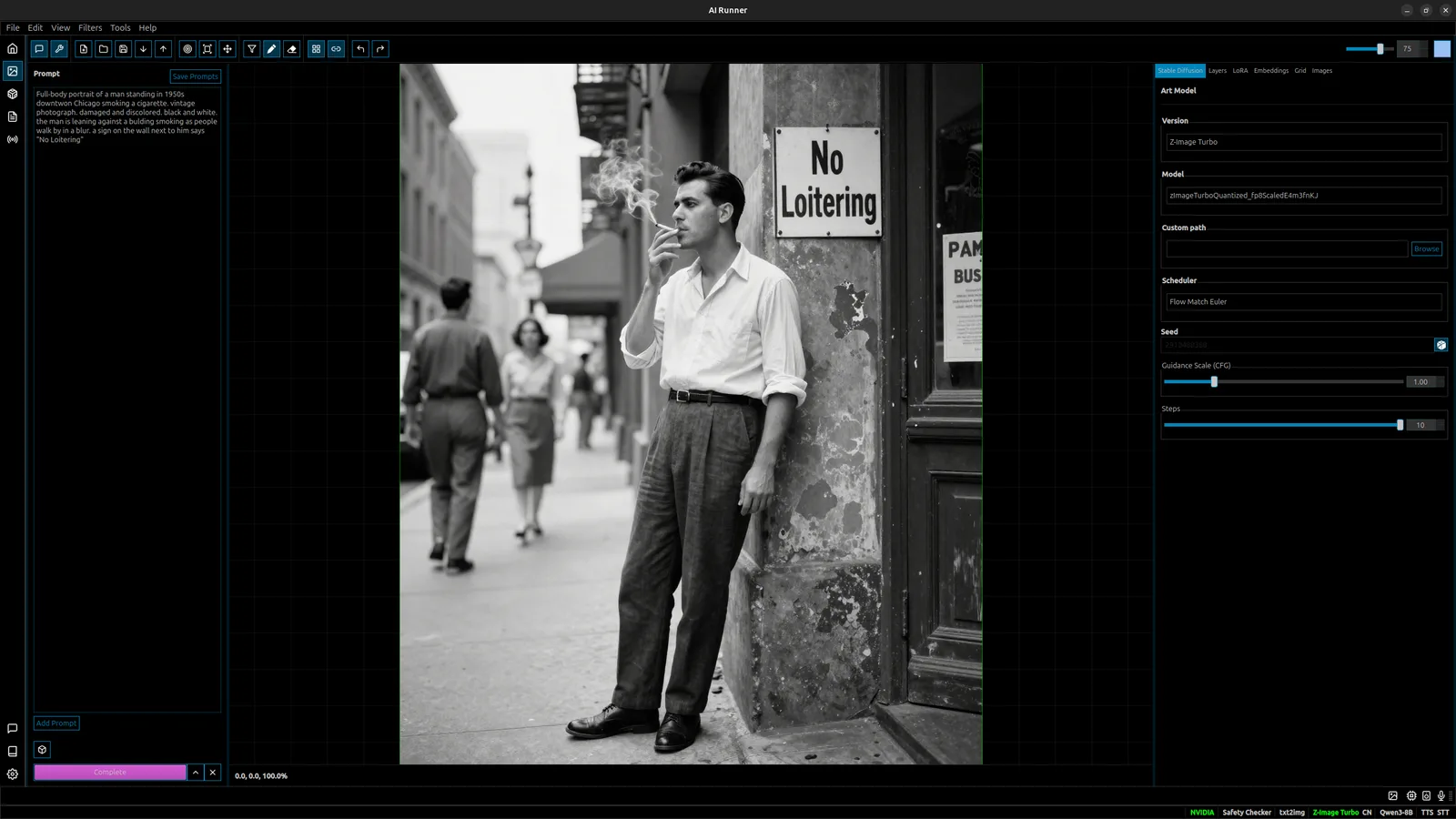
AI Runner is a Python desktop application from Capsize Games that bundles two things into one offline program: a chat companion you shape and a layered canvas for AI image generation. The companion gets a name, a personality and a voice, builds long-term memory of you across sessions with RAG-powered recall, and is aware of the time, date and local weather. The canvas lets you sketch, paint, generate and filter on layers — converting sketches to images, iterating with image-to-image and inpainting, and compositing scenes — with the companion available alongside you while you work.
Everything runs on your own hardware by default, with no API key, subscription or telemetry. Local LLM inference runs GGUF models through a llama.cpp sidecar (Qwen3.5-9B in Q8_0 is the default), speech-to-text uses a faster-distil-whisper model, text-to-speech uses OpenVoice, and image generation supports Stable Diffusion 1.5, SDXL and Z-Image Turbo with LoRA and embeddings. Optional features reach outside the machine only when you turn them on: model downloads from Hugging Face and Civitai, DuckDuckGo-backed web search, the Open-Meteo weather prompt, and OpenRouter or OpenAI as alternative LLM providers next to local models and Ollama.
The same engine also runs without the GUI. The airunner-headless command starts an HTTP API with native endpoints for LLM, image generation, TTS and STT, plus Ollama-compatible and OpenAI-compatible routes, so it can stand in for Ollama in an editor extension such as Continue. The project lists Linux (Ubuntu 22.04) as its primary platform with Windows support experimental, recommends an NVIDIA GPU (RTX 3060 minimum) and 16 GB of RAM, and is released under GPL-3.0.
What it does
- A named, voiced AI companion with a persistent personality, shifting mood and long-term memory built from your conversations
- A multi-layer art canvas for drawing, painting, sketch-to-image, image-to-image, inpainting, filters and background removal with SDXL and Z-Image Turbo, LoRA and embeddings
- Full voice conversation: speech-to-text with a faster-distil-whisper model and text-to-speech via OpenVoice, with TTS and LLM support for English, Japanese, Spanish, French, Chinese and Korean
- Local LLM inference on GGUF models through a llama.cpp sidecar, with Ollama, OpenRouter and OpenAI as optional providers
- A headless API server with native /llm, /art, /tts and /stt endpoints plus Ollama- and OpenAI-compatible routes
- Built-in Hugging Face and Civitai model downloaders, from the GUI or the airunner-hf-download and airunner-civitai-download commands
Getting started
AI Runner ships as a desktop download on itch.io (no Python setup), as container images on GitHub Container Registry, and as Python packages on PyPI. The pip route below follows the README; it needs Python 3.13 and, for GPU inference, an NVIDIA card.
Install from PyPI
Install the CUDA build of PyTorch first, then the desktop GUI package and the model runtimes. The `headless` extra on airunner-services pulls in the LLM, STT, art and TTS runtimes.
pip install torch torchvision torchaudio --index-url https://download.pytorch.org/whl/cu129
pip install "airunner"
pip install "airunner-services[headless]"
Download a model and launch the app
TTS and STT models download automatically; LLM and image models are configured by you. Fetch a GGUF LLM from Hugging Face (add --full for safetensors), or pull an art model from a Civitai URL, then start the GUI. Inside the app, Tools → Download Models opens a filtered Civitai browser.
airunner-hf-download qwen3-8b
airunner-civitai-download https://civitai.com/models/995002/70s-sci-fi-movie
airunner
Or run it in Docker
From a clone of the repository, the compose file runs the GUI against your X display, or the headless API server with its port 8080 published.
xhost +local:docker && docker compose run --rm airunner

# headless API server
docker compose run --rm --service-ports airunner --headless
Serve models over HTTP
airunner-headless starts the API on 127.0.0.1:8080 with the LLM service; add --enable-art, --enable-tts or --enable-stt for the other services, or use --ollama-mode to answer Ollama API calls on port 11434 (for example from the VS Code Continue extension).
airunner-headless

curl -X POST http://localhost:8080/llm \
  -H "Content-Type: application/json" \
  -d '{"prompt": "What is the capital of France?", "stream": true, "max_tokens": 100}'
Commands and code are distilled from the project's own documentation — always check the official repo for the latest.
When to use it
- Keep a private, voiced chat companion that remembers you across sessions without sending conversations to a cloud service
- Sketch, generate, inpaint and composite Stable Diffusion images on a layered canvas on your own GPU
- Run local LLM, image, speech-to-text and text-to-speech models behind one HTTP API for scripts or other apps
- Point an editor extension that speaks the Ollama API at a locally hosted model via Ollama mode
How AI Runner compares
AI Runner alongside other open-source local runtimes tools AI/TLDR tracks, ranked by GitHub stars.
| Tool | Stars | What it does |
|---|---|---|
| Ollama | ★ 182k | A developer-friendly tool that downloads and runs local LLMs from the terminal with a built-in OpenAI-compatible API. |
| llama.cpp | ★ 130k | A C/C++ inference engine that runs LLMs in the GGUF format on CPUs, Apple Silicon, and GPUs with low memory use. |
| GPT4All | ★ 77.4k | GPT4All is a free desktop app and Python client that runs large language models locally on your own computer, with no API calls or GPU required. |
| LocalAI | ★ 49.4k | A self-hosted server that exposes an OpenAI-compatible API for running text, vision, voice, and image models on local hardware. |
| Jan | ★ 44.7k | An open-source desktop app that runs LLMs fully offline as a ChatGPT-style assistant on your own computer. |
| Colibrì | ★ 38.9k | A pure-C inference engine that keeps a Mixture-of-Experts model's dense trunk resident in RAM and streams its routed experts from disk, so 744B-2.8T models run on consumer hardware. |
| llmfit | ★ 37.4k | A Rust terminal tool that inspects your CPU, RAM, GPUs and VRAM and scores which open-weight models and quantizations will actually run well on that machine, with a TUI, CLI, REST API and local-runtime integrations. |
| AI Runner | ★ 1.3k | An offline desktop app that pairs a voiced, memory-keeping AI companion with a layered canvas for Stable Diffusion art — all running on your own GPU |