Overview
audio.cpp is a C++ inference framework for audio models built on `ggml`, from the same lineage as llama.cpp and whisper.cpp. Its premise is that running a handful of modern audio models should not mean a handful of Conda environments: instead of each project carrying its own Python stack, they share one native runtime with a common CLI and server surface. It runs on Windows, Linux and macOS across NVIDIA, AMD and Apple Silicon hardware, and on CPU-only machines.
The scope is wider than text-to-speech. The same runtime covers TTS, voice cloning, voice conversion, ASR, diarization, voice-activity detection, source separation, forced alignment, codec-style models, and multi-step workflows through an experimental JSON pipeline format. Built-in audio utilities handle denoise, enhancement, resampling and STFT/ISTFT, so ordinary production-style pre- and post-processing does not need a separate toolchain. Release 0.8.0 (September 2026) put the count at more than 80 model families and 120 model variants.
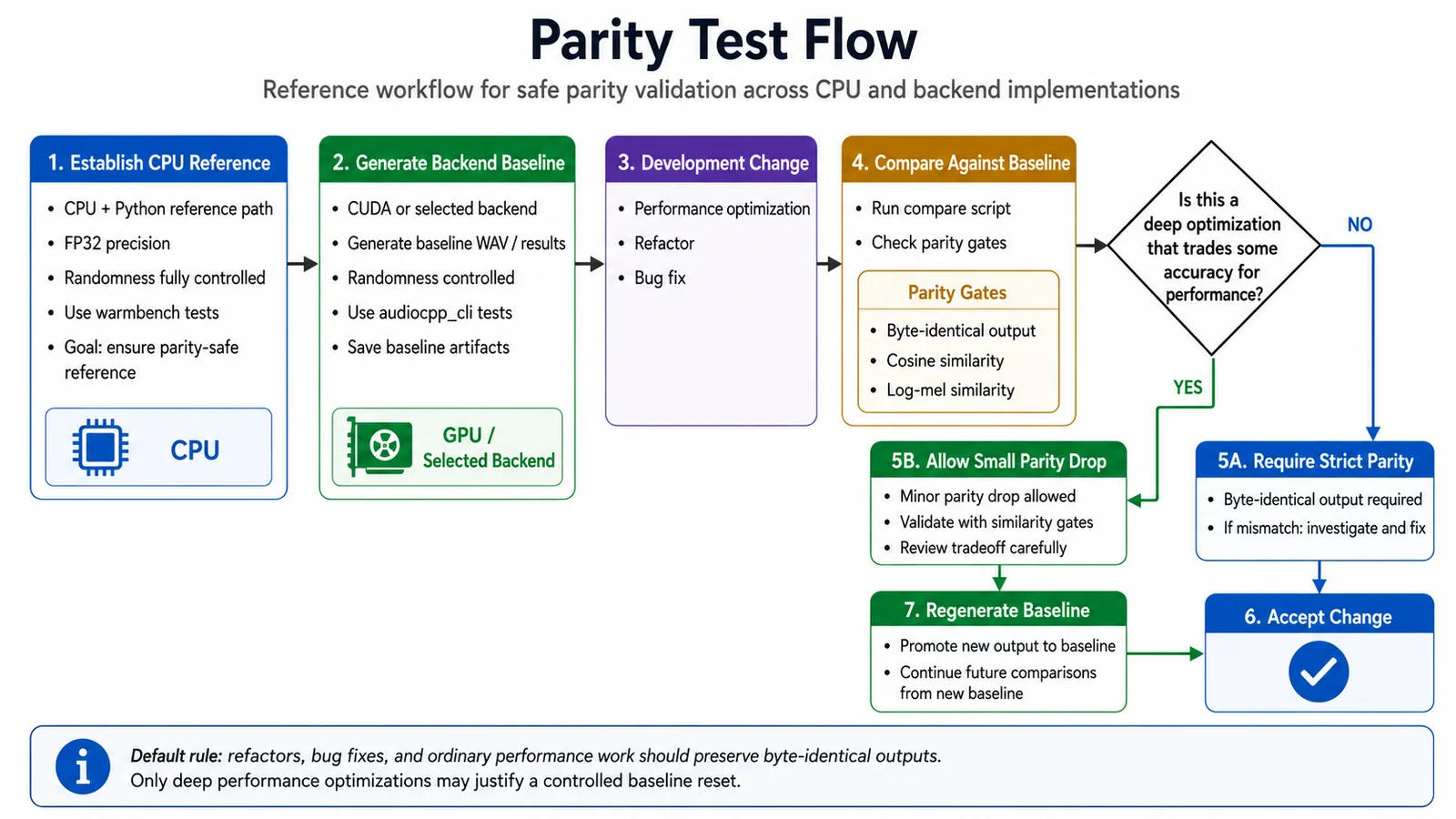
Correctness is handled explicitly rather than assumed. The project maintains parity tooling that pins a CPU + Python reference path at FP32 with randomness controlled, generates a backend baseline, and gates every change on parity checks — byte-identical output, cosine similarity and log-mel similarity — with a documented rule that refactors, bug fixes and ordinary performance work must preserve byte-identical outputs, and only deep optimisations may justify a controlled baseline reset.
Performance is where it argues for itself. The project publishes per-model speed ratios against each model's official Python implementation for both one-shot runs and long-lived sessions, and says multiple TTS paths run 1.8× to 8× faster than their Python reference paths while cutting end-to-end latency by 45–85% on CUDA. All released families load GGUF, and the project reports tested Q8 packages running up to 1.53× faster with peak VRAM down by around 37% on routes such as Higgs Audio, Fish Audio and Voxtral.
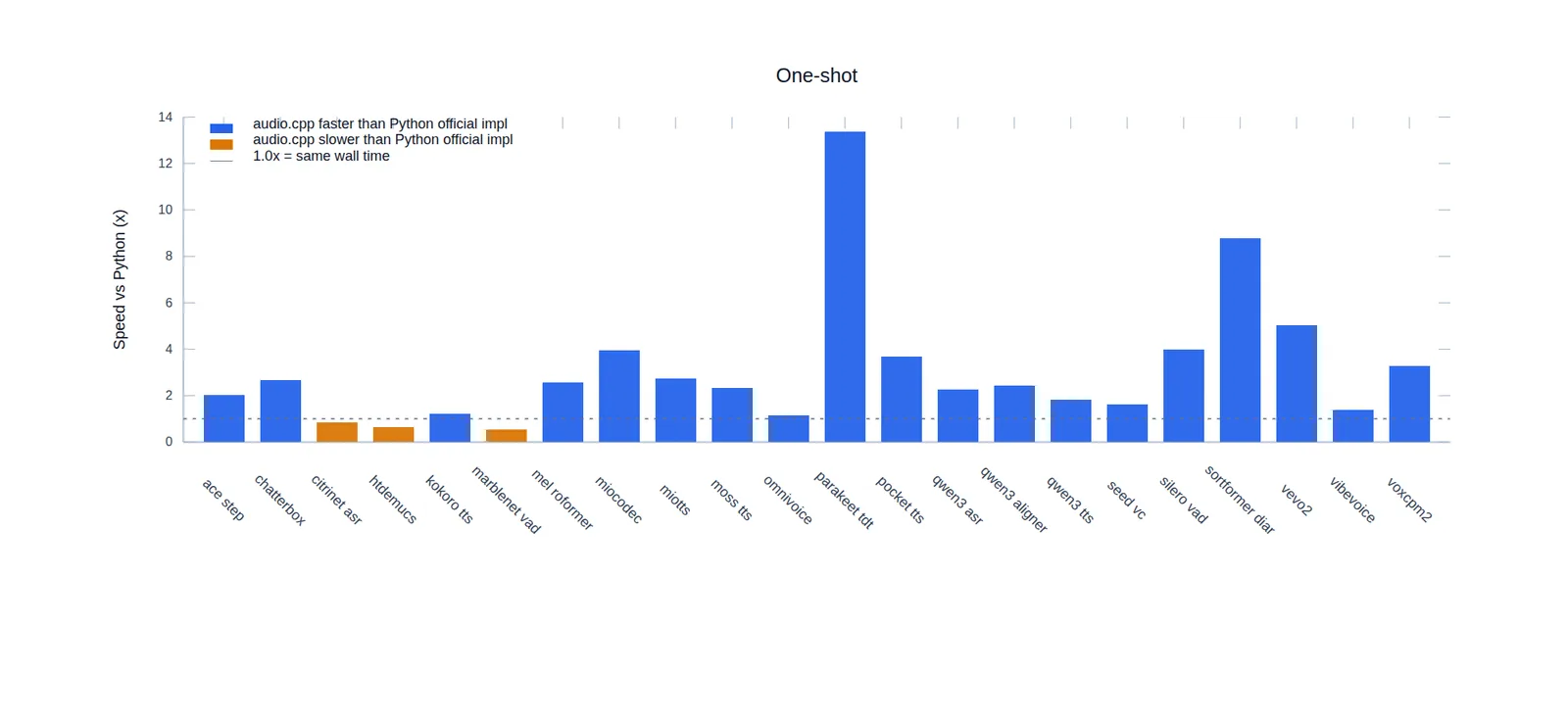
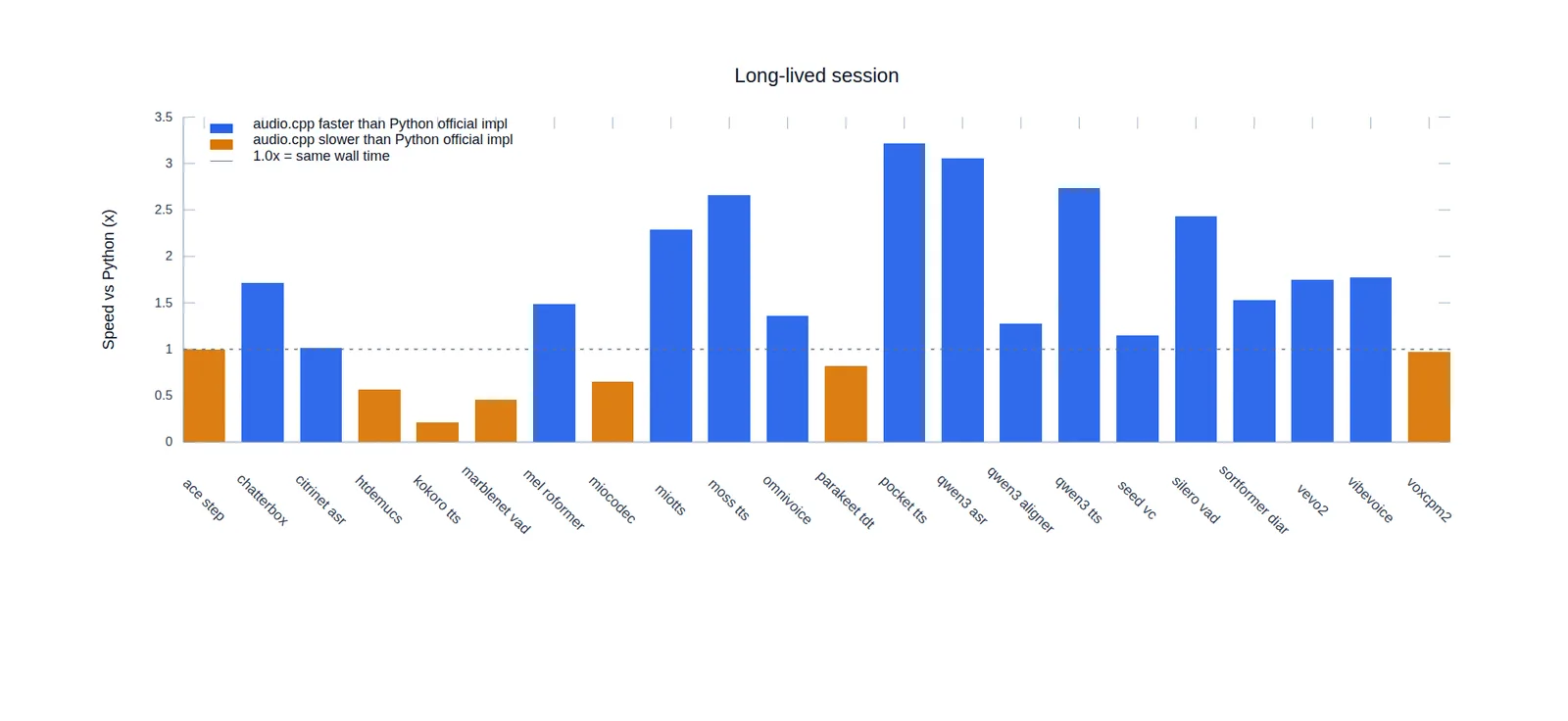
A SvelteKit WebUI is compiled into the `audiocpp_server` binary, so the browser interface needs neither Python nor separate frontend files. Its Arena tab queues several local models or GGUF variants against one shared input and compares the outputs with metrics — useful when the question is which of five local TTS models sounds best on your own audio.
What it does
- One ggml-based native runtime for TTS, voice cloning and conversion, ASR, diarization, VAD, source separation, alignment and codec models — 80+ model families as of release 0.8.0
- Backends for CUDA, HIP/ROCm, Vulkan, Metal and CPU behind shared CLI (`audiocpp_cli`) and server (`audiocpp_server`) entry points
- GGUF loading across all released families, with published 16-bit vs Q8 measurements
- A parity harness that gates changes on byte-identical output plus cosine and log-mel similarity against the Python reference path
- An embedded SvelteKit WebUI inside the server binary, including an Arena tab for side-by-side model comparison with metrics
- Composite builds — compile only the model families you need (`--model-set custom --models …`) instead of the full set
- Built-in denoise, enhancement, resampling and STFT/ISTFT utilities, plus experimental JSON pipelines for multi-step workflows
Getting started
Official packages are attached to every release, so there is usually nothing to build. Windows x64 ships CPU, Vulkan and CUDA (12.4 / 13.3) builds, Ubuntu x64 ships CPU and Vulkan, and macOS arm64/x64 ships Metal.
Install on macOS from the Homebrew tap
The tap carries the Metal build.
brew tap 0xShug0/audio-cpp
brew trust 0xShug0/audio-cpp
brew install audio-cpp
Or take a prebuilt package from the Releases page
Download the archive for your platform and backend. On Windows the CUDA packages ship the CUDA runtime in a separate `cudart` archive — extract it next to the binaries so the CUDA backend can load `ggml-cuda.dll` along with the cudart, cuBLAS and cuFFT DLLs. Weights come from the project's Hugging Face repo, `audio-cpp/audio.cpp-gguf`, with a ModelScope mirror.
Start the server with its built-in WebUI
The production UI is compiled into `audiocpp_server`, so no Python or frontend files are needed. `--ui-management` turns on catalog browsing, downloads, temporary uploads and dynamic model switching — the quickest way to try things without writing a server config first. Then open http://127.0.0.1:8080.
audiocpp_server --ui --ui-management --backend cudaBuild from source if you need a different backend
The helper scripts wrap CMake. Linux needs GCC 13+ and CMake plus the toolchain for your backend (CUDA Toolkit, Vulkan SDK or ROCm); macOS needs Xcode command line tools and CMake, with `xcrun`'s Metal compiler for Metal builds.
scripts/build_linux.sh --backend cuda --target audiocpp_cli --target audiocpp_server
scripts/build_linux.sh --backend vulkan --target audiocpp_cli --target audiocpp_server
scripts/build_linux.sh --backend cpu --target audiocpp_cli --target audiocpp_server
Compile only the models you need
`full` is the default and what release and Docker builds should use; `custom` registers only the loaders you name; `core` builds the runtime without the optional model-family set. Same variables through direct CMake as through the scripts.
scripts/build_linux.sh --backend cuda --model-set custom \
  --models qwen3_tts,pocket_tts,qwen3_asr --target audiocpp_cli

# or directly through CMake
cmake -S . -B build/debug -DCMAKE_BUILD_TYPE=Debug \
  -DAUDIOCPP_MODEL_SET=custom -DAUDIOCPP_MODELS=qwen3_tts,pocket_tts,qwen3_asr
cmake --build build/debug --target audiocpp_cli -j 8
Commands and code are distilled from the project's own documentation — always check the official repo for the latest.
When to use it
- Reach for it when several audio models have to ship in one product and you would rather maintain one native runtime than several Python environments
- Reach for it to run TTS, ASR or diarization on CPU-only or edge machines where a Python stack is not an option
- Reach for it when you need to pick between local TTS or ASR models — the Arena tab queues them against one shared input and reports metrics
- Reach for it when VRAM is the constraint and GGUF Q8 packaging buys back headroom without a rewrite
How audio.cpp compares
audio.cpp alongside other open-source audio, music & voice tools AI/TLDR tracks, ranked by GitHub stars.
| Tool | Stars | What it does |
|---|---|---|
| Whisper | ★ 109k | OpenAI's speech recognition model that transcribes and translates audio across many languages. |
| GPT-SoVITS | ★ 62k | An open-source WebUI that clones a voice from a short audio sample and turns text into speech, with zero-shot and few-shot fine-tuning. |
| Voicebox | ★ 55.4k | Local-first voice studio that clones a voice from a short sample, generates speech across seven TTS engines and 23 languages, handles system-wide dictation, and speaks for agents over MCP. |
| VibeVoice | ★ 54.4k | Microsoft's text-to-speech model for generating long, expressive multi-speaker audio like podcasts. |
| whisper.cpp | ★ 53.8k | A dependency-free C/C++ port of Whisper built on ggml, running speech recognition on CPU, Metal, CUDA, Vulkan and NPUs from phones to servers. |
| Coqui TTS | ★ 46k | A library of text-to-speech models including the multilingual XTTS voice-cloning model. |
| ChatTTS | ★ 39.9k | ChatTTS is an open-source text-to-speech model tuned for dialogue, with multi-speaker support and fine-grained control over laughter, pauses, and prosody. |
| audio.cpp | — | One native ggml runtime for local audio models — TTS, ASR, voice cloning and conversion, diarization, VAD and separation, with no Python in the loop |