Overview
Whishper is an open-source audio transcription and subtitling suite that runs entirely on your own machine. You give it a media file or a URL, it transcribes the speech with Whisper, and you get back text you can download as TXT, JSON, VTT or SRT — or keep editing in the browser. Nothing is uploaded to a third-party service: the transcription, the translation and the subtitle editing all happen in containers you started, which is the whole point of the project.
It is built as a small stack of cooperating services rather than a single binary. A transcription API wraps Faster-Whisper, a Go backend coordinates the frontend, the job queue and the database, a SvelteKit frontend provides the web UI, and three third-party containers fill in the rest: LibreTranslate for subtitle translation, MongoDB for storing transcriptions, and Nginx so the whole thing is reachable on one domain. Faster-Whisper is what makes CPU-only transcription practical; if you have an NVIDIA GPU, Whishper can use it for a large speed-up.
The part that distinguishes it from a plain Whisper wrapper is the subtitle editor. Segments are listed with editable start and end timestamps beside the playing media, the line matching the current playback position is highlighted, and each segment is flagged with its characters-per-second reading rate so you can see which subtitles are too dense before you export them. You can split a segment, insert one, and switch the subtitle language, without leaving the page. Because Whishper accepts any source yt-dlp supports, the usual workflow is to paste a URL, wait for the job, then correct the result in the editor.
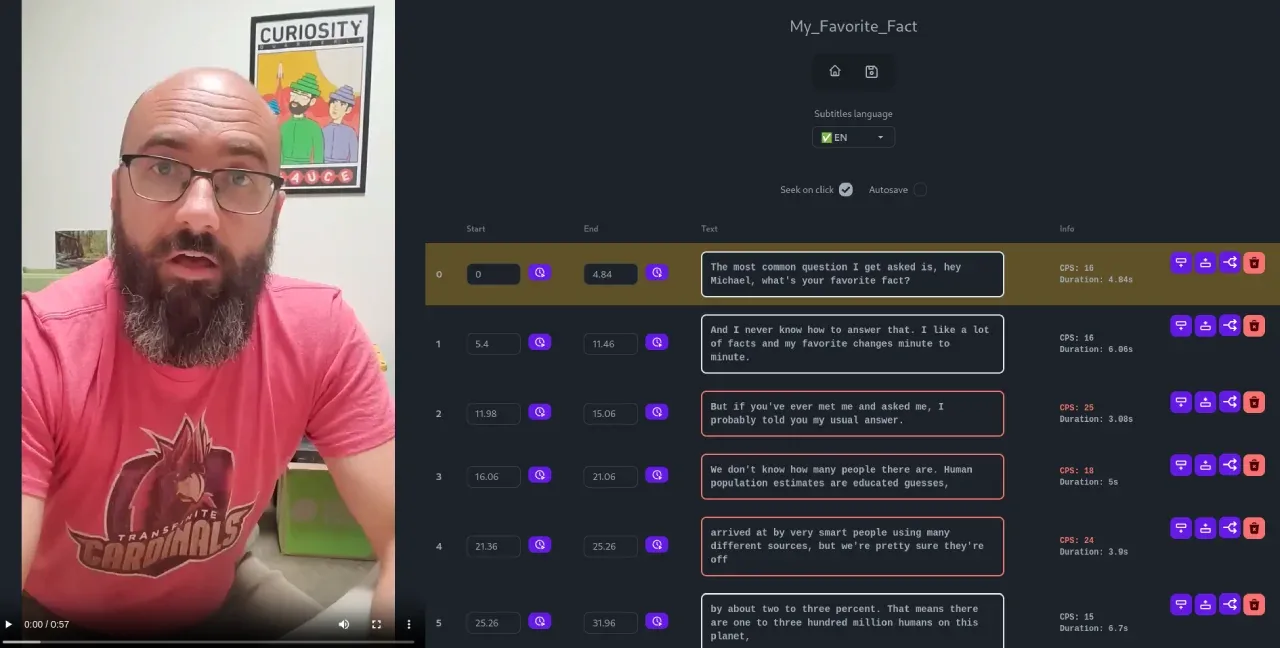
The project is AGPL-3.0 and distributed as Docker images. Its maintainer has frozen this branch while a full rewrite lands on the `v4` branch, so the documented v3 stack is what the published images and the install guide describe.
What it does
- Transcribes audio or video from an uploaded file or from any URL that yt-dlp can fetch
- Faster-Whisper as the Whisper backend, so CPU-only transcription is usable; NVIDIA GPU acceleration is supported for much faster runs
- Exports to TXT, JSON, VTT and SRT, or copies the raw text to the clipboard
- Subtitle editor in the browser: playback-synced highlighting, characters-per-second warnings, segment splitting and insertion, and subtitle-language selection
- Translates finished transcriptions into any language LibreTranslate supports, in a container of your own
- Runs 100% locally — transcription, translation and editing can all work offline once the images and models are pulled
Getting started
Whishper ships as a set of Docker containers driven by one Compose file and one `.env`. The quick-start script writes both for you; the manual path is the same files, edited by hand.
Check the prerequisites
You need Docker and the Compose plugin. For GPU transcription you additionally need an NVIDIA GPU with the NVIDIA Container Toolkit installed.
docker --version
docker compose version
Run the quick-start script
The script fetches the Compose file, the example `.env` and the Nginx config, and walks you through the rest. Read the GPU-support page first if you intend to use an NVIDIA GPU.
curl -fsSL -o get-whishper.sh https://raw.githubusercontent.com/pluja/whishper/main/get-whishper.sh
bash get-whishper.sh
Or install by hand
The manual path is the same three files plus the LibreTranslate data directories, which need to be owned by the container's user.
curl -o docker-compose.yml https://raw.githubusercontent.com/pluja/whishper/main/docker-compose.yml
curl -o .env https://raw.githubusercontent.com/pluja/whishper/main/example.env
curl -o nginx.conf https://raw.githubusercontent.com/pluja/whishper/main/nginx.conf

mkdir -p ./whishper_data/libretranslate/{data,cache}
chown -R 1032:1032 whishper_data/libretranslate
Edit .env, then start the stack
`WHISHPER_HOST` is the URL you will actually open, port included — the frontend uses it to reach the backend, so `127.0.0.1` means Whishper only works from that machine. `WHISPER_MODELS` is the comma-separated list to download, and `LT_LOAD_ONLY` limits which LibreTranslate language pairs are fetched.
# .env
LT_LOAD_ONLY=es,en,fr
WHISPER_MODELS=tiny,small
WHISHPER_HOST=http://127.0.0.1:8082
DB_USER=whishper
DB_PASS=whishper

docker compose up -d
Transcribe something and edit the subtitles
Open the host you configured, then paste a URL or upload a file, pick the language and model, and wait for the job. When it finishes, open it in the editor to fix the timings and wording, then download SRT or VTT.
Commands and code are distilled from the project's own documentation — always check the official repo for the latest.
When to use it
- Reach for it when the recording is confidential — an interview, a medical or legal conversation, an internal meeting — and a hosted transcription API is not an option
- Reach for it to subtitle a video end to end: transcribe, correct the timings in the editor, translate, export SRT
- Reach for it to turn a backlog of podcast or lecture URLs into searchable text without paying per minute
- Reach for it when you have a spare NVIDIA GPU and want a self-hosted alternative to a per-minute transcription service
How Whishper compares
Whishper alongside other open-source audio, music & voice tools AI/TLDR tracks, ranked by GitHub stars.
| Tool | Stars | What it does |
|---|---|---|
| Whisper | ★ 110k | OpenAI's speech recognition model that transcribes and translates audio across many languages. |
| GPT-SoVITS | ★ 62.2k | An open-source WebUI that clones a voice from a short audio sample and turns text into speech, with zero-shot and few-shot fine-tuning. |
| Voicebox | ★ 56.1k | Local-first voice studio that clones a voice from a short sample, generates speech across seven TTS engines and 23 languages, handles system-wide dictation, and speaks for agents over MCP. |
| VibeVoice | ★ 54.6k | Microsoft's text-to-speech model for generating long, expressive multi-speaker audio like podcasts. |
| whisper.cpp | ★ 54.1k | A dependency-free C/C++ port of Whisper built on ggml, running speech recognition on CPU, Metal, CUDA, Vulkan and NPUs from phones to servers. |
| VoiceStudio | ★ 51.5k | A local-first desktop voice studio that clones and designs voices, dubs video, and handles dictation, running 16 text-to-speech and 11 speech-recognition engines on your own hardware. |
| Coqui TTS | ★ 46.1k | A library of text-to-speech models including the multilingual XTTS voice-cloning model. |
| Whishper | ★ 3.1k | A self-hosted transcription and subtitling suite that never sends your audio anywhere |