Overview

bigarrow is a macOS command-line tool, plus a skill for Claude Code and Codex, that lets an AI agent draw a large arrow and a text sign on your screen. When an agent hits a step only a human can do, such as a permission prompt, a 2FA code or a confirmation dialog, it can point straight at the right control with a sign like "click Allow" instead of describing where to look.
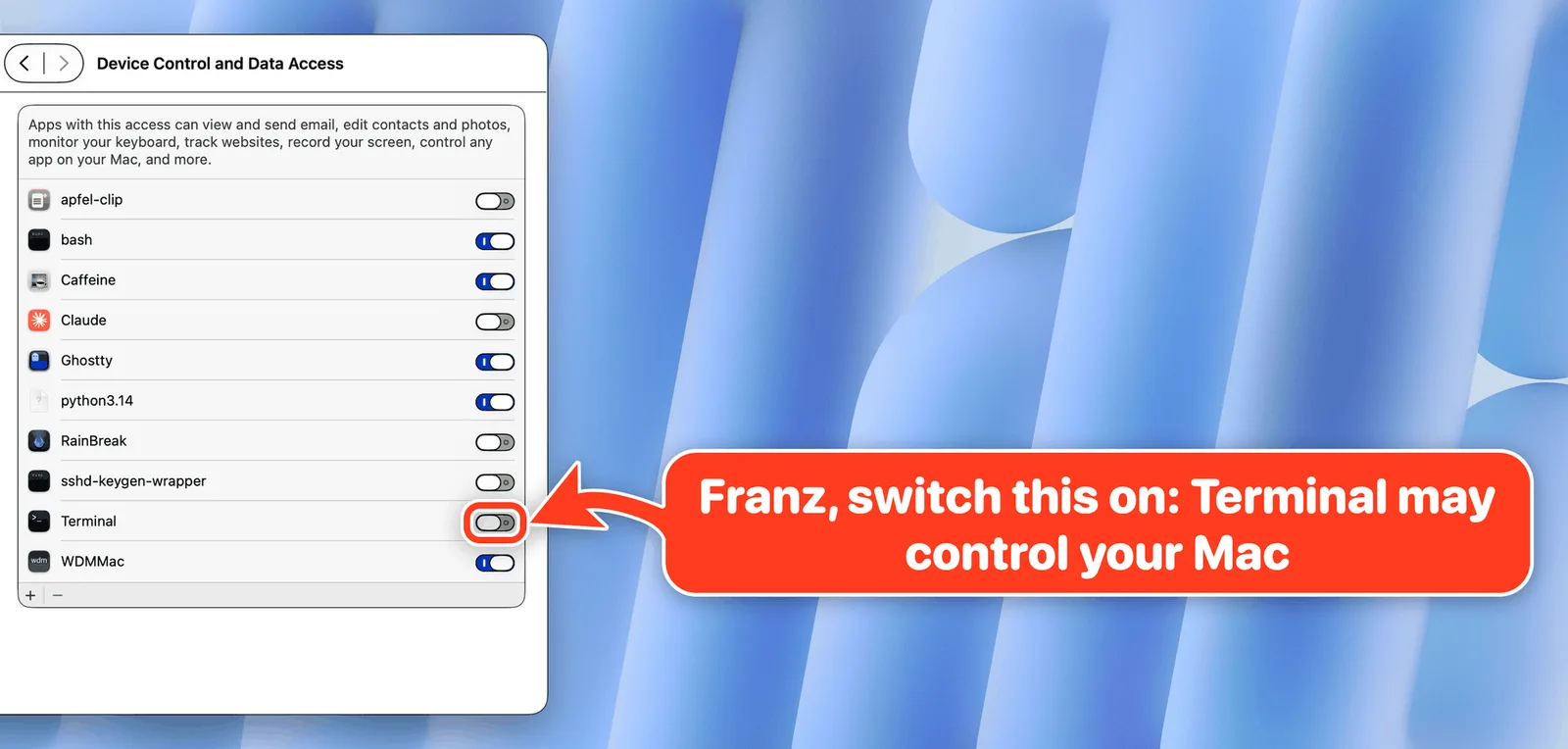
The arrow lives in a transparent window above other windows. Clicks pass through to the app underneath and keyboard focus stays where it was. Targets can be given as screen coordinates, a rectangle, the mouse position, a window (optionally by tab or window title), a UI element label inside an app, or a Peekaboo snapshot ID. Finding targets by label or window title needs Accessibility or Screen Recording permission for the terminal or IDE that runs the tool; drawing alone needs none, and `bigarrow doctor` reports what is missing.
bigarrow only points. It never clicks, types or captures the screen, and every arrow ends by itself: after a time limit (8 seconds for `point`, 300 seconds for `start`), when the agent process that drew it exits, on `bigarrow stop`, or when you click the arrow. It can read the sign aloud with `--say`, and `--json` output plus exit codes make it scriptable. The project is written in Swift, MIT-licensed, and its CI runs on macOS; building from source needs Xcode 16+ and macOS 14+.
What it does
- Draws a click-through arrow and text sign above any app without stealing keyboard focus
- Targets by coordinates, rectangle, mouse position, window or tab title, UI element label, display or Peekaboo snapshot
- Arrows remove themselves on a timeout, on `bigarrow stop`, on click or when the owning agent process exits
- Never clicks, types or captures the screen — it only points
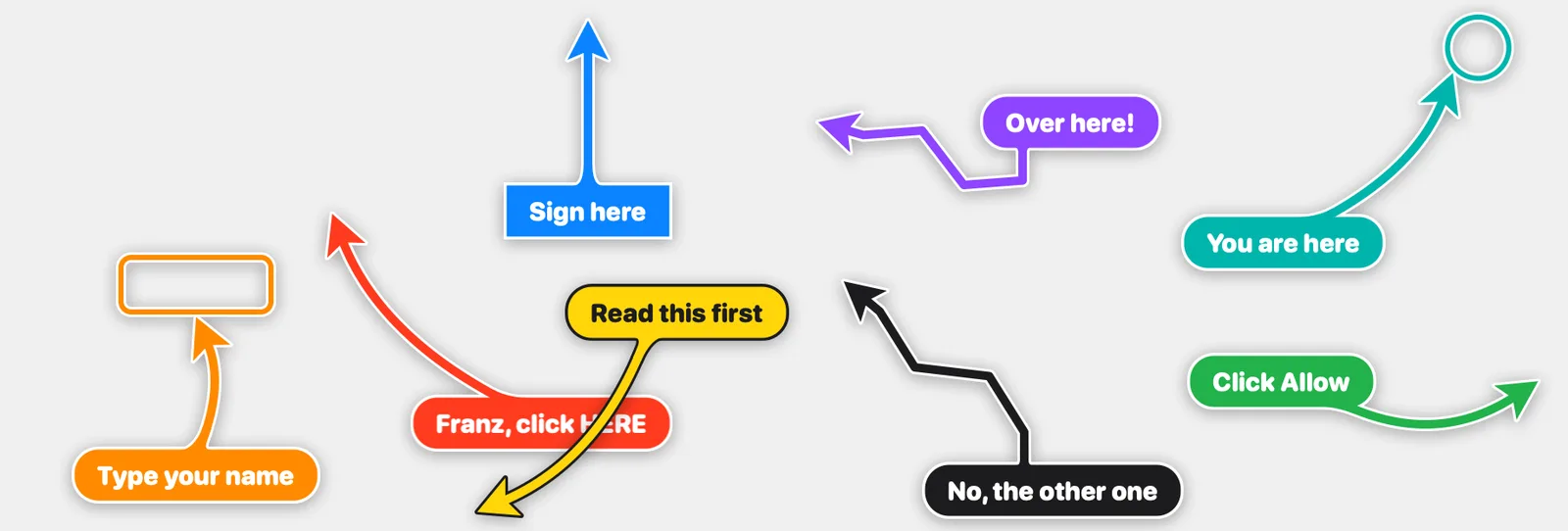
- Shapes (bend, straight, zigzag, spiral), styles (arrow, ring, box), sizes, colours and border options
- Ships an Agent Skills-format skill for Claude Code and Codex, installed with `bigarrow install-skill`
- `--say` reads the sign aloud; `--json` and exit codes support scripting
Getting started
Install the CLI with Homebrew, add the skill to your coding agent, then point at things from the command line or let the agent do it. Drawing needs no macOS permission; element and window targeting need Accessibility or Screen Recording for the terminal or IDE that launches bigarrow.
Install the CLI and the agent skill
The skill teaches Claude Code and Codex when and how to call bigarrow.
brew install franzenzenhofer/tap/bigarrow
bigarrow install-skill
Point at a UI element or a spot on screen
`point` shows an arrow for a few seconds. Target an element by its label inside an app, or give screen coordinates.
bigarrow point --element "Allow" --app "System Settings" --text "Franz, click Allow"
bigarrow point --at 760,500 --text "Franz, click HERE"
Keep an arrow up until you are done
`start` keeps the arrow on screen until `stop`, its time limit, or the owning process exits. Run `bigarrow doctor` if a target can't be found.
bigarrow start --window "Safari:Inbox" --text "This window" && bigarrow stopCommands and code are distilled from the project's own documentation — always check the official repo for the latest.
When to use it
- Let a coding agent show you which macOS permission switch or dialog button to press
- Mark steps that need a human, such as 2FA codes or confirmations, during an agent run
- Point out the right window or browser tab among many
- Guide a less technical person through an app step by step, with the sign read aloud
- Annotate screens for demos and documentation screenshots
How bigarrow compares
bigarrow alongside other open-source agent skills & plugins tools AI/TLDR tracks, ranked by GitHub stars.
| Tool | Stars | What it does |
|---|---|---|
| Superpowers | ★ 297k | A composable skills plugin that installs a spec-first, TDD, subagent-driven development methodology into Claude Code, Codex, Cursor, Gemini CLI and other coding harnesses. |
| Skills for Real Engineers | ★ 282k | Matt Pocock's everyday agent skills for coding agents, covering alignment grilling, planning, code review and research — small, composable and meant to be edited. |
| ECC | ★ 276k | An installable plugin that adds 68 agents, 286 skills, hooks, rules, memory and an agent-config security scanner to Claude Code, Codex and other coding harnesses. |
| Karpathy Coding Guidelines | ★ 218k | A Claude Code plugin and CLAUDE.md rule set built from Andrej Karpathy's observations on LLM coding pitfalls: think before coding, keep it simple, make surgical changes, and work to verifiable success criteria. |
| Ponytail | ★ 159k | A skill and plugin that makes a coding agent take the laziest correct route — a seven-rung ladder from "does this need to exist?" to "the minimum that works" — while keeping validation, security and accessibility off the chopping block. |
| Caveman | ★ 111k | A skill plus local proxy that shortens an AI coding agent's prose while leaving code, commands and paths untouched — the rule file cuts what the agent writes, the proxy compresses what it reads. |
| Addy’s Agent Skills | ★ 104k | A pack of production engineering skills for AI coding agents, with nine lifecycle slash commands — /spec, /plan, /build, /test, /review, /ship — installable into 70+ agents. |
| bigarrow | ★ 292 | Lets your AI agent point at the button you need to click |