
What is Cicada?
Cicada (知了 in Chinese) is an open-source macOS app that puts live bilingual subtitles, structured meeting notes and simultaneous interpreting on top of any call or stream — Zoom, Feishu, Tencent Meeting, X Spaces or a YouTube livestream. It sits in the Meeting & Notes AI category of the AI Productivity & Writing tools and is open-source, written in Swift and licensed Apache-2.0.
Overview
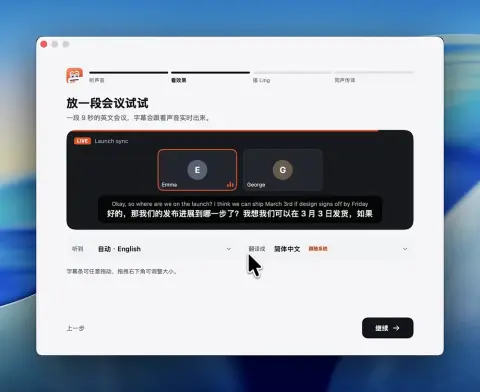
Cicada (知了 in Chinese) is an open-source macOS app that puts live bilingual subtitles, structured meeting notes and simultaneous interpreting on top of any call or stream — Zoom, Feishu, Tencent Meeting, X Spaces or a YouTube livestream. It works by reading the Mac's system audio and recognising speech on the machine with Apple's SpeechAnalyzer, so no bot joins the meeting and the other side sees nothing.
While you listen, a notes window builds a summary, topics, conclusions, to-dos, a fishbone diagram and a glossary of names and terms; clicking a conclusion or to-do jumps back to the original line in the bilingual transcript. For the other direction, holding the right Option key lets you speak and have the translated voice played into the meeting through the BlackHole 2ch virtual microphone, which Cicada installs on request. Each meeting's bilingual transcript, notes and recording are kept locally and can be exported as Markdown, Word or SRT subtitles; experimental speaker identification runs a bundled WeSpeaker voiceprint model on device.
Subtitles, translation (Google Translate with Apple on-device Translation as fallback), meeting records and interpreting with macOS voices work without any key. Live notes, one-step voice translation and voice cloning use your own key for Ling, Ant Group's model service, running Ling-3.1-flash for notes and translation and Ming models for speech. Cicada requires macOS 26 or later on Apple silicon, has a Chinese, English, Japanese and Korean interface, and is written in Swift under the Apache-2.0 licence; v1.0.0 was released on November 3, 2026.
What it does
- Live bilingual subtitles for any app's audio, with on-device language detection and a subtitle bar that turns see-through under the pointer
- Live meeting notes: summary, topics, conclusions, to-dos, a fishbone diagram and a names-and-terms glossary linked back to the transcript
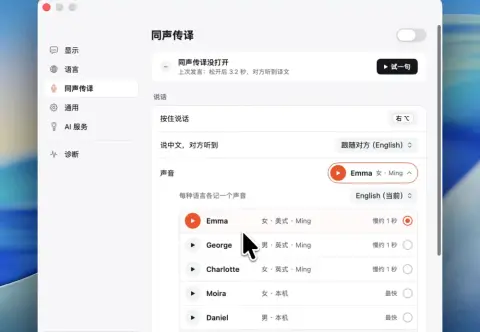
- Push-to-talk interpreting on the right Option key, played into the meeting through BlackHole 2ch, with Ming voices or macOS voices
- Optional voice cloning from an 8-30 second recording (with a Ling key)
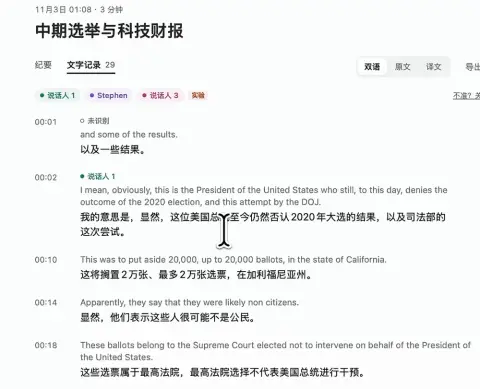
- Local meeting records with export to Markdown, Word and SRT, plus experimental on-device speaker identification
- Audio capture and speech recognition stay on the Mac; no analytics and no project-run servers
Getting started
Cicada needs macOS 26 or later on an Apple silicon Mac. It ships as a DMG from GitHub Releases or the project website.
Download and install
Get Cicada-<version>-macOS-AppleSilicon.dmg and drag Cicada into Applications. The app is locally signed but not yet notarised, so the first time it is blocked choose Open Anyway in System Settings › Privacy & Security. checksums.txt on the download page lets you verify the file.
shasum -a 256 Cicada-*.dmgRun the onboarding
Grant system-audio recording, play the two-person sample meeting to see live subtitles, and add a Ling key or skip it for now. Install the virtual microphone later, when you want interpreting.
Add a Ling API key (optional)
On the Ling open platform, create a token and copy the key starting with sk-. In Cicada open Settings › AI Service, paste it and click Save and check; a one-token request confirms it works. The same page picks the model (Ling-3.1-flash by default).
Switch views and interpret
⌃⌥S switches between the notes window, the subtitle bar and hidden. Hold the right Option key to speak and have the translation played into the meeting; the shortcut can be changed to a ⌃/⌘ combination in Settings.
Build from source
Only the Xcode Command Line Tools are needed; the project has no third-party dependencies. The dev build is named Cicada Dev and runs beside the release.
xcode-select --install
scripts/build.sh
open build/Cicada.app
Commands and code are distilled from the project's own documentation — always check the official repo for the latest.
When to use it
- Follow a meeting or livestream in a language you do not speak, with subtitles in your system language
- Get structured notes and to-dos from a call without inviting a recording bot
- Speak in your own language and have the other participants hear a translation inside Zoom or Tencent Meeting
- Keep a searchable bilingual transcript and recording of every call on your own Mac
How Cicada compares
Cicada alongside other open-source meeting & notes ai tools AI/TLDR tracks, ranked by GitHub stars.
| Tool | Stars | What it does |
|---|---|---|
| Cicada | ★ 2.2k | macOS menu-bar app for live bilingual subtitles, meeting notes and push-to-talk interpreting |
| Otter.ai | — | AI meeting assistant that records, transcribes in real time, and summarizes conversations with speaker labels and action items. |
| Fireflies.ai | — | AI notetaker that joins calls to transcribe, summarize, and search meetings, with conversation analytics and CRM integrations. |
| Granola | — | Bot-free AI notepad that transcribes meeting audio in the background and turns your rough notes into structured summaries. |
| Fathom | — | AI notetaker that records, transcribes, and instantly summarizes calls with action items synced to Slack, Salesforce, and HubSpot. |
| tl;dv | — | AI meeting recorder and notetaker that transcribes, summarizes, and clips highlights across Zoom, Meet, and Teams. |
| Avoma | — | AI meeting assistant and conversation intelligence platform for sales teams, with transcription, scheduling, and CRM automation. |
| Sembly AI | — | Agentic meeting AI that transcribes calls and generates client-ready documents, action items, and decisions for professional teams. |