

What is DATA HIT Tools?
DATA HIT Tools is a set of five free, browser-based analytics tools made by DATA HIT, a UK data and analytics consultancy. It sits in the SEO & AI Search Visibility category of the AI Productivity & Writing tools and is licensed Proprietary (freemium). To get started: open the sample AI answer report.
Overview
DATA HIT Tools is a set of five free, browser-based analytics tools made by DATA HIT, a UK data and analytics consultancy. Two of the tools answer a question that classic SEO dashboards do not: what do AI answer engines say about your brand? AI Answer Monitor shows how much of your search demand Google now answers itself, and AI Answer Stability counts how often ChatGPT, Gemini, Perplexity, Claude and Google AI Mode name you. The other three tools turn Google Analytics 4, Search Console and Google search-volume data into charts that show seasons and weekly rhythms. DATA HIT says the suite is meant to sit next to Semrush, Ahrefs or Looker Studio, not to replace them.
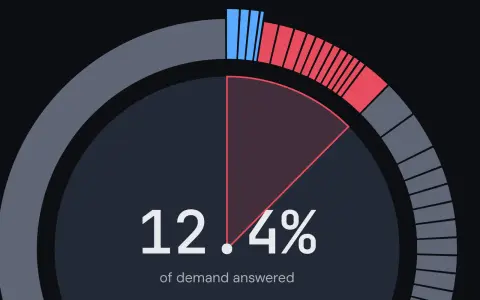
AI Answer Monitor starts from your own domain. You enter it, pick a country, and get one ring chart: the number in the middle is the share of your search demand that Google answers with its own AI answer above the results. Around it, every search term you rank for is an arc. Blue means Google's answer links to you (click it to read the exact passage Google quoted from your page), red means the answer names someone else, and grey means a normal results page with no AI answer. You can weight the chart by search volume or count each term once, and your own brand searches are left out by default so they do not make the picture look better than it is. Every red row has an Ask ChatGPT button: it sends that search to ChatGPT live and tells you whether the answer cites you, cites a competitor (and which one), cites nobody, or mentions you without a link. On Pro, a topic scan shows the brands, cited sources and follow-up "fan-out" queries that ChatGPT or Google AI Overviews produce across a whole topic.
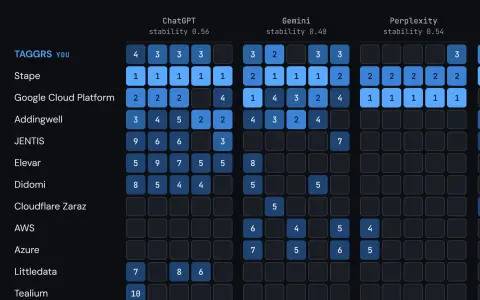
AI Answer Stability exists because one AI answer proves very little. Ask an engine the same question twice and the list of brands it recommends often changes. So the tool asks ChatGPT, Gemini, Perplexity, Claude and Google AI Mode the same question 5, 10 or 20 times each and counts. You get the mention rate with a 95% confidence interval (a Wilson score interval), how often you are named first, and a stability score from 0 to 1 that shows how much the brand list overlaps from one answer to the next. When the interval is wider than 30 points, the tool says the number is too wide to report. A map shows every single answer, with your brand's position in it, next to the competitors you entered and the ones the engines offered by themselves. It also lists the sites each engine cited. A day later you can run the same check again and compare all runs in a History view, where a move smaller than the interval bars is most likely noise.
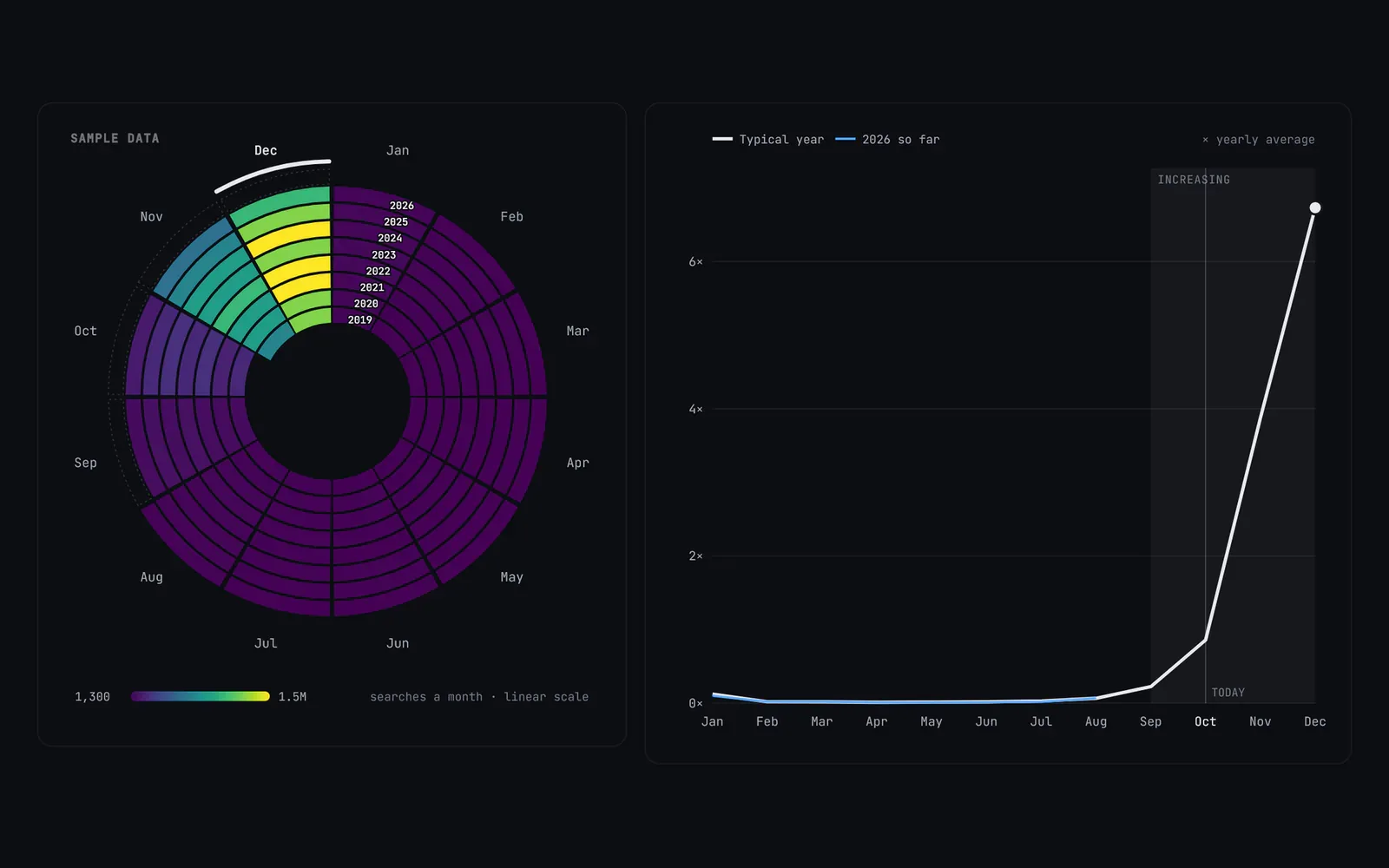
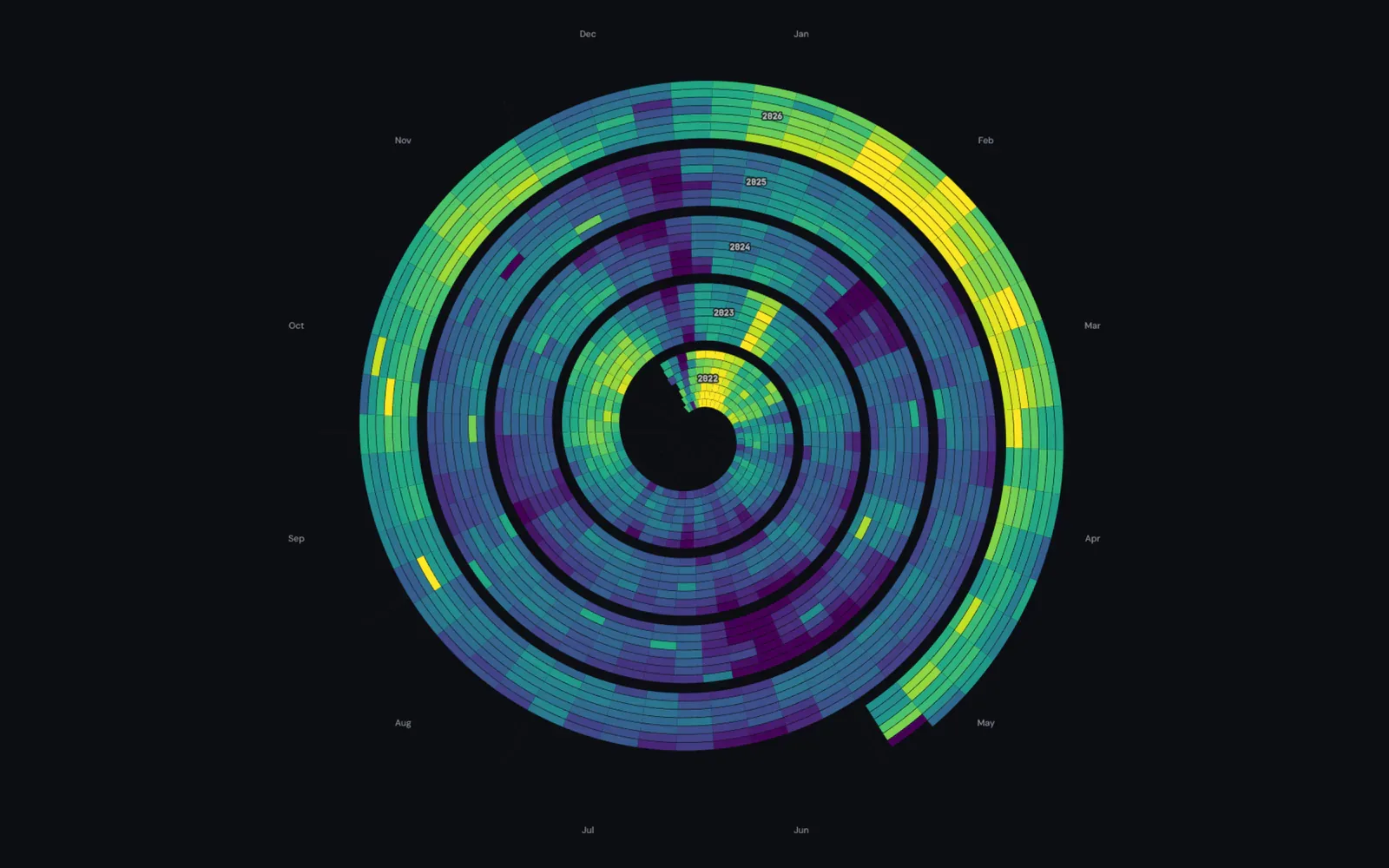
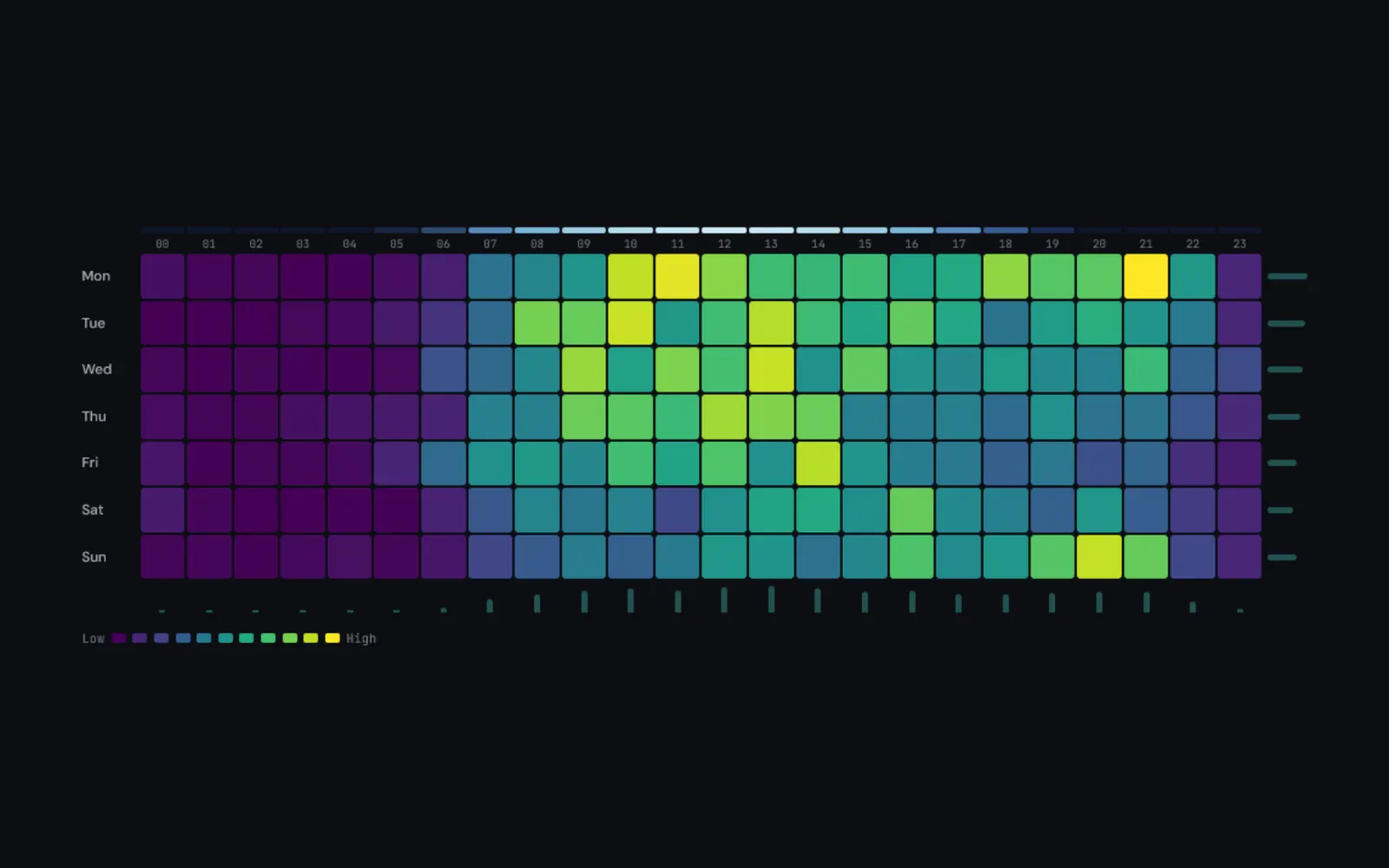
The three other tools look at search demand and your own traffic. Search Seasonality draws about eight years of monthly Google searches for any keyword as a spiral and a "typical year", with the peak month, when demand starts to rise, the peak volume and the trend; give it a list of keywords and it lays them out as a calendar sorted by peak month, so you can publish before demand rises. Seasonal Spiral winds daily GA4 or Search Console data (or a CSV) into a spiral with one turn per year, so weekly rhythms and year-on-year shifts sit next to each other. Timing Grid breaks GA4 traffic into a 7 by 24 heatmap of day of week and hour of day, for ad scheduling and outreach timing. All three open with sample data and need no sign-up to try.
The free charts are built in your browser: Google Analytics and Search Console connect read-only, and DATA HIT says your raw analytics data is never stored on its servers. The AI checks need a free account and run on AI credits: free accounts get 30 a month, the Pro Solo plan (£29 a month) gets 145 and the Pro Agency plan (£79 a month) gets 400, with a 14-day free trial. Pro also adds weekly snapshots of Google's top 10 for tracked keywords with a Monday email digest, and GA4 Tracking Health (in beta), a daily check that emails you when a GA4 event you care about stops or breaks.
What it does
- AI answer exposure report: the share of your search demand that Google answers itself, and whether its answers link to you or to a competitor (free, uses no AI credits)
- Live prompt checks: send one exact question to ChatGPT and see whether the answer cites you, cites a competitor, cites nobody, or names you without a link (1 credit)
- AI Answer Stability: the same question asked 5, 10 or 20 times on ChatGPT, Gemini, Perplexity, Claude and Google AI Mode, with mention rate, 95% interval, "named first" rate and answer stability
- A map of every answer, the brands each engine offered, the sites it cited, and a History view to compare repeated checks of the same question
- Topic scans on Pro: the brands, cited sources and fan-out queries across a topic, from ChatGPT (US English) or Google AI Overviews (11 countries), with PNG and CSV export
- Search Seasonality: about eight years of monthly Google searches per keyword, plus a demand calendar for whole keyword sets
- Seasonal Spiral and Timing Grid: GA4 and Search Console data as a yearly spiral and a day-by-hour heatmap, built in the browser
- Pro monitoring: weekly top-10 snapshots for tracked keywords with a Monday digest, and GA4 Tracking Health alerts (beta)
Getting started
DATA HIT Tools is a hosted web app, so there is nothing to install. Every tool opens on a sample report first, so you can see what you will get before you sign up.
Open the sample AI answer report
AI Answer Monitor loads a sample report straight away. Read the ring chart: blue arcs are searches where Google's AI answer links to the site, red arcs are searches where it names someone else.
https://tools.datahit.co/ai-mention-monitorRun the report on your own domain
Create a free account, enter your domain, choose a country and press See my exposure. It takes a few seconds. Use Edit to change which brand terms are excluded, and switch between "by search volume" and "per term".
Your domain: example.com
Country: United Kingdom
→ See my exposure
Ask ChatGPT about a gap
Press Ask ChatGPT on a red row. The tool shows the question before it sends it, so you can turn a bare search term into a real question first (at least 8 characters, up to 500). Each check costs 1 AI credit.
What's the best tool for visualising GA4 seasonality?Run an AI Answer Stability check
Write the question the way a customer would ask an AI assistant, then add your brand and up to 3 competitors (up to 10 on Pro). A free check runs 5 times on each engine, costs 8 credits and usually takes one to three minutes; free accounts can run three a month.
Question: What is the best server-side tagging platform for Google Tag Manager?
Your brand: TAGGRS
Competitors: Stape, Addingwell
→ Run check
Run it again and compare
A day after a check, Run again asks the same question with the same brands. History shows every run with its 95% interval. If the result moved by less than the width of the bars, treat it as noise, not a trend.
https://tools.datahit.co/ai-answer-stabilityTry the search and traffic charts
Search Seasonality works with any keyword and no account. Seasonal Spiral and Timing Grid open with sample data; connect GA4 or Search Console (read-only) to see your own. Pro (Solo £29 or Agency £79 a month, 14-day free trial) adds more AI credits, 10- and 20-run Stability checks, topic scans and the Monday digest.
https://tools.datahit.co/proCommands and code are distilled from the project's own documentation — always check the official docs for the latest.
When to use it
- Finding out how much of your organic traffic is now exposed to Google's AI answers, and which searches link to a competitor instead of you
- Reporting AI visibility to a client or manager with a number that has an honest error margin, instead of a score based on one answer
- Checking which competitors and which cited sites ChatGPT, Gemini, Perplexity, Claude and Google AI Mode recommend for your category
- Planning content around search seasons, and scheduling ads or outreach for the days and hours your site is busiest
How DATA HIT Tools compares
DATA HIT Tools alongside other open-source seo & ai search visibility tools AI/TLDR tracks, ranked by GitHub stars.
| Tool | Stars | What it does |
|---|---|---|
| OpenSEO | ★ 26.8k | A self-hostable SEO workbench — keyword research, rank tracking, competitor and backlink analysis, site audits and AI-visibility checks — that runs on your own DataForSEO key and exposes the whole dataset to agents over MCP. |
| Open SEO MCP Skills | ★ 8.9k | Eight MIT-licensed SEO and GEO skills for Claude — site audit, keyword research, rank tracking, competitor gap, backlinks, AI visibility — that run on your own Search Console, GA4 and ads data through Ryze's hosted MCP connector. |
| new-term-radar | ★ 2.1k | Python CLI, Agent Skills and MCP server that catches new AI names on X, Hugging Face, GitHub and sitemaps each day and turns them into a keyword table with search volume, trends and page-one checks. |
| DATA HIT Tools | — | Free tools that show how often ChatGPT, Gemini, Perplexity, Claude and Google's AI answers name your brand, plus GA4 and search-demand charts |