Overview
Edit Banana takes a diagram that only exists as a picture — a flowchart screenshot, an architecture figure from a paper, a technical schematic, a scientific formula — and reconstructs it as an editable draw.io file. The output is DrawIO XML in which every shape, arrow and text label is a separate element you can select, drag, restyle or retype, instead of a flat bitmap you would otherwise have to redraw by hand. It is built by BIT-DataLab, a data lab at Beijing Institute of Technology.
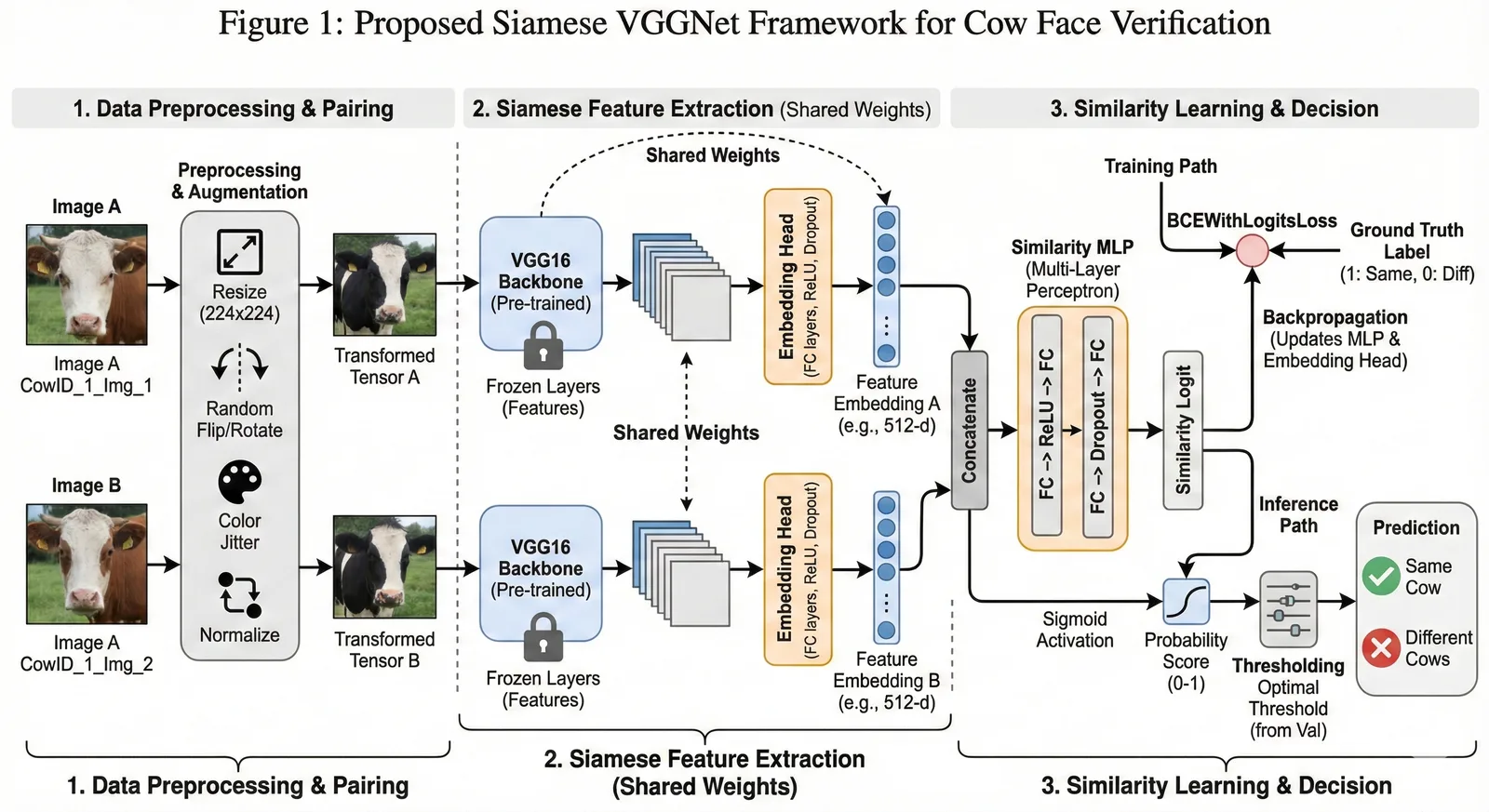
Under the hood the pipeline segments the image with a fine-tuned SAM 3 (Segment Anything Model 3) mask decoder, runs a fixed multi-round scan guided by a multimodal LLM, and extracts text in parallel: local OCR (Tesseract, or optionally PaddleOCR) finds text boxes, and high-resolution crops of text and formula regions go to Pix2Text for LaTeX conversion. The spatial data from segmentation and OCR is then merged into DrawIO XML. The README says the reconstruction aims to keep the original layout, colours, element hierarchy, stroke and fill styles and arrow styles such as dashed lines and thickness.
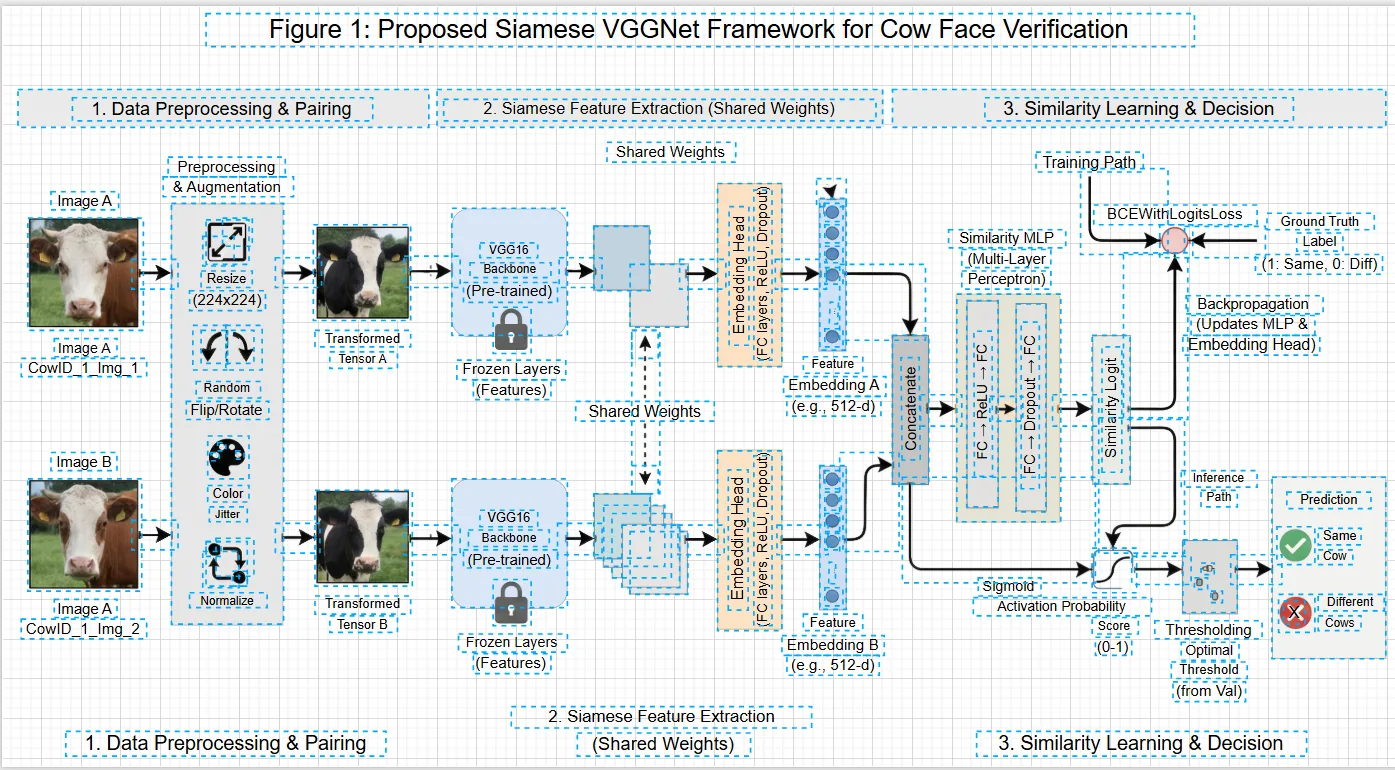
The repository runs locally as a Python CLI or as a FastAPI server with a /convert endpoint; a CUDA GPU is highly recommended. The same team runs a hosted web version at editbanana.net where you upload an image and download the editable result, and the README notes that the GitHub code trails behind that web service in features and performance.
What it does
- Reconstructs diagram images (PNG, JPG, BMP, TIFF, WebP) as DrawIO XML with every shape, arrow and label independently editable
- Segments diagram elements with a fine-tuned SAM 3 mask decoder, followed by a fixed multi-round scan guided by a multimodal LLM
- Text recognition with local Tesseract OCR (PaddleOCR optional) plus Pix2Text for turning formula regions into LaTeX via high-resolution crops
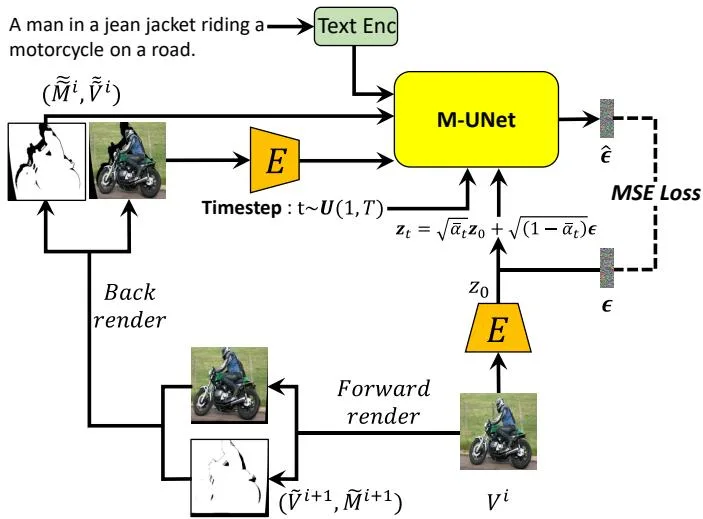
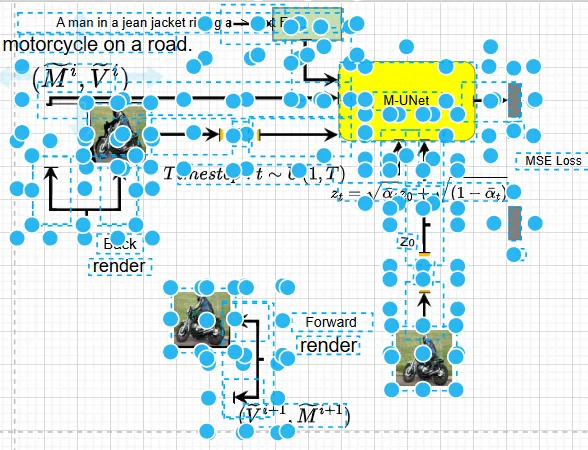
- Optional background removal (RMBG) for cleaner shape extraction
- Runs as a CLI with single-image or batch mode, or as a FastAPI backend with a /convert upload endpoint and interactive docs
- Configurable via config.yaml: SAM 3 score and NMS thresholds, maximum iteration loops, input/output paths and dominant-colour sensitivity
Getting started
Edit Banana needs Python 3.10+ and, ideally, a CUDA-capable GPU. The SAM 3 weights (sam3.pt) are downloaded separately from ModelScope or Hugging Face (facebook/sam3) and placed under models/. If you only want to try it, the hosted version at editbanana.net needs no setup.
Clone and install dependencies
Create a virtual environment, install PyTorch (the CUDA 11.8 build shown here, or a CPU build), the Python requirements and Tesseract for OCR.
git clone https://github.com/BIT-DataLab/Edit-Banana.git && cd Edit-Banana
python3 -m venv .venv && source .venv/bin/activate
pip install torch torchvision --index-url https://download.pytorch.org/whl/cu118
pip install -r requirements.txt
sudo apt install tesseract-ocr tesseract-ocr-chi-sim
Install SAM 3 and check it loads
The setup script installs the SAM 3 library and copies the BPE vocabulary into models/. Put the downloaded sam3.pt weights under models/sam3_ms.
bash scripts/setup_sam3.sh
python -c "from sam3.model_builder import build_sam3_image_model; print('OK')"
Configure
Copy the example config, then edit config/config.yaml so sam3.checkpoint_path and sam3.bpe_path point at your models/ files. On a GPU architecture mismatch the README suggests setting sam3.device to "cpu".
mkdir -p input output
cp config/config.yaml.example config/config.yaml
Convert a diagram
Point the CLI at an image; the DrawIO XML and intermediate files land under output/<image_stem>/. Run python main.py without -i to batch-process everything in input/.
python main.py -i input/test.pngOr serve it as an API
Start the FastAPI backend and post an image to /convert, or open http://localhost:8000/docs to upload through the interactive docs.
python server_pa.py
# in another terminal:
curl -X POST http://localhost:8000/convert -F "file=@input/test.png"
Commands and code are distilled from the project's own documentation — always check the official repo for the latest.
When to use it
- Reach for it when you need to revise a flowchart or architecture diagram and only have a screenshot or an exported PNG
- Reach for it to lift figures out of papers and slides into draw.io so you can restyle, relabel or reuse them
- Reach for it when a diagram contains formulas you want back as editable LaTeX rather than pixels
- Reach for it to batch-convert a folder of legacy diagram images into editable DrawIO files through the CLI or the /convert API
How Edit Banana compares
Edit Banana alongside other open-source office documents & spreadsheets tools AI/TLDR tracks, ranked by GitHub stars.
| Tool | Stars | What it does |
|---|---|---|
| Next AI Draw.io | ★ 36.4k | An open-source web app, desktop app and MCP server that draws and edits real draw.io diagrams from chat, with every AI change saved as a version you can compare, restore or undo, across 25 model providers. |
| OfficeCLI | ★ 32.4k | A single-binary command-line Office suite built for AI agents: create, read and edit Word, Excel and PowerPoint files, render them to HTML or PNG, and drive it all over MCP. |
| Univer | ★ 22.7k | An open-source TypeScript SDK that embeds spreadsheets, docs, slides, boards and bases in your product, with a headless Node.js runtime and an AI SDK for agents. |
| GenOffice | ★ 10.7k | A desktop office suite for macOS, Windows and Linux that opens and saves native .docx, .xlsx and .pptx files with an AI panel beside every document, plus a CLI and agent skill for editing the same files headlessly. |
| Edit Banana | ★ 5.5k | Turns static diagram images into editable draw.io (DrawIO XML) files |